
Msg 2812 means SQL Server looked for that exact name in the database and schema you are in, and it is not there. Start with where you are.
What Msg 2812 Says
2812 is a name that did not resolve, not a permission problem and not a broken procedure. Every case below was run on SQL Server 2025 and gave the same Msg 2812, State 62, so the message itself will not tell them apart. Where you were connected, and the exact name it quotes, will.
Check Where You Are
-- Run in the same window that raised the 2812
SELECT DB_NAME() AS current_database,
       SCHEMA_NAME() AS default_schema;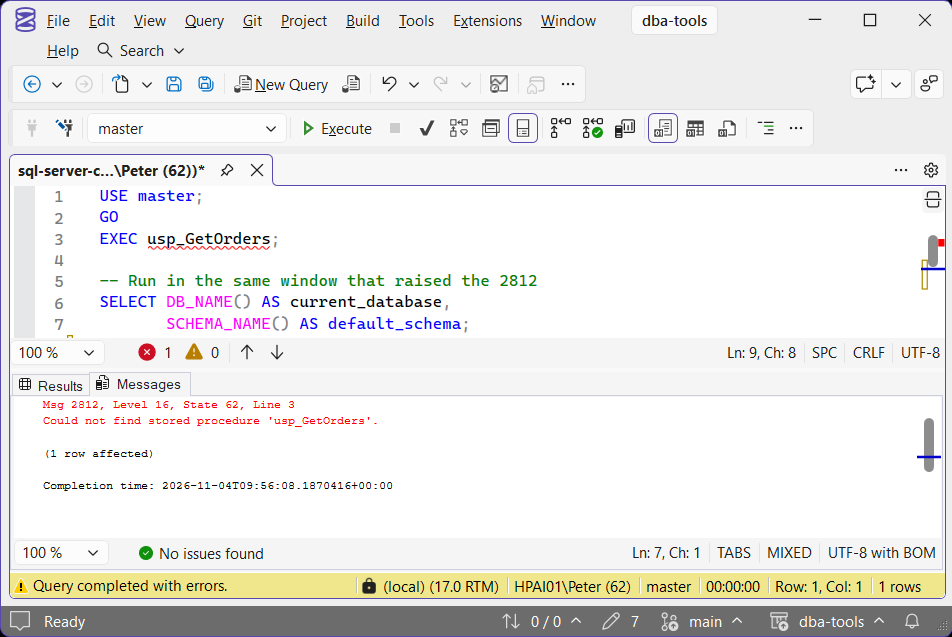
Most of these come from 2 causes. The first is the wrong database: connected to master, the procedure in the application database is not there to find. A three-part name, or a USE first, fixes it, and What the USE Command Does covers why the context matters.
EXEC YourDatabase.sales.usp_GetOrders;The second is the schema left off. A procedure created as sales.usp_GetOrders and called as EXEC usp_GetOrders; is looked for in your default schema, which is usually dbo, so it is not found even in the right database. Name the schema in the call. Setting the user’s default schema to sales also made the short call work, but it fixes one user and leaves the next one broken.
Find It on the Instance
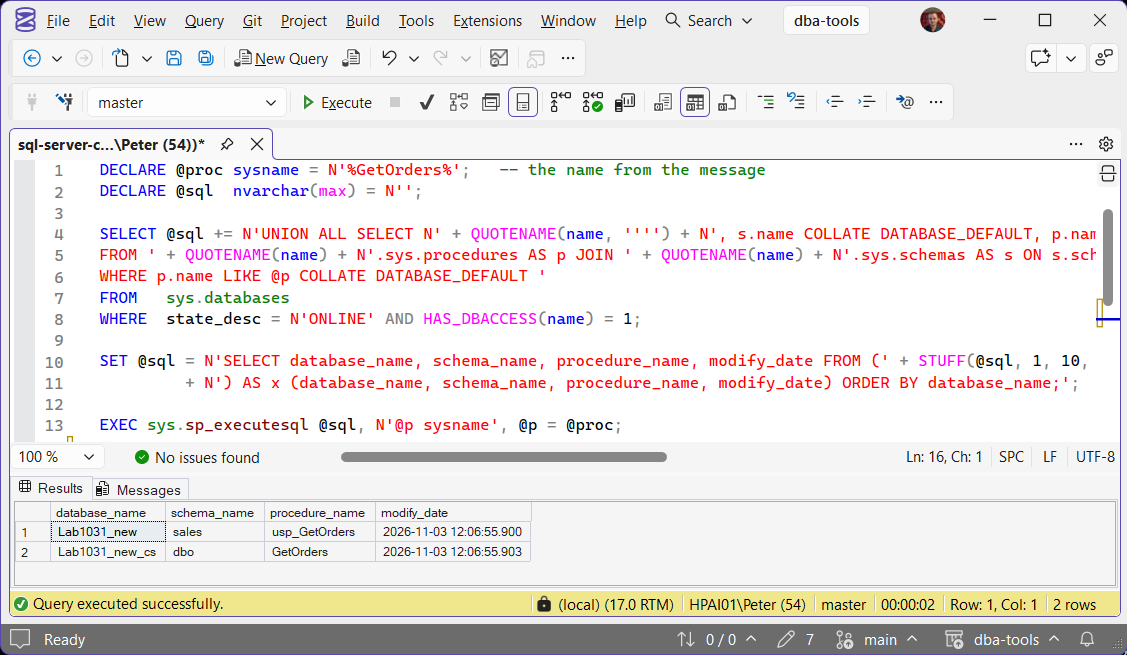
Search every online database you can read, in any schema. Wildcards are allowed, which is what you want when the name in the message has a typo in it:
DECLARE @proc sysname = N'%GetOrders%';   -- the name from the message
DECLARE @sql  nvarchar(max) = N'';

SELECT @sql += N'UNION ALL SELECT N' + QUOTENAME(name, '''') + N', s.name COLLATE DATABASE_DEFAULT, p.name COLLATE DATABASE_DEFAULT, p.modify_date
FROM ' + QUOTENAME(name) + N'.sys.procedures AS p JOIN ' + QUOTENAME(name) + N'.sys.schemas AS s ON s.schema_id = p.schema_id
WHERE p.name LIKE @p COLLATE DATABASE_DEFAULT '
FROM   sys.databases
WHERE  state_desc = N'ONLINE' AND HAS_DBACCESS(name) = 1;

SET @sql = N'SELECT database_name, schema_name, procedure_name, modify_date FROM (' + STUFF(@sql, 1, 10, N'')
         + N') AS x (database_name, schema_name, procedure_name, modify_date) ORDER BY database_name;';

EXEC sys.sp_executesql @sql, N'@p sysname', @p = @proc;
The COLLATE DATABASE_DEFAULT is there because one case-sensitive database on the instance otherwise stops the whole search with Msg 451, Cannot resolve collation conflict ... in UNION ALL operator. Collation Conflict (Error 468) covers why mixed collations clash. If it comes back empty, the procedure is not on this instance: Get Schema Change History shows whether it was dropped or renamed recently.
Read the Name It Quotes
The message repeats the name character for character, and 3 more causes are visible in it once you look:
A typo, or the wrong case. In a case-sensitive database, EXEC dbo.getorders; fails against dbo.GetOrders with Could not find stored procedure 'dbo.getorders'. Collation Case Sensitivity covers why the same call works on another server.
A string executed as a procedure name. EXEC @sql; with no brackets treats the variable as the name of a procedure, which is the @module_name_var form in Microsoft’s EXECUTE reference, so a statement comes back as the name:
DECLARE @sql nvarchar(200) = N'SELECT 1';
EXEC @sql;
-- Could not find stored procedure 'SELECT 1'.

EXEC (@sql);                    -- runs the statement
EXEC sys.sp_executesql @sql;    -- runs it, and takes parameters
An extended procedure. EXEC master.dbo.xp_SomethingMissing; raises the same 2812, with the three-part name in the quotes.
Created Fine, Fails When It Runs
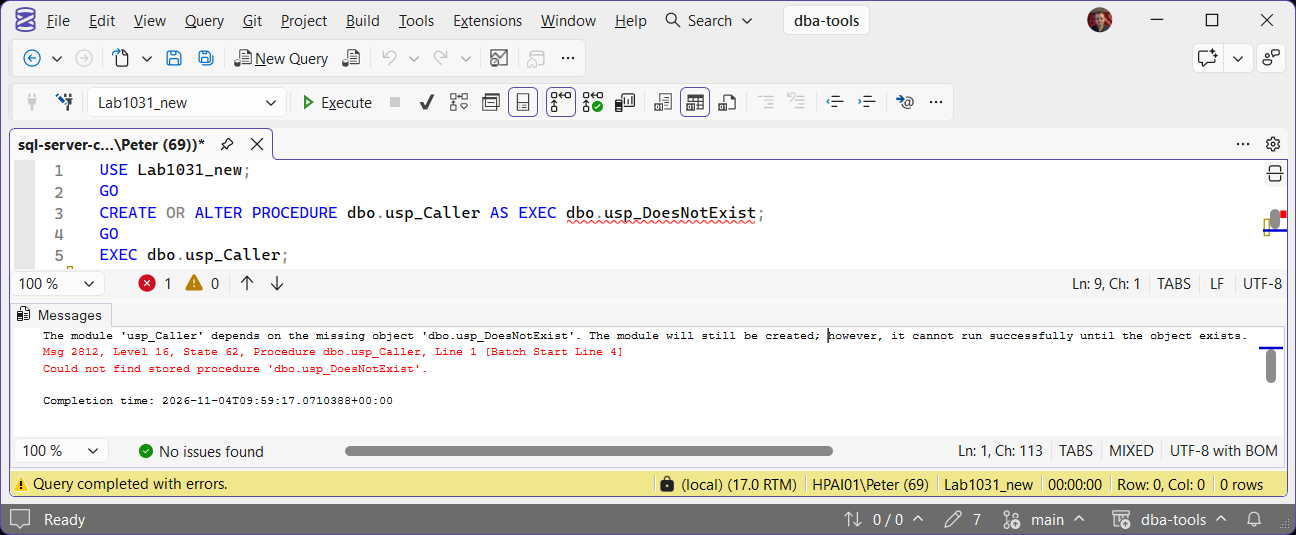
A procedure that calls another one is allowed to be created when the one it calls does not exist. SQL Server warns and carries on:
CREATE OR ALTER PROCEDURE dbo.usp_Caller AS EXEC dbo.usp_DoesNotExist;
-- The module 'usp_Caller' depends on the missing object 'dbo.usp_DoesNotExist'.
-- The module will still be created; however, it cannot run successfully until the object exists.
That warning scrolls past in a deployment script, and the 2812 only arrives when the caller runs. When it does, the message carries Procedure dbo.usp_Caller in its header, which is the procedure to open: the missing name is inside it, not in your own call.
Not a Permissions Problem
A user with no EXECUTE right on a procedure that exists does not get 2812. They get Msg 229 instead, The EXECUTE permission was denied on the object 'usp_GetOrders', database 'YourDatabase', schema 'sales'., which Permission Denied (Error 229) covers. So a 2812 is worth believing: the name did not resolve.
Frequently Asked Questions
The procedure is right there in Object Explorer. Why can SQL Server not find it?
SELECT DB_NAME(), SCHEMA_NAME(); in the window that failed, then call it with its schema, or its full three-part name.Does TRY…CATCH catch error 2812?
BEGIN TRY EXEC dbo.usp_Nope; END TRY BEGIN CATCH ... END CATCH caught it with ERROR_NUMBER() 2812.Is it ever a permissions problem?
EXECUTE on it got error 229, which names the object.It works for me and fails for the application. Why?
Where To Go Next
- Invalid Object Name (Error 208), the same name-resolution failure for tables and views
- Invalid Column Name (Error 207), when the table resolves and a column does not
- View the Definition of a Stored Procedure, open the caller and find the name it is looking for
- Set the Default Database for a SQL Server Login, when the application lands in the wrong database
- Cannot Open Database (Error 4060), when that default database is not there at all
Leave a Reply