
A WHERE clause that matches rows it should not, or a join that worked yesterday and now fails with Msg 468 after a restore: both come down to collation. This covers what collation controls, a case-sensitivity test you can run, the cross-database trap, and how to fix a mismatch without changing the whole database.
What Collation Actually Controls
Collation determines two things for character data: sort order (does ‘a’ come before ‘B’?) and comparison rules (does 'Smith' = 'smith' evaluate true?). It’s set at the server level (the default for every new database), the database level (can differ from the server), and can be overridden per-column or even per-expression with COLLATE. For nvarchar data it only changes how values sort and compare. For varchar it also sets the code page, so a character outside that code page cannot be stored as itself: it comes back as ? or a near-match.
This instance’s server-level collation:
SELECT SERVERPROPERTY('Collation') AS server_collation;
-- SQL_Latin1_General_CP1_CI_AS
Reading the name itself tells you the behavior: CP1 is code page 1252, CI means case-insensitive, AS means accent-sensitive. Swap CI for CS and you have a case-sensitive collation with everything else identical.
Case Sensitivity, Tested Directly
The most common way collation actually bites someone: assuming a comparison is case-sensitive (or insensitive) without checking. A real test against three rows differing only in case:
-- Table holds: 'Smith', 'SMITH', 'smith'
SELECT val FROM #CollTest WHERE val = 'smith';
Real result under this database’s default collation (CI_AS):
All three match: = is case-insensitive under this collation. Overriding the comparison explicitly with COLLATE:
SELECT val FROM #CollTest
WHERE val COLLATE SQL_Latin1_General_CP1_CS_AS = 'smith';
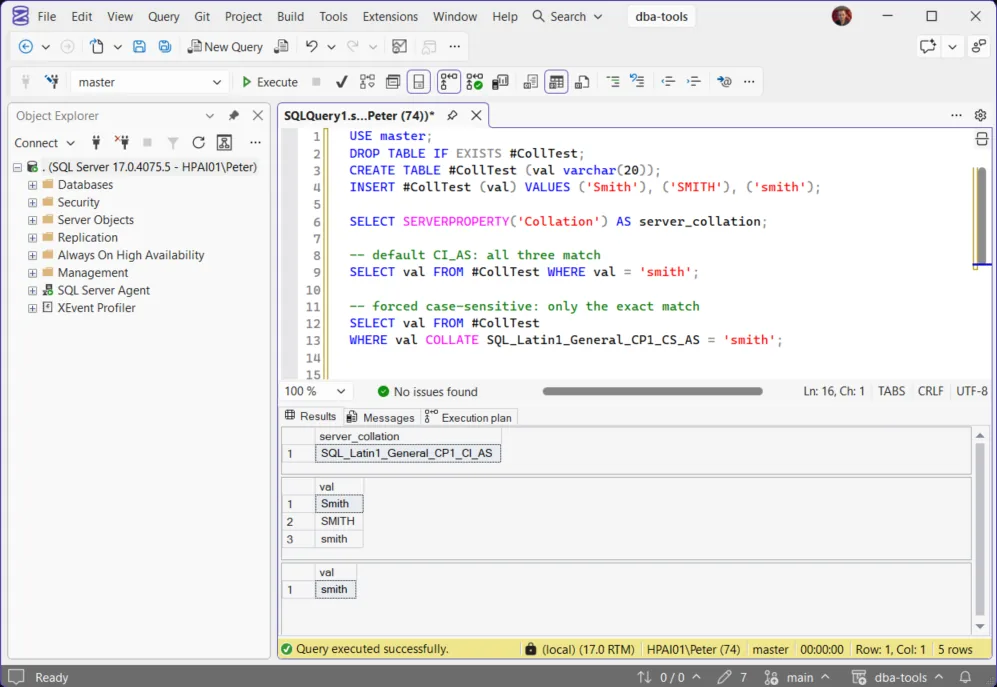
Real result, same source data, only the collation of the comparison changed:
Only the exact-case match. Same table, same data, and a different result set from the COLLATE clause alone.
The Cross-Database Trap
A database’s collation doesn’t have to match the server’s default, and a query joining across databases (or a temp table compared against a permanent table) with mismatched collations fails with Msg 468. This happens more often than expected because:
- A database restored or migrated from a different server often carries a different collation than the destination server’s default. Nobody chose the mismatch. It travels with the backup.
tempdbuses the server’s default collation, not the calling database’s (a contained database is the exception). A temp table created from a database with a different collation, then joined back to that database’s own columns, conflicts with it.- Linked servers and cross-database queries surface this the moment two differently-collated text columns meet in a
JOINorWHEREclause.
The temp table case, reproduced on a SQL_Latin1_General_CP1_CI_AS instance with a database created as Latin1_General_CS_AS:
USE CollationTest;   -- created with COLLATE Latin1_General_CS_AS
CREATE TABLE dbo.Customers (Name varchar(20));
CREATE TABLE #Names (Name varchar(20));   -- takes tempdb's collation, not this database's

SELECT c.Name FROM dbo.Customers AS c JOIN #Names AS n ON n.Name = c.Name;
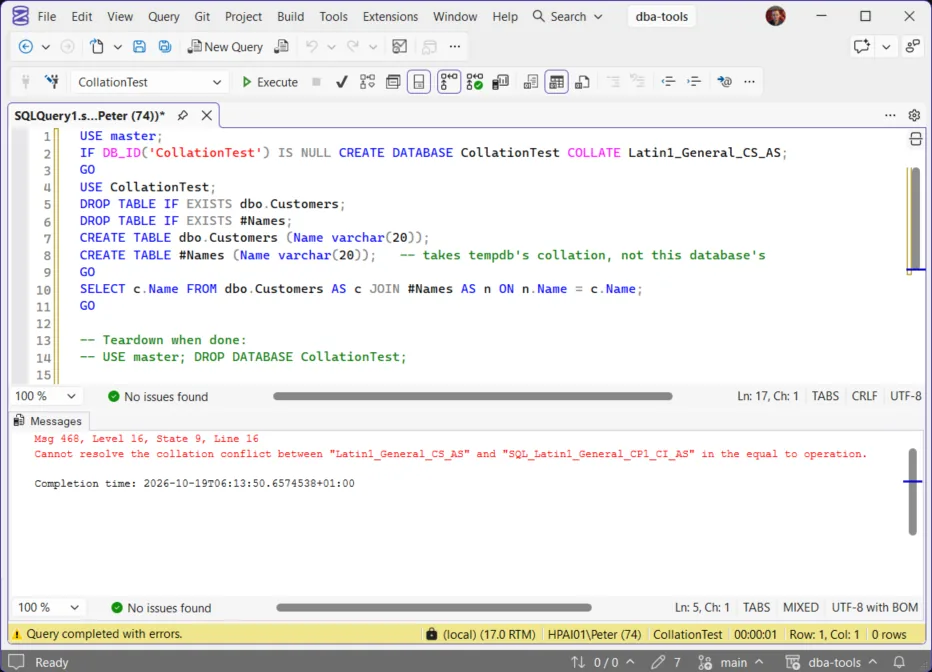
Declaring the temp table column as Name varchar(20) COLLATE DATABASE_DEFAULT makes the same join run cleanly, because the column then takes the current database’s collation instead of tempdb’s.
Hit Msg 468 on a real query? Cannot Resolve the Collation Conflict (Error 468) finds which side carries which collation and puts the fix on the comparison.
Get Collation Conflicts and Cross-Database Dependencies finds the setup for this before it fails: every database’s collation against the server default, flagging real mismatches before they surface as a production query failure.
Fixing a Mismatch
COLLATE DATABASE_DEFAULTAdd COLLATE DATABASE_DEFAULT (or an explicit collation name) to one side of the comparison. Safe, immediate, and it does not touch stored data.
TakeawayFor temp tables, put it in the CREATE TABLE instead.
ALTER COLUMN ... COLLATEALTER TABLE ... ALTER COLUMN ... COLLATE ... changes the column’s collation. It fails while the column is referenced by an index, statistics, a computed column, or a CHECK or FOREIGN KEY constraint (Set or change the column collation), so drop those, alter, then recreate them.
TakeawayTest it on a non-production copy first.
ALTER DATABASE ... COLLATEChanging an entire database’s collation is rarely the right first move: ALTER DATABASE ... COLLATE changes the default for new objects, and existing user table columns keep their old collation until each one is altered.
TakeawayFix the columns actually in conflict first.
Best Practices
- Don’t assume a comparison is case-sensitive or not. Check
SERVERPROPERTY('Collation')andDATABASEPROPERTYEX(DB_NAME(), 'Collation')directly. - When restoring or migrating a database onto a new server, check its collation against the destination server’s default before anything else touches it.
- In code that runs in databases whose collation differs from the server’s, declare temp table text columns with
COLLATE DATABASE_DEFAULT. - Fix conflicts at the column level with an explicit
COLLATEclause before considering a broader collation change.
Related
- Cannot Resolve the Collation Conflict (Error 468), the error this trap raises and the fix for each case
- Get Collation Conflicts and Cross-Database Dependencies, every database whose collation differs from the instance, and the cross-database references that will hit it
- Get Database Inventory, includes collation per database
- Server and Configuration (pillar), the hub for instance and database configuration scripts
Leave a Reply