
Check for Collation Mismatches and Dependencies
Before a migration, rename, or decommission, run Get-CollationConflicts on the target instance and Get-CrossDatabaseDependencies in every database whose objects may reference the one being changed. The first compares online database collations with the server default; the second finds static references and synonyms, not dynamic SQL. Rerun after restores or other changes: a clean result describes only the state at that time.
Why Collation Conflicts and Cross-Database Dependencies Matter
- A collation mismatch does nothing until a query compares string columns from both sides. Then it fails with a collation conflict error, usually in front of whoever runs that query first.
- Cross-database references are invisible from inside the referencing database. Nothing about the object looks unusual until you check what it points at.
- Both checks answer questions a migration or decommission plan needs up front, not mid cutover when a query starts failing.
- Synonyms are the easiest to miss. The synonym looks local, and the real target sits behind it, sometimes on another server.
When to Run These Scripts
- Before any database migration, rename or decommission: both checks belong in that review.
- Collation Conflicts: after restoring a database from another instance, to confirm it matches the target server.
- Cross-Database Dependencies: before removing or renaming any database, to confirm nothing elsewhere depends on it by name.
- As a routine check on any instance with many databases, since both build up quietly over time.
The Scripts
Get-CollationConflicts: Does This Database Match the Server?
- Tested on: SQL Server 2025 (RTM CU8), Windows lab instance
- Last verified: 2026-10-12 (both scripts run; the screenshot and output below are from it)
- Permissions: VIEW ANY DATABASE · VIEW DEFINITION, SELECT on sys.sql_expression_dependencies (db_owner covers both)
- Safety: read-only, impact low
/*
Script Name : Get-CollationConflicts
Category    : monitoring
Purpose     : Databases whose collation differs from the server collation — a common source of implicit conversion errors and failed JOIN operations.
Author      : Peter Whyte (https://sqldba.blog/dba-scripts-get-collation-conflicts-and-cross-database-dependencies/)
Requires    : VIEW ANY DATABASE
*/
-- SAFE:ReadOnly
-- IMPACT:Low
SET NOCOUNT ON;

DECLARE @server_collation NVARCHAR(128) = CAST(SERVERPROPERTY('Collation') AS NVARCHAR(128));

SELECT
    @server_collation AS server_collation,
    d.name AS database_name,
    d.collation_name AS database_collation,
    CASE WHEN d.collation_name <> @server_collation
         THEN 'MISMATCH' ELSE 'OK' END AS collation_status,
    d.state_desc,
    d.recovery_model_desc,
    d.database_id
FROM sys.databases d
WHERE d.state_desc = 'ONLINE'
ORDER BY
    CASE WHEN d.collation_name <> @server_collation THEN 0 ELSE 1 END,
    d.name;
Get-CrossDatabaseDependencies: What Reaches Outside This Database
/*
Script Name : Get-CrossDatabaseDependencies
Category    : monitoring
Purpose     : Objects in the current database that reference other databases via 3-part names or linked servers — critical to find before a migration, rename, or decommission.
              Note: only captures statically-resolvable references. Dynamic SQL built at runtime will not appear here.
Author      : Peter Whyte (https://sqldba.blog/dba-scripts-get-collation-conflicts-and-cross-database-dependencies/)
Requires    : VIEW DEFINITION, SELECT on sys.sql_expression_dependencies (db_owner covers both)
*/
-- SAFE:ReadOnly
-- IMPACT:Low
-- SCOPE:CurrentDatabase
SET NOCOUNT ON;

/* ── Static cross-database references from sys.sql_expression_dependencies ─ */
SELECT
    'Object Reference' AS reference_type,
    DB_NAME() AS source_database,
    OBJECT_SCHEMA_NAME(d.referencing_id) AS source_schema,
    OBJECT_NAME(d.referencing_id) AS source_object,
    o.type_desc AS source_object_type,
    COALESCE(d.referenced_server_name + '.', '')
    + COALESCE(d.referenced_database_name + '.', '')
    + COALESCE(d.referenced_schema_name + '.', '')
    + COALESCE(d.referenced_entity_name, '?') AS referenced_target,
    d.referenced_server_name,
    d.referenced_database_name,
    d.referenced_schema_name,
    d.referenced_entity_name
FROM sys.sql_expression_dependencies d
JOIN sys.objects o ON o.object_id = d.referencing_id
WHERE ( d.referenced_database_name IS NOT NULL
       AND d.referenced_database_name <> DB_NAME()
      )
   OR d.referenced_server_name IS NOT NULL

UNION ALL

/* ── Synonyms pointing to other databases or servers ────────────────────── */
SELECT
    'Synonym' AS reference_type,
    DB_NAME() AS source_database,
    SCHEMA_NAME(syn.schema_id) AS source_schema,
    syn.name AS source_object,
    'SYNONYM' AS source_object_type,
    syn.base_object_name AS referenced_target,
    /* base_object_name is stored bracketed ([srv].[db].[schema].[obj]), so PARSENAME reads each part;
       it returns NULL for the parts a 3-part name does not have */
    PARSENAME(syn.base_object_name, 4) AS referenced_server_name,
    PARSENAME(syn.base_object_name, 3) AS referenced_database_name,
    PARSENAME(syn.base_object_name, 2) AS referenced_schema_name,
    PARSENAME(syn.base_object_name, 1) AS referenced_entity_name
FROM sys.synonyms syn
WHERE syn.base_object_name LIKE '%.%.%' /* at least a 3-part name */

ORDER BY reference_type, source_object, referenced_target;
Run it in the database you want to check: it reads that database only. It catches references written into object definitions and synonyms. Anything built in dynamic SQL at runtime does not show up, so a clean result is not proof of zero dependencies.
How To Run From The Repo
Clone DBA Tools, initialize and run either script:
# Clone dba-tools repo:
git clone https://github.com/peterwhyte-lgtm/dba-tools

# Initialize environment:
cd dba-tools
.\Initialize-Environment.ps1

# Every database's collation vs the server default:
.\run.ps1 Get-CollationConflicts

# What the current database references outside itself:
.\run.ps1 Get-CrossDatabaseDependencies -Database YourDatabase

# To run against a remote sql server:
.\run.ps1 Get-CollationConflicts -ServerInstance SQLSERVER01
These scripts live in the repo at:
sql/monitoring/features/Get-CollationConflicts.sqlsql/monitoring/features/Get-CrossDatabaseDependencies.sql
Example Output
Get-CollationConflicts across 26 online databases on a lab instance:
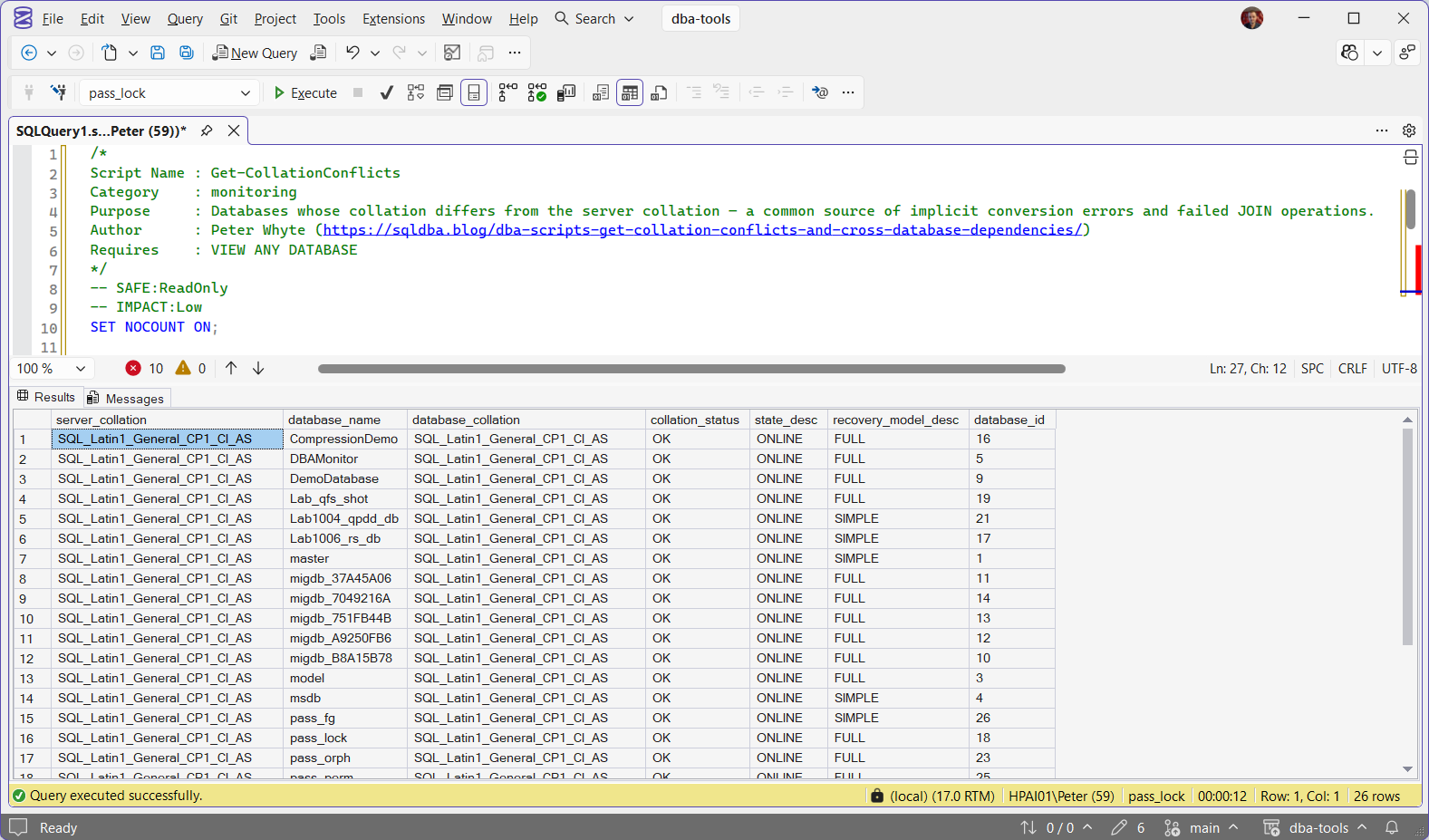
Every database matches the server’s SQL_Latin1_General_CP1_CI_AS, so every row reads OK. That means no conflict today, on the databases that exist today. It says nothing about the next database restored onto the instance, which is the most likely way a mismatch arrives.
Get-CrossDatabaseDependencies, run in a lab database holding a view over msdb and 2 synonyms:
What it means: this database cannot move on its own. The view needs msdb’s job tables wherever it lands, so it works on any SQL Server instance but reads the jobs of whichever server it is on, not the old one. syn_backupset is the same, behind a synonym. syn_remote_orders is the one to stop on: a 4-part name ties this database to a linked server called PWSQL02, which must exist with that exact name on the target. On this lab it does not exist at all. SQL Server does not check a synonym’s target when it is created, so a broken one only fails when something uses it.
Understanding the Results
Get-CollationConflicts
collation_statusserver_collationdatabase_namedatabase_collation#temp table does too.state_descrecovery_model_descdatabase_idGet-CrossDatabaseDependencies
reference_typereferenced_server_namereferenced_targetreferenced_database_namereferenced_schema_namereferenced_entity_namesource_databasesource_schemasource_objectsource_object_type0 rows from Get-CrossDatabaseDependencies means no references in object definitions or synonyms. It does not rule out dynamic SQL built at runtime.
Best Practices
- Run Collation Conflicts after restoring any database from another instance. Never assume the collation carried over.
- Run Cross-Database Dependencies before renaming, moving or retiring a database, in both directions: what it references, and, run in every other database, what references it.
- Search application code for cross-database SQL built at runtime, since this script cannot see it.
- Fix a collation conflict in the query with
COLLATE DATABASE_DEFAULT. Changing a database’s collation withALTER DATABASEonly changes the default for new objects: existing columns keep the collation they were created with.
Microsoft’s reference covers sys.sql_expression_dependencies, sys.databases and sys.objects in full.
Frequently Asked Questions
Why does a collation mismatch cause errors?
To compare 2 strings, SQL Server needs one collation to compare them under. When both sides are columns with different collations, neither wins, and the query fails with error 468. The classic case is a database whose collation differs from the server’s: its columns no longer match #temp tables, which are created in TempDB with the server collation. When one side is a variable or a literal, the column’s collation wins and there is no error.
Does a clean Cross-Database Dependencies result guarantee no cross-database references exist?
No. It shows references written into object definitions and synonyms. Dynamic SQL that builds a cross-database or cross-server name at runtime, such as a concatenated EXEC, does not exist as a reference until it runs, so this script cannot see it.
Do these scripts work on Azure SQL Database and Managed Instance?
Both run on Managed Instance as they do on SQL Server. On Azure SQL Database, Get-CollationConflicts runs, but cross-database queries by 3-part name are not supported there, so cross-database dependencies are rare and Get-CrossDatabaseDependencies mostly finds synonyms left behind by a migration.
Summary
Both of these checks are quiet until a migration, rename, or decommission changes the thing they were depending on, at which point they fail loudly. Collation Conflicts confirms every database agrees with the server on how to compare strings. Cross-Database Dependencies finds what would actually break if a specific database disappeared or moved.
Run both before any migration or decommission, and treat every cross-database reference as a dependency to resolve, not a detail to note.
Related
You may also find these scripts useful:
- SQL Server Collation: Case Sensitivity and the Cross-Database Trap, the fundamentals behind these findings
- Migration Risk Assessment
- Linked Servers
- Migration Login Audit and Post-Migration Validation
- Cannot Resolve the Collation Conflict (Error 468), the error these findings produce, and the one-line COLLATE DATABASE_DEFAULT fix
- DBA Scripts: The Complete Guide, the map across every script on this site
Leave a Reply