
The Login Exists, the Database Still Says No
An account that worked last week stops working against one database. The password is right, the login is there in Object Explorer, the user is still in the database with its roles intact, and the connection is still refused. The client returns Msg 4060 and the SQL Server error log gives the reason in plainer words than the client does.
A database user is not matched to its login by name. It is matched by SID, copied from the login at the moment the user was created. Drop and recreate that login, or restore the database onto a server where the login never existed, and the new login gets a brand new SID. In the run above the user held 0xBE62DBF7BC57EC4B9E63571218955973 while the login of the same name held 0xA111277F7ED93A458FCB7895ED4B9EBE. Same name, different identity, so there is no user for the login to be and the database refuses it. That is an orphaned user.
This script scans every online database it can open and returns every user whose SID matches no login on the instance, along with whether a login of the same name exists, which is the single fact that decides how you fix it.
Why Orphaned Users Matters
Orphaned users are a quiet side effect of routine work, and they are usually found by an outage rather than by a check:
- The common cause is restoring or attaching a database onto a different server, where the SIDs in the restored database line up with nothing local
- Dropping and recreating a login does it too, on the same server, with no restore involved anywhere
- Nothing warns you. The user keeps its permissions and role memberships, and the failure only appears the next time something tries to connect as that identity
- A
WINDOWS_GROUPorphan takes out every member of the group at once, so one broken row can read like an application-wide outage - They are an access-review finding as well as an incident: an orphan is a live permission grant that nobody can use and nobody is watching
When to Run This Script
- After any database restore or attach, especially across servers or environments
- Immediately after dropping or recreating a login, before anyone else finds out
- Routine SQL Server health checks
- Security reviews and access audits
The Script
Run the following script against your SQL Server instance.
- Tested on: SQL Server 2025 (RTM CU8), Windows lab instance
- Last verified: 2026-10-03 (saved output from a real run against a scratch database holding 4 deliberate orphans, Get-OrphanedUsers-20261003-203500.csv)
- Permissions: VIEW ANY DATABASE, plus access to each database it inspects
- Safety: read-only, impact low
/*
Script Name : Get-OrphanedUsers
Category    : security-and-permissions
Purpose     : Find database users whose SID matches no server login, the state that makes an
              account fail to authenticate after a restore, an attach, or a dropped login.
              Reports whether a login of the same name exists, which is what decides between
              a straight remap and creating a login first.
Author      : Peter Whyte (https://sqldba.blog/dba-scripts-get-orphaned-users/)
Requires    : VIEW ANY DATABASE, plus access to each online database it inspects (it opens every database)
HealthCheck : Yes
Notes       : Orphaned users cause login failures for that account. Fix with
              ALTER USER [username] WITH LOGIN = [login_name]; or DROP USER [username].
              Users created WITHOUT LOGIN (authentication_type NONE) and contained database
              users (authentication_type DATABASE) also have no server login by design and are
              deliberately excluded, they are not orphans.
*/
-- SAFE:ReadOnly
-- IMPACT:Low
SET NOCOUNT ON;
SET QUOTED_IDENTIFIER ON;

IF OBJECT_ID('tempdb..#orphaned') IS NOT NULL DROP TABLE #orphaned;

CREATE TABLE #orphaned (
    database_name NVARCHAR(128),
    user_name NVARCHAR(128),
    user_type NVARCHAR(60),
    matching_login NVARCHAR(128) NULL,
    create_date DATETIME
);

DECLARE @sql NVARCHAR(MAX) = N'';

SELECT @sql += N'
USE ' + QUOTENAME(name) + N';
INSERT INTO #orphaned
SELECT
    DB_NAME() AS database_name,
    dp.name AS user_name,
    dp.type_desc AS user_type,
    (SELECT TOP (1) sp2.name
     FROM sys.server_principals AS sp2
     WHERE sp2.name = dp.name
       AND sp2.type IN (''S'', ''U'', ''G'')) AS matching_login,
    dp.create_date
FROM sys.database_principals AS dp
WHERE dp.type IN (''S'', ''U'', ''G'')
  AND dp.principal_id > 4
  AND dp.sid IS NOT NULL
  AND dp.authentication_type IN (1, 3)   /* 1 INSTANCE, 3 WINDOWS. Excludes 0 NONE (WITHOUT LOGIN) and 2 DATABASE (contained). */
  AND dp.name NOT IN (''guest'', ''INFORMATION_SCHEMA'', ''sys'', ''dbo'')
  AND NOT EXISTS (
      SELECT 1
      FROM sys.server_principals AS sp
      WHERE sp.sid = dp.sid
  );
'
FROM sys.databases
WHERE state_desc = 'ONLINE'
  AND database_id <> 2            /* tempdb is rebuilt at every startup */
  AND HAS_DBACCESS(name) = 1;     /* skip what this account cannot open, rather than failing the whole run */

EXEC sys.sp_executesql @sql;

SELECT
    database_name,
    user_name,
    user_type,
    matching_login,
    create_date
FROM #orphaned
ORDER BY CASE WHEN matching_login IS NULL THEN 1 ELSE 0 END, database_name, user_name;

DROP TABLE #orphaned;
It builds one pass per database, compares each user’s SID against sys.server_principals, and returns the ones with no match. Users that have no server login by design, those created WITHOUT LOGIN and contained database users, are filtered out by authentication_type rather than reported as orphans.
How To Run From The Repo
Clone DBA Tools, initialize and run the script:
# Clone dba-tools repo:
git clone https://github.com/peterwhyte-lgtm/dba-tools

# Initialize environment:
cd dba-tools
.\Initialize-Environment.ps1

# Find orphaned database users across all databases:
.\run.ps1 Get-OrphanedUsers

# To run against a remote sql server:
.\run.ps1 Get-OrphanedUsers -ServerInstance SQLSERVER01
This script lives in the repo at:
Example Output
Run against a lab instance carrying 4 deliberate orphans in one database: 2 SQL users, 1 Windows user and 1 Windows group. The ones that can be remapped in a single statement sort to the top.
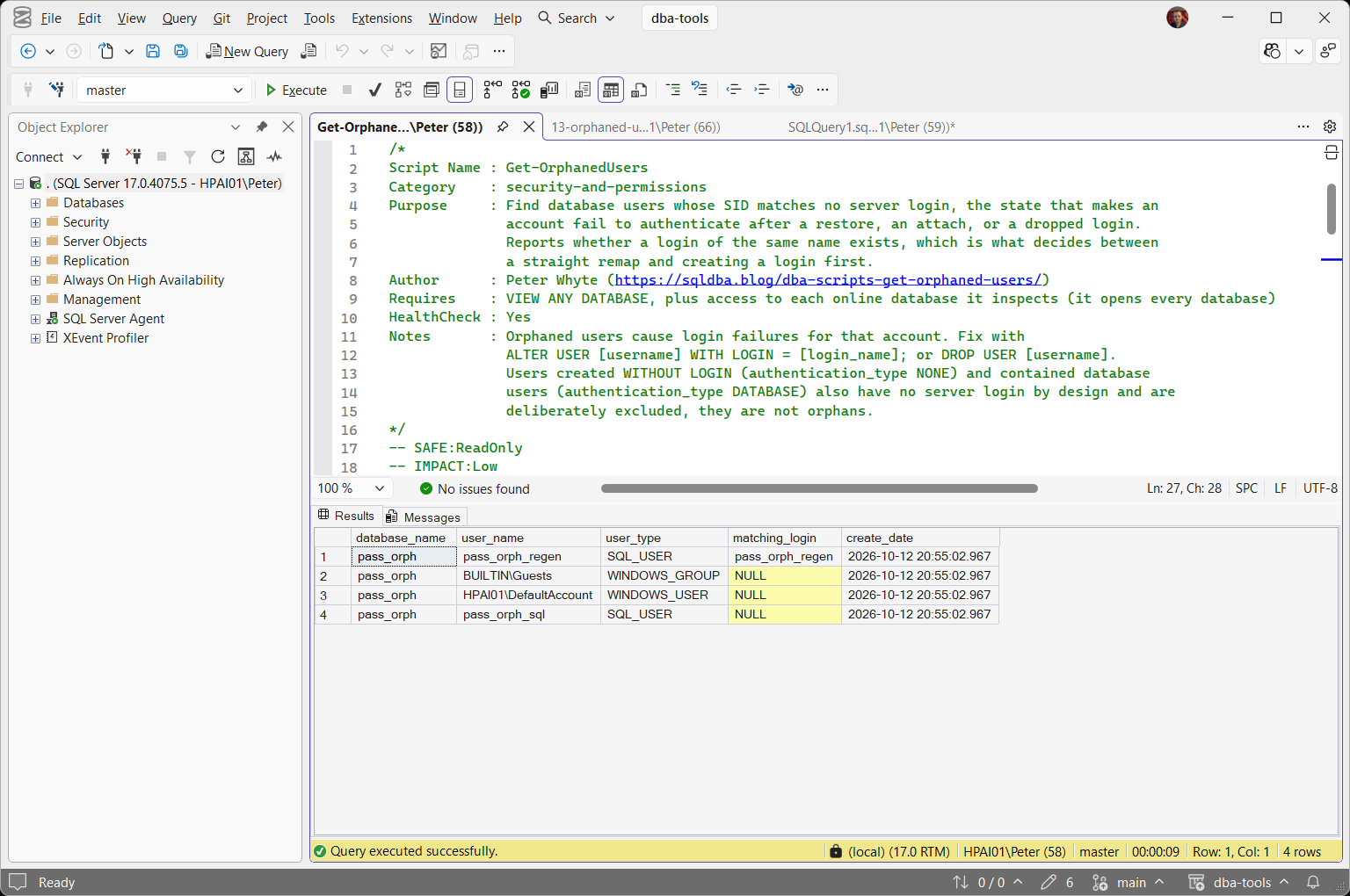
Read matching_login first, because it is the difference between a one-line fix and a decision. pass_orph_regen has a login of that name on the server already, so a single ALTER USER puts it back. The 3 rows below it return NULL, which means there is nothing on this instance to remap them to: each one is either a login that has to be created first or a user that should be dropped.
BUILTIN\Guests is in the list as a WINDOWS_GROUP, not a user. Groups orphan in exactly the same way, and they are easy to miss because nobody logs in as a group, they log in as a member of one.
What is not in the list matters as much. A user created WITHOUT LOGIN has a SID that matches no login either, so a SID-only check reports it as orphaned on every instance it ever runs against. SQL Server ships one: msdb contains MS_DataCollectorInternalUser, authentication_type NONE, SID matching nothing. It is not broken and it must not be dropped. The authentication_type filter is what keeps rows like that out of the result.
Understanding the Results
database_nameuser_nametempdb excluded because it is rebuilt at every startup. A database the account cannot open is skipped rather than failing the whole run, so a database you expected to see and cannot find is worth chasing separately.user_typeSQL_USER, WINDOWS_USER or WINDOWS_GROUP. SQL users orphan most often, because their SID is generated per server and a restore carries the old one across. Windows principals orphan when the account or group is deleted and recreated, or when the database arrives from a different domain.Act when the row is a WINDOWS_GROUP. Every member of that group loses access at once, which reads like an application outage rather than one broken account, and no individual login looks wrong anywhere.matching_loginNULL if there is none. This is the column that decides the fix, and the result is sorted so the rows with a match come first. A value here means ALTER USER ... WITH LOGIN works as it stands. NULL means you create the login first, or drop the user.Act when you are tempted to trust the name. A matching name is not a matching identity: a login called svc_reports on this server may be a completely different service from the one the restored database meant. Confirm who the account belongs to before remapping, because the remap hands it every permission the orphan still holds.create_dateUsers with authentication_type of NONE (created WITHOUT LOGIN, usually for EXECUTE AS impersonation) and DATABASE (contained database users) never appear here. Both are meant to have no server login, so reporting them as orphans would be wrong twice over: the row is noise, and acting on it drops a working account.
How to Fix Orphaned Users
Three outcomes, chosen by what matching_login returned:
USE [YourDatabase];

-- matching_login had a value: remap the user you already have to that login.
-- Permissions and role memberships are untouched.
ALTER USER [AppServiceUser] WITH LOGIN = [AppServiceUser];

-- matching_login was NULL and the account is still needed:
-- create the login first, then remap.
CREATE LOGIN [AppServiceUser] WITH PASSWORD = 'ReplaceThisPassword!';
ALTER USER [AppServiceUser] WITH LOGIN = [AppServiceUser];

-- matching_login was NULL and the account is not needed any more:
-- remove it, and the permissions it still carries.
DROP USER [AppServiceUser];
The remap takes effect for the next connection, with no restart and no reconnecting of other sessions. On the run above, the user and login SIDs both read 0xA111277F7ED93A458FCB7895ED4B9EBE straight after the ALTER USER, and the login that had been refused connected to the database on the next attempt.
Three places to go from here, rather than repeating them on this page:
- Fix Orphaned Users generates the
ALTER USERstatements for every orphan it finds and names the ones it cannot fix, which is what you want after a migration, where the list is long. - User, Group, or Role Already Exists in the Current Database (Error 15023) covers what happens when you try to create the user instead of remapping it, how to keep the original password, and why the
sp_change_users_loginadvice you will find online no longer applies. - Cannot Open Database Requested by the Login (4060) is the error at the other end, for when you are starting from the failure rather than from the audit.
Best Practices
- Run this as a standard step after every restore or attach onto a different server, in the same change as the restore rather than after someone reports a failure.
- Script logins with their SIDs when you migrate. A SQL login recreated on the target
WITH SIDmatching the source produces no orphans at all, and Windows principals keep their directory SID for free. - Never drop a user on the strength of a SID mismatch alone. Check
authentication_typeand confirm the account is genuinely dead, because the user still holds live permissions and a drop is not a remap. - Review orphans as part of routine access audits, not just when a login failure forces the investigation.
Microsoft’s reference covers sys.server_principals, sys.database_principals including the authentication_type column, sys.databases and ALTER USER in full.
Related Scripts
You may also find these scripts useful:
- Security (hub)
- Fix Orphaned Users, the remediation half of this one
- Permissions and Role Membership
- Login Security Audit
- Sysadmin Members
- User Permissions Audit
- User, Group, or Role Already Exists in the Current Database (Error 15023)
- Cannot Open Database Requested by the Login (4060), the login failure an orphan produces
- The Database Principal Owns a Schema (Error 15138)
- DBA Scripts: The Complete Guide, the map across every script on this site
Frequently Asked Questions
Why does a database restore create orphaned users?
Because a SQL login’s SID is generated when the login is created on that specific server, and the database user’s SID is a copy of it taken at the moment the user was granted access. Restore that database somewhere else, and unless a login with the exact same SID exists there too, the SIDs do not match and the user is orphaned. Windows principals usually survive, because their SID comes from the directory rather than from the instance.
Does WITH LOGIN change the user’s permissions?
No. ALTER USER ... WITH LOGIN only changes which login the existing user maps to. The user keeps every permission and role membership it already had, which is the whole reason a remap is preferred over dropping and recreating.
I created a user WITHOUT LOGIN and the script does not list it. Why not?
Because it is not orphaned. A user created WITHOUT LOGIN has authentication_type of NONE and is never meant to have a server login, so a check based on the SID alone reports it wrongly. msdb ships one of these as standard, MS_DataCollectorInternalUser, which is why a SID-only orphan check returns a false positive on an otherwise clean instance.
What about contained database users?
They are excluded for the same reason. A contained database user authenticates inside the database and has authentication_type of DATABASE, so having no server login is the point of it rather than a fault. Contained database authentication is off by default at instance level, so if you have never turned it on you will not have any.
Can a Windows group be orphaned, not just a user?
Yes, and it is the version most likely to be missed. A WINDOWS_GROUP user orphans when the group is deleted and recreated, or when the database comes from another domain, and the result is that every member loses access at once while no individual login looks wrong. The script reports group orphans alongside user orphans and labels them in user_type.
Summary
An orphaned user is a permission grant that still exists and can no longer be used, and it is created by the most ordinary things a DBA does: a restore onto another server, or a login dropped and put back. Nothing reports it until something fails to connect.
Run this after every restore or attach, and periodically as part of access reviews. Read matching_login before you touch anything, and check authentication_type before you decide a user is dead, because the users that are supposed to have no login look identical to the ones that are broken.
Leave a Reply