
Query Store is the single most useful diagnostic feature SQL Server has shipped in the last decade, a built-in, per-database history of every query’s plans and runtime stats, no third-party tooling required. And it fails in one of the quietest ways possible: it either isn’t turned on at all, or it’s silently full and has auto-switched itself to READ_ONLY, which means it’s stopped recording new data while looking, at a glance, like it’s still working.
Neither failure mode throws an error or shows up anywhere obvious. A database can sit with Query Store off, or read-only, for months, and the only symptom is that the regression investigation someone eventually runs turns up nothing, because the data simply isn’t there.
This script checks every database on the instance at once: is Query Store on, what’s its fill percentage, and has it auto-switched to read-only.
Why Query Store Status Matters
Query Store’s value is entirely dependent on it actually being enabled and actively capturing:
- Query Store off means there’s no runtime plan history at all for that database, no regression detection, no “what did this query’s plan look like last week” for it to answer.
READ_ONLYwith a nonzeroreadonly_reasonmeans Query Store hit its storage limit and stopped capturing automatically, it’s still queryable for historical data, but nothing new is being recorded from that point forward.- A fill percentage climbing toward 80-90% is an early warning that the auto-switch to read-only is coming soon, worth acting on before it happens rather than discovering it after.
desired_state_descnot matchingactual_state_descusually means SQL Server tried to bring Query Store back up after a restart or a storage issue and hasn’t fully succeeded, worth investigating directly.
Common Symptoms
- A performance regression investigation that comes up empty because Query Store had no data for the relevant window.
- Query Store showing as configured
READ_WRITEin database properties, but new query data simply isn’t appearing. - A database migrated or restored from another environment that inherited Query Store settings inappropriate for its new home.
When to Run This Script
- Routine SQL Server health checks
- Immediately after enabling Query Store on a database, to confirm it took effect
- Before relying on Query Store during a regression investigation, to confirm it was actually capturing during the window you care about
- After any restore or migration, Query Store settings travel with the database and may not suit the new environment
The Script
Run the following script against your SQL Server instance.
- Tested on: SQL Server 2025 (RTM CU5), Windows lab instance
- Last verified: 2026-08-07 (saved output from a real run, Get-QueryStoreStatus-20260807-211901.csv)
- Permissions: VIEW ANY DATABASE, VIEW DATABASE STATE
- Safety: read-only, impact low
/*
Script Name : Get-QueryStoreStatus
Category    : monitoring
Purpose     : Query Store enablement, fill ratio, capture mode, and health across all user databases.
              Surfaces databases where QS is off, full, or auto-switched to READ_ONLY.
Author      : Peter Whyte (https://sqldba.blog/dba-scripts-get-query-store-status/)
Requires    : VIEW ANY DATABASE, VIEW DATABASE STATE
HealthCheck : Yes
*/
-- SAFE:ReadOnly
-- IMPACT:Low
SET NOCOUNT ON;

CREATE TABLE #qs_status (
    database_name SYSNAME,
    db_state NVARCHAR(60),
    qs_state NVARCHAR(60),
    qs_desired_state NVARCHAR(60),
    capture_mode NVARCHAR(60),
    cleanup_mode NVARCHAR(60),
    current_storage_mb DECIMAL(10,2),
    max_storage_mb DECIMAL(10,2),
    fill_pct DECIMAL(5,1),
    stale_query_threshold_days INT,
    flush_interval_seconds INT,
    readonly_reason INT,
    status NVARCHAR(200)
);

DECLARE @db SYSNAME;
DECLARE @sql NVARCHAR(MAX);

DECLARE db_cursor CURSOR FAST_FORWARD FOR
    SELECT name
    FROM sys.databases
    WHERE database_id > 4
      AND state = 0
      AND compatibility_level >= 130; -- QS requires 2016+ compat

OPEN db_cursor;
FETCH NEXT FROM db_cursor INTO @db;

WHILE @@FETCH_STATUS = 0
BEGIN
    SET @sql = N'
        INSERT INTO #qs_status
        SELECT
            N' + QUOTENAME(@db, N'''') + N',
            N''' + (SELECT state_desc FROM sys.databases WHERE name = @db) + N''',
            actual_state_desc,
            desired_state_desc,
            query_capture_mode_desc,
            size_based_cleanup_mode_desc,
            CAST(current_storage_size_mb AS DECIMAL(10,2)),
            CAST(max_storage_size_mb AS DECIMAL(10,2)),
            CAST(100.0 * current_storage_size_mb / NULLIF(max_storage_size_mb, 0) AS DECIMAL(5,1)),
            stale_query_threshold_days,
            flush_interval_seconds,
            readonly_reason,
            CASE
                WHEN actual_state_desc = ''OFF''
                    THEN ''WARN - Query Store not enabled''
                WHEN actual_state_desc = ''READ_ONLY'' AND readonly_reason <> 0
                    THEN ''WARN - auto-switched to READ_ONLY (check fill ratio)''
                WHEN 100.0 * current_storage_size_mb / NULLIF(max_storage_size_mb, 0) > 80
                    THEN ''WARN - fill > 80%; risk of auto READ_ONLY switch''
                WHEN desired_state_desc <> actual_state_desc
                    THEN ''WARN - desired/actual state mismatch''
                ELSE ''OK''
            END
        FROM ' + QUOTENAME(@db) + N'.sys.database_query_store_options;';

    BEGIN TRY
        EXEC sp_executesql @sql;
    END TRY
    BEGIN CATCH
        -- QS catalog may not be visible if DB is inaccessible; skip silently
    END CATCH;

    FETCH NEXT FROM db_cursor INTO @db;
END;

CLOSE db_cursor;
DEALLOCATE db_cursor;

-- Also surface user databases that are below compat 130 (QS not applicable)
INSERT INTO #qs_status (database_name, db_state, qs_state, status)
SELECT
    name,
    state_desc,
    'N/A',
    'INFO - compat level ' + CAST(compatibility_level AS VARCHAR(5)) + ' (< 130); Query Store not supported'
FROM sys.databases
WHERE database_id > 4
  AND state = 0
  AND compatibility_level < 130;

SELECT
    database_name,
    db_state,
    qs_state,
    qs_desired_state,
    capture_mode,
    cleanup_mode,
    current_storage_mb,
    max_storage_mb,
    fill_pct,
    stale_query_threshold_days,
    flush_interval_seconds,
    readonly_reason,
    status
FROM #qs_status
ORDER BY
    CASE WHEN status LIKE 'WARN%' THEN 1 WHEN status LIKE 'INFO%' THEN 2 ELSE 3 END,
    database_name;

DROP TABLE #qs_status;
This loops every user database at compatibility level 130 or higher, reads sys.database_query_store_options for each, and returns state, fill ratio, capture mode, and a computed status flag, with databases below the required compatibility level listed separately as not applicable.
How To Run From The Repo
Clone DBA Tools, initialize and run the script:
# Clone dba-tools repo:
git clone https://github.com/peterwhyte-lgtm/dba-tools

# Initialize environment:
cd dba-tools
.\Initialize-Environment.ps1

# Check Query Store enablement, fill ratio, and health across every database:
.\run.ps1 Get-QueryStoreStatus

# To run against a remote sql server:
.\run.ps1 Get-QueryStoreStatus -ServerInstance SQLSERVER01
This script lives in the repo at:
sql/monitoring/features/Get-QueryStoreStatus.sqlpowershell/wrappers/monitoring/features/Get-QueryStoreStatus.ps1
Example Output
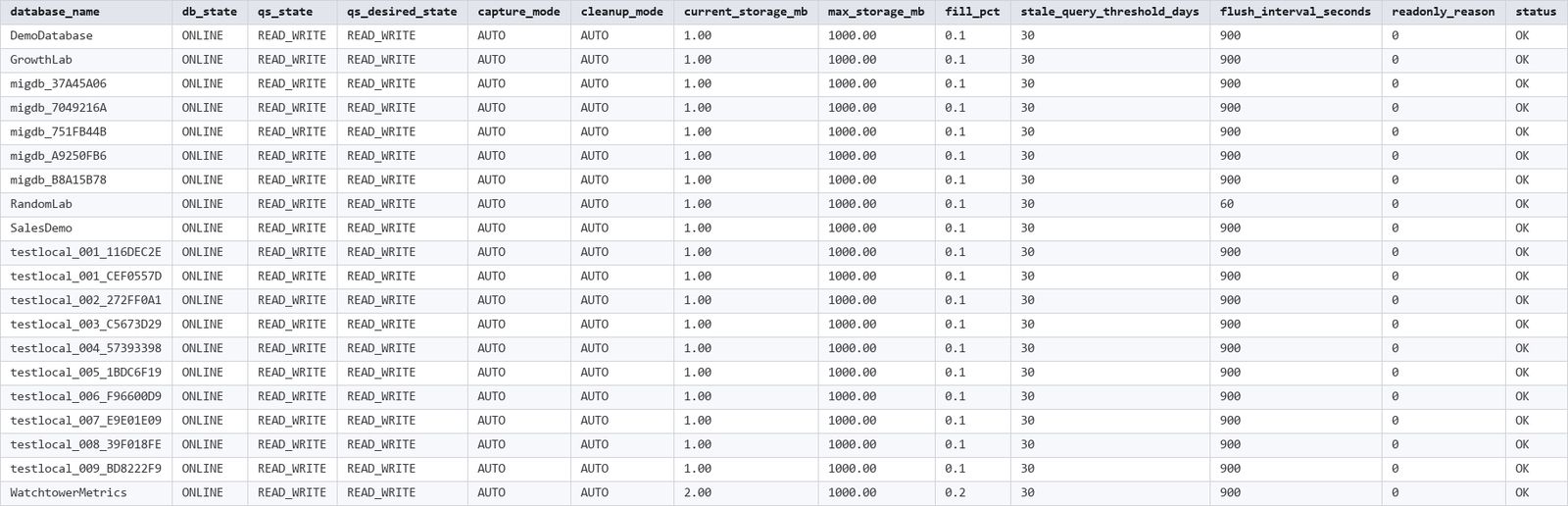
Every database here already shows READ_WRITE and OK, Query Store was enabled on this lab instance in an earlier check, this is what a healthy fleet looks like: low fill percentage, capture and cleanup both on AUTO, no readonly_reason set.
Understanding the Results
qs_state/qs_desired_stateare the two states to compare.OFFmeans Query Store isn’t running at all for that database. A mismatch between actual and desired usually means something (typically a storage or availability issue) prevented the desired state from taking effect.fill_pctis the current storage usage as a percentage ofmax_storage_mb. Everything in the capture above is comfortably low, worth watching once it climbs past 80%, since that’s the threshold at which SQL Server auto-switches toREAD_ONLY.readonly_reasonis0when there’s no forced read-only condition. A nonzero value means Query Store hit a limit (usually storage) and stopped capturing on its own, worth investigating regardless of what the rest of the row shows.capture_modeofAUTO(the default and recommended setting) only persists plans for queries that meet a resource-usage threshold, filtering out one-off trivial queries automatically.ALLcaptures everything and fills storage far faster.
Common Causes
Query Store being off is usually either a database that predates the feature being enabled instance-wide, or a restore/migration from a source where it was never turned on, settings travel with the database, they don’t get re-evaluated against the new environment automatically. A READ_ONLY auto-switch almost always traces back to max_storage_size_mb being set too small for the workload’s query volume, or stale_query_threshold_days retaining more history than the storage budget supports.
How to Fix Query Store Issues
Enable Query Store on a database where it’s off:
ALTER DATABASE RandomLab SET QUERY_STORE = ON;
ALTER DATABASE RandomLab SET QUERY_STORE (
    OPERATION_MODE = READ_WRITE,
    MAX_STORAGE_SIZE_MB = 1000,
    QUERY_CAPTURE_MODE = AUTO,
    CLEANUP_POLICY = (STALE_QUERY_THRESHOLD_DAYS = 30)
);
Recover a database that’s auto-switched to READ_ONLY:
-- Either increase the storage budget...
ALTER DATABASE RandomLab SET QUERY_STORE (MAX_STORAGE_SIZE_MB = 2000);

-- ...or clear out older data to make room and flip it back on
ALTER DATABASE RandomLab SET QUERY_STORE CLEAR;
ALTER DATABASE RandomLab SET QUERY_STORE (OPERATION_MODE = READ_WRITE);
Increasing the storage budget without addressing why it filled is usually a temporary fix, if the query volume is genuinely high, either raise MAX_STORAGE_SIZE_MB to match or reduce STALE_QUERY_THRESHOLD_DAYS to retain less history.
Best Practices
- Enable Query Store on every user database above compatibility level 130 as standard practice, not just the ones you happen to be actively investigating.
- Set
MAX_STORAGE_SIZE_MBgenerously enough for your query volume, running out and auto-switching to read-only defeats the entire point of having it. - Check fill percentage as part of routine health checks, not just when something’s already gone wrong, 80% is the point to act, not 99%.
- Re-verify Query Store status after any restore or migration, don’t assume settings carried over correctly just because the restore succeeded.
Microsoft’s reference covers sys.databases, sys.database_query_store_options and sp_executesql in full.
Frequently Asked Questions
Why does Query Store switch itself to read-only?
Because it hit its configured storage limit (MAX_STORAGE_SIZE_MB) and SQL Server automatically stops accepting new data rather than let it grow unbounded. It’s a safety mechanism, not a failure, but it does mean new query history stops being recorded until the condition clears.
Does Query Store need to be enabled per database?
Yes. Query Store is a per-database feature, there’s no instance-wide switch. Each database needs ALTER DATABASE ... SET QUERY_STORE = ON run against it individually, and each one tracks its own fill percentage and settings independently.
Does Query Store need a particular compatibility level?
No. Query Store needs the engine to be SQL Server 2016 or later, but it does not care what compatibility level the database sits at. That matters more than it sounds: Microsoft’s own upgrade workflow is to leave a database on its old compatibility level, turn Query Store on, collect a baseline of how the workload behaves, and only then raise the level and compare. A database still on an older compatibility level after a migration is exactly the one worth switching Query Store on for first.
Summary
Query Store is only as useful as it is actually running, and the two ways it stops, being off entirely or silently filling up to read-only, both look identical to “everything’s fine” until you go looking for data that isn’t there. Checking status across every database in one pass turns that blind spot into a routine, 30-second confirmation.
Run it after enabling Query Store anywhere new, and again as part of routine health checks, so the next regression investigation has the data it needs instead of a gap.
Related Scripts
You may also find these scripts useful:
- Query and Performance Tuning (hub)
- CDC and Change Tracking
- Collation Conflicts and Cross-Database Dependencies
- Compression Candidates
- Service Broker Health and Database Mail Queue
- Get Active XE Sessions
- Query Store Top Queries
- DBA Scripts: The Complete Guide, the map across every script on this site
Leave a Reply