
Most index problems aren’t about a single bad index, they’re about a table’s index design as a whole drifting out of shape over time. A table that accumulates 25 indexes because nobody ever removed the old ones. A composite key that grew column by column until it’s wider than SQL Server is comfortable with. A table where the Missing Index DMV has given up and is suggesting a dozen different indexes because none of the existing ones come close to covering the workload.
This script checks every table in every user database against 3 specific design problems at once: too many indexes, key columns that are too wide, and tables where the optimizer is flooding you with missing-index suggestions because existing coverage is that far off.
Why Index Design Issues Matters
Individually, any one of these problems is manageable. Together, or left unaddressed for a long time, they compound:
- Too many indexes, every one of them is maintained on every write. A table with 30 indexes pays 30x the index-maintenance cost per row change.
- Wide key columns. SQL Server’s index key limit is 1,700 bytes for a nonclustered index and 900 bytes for a clustered index (nonclustered was also 900 before SQL Server 2016 and compatibility level 130). Getting close to those limits means larger index pages, fewer rows per page, and more I/O per seek. Going over the limit fails at
CREATE INDEXwhen the key columns are all fixed-length; with variable-length columns the index creates with a warning and fails later, on the first insert or update where the actual key data exceeds the limit. - Missing-index flooding, when the DMV is suggesting 5 or more indexes for the same table, it’s not asking for 5 new indexes, it’s telling you the existing index design doesn’t match how the table is actually queried.
When to Run This Script
- Routine SQL Server health checks
- Reviewing a table before a major schema or query change
- Investigating a table with high write latency or a large index footprint
- Auditing a server or database you’ve just inherited
The Script
Run the following script against your SQL Server instance.
- Tested on: SQL Server 2025 (RTM CU8), Windows lab instance
- Last verified: 2026-09-01 (re-run against the lab instance, build 17.0.4075.5)
- Permissions: VIEW ANY DATABASE, VIEW DATABASE STATE
- Safety: read-only, impact low
/*
Script Name : Get-IndexDesignIssues
Category    : performance
Purpose     : Tables with index design problems: excessive index count (write amplification),
              wide key columns (>900 bytes, approaching the 1700-byte nonclustered key limit),
              and tables where Missing Index DMV has > 3 recommendations (optimizer giving up
              on existing index coverage). Complements Get-DuplicateIndexes.
Author      : Peter Whyte (https://sqldba.blog/dba-scripts-get-index-design-issues/)
Requires    : VIEW ANY DATABASE, VIEW DATABASE STATE
*/
-- SAFE:ReadOnly
-- IMPACT:Low
SET NOCOUNT ON;

CREATE TABLE #issues (
    database_name SYSNAME,
    schema_name SYSNAME,
    table_name SYSNAME,
    issue_type NVARCHAR(60),
    detail NVARCHAR(500),
    metric_value INT,
    status NVARCHAR(400)
);

DECLARE @db SYSNAME;
DECLARE @sql NVARCHAR(MAX);

DECLARE db_cursor CURSOR FAST_FORWARD FOR
    SELECT name FROM sys.databases WHERE database_id > 4 AND state = 0;

OPEN db_cursor;
FETCH NEXT FROM db_cursor INTO @db;

WHILE @@FETCH_STATUS = 0
BEGIN
    SET @sql = N'
    -- Issue 1: Too many indexes per table (write amplification)
    INSERT INTO #issues
    SELECT
        N' + QUOTENAME(@db, N'''') + N',
        s.name,
        t.name,
        ''TOO_MANY_INDEXES'',
        CAST(COUNT(i.index_id) AS VARCHAR) + '' indexes on this table (reported above 10; above 20 starts to harm INSERT/UPDATE/DELETE throughput)'',
        COUNT(i.index_id),
        CASE WHEN COUNT(i.index_id) > 30 THEN ''CRITICAL''
             WHEN COUNT(i.index_id) > 20 THEN ''WARN''
             ELSE ''INFO'' END
    FROM ' + QUOTENAME(@db) + N'.sys.indexes i
    JOIN ' + QUOTENAME(@db) + N'.sys.tables t ON t.object_id = i.object_id
    JOIN ' + QUOTENAME(@db) + N'.sys.schemas s ON s.schema_id = t.schema_id
    WHERE i.type IN (1, 2) AND t.is_ms_shipped = 0 AND i.is_disabled = 0
    GROUP BY s.name, t.name
    HAVING COUNT(i.index_id) > 10;

    -- Issue 2: Wide key columns (nonclustered key limit is 1700 bytes in SQL 2016+, 900 before; clustered is always 900)
    INSERT INTO #issues
    SELECT
        N' + QUOTENAME(@db, N'''') + N',
        s.name,
        t.name,
        ''WIDE_KEY_COLUMNS'',
        i.name + '' - key width ~'' +
            CAST(SUM(CASE WHEN c.max_length = -1 THEN 900 ELSE c.max_length END) AS VARCHAR) +
            '' bytes (avoid keys > 900 bytes; limits: 1700 nonclustered, 900 clustered)'',
        SUM(CASE WHEN c.max_length = -1 THEN 900 ELSE c.max_length END),
        CASE
            WHEN SUM(CASE WHEN c.max_length = -1 THEN 900 ELSE c.max_length END) > 1700
            THEN ''CRITICAL''
            WHEN SUM(CASE WHEN c.max_length = -1 THEN 900 ELSE c.max_length END) > 900
            THEN ''WARN''
            ELSE ''INFO''
        END
    FROM ' + QUOTENAME(@db) + N'.sys.indexes i
    JOIN ' + QUOTENAME(@db) + N'.sys.tables t ON t.object_id = i.object_id
    JOIN ' + QUOTENAME(@db) + N'.sys.schemas s ON s.schema_id = t.schema_id
    JOIN ' + QUOTENAME(@db) + N'.sys.index_columns ic ON ic.object_id = i.object_id
                                AND ic.index_id = i.index_id
                                AND ic.is_included_column = 0
    JOIN ' + QUOTENAME(@db) + N'.sys.columns c ON c.object_id = ic.object_id
                                AND c.column_id = ic.column_id
    WHERE i.type IN (1, 2) AND t.is_ms_shipped = 0
    GROUP BY s.name, t.name, i.name
    HAVING SUM(CASE WHEN c.max_length = -1 THEN 900 ELSE c.max_length END) > 450;

    -- Issue 3: Tables with many Missing Index recommendations (index coverage severely lacking)
    INSERT INTO #issues
    SELECT
        N' + QUOTENAME(@db, N'''') + N',
        mi_details.schema_name,
        mi_details.table_name,
        ''MISSING_INDEX_FLOOD'',
        CAST(mi_details.missing_count AS VARCHAR) + '' missing index recommendations - index coverage likely poor; review before applying all'',
        mi_details.missing_count,
        CASE WHEN mi_details.missing_count >= 10 THEN ''WARN''
             ELSE ''INFO'' END
    FROM (
        SELECT
            OBJECT_SCHEMA_NAME(mid.object_id, DB_ID(N' + QUOTENAME(@db, N'''') + N')) AS schema_name,
            OBJECT_NAME(mid.object_id, DB_ID(N' + QUOTENAME(@db, N'''') + N')) AS table_name,
            COUNT(*) AS missing_count
        FROM sys.dm_db_missing_index_details mid
        WHERE mid.database_id = DB_ID(N' + QUOTENAME(@db, N'''') + N')
        GROUP BY mid.object_id
        HAVING COUNT(*) >= 5
    ) mi_details;';

    BEGIN TRY EXEC sp_executesql @sql; END TRY
    BEGIN CATCH END CATCH;

    FETCH NEXT FROM db_cursor INTO @db;
END;

CLOSE db_cursor;
DEALLOCATE db_cursor;

SELECT
    database_name,
    schema_name,
    table_name,
    issue_type,
    detail,
    metric_value,
    status
FROM #issues
ORDER BY
    CASE status WHEN 'CRITICAL' THEN 1 WHEN 'WARN' THEN 2 ELSE 3 END,
    database_name,
    schema_name,
    table_name,
    issue_type;

DROP TABLE #issues;
The script checks every table in every online user database for 3 separate issues (too many indexes, wide key columns, missing-index flooding) and returns one row per issue found, ranked by severity.
How To Run From The Repo
Clone DBA Tools, initialize and run the script:
# Clone dba-tools repo:
git clone https://github.com/peterwhyte-lgtm/dba-tools

# Initialize environment:
cd dba-tools
.\Initialize-Environment.ps1

# Check every table for index design problems:
.\run.ps1 Get-IndexDesignIssues

# To run against a remote sql server:
.\run.ps1 Get-IndexDesignIssues -ServerInstance SQLSERVER01
This script lives in the repo at:
sql/performance/indexes/Get-IndexDesignIssues.sqlpowershell/wrappers/performance/indexes/Get-IndexDesignIssues.ps1
Example Output
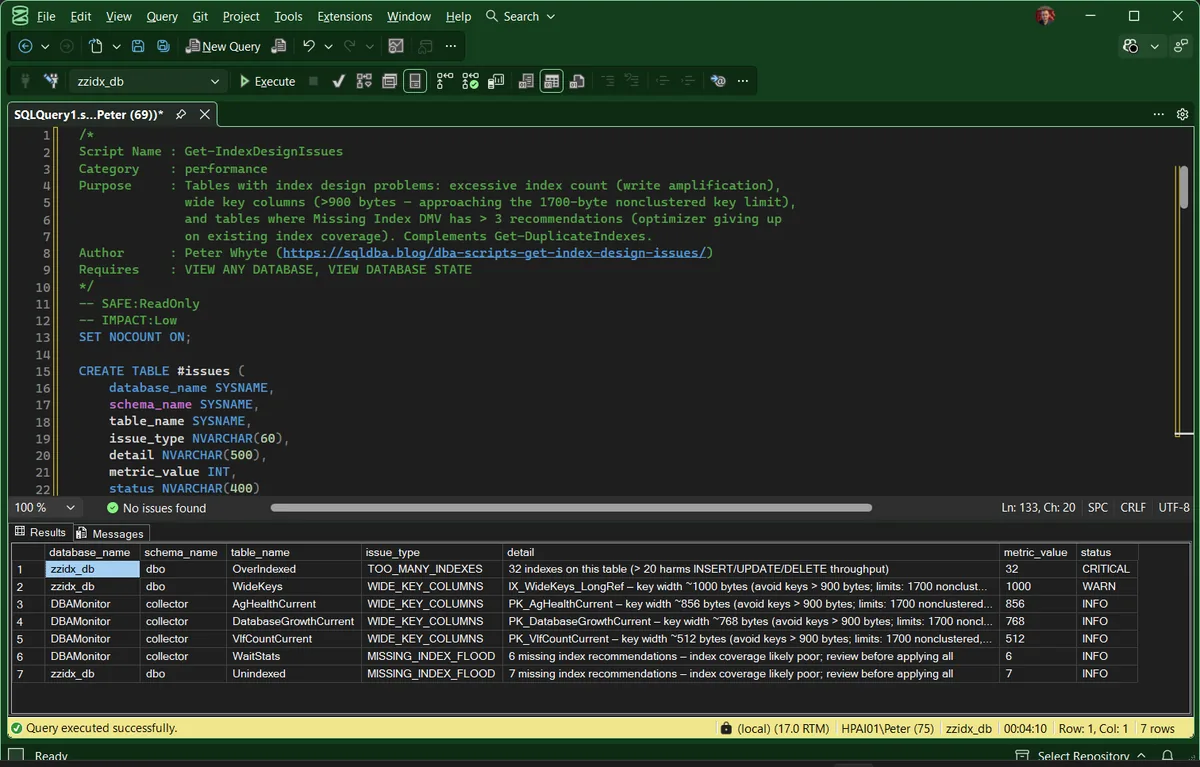
Run against a lab with a deliberately over-indexed database alongside a real collector database. 7 rows come back, sorted worst first.
The top row is CRITICAL: one table carrying 32 indexes, where the write cost of keeping them all current outweighs what they give back. Under it sits a WARN for a key roughly 1,000 bytes wide, then a run of INFO rows: 3 wide composite primary keys between 512 and 856 bytes, and two tables where the missing index DMV is asking for 6 and 7 recommendations.
2 things are worth noticing. The sort is deliberate, so the row that needs a decision is always at the top and you read down until the rows stop mattering. And metric_value carries a different unit on every row: an index count on the first, a key width in bytes on the next 4, a count of recommendations on the last 2. It is only meaningful next to its own issue_type.
Had every row come back INFO, that would still be a complete answer rather than a failed run. A clean instance is allowed to have nothing above INFO.
Understanding the Results
database_nameschema_nametable_namedatabase_id > 4 that is in a normal state.issue_typestatus is INFO from 11, WARN above 20, CRITICAL above 30. The detail sentence in the capture quotes only the 20 threshold, an older wording; the script now says reported above 10. Read status and metric_value in preference to the sentence either way.Act when a heavily written table lands here at WARN or worse. Every index on it is maintained on every insert, update and delete.status is WARN above 900 and CRITICAL above 1,700. The width is the declared maximum, not the data in the rows, so a wide variable length column counts in full even when every value is short.Act when status reads CRITICAL. The declared key is wider than a nonclustered key is allowed to be, and the failure lands on whichever insert first produces a key that long.sys.dm_db_missing_index_details, WARN at 10. It is a signal that coverage is poor. It is not a list of indexes to create, and the DMV forgets everything on restart.Act when a table appears here and under TOO_MANY_INDEXES as well. That pairing usually means the existing indexes are numerous but pointed at the wrong columns.detailmetric_value.metric_valueissue_type.statusissue_type by the thresholds above. Results are ordered with CRITICAL first.Act when anything reads WARN or CRITICAL on a table that is written to constantly. INFO rows are a record of the shape of the schema, not a queue of work.How to Fix Index Design Issues
The fix depends on which issue fired:
- TOO_MANY_INDEXES, run Duplicate Indexes and Unused Indexes against the same table first; the fix is usually consolidation, not a wholesale redesign.
- WIDE_KEY_COLUMNS, check whether every key column is actually needed for seeks, or whether some belong in the
INCLUDElist instead (included columns don’t count toward the key-width limit). - MISSING_INDEX_FLOOD, group the suggested indexes by overlapping columns and design 1 or 2 wider indexes that cover most of them, rather than creating each suggestion verbatim.
-- Move a column from the key to INCLUDE to reduce key width
-- without losing the ability to cover the query
DROP INDEX [IX_Example] ON [dbo].[YourTable];
CREATE NONCLUSTERED INDEX [IX_Example]
    ON [dbo].[YourTable] (KeyColumn1, KeyColumn2)
    INCLUDE (WideColumn);
Best Practices
- Review a table’s full index list before adding another one, not just the query that prompted the request.
- Prefer
INCLUDEcolumns over key columns for anything not used in aWHERE,JOIN, orORDER BYclause. - Treat a growing missing-index recommendation count as a design signal, not a to-do list to apply verbatim.
Microsoft’s reference covers sys.indexes, sys.tables and sys.databases in full.
Frequently Asked Questions
How many indexes on a table is too many?
There’s no universal number, but past 10-15 non-clustered indexes on a heavily-written OLTP table, the write cost is usually worth investigating. This script starts flagging at 10 and escalates from there.
What happens if an index key exceeds 1,700 bytes?
It depends on the key columns. 1,700 bytes is the nonclustered limit, and clustered indexes are capped at 900. If the key columns are all fixed-length, CREATE INDEX fails with an error. If any are variable-length, the index creates with a warning and the failure is deferred until an insert or update produces a key that actually exceeds the limit, the same deferred failure covered in Collect Health and Configuration Baselines. Either way the fix is the same: move non-searched columns to INCLUDE or narrow the key design.
Summary
Index design problems rarely show up as a single dramatic incident. They accumulate quietly across months of ad-hoc changes until a table is carrying more indexes, wider keys, or worse coverage than anyone intended.
Run this script as part of your regular health checks, especially on tables that have been through several rounds of tuning by different people, and treat each finding as a design conversation rather than a one-line fix.
Related Scripts
You may also find these scripts useful:
- Index Maintenance (hub)
- Duplicate Indexes
- Heaps
- Index Fragmentation
- Index Fragmentation Across Databases
- Index Usage Stats
- Missing Indexes
- Unused Indexes
- DBA Scripts: The Complete Guide, the map across every script on this site
Leave a Reply