
Test works and production does not, and the first question is what is actually different between the two databases. SSMS answers that itself now. Schema Compare takes two database definitions, a live database, a .dacpac file or a SQL project, and lists every difference as the change that would make the target match the source. It arrived in SSMS 22.7 and has been generally available since 22.10.2, so there is nothing extra to buy or install.
Run a Comparison
- In Object Explorer, right-click the database you are comparing from, the one that is right, and choose Tasks → Schema Compare. On releases before 22.10.2 the menu item reads Schema Compare (Preview).
- That database is filled in as the source. Choose the target: another database, a
.dacpacfile, or a SQL database project. - Select Compare in the toolbar.
You can also start from Tools → Schema Compare, which opens with neither side filled in. Microsoft’s Schema Compare page covers the third way in, from a SQL database project in Solution Explorer.
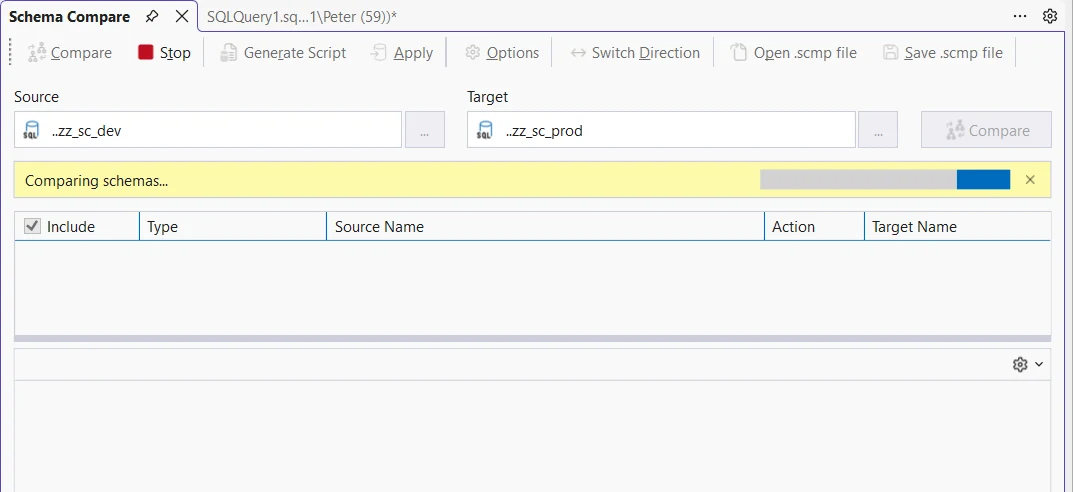
If it stops with Unexpected exception caught during population of source model: Execution Timeout Expired, the server could not read the schema in time, usually for lack of memory: Schema Compare: Execution Timeout Expired explains why and how to get it to run.
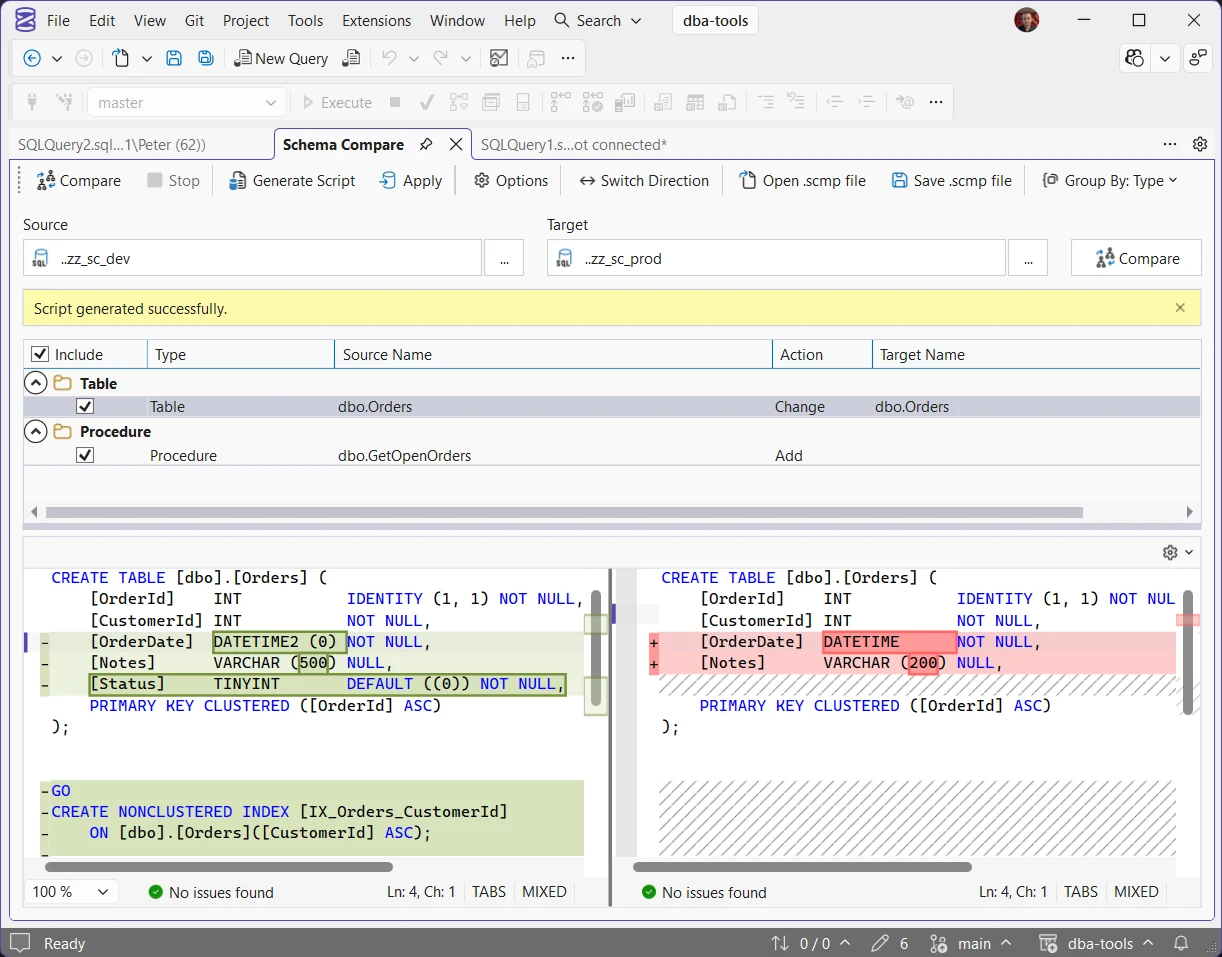
Here the development copy is the source and production the target, and the compare found 2 differences. dbo.GetOpenOrders is an Add: the procedure only exists in development, so the script would create it on production. dbo.Orders is a Change, and that one row carries every difference on the table: OrderDate is datetime2 in development and datetime in production, Notes is varchar(500) against varchar(200), development has a Status column production does not, and development has an index, IX_Orders_CustomerId, that production lacks.
Columns, indexes and constraints roll up under their table, so a single Change row can be several changes. With dbo.Orders selected, as here, the pane underneath shows both definitions: development on the left, production on the right, each difference highlighted down to the 500 and the 200. What is missing is as useful: the 2 primary keys have different system-generated names, and Schema Compare does not report that as a difference.
Reading the Results
Every row is written from the target’s point of view. Add means the object exists in the source and would be created in the target. Delete means it exists only in the target and would be dropped. Change means it exists in both and the target’s version would be altered to match. Get source and target the wrong way round and every Add becomes a Delete, so check which side is which before you read further. Switch Direction in the toolbar swaps them without starting again.
- Results can be grouped by action (Add, Change, Delete) or by object type, as in the screenshot. Group By in the toolbar switches between them, and type reads better on a large database.
- Select a row to see the two definitions side by side, highlighted like a source control diff.
- A renamed object, or one moved to another schema, shows the source name in bold.
- Objects that are identical, or that cannot be updated such as built-in objects, are hidden by default. The filter buttons in the toolbar show them.
Apply or Generate Script
Apply asks you to confirm, then makes the changes to the target straight away. Generate Script writes the same changes as a T-SQL script and opens it in the query editor. For anything that matters, take the script: you can read it, run it in a change window, and keep it with the rest of your deployment scripts. Apply is fine for a scratch database you would happily rebuild.
To leave a difference out, clear the row’s Include box. A row that other rows depend on, such as a table under a view, stays included until you clear its dependants too.
Before You Run the Script
The script is a DacFx publish script, the same kind SSDT and SqlPackage write, and 5 things about it are worth knowing before you press Execute:
- It needs SQLCMD Mode. The database name is a
:setvarvariable, so turn on Query → SQLCMD Mode before you run it. Without it, the script notices and switches execution off withSET NOEXEC ON, so nothing runs. After turning the mode on, runSET NOEXEC OFFand start again. - It is not one transaction. It stops at the first error, and everything before that error stays done. Take a backup or know your way back first.
- It is written for one database. The header names the target, and
DatabaseNameis a variable. Change that one line and the same script runs against a restored copy of production first, which is the cheapest rehearsal there is. - Dropping a table checks for rows first. If the table has data, the script stops with Rows were detected. The schema update is terminating because data loss might occur.
- Dropping an index does not. An index that only exists on production, maybe one added there on purpose for a slow query, is a Delete row and goes without a warning. Clear its Include box if it should stay.
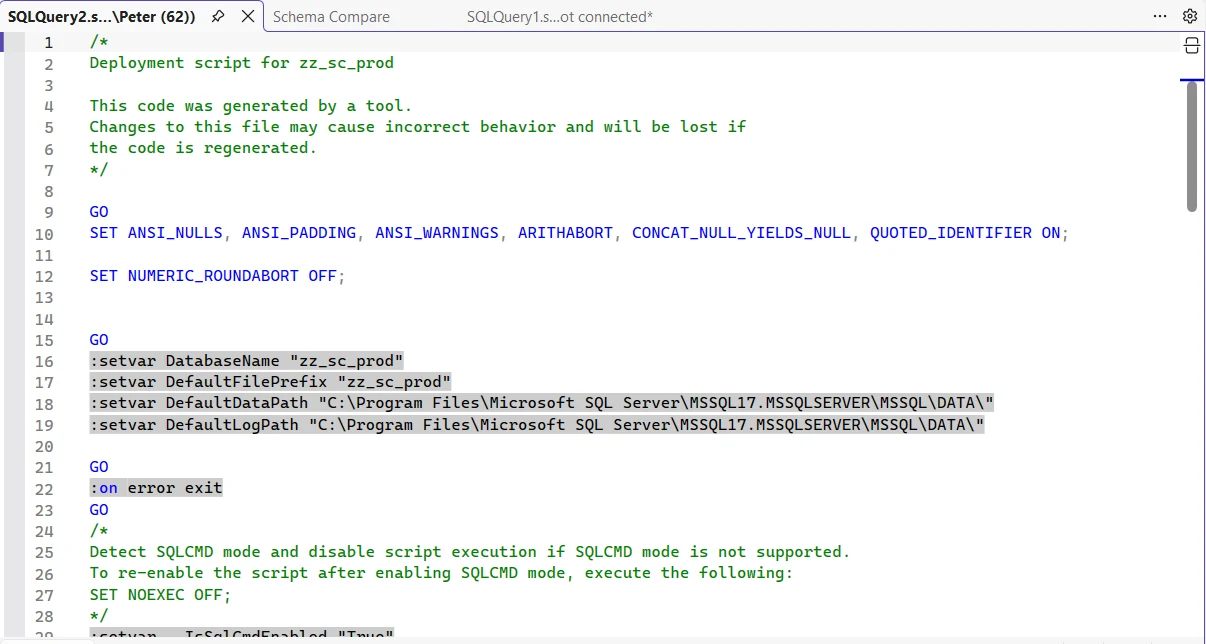
The top of the script from the compare above. Lines 16 to 19 are the :setvar variables, line 22 is the stop-on-error, and lines 24 to 28 are the check that switches execution off when SQLCMD Mode is not on.
Options Worth Setting
Options in the toolbar opens 2 tabs. Include Object Types decides what is compared: leave out permissions, users or user-defined types when you only care about tables and code. General Options decides what counts as a difference and how the change script behaves, and the search box at the top finds an option by name.

The ones to know before you generate a script for production:
- Block on possible data loss is the guard that stops the script when a table it would drop or narrow still has rows. Leave it ticked.
- Allow table recreation in Publish lets a change that cannot be made with
ALTER, such as a new column in the middle of a table, rebuild the whole table and copy the rows across. On a big table that is a long, logged operation, so look for it in the script. - Backup database before changes is off. Tick it for a scratch run, or take your own backup first on anything that matters.
- Disable and reenable DDL triggers is on, so an audit trigger on the target will not see the change. Untick it if your change process relies on one.
Ignore whitespace and Ignore column order are further down the same list, and they stop cosmetic noise from burying the real changes.
Save the comparison as an .scmp file and the source, target and options come back with it. Rerun it before every release, or hand it to a colleague to run the same check.
Frequently Asked Questions
Does Schema Compare compare the data too?
No. It compares object definitions: tables, columns, indexes, procedures, permissions and the rest. Rows that differ between the two databases do not show up here.
Does it work with Azure SQL Database and Managed Instance?
Yes. SQL Server, Azure SQL Database, Azure SQL Managed Instance and Azure Synapse Analytics are all supported, as a source or a target.
Do I need the Database DevOps workload?
Only to compare against a SQL database project. Database to database, and database to .dacpac, work without it.
What permissions does it need?
Reading a database’s schema is the same read as extracting a .dacpac. Microsoft’s minimum for that is VIEW DEFINITION on the database, ALTER ANY LOGIN on the server and SELECT on sys.sql_expression_dependencies. Applying changes needs the rights to make them on the target.
Which SSMS version do I need?
22.7 or later. It was a preview until 22.10.2, when it became generally available. Install and Update SSMS covers getting onto the current release.
- Schema Compare: Execution Timeout Expired, when the compare fails before it shows anything.
- Use Git in SSMS, where a generated script can live with the rest of your deployment scripts.
- What’s New in SSMS 22 for DBAs, the other features that arrived with it.
- SSMS: The Complete Guide, the hub this post belongs to.
Summary
Schema Compare answers “what is different between these 2 databases” without leaving SSMS. Make the database that is right the source, read every row as a change to the target, and select a row to see exactly what differs.
For production, take Generate Script over Apply, run it in SQLCMD Mode against a restored copy first, and read it for dropped indexes and table rebuilds. Save the comparison as an .scmp to rerun before each release. If it times out before showing anything, the server is short of memory, not the database: Schema Compare: Execution Timeout Expired.
Leave a Reply