
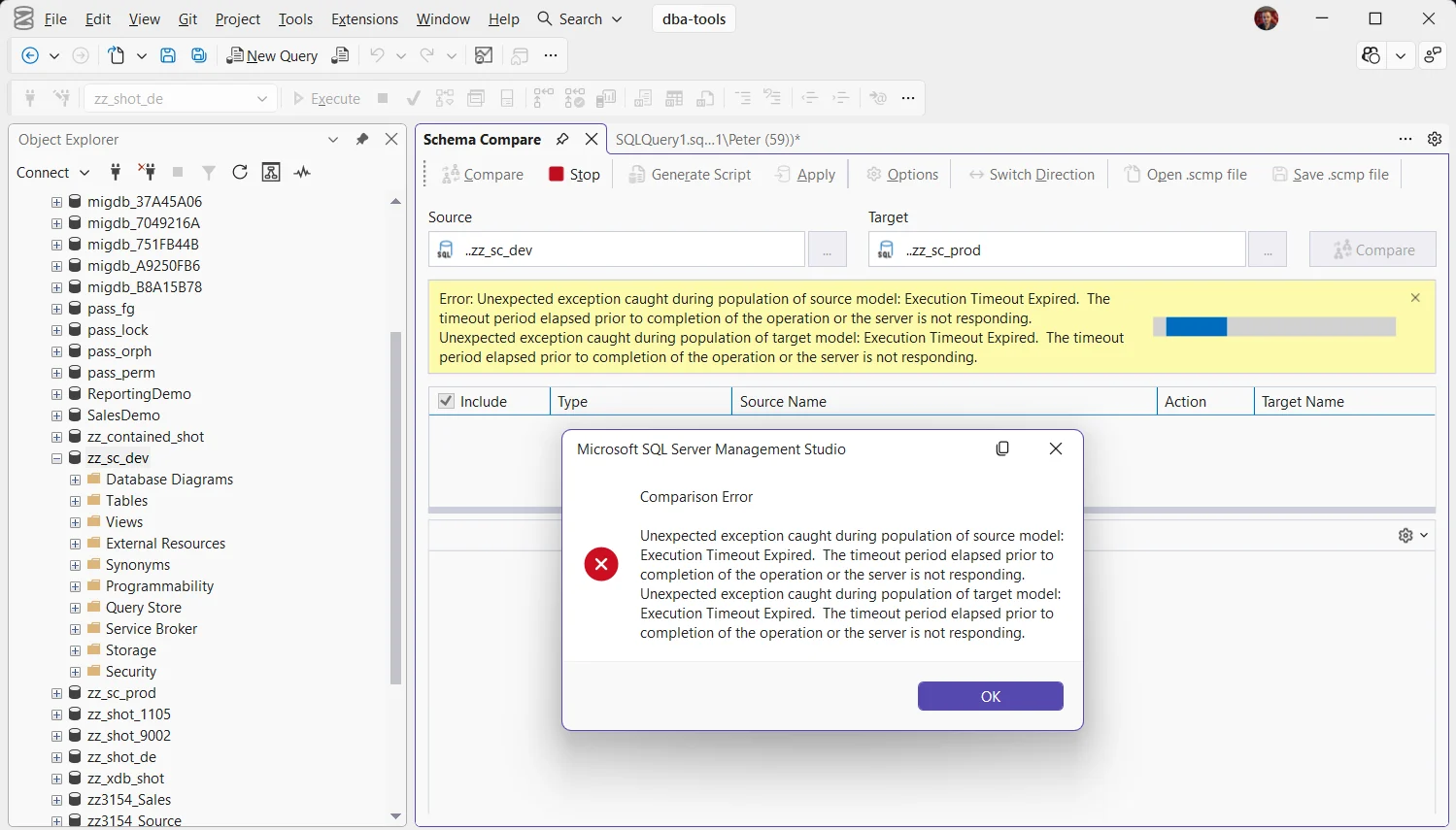
What the Message Means
Before Schema Compare can show a single difference, it builds a model of each side: every table, column, index, procedure and permission, read from the system catalog. Population of source model is that read against the source, and target model the same against the target. Execution Timeout Expired means one of those catalog queries ran longer than the client was prepared to wait, so the compare stopped before it had anything to show.
How long is too long? Schema Compare runs on DacFx, the engine behind SSDT and SqlPackage. Microsoft documented its defaults for SSDT: 60 seconds for a query and 5 seconds for a lock. Schema Compare’s own Options only decide what is compared, so there is nothing in SSMS to make it wait longer.
The size of the database is rarely the reason. The error in the screenshot came from 2 lab databases holding 4 objects between them, on a machine that was short of RAM. Windows asked SQL Server to give memory back, SQL Server did, and the schema reads then needed more memory than it had left to hand out. They queued behind 2 Agent jobs waiting for the same thing, and the compare timed out every time we ran it. Nothing in SSMS fixes that: this compare needs RAM.
Why It Happens
The catalog queries are queued for memory. Reading a schema joins objects, columns and module definitions and sorts the result, and a sort needs a memory grant. When the server is short of memory, grants queue on RESOURCE_SEMAPHORE, and a catalog query waits in that queue like any other. When the whole machine is short of RAM, SQL Server shrinks to make room, and the queue gets long even on a quiet server.
The catalog queries are blocked. An index rebuild, a deployment or any other schema change holds locks that catalog reads have to wait for. A long-running one stalls the model population until the timeout fires.
The database is at its service tier limit. On Azure SQL Database the queue is the tier itself. Microsoft has seen the same timeout from SSDT on a Basic database sitting at 100% CPU for the whole read.
The schema really is that big. Tens of thousands of objects, or a slow network to a remote server, can make the read itself take longer than the timeout, even on a quiet server.
Check the Server While It Fails
Run this in another query window while the compare is running:
-- Who is waiting for memory, and who holds it
SELECT session_id,
       requested_memory_kb,
       granted_memory_kb,
       wait_time_ms / 1000 AS waited_s,
       CASE WHEN grant_time IS NULL THEN 'WAITING'
            ELSE 'GRANTED' END AS grant_state
FROM sys.dm_exec_query_memory_grants
ORDER BY grant_state DESC, waited_s DESC;
Any WAITING rows mean queries are queued for memory, and Schema Compare’s are among them. RESOURCE_SEMAPHORE When SQL Server Is Nowhere Near Its Memory Cap walks through finding what is holding the memory. If nothing is waiting for memory, look for blocking instead with Get Blocking Chains, or at what is running with Get Active Sessions and Requests.
If memory is queued, check whether Windows itself is short, which is what pushes SQL Server to give memory back:
-- 1 = Windows is asking SQL Server to shrink
SELECT physical_memory_in_use_kb / 1024 AS sql_memory_mb,
       process_physical_memory_low
FROM sys.dm_os_process_memory;
On Azure SQL Database, run this in the database you are comparing. One row covers 15 seconds, and a run of rows near 100 means the tier is the bottleneck:
-- Azure SQL Database: recent load against the tier
SELECT TOP (20) end_time,
       avg_cpu_percent,
       avg_data_io_percent,
       avg_memory_usage_percent
FROM sys.dm_db_resource_stats
ORDER BY end_time DESC;
Getting the Compare to Run
- Give SQL Server memory back. On a laptop or a small VM, close what you do not need and run the compare again. On a server, check its memory settings with Get Memory Configuration and Usage and whatever else is running on the box.
- Clear the queue or wait it out. Once the queries holding or waiting for memory finish, run the compare again. A busy batch window is the worst time to compare a production database.
- Compare against a snapshot instead. In Object Explorer, right-click the database → Tasks → Extract Data-tier Application to save its schema as a
.dacpacwhen the server is quiet. Schema Compare accepts a.dacpacas either side, and reading a file needs nothing from the server. - Script the extract with a longer timeout. SqlPackage, the command line tool for the same engine, takes
/p:CommandTimeouton an extract (60 seconds by default), so a very large schema can be captured with as long as it needs. Compare against the.dacpacit writes.
Frequently Asked Questions
Can I make Schema Compare wait longer?
Not from SSMS. Extract the slow side to a .dacpac with SqlPackage and a longer /p:CommandTimeout, then compare against the file.
Is my database damaged?
No. Nothing was changed: Schema Compare only reads the schema, and it stopped before it had read it all. Run it again once the server is less busy.
Why does it fail on the source and the target at the same time?
Here both databases are on the same server, so both reads wait in the same queue for the same memory and both time out. When the source and target are on different servers, the one that fails is the busy one.
Which one depends on what the check showed:
- RESOURCE_SEMAPHORE When SQL Server Is Nowhere Near Its Memory Cap, when queries are queued for memory.
- Errors 701 and 8645, when the same memory shortage reaches ordinary queries.
- Get Blocking Chains, when the catalog reads are stuck behind a lock.
- Execution Timeout Expired, the same timeout from a query window.
- SSMS Schema Compare, running and reading a comparison once it works.
Leave a Reply