
What Msg 2628 Says
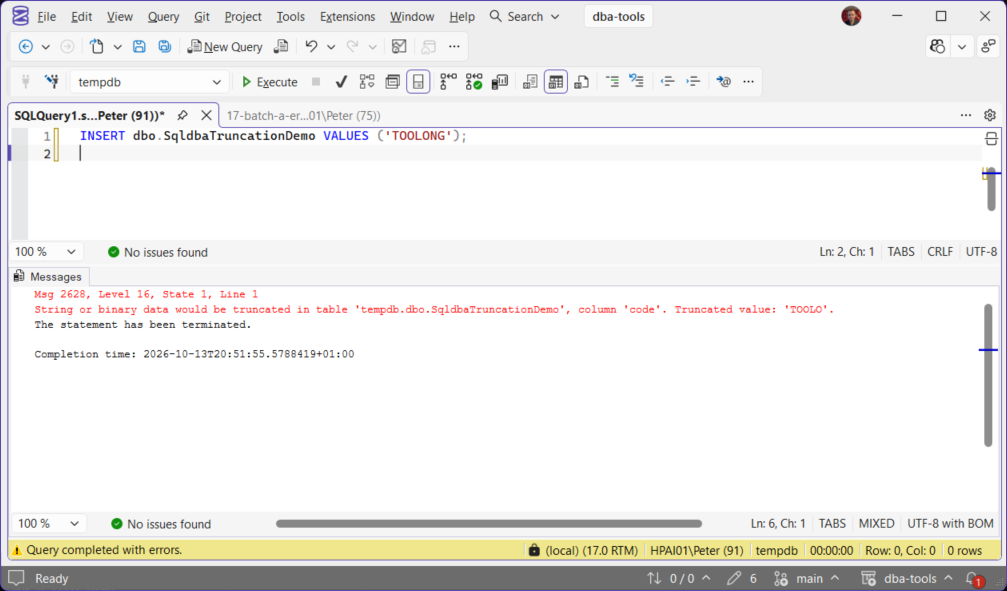
Every SQL Server developer hits this one early, and it’s usually the first real evidence that a column’s declared size doesn’t match what the application is actually sending it. Since SQL Server 2019 (with the database in a current compatibility level), the error is genuinely useful, it tells you the actual value that didn’t fit. Before that, and still today under ANSI_WARNINGS OFF, the behavior is very different, and the difference matters more than it looks.
The Modern Error (Msg 2628)
CREATE TABLE dbo.SqldbaTruncationDemo (id int IDENTITY PRIMARY KEY, code varchar(5));
INSERT dbo.SqldbaTruncationDemo (code) VALUES ('TOOLONG');
This is the actual message SQL Server produces on a current compatibility level, measured here at 170 on SQL Server 2025 CU8: it names the table, the column, and shows exactly what the value would have been truncated to. The insert fails, nothing gets written, that’s the correct, safe default behavior, a value that doesn’t fit gets rejected rather than silently cut down.
Microsoft’s reference covers trace flag 460 and VERBOSE_TRUNCATION_WARNINGS in full: which builds show Msg 2628 and how to switch between the two messages per database.
The Behavior That Actually Causes Silent Data Loss
The dangerous version of this isn’t the error, it’s the case where there’s no error at all:
No error, no warning, the row is inserted, and 'TOOLONGVALUE' became 'TOOLO' with nothing telling anyone it happened. SET ANSI_WARNINGS OFF is the reason: some drivers, some legacy application frameworks, and some explicit SET statements in older code disable ANSI warnings for other reasons (certain indexed-view or computed-column requirements historically needed it off), and truncation silently going through is a side effect most people setting it don’t realize they’re accepting. This is the version of this problem that actually costs someone data, not the version that throws a visible error.
Diagnosing an Existing Case
When this shows up in an application that’s already live, the fix is rarely “just make the column bigger” without checking what’s actually driving the length first:
-- What's the real length distribution of data trying to go into this column?
SELECT LEN(source_column) AS length, COUNT(*) AS n
FROM staging_or_source_table
GROUP BY LEN(source_column)
ORDER BY length DESC;

-- What's the column actually declared as right now?
SELECT c.name, t.name AS type_name, c.max_length, c.is_nullable
FROM sys.columns c
JOIN sys.types t ON c.user_type_id = t.user_type_id
WHERE c.object_id = OBJECT_ID('dbo.SqldbaTruncationDemo');
max_length on sys.columns is in bytes, not characters, for NVARCHAR/NCHAR divide by 2 to get the character count; for VARCHAR/CHAR it’s already the character count. A column reported as max_length = 10 for an NVARCHAR column holds 5 characters, a common source of confusion when comparing against what the application thinks the limit is.
When the application only shows you the message and not the statement, capture the statement at the moment it fails. Msg 2628 is not written to the error log, but an Extended Events session filtered to the error number records the SQL text, the login and the application that raised it:
CREATE EVENT SESSION [truncation_2628] ON SERVER
ADD EVENT sqlserver.error_reported
(
    ACTION (sqlserver.sql_text, sqlserver.database_name, sqlserver.client_app_name, sqlserver.username)
    WHERE error_number = 2628 OR error_number = 8152
)
ADD TARGET package0.ring_buffer;
ALTER EVENT SESSION [truncation_2628] ON SERVER STATE = START;
Reproduce the failure, then read the ring buffer. The result is one XML document; click it in SSMS and each event node carries the statement text, the database, the login, the application and the message. Drop the session once you have the statement, it is a diagnostic rather than a monitor:
SELECT  CAST(t.target_data AS xml) AS ring_buffer
FROM    sys.dm_xe_sessions AS s
JOIN    sys.dm_xe_session_targets AS t ON t.event_session_address = s.address
WHERE   s.name = 'truncation_2628';

DROP EVENT SESSION [truncation_2628] ON SERVER;
Common Causes and Fixes
- A genuinely undersized column for legitimate data (a
VARCHAR(50)company name field that occasionally needs 60 characters). The real fix is widening the column,ALTER TABLE ... ALTER COLUMNafter confirming no code depends on the old width viasys.columnsand application-layer validation. - Bad or unexpected input the column correctly rejected. Not every truncation error is a schema problem, sometimes the incoming value genuinely shouldn’t be that long (a data quality issue upstream, a scraping or import job pulling in garbage). Fix the source, not the column, in this case.
NVARCHARvsVARCHARbyte-length confusion. A column sized assuming character count when it’s actually byte count (or vice versa) silently has half the intended capacity. Checksys.columns.max_lengthdirectly rather than trusting the number in theCREATE TABLEscript matches what’s actually enforced.- Legacy
SET ANSI_WARNINGS OFFcode paths. Search for this setting in older stored procedures, connection string options, or driver defaults, this is the actual silent-data-loss path and worth actively hunting down rather than assuming it’s not in use anywhere. - Implicit conversions from a wider type to a narrower one in an
INSERT ... SELECTor a computed column, the truncation can originate somewhere other than the literalINSERTstatement itself; check any intermediate casts or conversions in the query, not just the target column’s declared width.
Best Practices
- Never rely on
ANSI_WARNINGS OFFas a way to make a truncation error “go away”, it doesn’t fix the underlying mismatch, it just hides it and lets bad data through silently. - When widening a column to fix this, check every index, computed column, and constraint referencing it first, a width change can have knock-on effects beyond the immediate error.
- Treat this error as useful signal on a new integration, not just a nuisance, an unexpectedly long value is often the first sign the source system’s data doesn’t match what was assumed during design.
- Audit for
SET ANSI_WARNINGS OFFacross the codebase periodically; it’s easy to inherit from an old connection string or ORM default and forget it’s there.
Frequently Asked Questions
Why does the old error not say which column?
Can I get the better message on an older version?
Which versions show the detailed Msg 2628?
VERBOSE_TRUNCATION_WARNINGS is on by default. Below 150 you get Msg 8152 unless trace flag 460 is enabled, which needs SQL Server 2016 SP2 CU6 or SQL Server 2017 CU12 at minimum. Both facts are on the Microsoft pages linked above.I am on a current version and still get the short message. Why?
VERBOSE_TRUNCATION_WARNINGS is ON by default, and with it turned OFF a database at compatibility level 170 goes straight back to Msg 8152, Level 16, State 30, with no table or column named. Measured both ways on SQL Server 2025 CU8. SELECT name, value FROM sys.database_scoped_configurations WHERE name = 'VERBOSE_TRUNCATION_WARNINGS' tells you which one you are on.Was anything written when the statement failed?
SET ANSI_WARNINGS OFF, where the value is cut to fit and no error is raised at all.Where To Go Next
Use these when the cause points to data shape, column design, or session settings.
- Get Table Sizes, when the truncation is part of a wider data-shape problem
- How to Add Columns to Tables in SQL Server, widening or adding a column safely on a large table
- Get Implicit Conversions, the same mismatch showing up as a performance problem instead of an error
- Collation and Case Sensitivity, for when the lengths match but the encoding does not
- How to Search for a String in All Tables in SQL Server, when you need to locate an unexpected value across the data
- Get Query Performance Deep-Dive, once the Extended Events session has named the procedure, its plan-cache history and variance
- Collect Health and Configuration Baselines, for auditing session-level settings like ANSI_WARNINGS across an instance
- Performance and Troubleshooting (area)
Leave a Reply