
Check Certificate Expiry and TDE State
A certificate is about to expire, a TDE restore has failed with Msg 33111, or someone needs to know which databases are encrypted. These scripts give you every certificate with its days left, the certificate behind each TDE database, and how far each database’s encryption has got. For the full restore fix, see TDE Restore Fails: Cannot Find Server Certificate (Error 33111).
Get-CertificateExpiryWarnings lists every certificate in master and the user databases with days until expiry. Get-CertificatesAndKeys shows what each certificate in the current database protects, TDE included. Get-TdeStatus gives the encryption state of every database, tempdb included.
Why Certificates, Keys, and TDE Status Matter
- A TDE database restores only where its certificate and private key exist. Without them the restore stops at Msg 33111; expired or not makes no difference
- TDE on any user database encrypts tempdb too, so an encrypted tempdb is expected, not a mystery
- Service Broker and backup encryption do check the expiry date, so an expired certificate there stops new dialogs and new encrypted backups
- A certificate or key nobody can explain is an audit gap
When to Run These Scripts
- A TDE restore fails with Msg 33111 and you need to know which certificate the source used
- Routine security and encryption reviews, ideally scheduled well before any certificate’s expiry date, not triggered by one
- Before any migration or DR failover involving a TDE-encrypted database, to confirm the certificate exists and its private key is backed up
- When investigating unexpected tempdb encryption or a Service Broker/column-encryption failure
- Alongside Edition Feature Usage, since TDE is one of the Enterprise-dependent features that check flags for downgrade risk
The Scripts
Get-CertificateExpiryWarnings: Every Certificate, Server and Database Scope
- Tested on: SQL Server 2025 (RTM CU8) 17.0.4075.5, Windows lab instance
- Last verified: 2026-10-28 (every script run on the lab instance in the captures)
- Permissions: VIEW SERVER STATE (or VIEW SERVER SECURITY STATE on SQL Server 2022 and later) and VIEW ANY DEFINITION, plus CONNECT ANY DATABASE for certificates inside user databases; with less, rows go missing without an error
- Safety: read-only, impact low
/*
Script Name : Get-CertificateExpiryWarnings
Category    : security
Purpose     : All user-managed certificates across server and user databases with days until expiry.
Author      : Peter Whyte (https://sqldba.blog/dba-scripts-get-certificates-keys-and-tde-status/)
Requires    : VIEW ANY DEFINITION, plus CONNECT ANY DATABASE (or a user in each database) for database-level certificates; without them rows are hidden, not errored
HealthCheck : Yes
*/
-- SAFE:ReadOnly
-- IMPACT:Low
SET NOCOUNT ON;
SET QUOTED_IDENTIFIER ON;

IF OBJECT_ID('tempdb..#CertInfo') IS NOT NULL DROP TABLE #CertInfo;
CREATE TABLE #CertInfo (
    cert_scope NVARCHAR(128) NOT NULL,
    cert_name NVARCHAR(128) NOT NULL,
    subject NVARCHAR(500),
    issuer_name NVARCHAR(500),
    start_date DATETIME,
    expiry_date DATETIME,
    days_until_expiry INT,
    expiry_status VARCHAR(10) NOT NULL,
    pvt_key_type NVARCHAR(60),
    is_service_broker BIT,          -- is_active_for_begin_dialog: ON by default for every certificate, so 1 does not prove Service Broker uses it
    pvt_key_last_backup DATETIME
);

/* ── Server-level certs in master (TDE, backup encryption, SB endpoint) ─── */
INSERT INTO #CertInfo
SELECT
    N'master' AS cert_scope,
    name AS cert_name,
    subject,
    issuer_name,
    start_date,
    expiry_date,
    DATEDIFF(DAY, GETDATE(), expiry_date),
    CASE
        WHEN expiry_date < GETDATE() THEN 'EXPIRED'
        WHEN DATEDIFF(DAY, GETDATE(), expiry_date) <= 30 THEN 'CRITICAL'
        WHEN DATEDIFF(DAY, GETDATE(), expiry_date) <= 90 THEN 'WARNING'
        ELSE 'OK'
    END,
    pvt_key_encryption_type_desc,
    is_active_for_begin_dialog,
    pvt_key_last_backup_date
FROM sys.certificates
WHERE name NOT LIKE '##%';

/* ── Per-database certs (Service Broker, column encryption) ─────────────── */
DECLARE @db NVARCHAR(128);
DECLARE @sql NVARCHAR(MAX);

DECLARE cert_cur CURSOR FAST_FORWARD FOR
    SELECT name FROM sys.databases
    WHERE state_desc = 'ONLINE'
      AND database_id > 4
      AND HAS_DBACCESS(name) = 1
    ORDER BY name;

OPEN cert_cur; FETCH NEXT FROM cert_cur INTO @db;
WHILE @@FETCH_STATUS = 0
BEGIN
    SET @sql = N'USE ' + QUOTENAME(@db) + N';
    INSERT INTO #CertInfo
    SELECT
        DB_NAME(), name, subject, issuer_name, start_date, expiry_date,
        DATEDIFF(DAY, GETDATE(), expiry_date),
        CASE
            WHEN expiry_date < GETDATE() THEN ''EXPIRED''
            WHEN DATEDIFF(DAY, GETDATE(), expiry_date) <= 30 THEN ''CRITICAL''
            WHEN DATEDIFF(DAY, GETDATE(), expiry_date) <= 90 THEN ''WARNING''
            ELSE ''OK''
        END,
        pvt_key_encryption_type_desc, is_active_for_begin_dialog, pvt_key_last_backup_date
    FROM sys.certificates
    WHERE name NOT LIKE ''##%'';';
    BEGIN TRY EXEC sp_executesql @sql; END TRY BEGIN CATCH END CATCH;
    FETCH NEXT FROM cert_cur INTO @db;
END;
CLOSE cert_cur; DEALLOCATE cert_cur;

SELECT
    cert_scope,
    cert_name,
    subject,
    issuer_name,
    expiry_date,
    days_until_expiry,
    expiry_status,
    pvt_key_type,
    is_service_broker,
    pvt_key_last_backup
FROM #CertInfo
ORDER BY days_until_expiry ASC, cert_scope, cert_name;

DROP TABLE #CertInfo;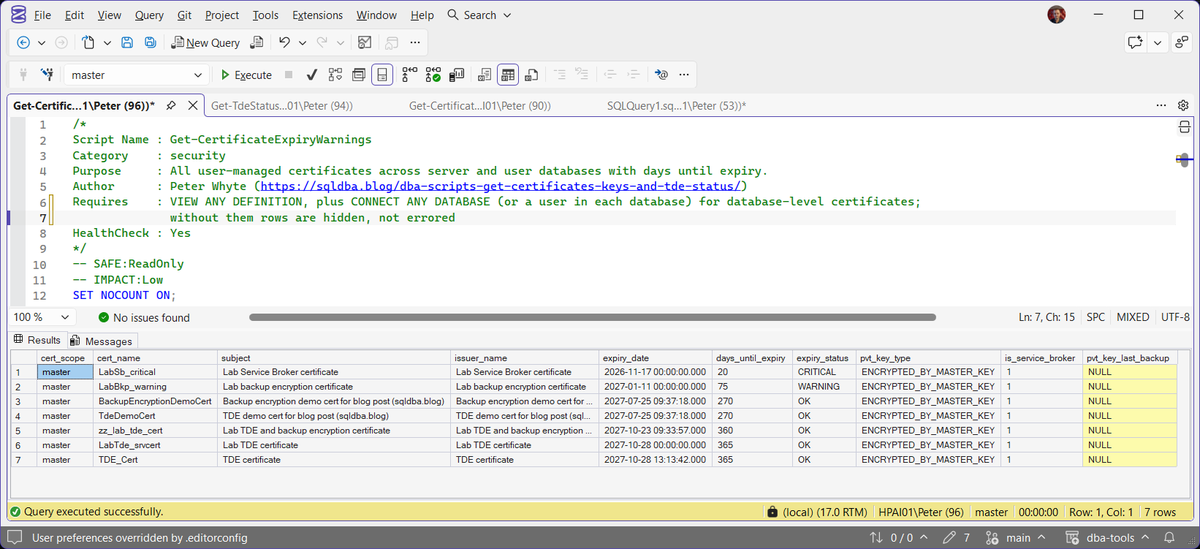
Get-CertificatesAndKeys: Usage Detection and Lifecycle Risk
/*
Script Name : Get-CertificatesAndKeys
Category    : security
Purpose     : Certificates and asymmetric keys in the current database (run it in master for
              TDE and backup certificates) with expiry, usage detection, and lifecycle risk flags.
              Certificates created for TDE, AG encrypted endpoints, or linked server auth are
              commonly created and never monitored. Expiry is not enforced for TDE: an expired
              cert still encrypts and still restores. The restore risk is a certificate or
              private key with no backup.
Author      : Peter Whyte (https://sqldba.blog/dba-scripts-get-certificates-keys-and-tde-status/)
Requires    : VIEW ANY DEFINITION, VIEW SERVER STATE (2022+: VIEW SERVER SECURITY STATE is enough); without VIEW ANY DEFINITION certificates are hidden, not errored
*/
-- SAFE:ReadOnly
-- IMPACT:Low
SET NOCOUNT ON;
SET QUOTED_IDENTIFIER ON;

SELECT *
FROM (
    -- Server-level certificates
    SELECT
        CAST('CERTIFICATE' AS NVARCHAR(30)) AS object_type,
        c.name COLLATE DATABASE_DEFAULT AS cert_or_key_name,
        DB_NAME() AS database_context,
        c.pvt_key_encryption_type_desc COLLATE DATABASE_DEFAULT AS key_protection,
        CONVERT(NVARCHAR(128), c.thumbprint, 1) AS thumbprint,
        c.start_date,
        c.expiry_date,
        DATEDIFF(DAY, GETDATE(), c.expiry_date) AS days_until_expiry,
        c.subject COLLATE DATABASE_DEFAULT AS subject_or_algorithm,
        CASE
            WHEN EXISTS (SELECT 1 FROM sys.dm_database_encryption_keys ek
                         WHERE ek.encryptor_thumbprint = c.thumbprint)
            THEN 'TDE - protects database encryption key'
            WHEN c.pvt_key_encryption_type_desc = 'NO_PRIVATE_KEY'
            THEN 'Public cert only (no private key - cannot sign or decrypt)'
            ELSE 'Unidentified - review usage manually'
        END AS used_for,
        ISNULL(
            STUFF((
                SELECT ', ' + DB_NAME(ek2.database_id)
                FROM sys.dm_database_encryption_keys AS ek2
                WHERE ek2.encryptor_thumbprint = c.thumbprint
                FOR XML PATH(''), TYPE
            ).value('.', 'NVARCHAR(500)'), 1, 2, ''),
            NULL) AS tde_databases,
        CASE
            WHEN c.expiry_date < GETDATE()
            THEN 'CRITICAL - EXPIRED; Service Broker and new encrypted backups refuse it (TDE and restores still work)'
            WHEN DATEDIFF(DAY, GETDATE(), c.expiry_date) < 30
            THEN 'CRITICAL - expires in ' + CAST(DATEDIFF(DAY, GETDATE(), c.expiry_date) AS VARCHAR) + ' days'
            WHEN DATEDIFF(DAY, GETDATE(), c.expiry_date) < 90
            THEN 'WARN - expires in ' + CAST(DATEDIFF(DAY, GETDATE(), c.expiry_date) AS VARCHAR) + ' days'
            WHEN c.pvt_key_encryption_type_desc = 'NO_PRIVATE_KEY'
            THEN 'INFO - no private key; verify this is intentional'
            ELSE 'OK'
        END AS status
    FROM sys.certificates AS c
    WHERE c.name NOT LIKE '##%'

    UNION ALL

    -- Asymmetric keys
    SELECT
        CAST('ASYMMETRIC_KEY' AS NVARCHAR(30)),
        ak.name COLLATE DATABASE_DEFAULT,
        DB_NAME(),
        ak.pvt_key_encryption_type_desc COLLATE DATABASE_DEFAULT,
        CONVERT(NVARCHAR(128), ak.thumbprint, 1),
        NULL,
        NULL,
        NULL,
        (ak.algorithm_desc COLLATE DATABASE_DEFAULT)
            + ' / ' + CAST(ak.key_length AS VARCHAR) + '-bit',
        'Asymmetric key - check if used for column encryption or EKM',
        NULL,
        'INFO - verify usage and that the key is backed up'
    FROM sys.asymmetric_keys AS ak
    WHERE ak.name NOT LIKE '##%'

    UNION ALL

    -- Open symmetric keys in current session
    SELECT
        CAST('OPEN_SYMMETRIC_KEY' AS NVARCHAR(30)),
        ok.key_name COLLATE DATABASE_DEFAULT,
        ok.database_name COLLATE DATABASE_DEFAULT,
        'OPEN_IN_SESSION',
        NULL,
        NULL,
        NULL,
        NULL,
        NULL,
        'Symmetric key currently open in session',
        NULL,
        CASE WHEN ok.key_name LIKE '##%'
             THEN 'INFO - internal system key'
             ELSE 'WARN - symmetric key is open; verify it is required for current operation'
        END
    FROM sys.openkeys AS ok
) AS all_keys
ORDER BY
    CASE WHEN status LIKE 'CRITICAL%' THEN 1
         WHEN status LIKE 'WARN%' THEN 2
         WHEN status LIKE 'INFO%' THEN 3
         ELSE 4 END,
    days_until_expiry,
    cert_or_key_name;
Get-TdeStatus: Encryption State Across Every Database
/*
Script Name : Get-TdeStatus
Category    : security
Purpose     : Transparent Data Encryption (TDE) status across all databases. Includes
              encryption state, key algorithm, encryptor type, and tempdb encryption
              side-effect awareness.
Author      : Peter Whyte (https://sqldba.blog/dba-scripts-get-certificates-keys-and-tde-status/)
Requires    : VIEW SERVER STATE (2022+: VIEW SERVER SECURITY STATE is enough), plus VIEW ANY DEFINITION for certificate_name and certificate_expiry (NULL without it)
*/
-- SAFE:ReadOnly
-- IMPACT:Low
SET NOCOUNT ON;
SET QUOTED_IDENTIFIER ON;

SELECT
    d.name AS database_name,
    d.is_encrypted AS tde_enabled,
    ISNULL(ek.encryption_state_desc, 'UNENCRYPTED') AS encryption_state,
    ek.key_algorithm,
    ek.key_length,
    ek.encryptor_type,
    ek.encryptor_thumbprint,
    ek.percent_complete,
    ek.create_date AS key_create_date,
    ek.set_date AS key_set_date,
    ek.regenerate_date AS key_regenerate_date,
    c.name AS certificate_name,
    c.expiry_date AS certificate_expiry,
    CASE
        WHEN d.database_id = 2 AND d.is_encrypted = 1
             AND EXISTS (SELECT 1 FROM sys.dm_database_encryption_keys AS u
                         WHERE u.database_id <> 2 AND u.encryption_state <> 1)
            THEN 'INFO - TempDB is encrypted because at least one user database uses TDE'
        WHEN d.database_id = 2 AND d.is_encrypted = 1
            THEN 'INFO - TempDB is still encrypted although no user database uses TDE now; it was turned on earlier'
        WHEN ek.encryption_state = 3 AND d.is_encrypted = 1
            THEN 'OK - encrypted'
        WHEN ek.encryption_scan_state = 2
            THEN 'WARN - encryption scan suspended; nothing progresses until ALTER DATABASE ... SET ENCRYPTION RESUME'
        WHEN ek.encryption_state IN (2, 4)
            THEN 'INFO - encryption/key-change in progress (' + CAST(ek.percent_complete AS VARCHAR) + '% complete)'
        WHEN ek.encryption_state = 5
            THEN 'INFO - decryption in progress'
        WHEN ek.encryption_state = 6
            THEN 'INFO - protection change in progress (DEK being re-encrypted by a new certificate or key)'
        WHEN d.is_encrypted = 0 AND d.database_id NOT IN (1,2,3,4)
            THEN 'INFO - not encrypted'
        ELSE 'OK'
    END AS status
FROM sys.databases AS d
LEFT JOIN sys.dm_database_encryption_keys AS ek
    ON ek.database_id = d.database_id
LEFT JOIN master.sys.certificates AS c
    ON c.thumbprint = ek.encryptor_thumbprint
WHERE d.database_id NOT IN (3) -- exclude model; include tempdb to show side-effect
ORDER BY
    d.is_encrypted DESC,
    d.name;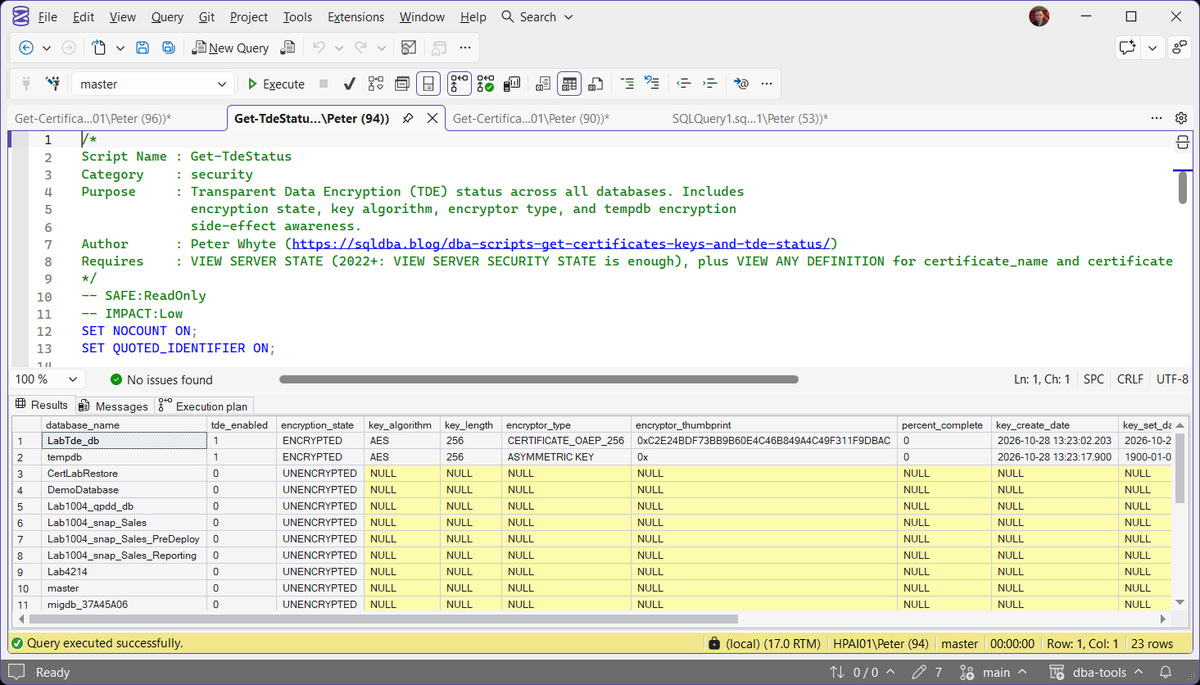
How To Run From The Repo
Clone DBA Tools, initialize and run whichever script answers your question:
# Clone dba-tools repo:
git clone https://github.com/peterwhyte-lgtm/dba-tools

# Initialize environment:
cd dba-tools
.\Initialize-Environment.ps1

# Every certificate across server and user databases, with expiry:
.\run.ps1 Get-CertificateExpiryWarnings

# Certificates and keys with usage detection and risk flags:
.\run.ps1 Get-CertificatesAndKeys

# TDE encryption state across every database:
.\run.ps1 Get-TdeStatus

# Any of these against a remote sql server:
.\run.ps1 Get-TdeStatus -ServerInstance SQLSERVER01
These scripts live in the repo at:
sql/security/encryption/Get-CertificateExpiryWarnings.sqlsql/security/encryption/Get-CertificatesAndKeys.sqlsql/security/encryption/Get-TdeStatus.sql
Example Output
The captures above come from one lab instance, set up for this page: LabTde_db encrypted with TDE by LabTde_srvcert in master, and two certificates set to expire on purpose, LabSb_critical in 20 days and LabBkp_warning in 75.
Get-CertificateExpiryWarnings put the two near-expiry certificates first, CRITICAL and WARNING, above the OK ones. Every pvt_key_last_backup was NULL: not one of the 7 certificates on that instance had ever had its private key backed up. On a real server that is the first thing to fix, before anything expires: How to Back Up a SQL Server Certificate.
Get-CertificatesAndKeys named a use for only one certificate, LabTde_srvcert, as TDE protecting LabTde_db. The rest read Unidentified – review usage manually, and that is the honest answer: nothing in the catalog records what a certificate is for unless a database encryption key points at it.
Get-TdeStatus showed LabTde_db as ENCRYPTED with the certificate behind it, and tempdb encrypted too, with no certificate of its own. That happens as soon as any user database uses TDE. On a database big enough to watch, the first reading is ENCRYPTION_IN_PROGRESS with percent_complete climbing, until the scan finishes.
Expired certificates are the other case worth knowing. CREATE CERTIFICATE on Microsoft Learn says expiration is not enforced when a certificate is used for database encryption, so an expired TDE certificate still restores its databases. SQL Server will not self-sign a new certificate with an expiry date already past (Msg 15297 on the lab), but it will load an expired one from its backup files, so an EXPIRED row is either a certificate that has aged or one restored from backup.
Understanding the Results
VIEW SERVER STATE without VIEW ANY DEFINITION: Get-TdeStatus lists every database with
certificate_name NULL, and Get-CertificateExpiryWarnings and Get-CertificatesAndKeys return 0 rows. No error.VIEW ANY DEFINITION without CONNECT ANY DATABASE: Get-CertificateExpiryWarnings lists master’s certificates only.
Get-CertificateExpiryWarnings
expiry_statusdays_until_expiryexpiry_date has passed, CRITICAL inside 30 days, WARNING inside 90, from sys.certificates (MS Docs).Act when a Service Broker or backup encryption certificate reads CRITICAL. Both check the date, per CREATE CERTIFICATE (MS Docs). TDE does not.pvt_key_last_backupcert_scopeis_service_brokeris_active_for_begin_dialog, which is ON by default for every certificate. All 7 lab rows read 1, the TDE certificate included, so it does not show that Service Broker uses the certificate.Get-CertificatesAndKeys
used_fortde_databasesthumbprintstatusexpiry_date. The EXPIRED wording overstates it for TDE: the lab restored a database protected by an expired certificate.Act when it reads EXPIRED on a Service Broker or backup encryption certificate. On a TDE certificate it means plan the renewal, not an outage.object_typeGet-TdeStatus
encryption_statepercent_completeSET ENCRYPTION OFF.Act when it stays at ENCRYPTION_IN_PROGRESS. A scan paused with SET ENCRYPTION SUSPEND reads the same INFO line, and on the lab it said 0% complete. Check encryption_scan_state_desc in the DMV; SUSPENDED needs SET ENCRYPTION RESUME.tempdbcertificate_namecertificate_expiryBest Practices
- Back up every certificate and its private key immediately after creating it (
BACKUP CERTIFICATE ... WITH PRIVATE KEY), store the backup somewhere other than the server it protects - Renew Service Broker and backup encryption certificates before their expiry date, because both check it. A TDE certificate keeps working past its date, so rotate it on your own schedule
- Investigate every “Unidentified” or unattributed key rather than leaving it as a permanent open question
- Cross-reference TDE findings here with Edition Feature Usage before any edition downgrade, since TDE is Enterprise-only up to SQL Server 2017 and available in Standard from SQL Server 2019
MS Docs: sys.certificates · sys.dm_database_encryption_keys · sys.databases · Move a TDE protected database to another SQL Server
Frequently Asked Questions
Does an expired TDE certificate stop the database from working?
No, and it does not stop a restore either. CREATE CERTIFICATE (MS Docs) says expiration isn’t enforced when a certificate is used for database encryption. On the lab, a backup protected by a certificate that expired on 2025-12-31 restored under a new name once that certificate was created from its backup files.
What stops a restore is the certificate being missing. A new server, a DR failover or a migration needs that certificate and its private key, expired or not.
Why is tempdb encrypted when I never touched it directly?
Enabling TDE on any single user database encrypts tempdb automatically, since tempdb temporarily holds working data from every database on the instance during query execution. This is expected SQL Server behavior, not a separate configuration step or a bug.
It does not switch back on its own. On the lab, tempdb still read ENCRYPTED after the only TDE database was decrypted and its encryption key dropped.
A restore fails with Msg 33111. What now?
The lab’s restore failed with Msg 33111, Cannot find server certificate with thumbprint '0x777B8C1BC6EAA06500EEEB510481763A48C17129'. The target server does not have the certificate that protects the backup’s database encryption key. RESTORE FILELISTONLY fails the same way, so the backup cannot even be listed.
On the source, run Get-CertificatesAndKeys in master and find that thumbprint. Back the certificate up with BACKUP CERTIFICATE ... WITH PRIVATE KEY, create it on the target with CREATE CERTIFICATE ... FROM FILE, then restore. On the lab the same restore then succeeded. Move a TDE protected database to another SQL Server (MS Docs) has the full steps, including the database master key the target needs in master first.
Summary
Certificates and keys back TDE, Service Broker and backup encryption, and they share one failure mode: nobody looks until something expires or a restore fails on another server. These scripts turn that blind spot into a routine check: what exists, what it’s for, how long until it expires, and whether the private key is backed up.
Run them as part of any encryption or security review. Treat a TDE certificate with no backup as urgent, because that is what fails a restore on another server. An expired one is a renewal, not an outage.
Related
- Backup Encryption Status
- Working with SQL Server Database Master Keys, the key that protects each certificate’s private key
- Permissions and Role Membership
- Backing Up a SQL Server Database with Encryption, where a backup certificate gets used
- DBA Scripts: The Complete Guide, the map across every script on this site
Leave a Reply