
Knowing when a database was last restored is useful during incident response, audits, and general environment validation.
This is not about backup schedules or restore progress. It is one historical check that answers one question, when was this database last restored, and the query below answers it for every database on the instance.
Show Last Restore Date and Time for Each Database
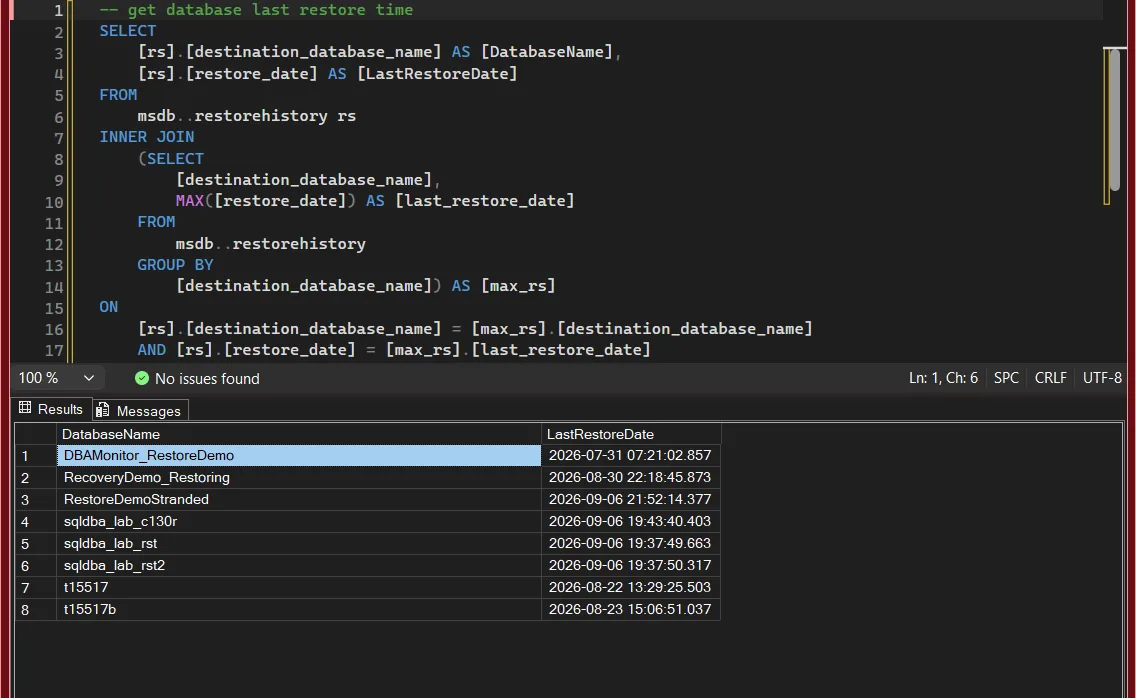
The query below returns the most recent restore date for each database recorded in msdb.dbo.restorehistory.
-- get database last restore time
SELECT
    [rs].[destination_database_name] AS [DatabaseName],
    [rs].[restore_date] AS [LastRestoreDate]
FROM
    msdb..restorehistory rs
INNER JOIN
    (SELECT
        [destination_database_name],
        MAX([restore_date]) AS [last_restore_date]
    FROM
        msdb..restorehistory
    GROUP BY
        [destination_database_name]) AS [max_rs]
ON
    [rs].[destination_database_name] = [max_rs].[destination_database_name]
    AND [rs].[restore_date] = [max_rs].[last_restore_date]
ORDER BY
    [rs].[destination_database_name];
This query returns the most recent restore event recorded for each database.
Why Last Restore Time Matters
Checking restore history is useful when:
- Investigating unexpected data changes
- Validating recent recovery activity
- Confirming whether a restore actually completed
- Reviewing activity on inherited or shared environments
A restore leaves a footprint. This query helps you find it.
Important Notes and Limitations
A few things to be aware of:
- Databases that were never restored will not appear
- Databases created manually may not have restore history
- Restore history can be lost if system databases are rebuilt
- This does not show restore progress or duration
If you need to know how long a restore that is running right now will take, that is a different query entirely: Get Backup and Restore Progress reads sys.dm_exec_requests for the live percentage and estimated finish.
Understanding Restore Types
Restore history includes different restore operations:
D, full database restoreI, differential restoreL, transaction log restoreFandG, file and filegroup restoresV,RESTORE VERIFYONLY, which checks the backup and restores nothing
Each restore event is logged separately. The query above only returns the most recent restore per database, regardless of type, so a V row from a verify job can be the newest entry for a database nobody has actually restored.
Final Thoughts
Restore history is easy to overlook, but it often explains more than expected.
When troubleshooting data issues or validating recovery actions, knowing when a database was last restored can save a lot of guesswork.
This is a simple check, but it earns its place in baseline DBA tooling.
Knowing when the last restore happened is usually the first of a few questions. These answer the rest.
- DBA Scripts: Get Last Restore History, every restore per database with its type, source file and LSNs, not only the latest.
- DBA Scripts: Get Backup and Restore Progress, if a restore is running right now, how far it is and when it will finish.
- Database Cannot Be Opened, It Is in the Middle of a Restore, when the last restore never finished and the database is stuck in RESTORING.
- Get Last Database Backup Times in SQL Server, the other half of the question, do we have backups to restore from.
- DBA Scripts: Get Backup Chain Integrity, whether the chain you would restore from has any gaps.
- DBA Scripts: Backups and Recovery, the hub for every backup and restore script on this site.
Leave a Reply