
A query that returns 18 rows is scanning the whole table to find them. You have the query open in SSMS, the actual plan is on screen, and Copilot is in the sidebar. I asked it to make the query faster and give me the exact changes, then checked every change against the plan.
CONVERT_IMPLICIT on a varchar column and the non-sargable YEAR(), and gave a rewrite, an index and a query to check for an existing index first. The rewrite alone still scanned all 200,000 rows. With its index as well, the plan became an Index Seek that read 18 rows, with no Sort. It would not create the index itself: it handed the statement back for me to run.On this page
The Slow Query and Its Plan
The query looks up one customer’s orders for this year from a 200,000 row dbo.Orders table. Run it with Include Actual Execution Plan (Ctrl+M) switched on:
SET STATISTICS IO, TIME ON;

SELECT OrderID, OrderDate, Amount
FROM dbo.Orders
WHERE CustomerCode = N'C123'
  AND YEAR(OrderDate) = 2026
ORDER BY OrderDate DESC;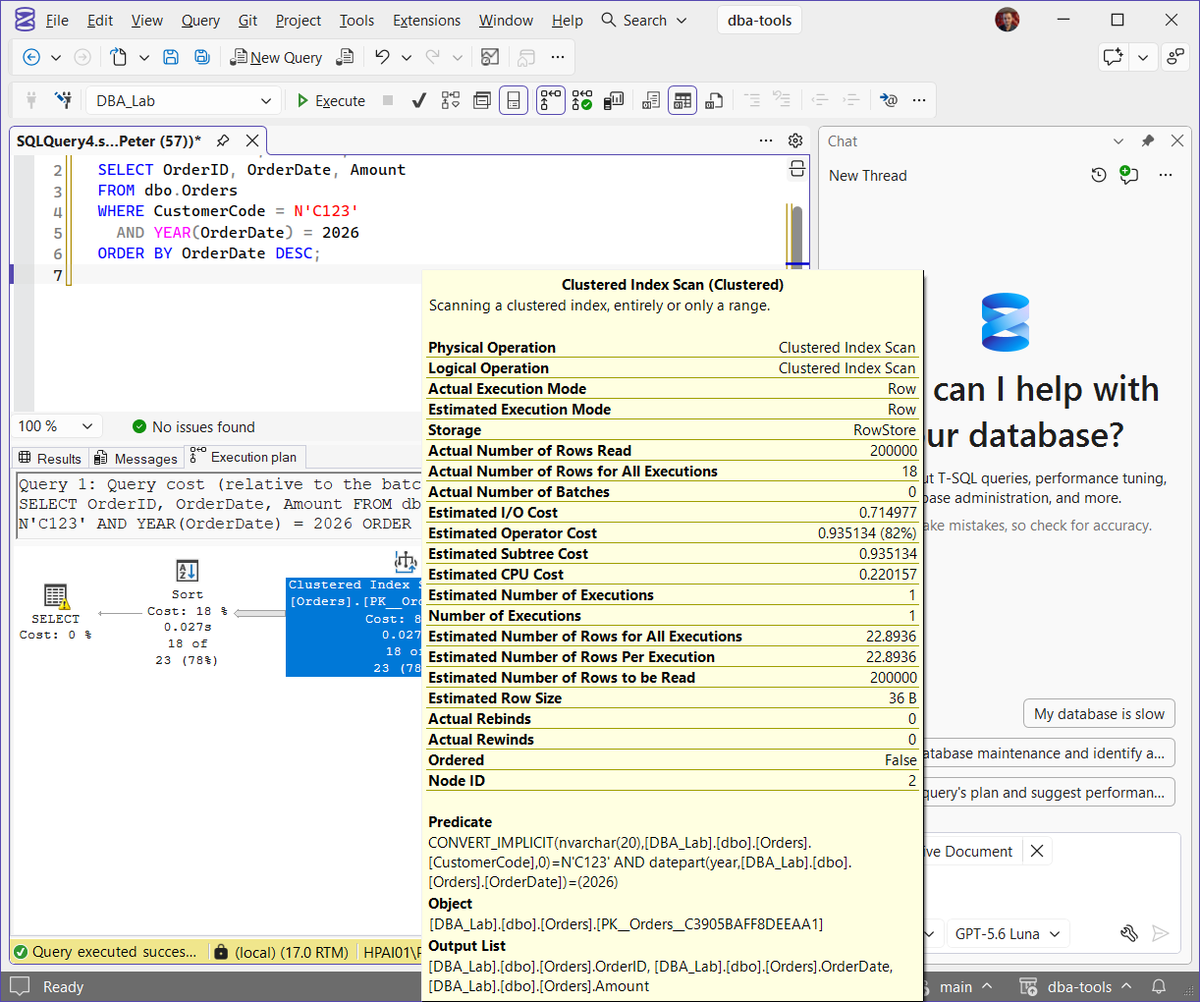
The plan is a Clustered Index Scan feeding a Sort, with a warning triangle on the SELECT. Hover over the scan: Actual Number of Rows Read is 200,000 to return 18 rows. The Predicate shows both problems before you ask anyone, CONVERT_IMPLICIT(nvarchar(20), ... [CustomerCode],0)=N'C123' and datepart(year, ... [OrderDate])=(2026).
What Copilot Found
With the query window open and Active Document attached, in Agent mode, I asked:
This query is slow. Look at the query and its execution plan and tell me how to make it faster. Give me the exact changes
It did not ask me to paste anything. It ran three of its own tools first: sql_editor_list to see the open editors, sql_editor_get_execution_plan to read the actual plan, and sql_editor_get_messages to read the Messages tab. Then it listed what the plan showed:
- A clustered index scan reading all 200,000 rows, and 967 logical reads on
Orders. - The filter applied after the scan, and a separate sort for the
ORDER BY. - An implicit conversion on
CustomerCode:CONVERT_IMPLICIT(nvarchar(20), CustomerCode) = N'C123'. YEAR(OrderDate)making the date predicate non-sargable.
Both problems, first time, with no nudge. The N prefix makes the literal nvarchar, the column is varchar(20), and SQL Server converts the column to match. How CONVERT_IMPLICIT Turns a Seek Into a Scan shows that on its own. Wrapping OrderDate in YEAR() means SQL Server has to work out the year for every row before it can compare, so no index on OrderDate can be used to jump to 2026.
The Rewrite and the Index
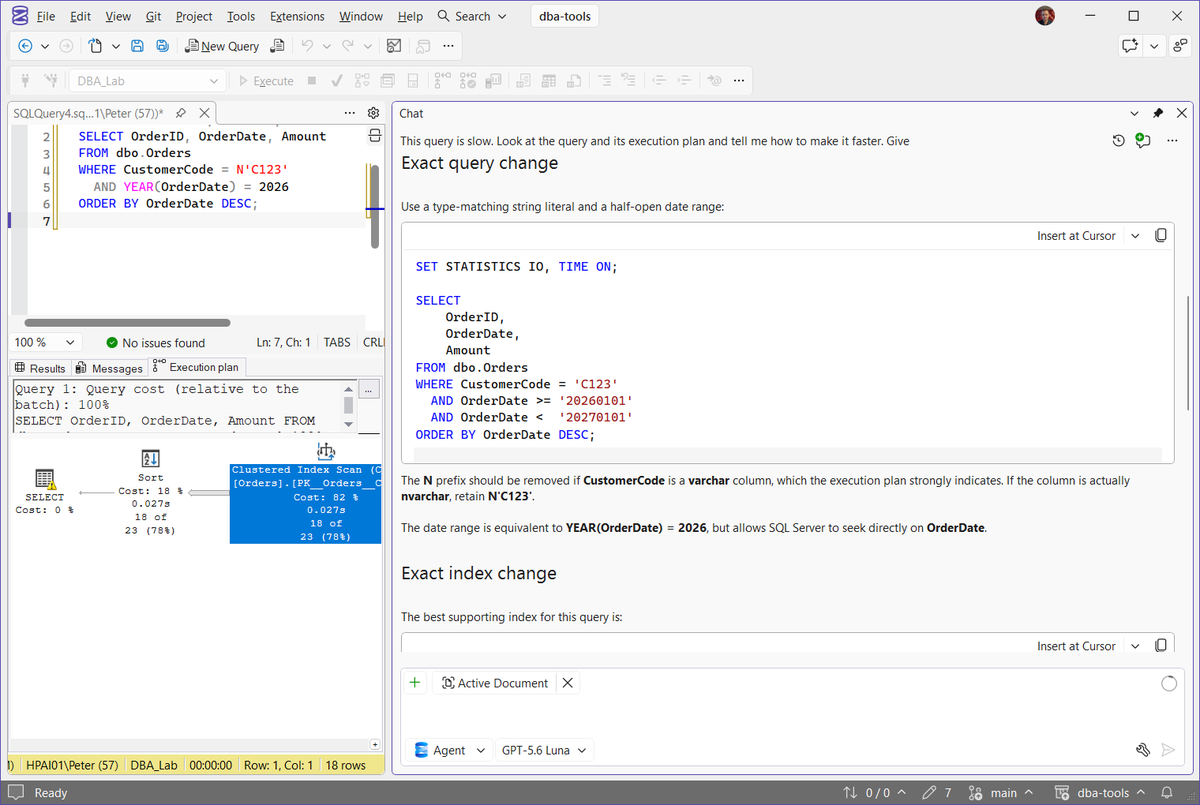
Its exact query change was a type-matching string literal and a half-open date range:
SET STATISTICS IO, TIME ON;

SELECT
    OrderID,
    OrderDate,
    Amount
FROM dbo.Orders
WHERE CustomerCode = 'C123'
  AND OrderDate >= '20260101'
  AND OrderDate <  '20270101'
ORDER BY OrderDate DESC;
It also hedged the right way on the N: “The N prefix should be removed if CustomerCode is a varchar column, which the execution plan strongly indicates. If the column is actually nvarchar, retain N’C123′.” It worked out the column type from the plan, and still told you to check.
Its exact index change, keyed on the equality column first and then the range column, sorted to match the ORDER BY:
CREATE INDEX IX_Orders_CustomerCode_OrderDate
ON dbo.Orders
(
    CustomerCode,
    OrderDate DESC
)
INCLUDE
(
    Amount
);
OrderID is not in it, and Copilot said why: OrderID is the clustered key, so every nonclustered index carries it already. Then the line I would want from a colleague: “Do not create this index if an equivalent index already exists. Check first with:”
SELECT
    i.name AS IndexName,
    c.name AS ColumnName,
    ic.key_ordinal,
    ic.is_descending_key,
    ic.is_included_column
FROM sys.indexes AS i
JOIN sys.index_columns AS ic
    ON ic.object_id = i.object_id
   AND ic.index_id = i.index_id
JOIN sys.columns AS c
    ON c.object_id = ic.object_id
   AND c.column_id = ic.column_id
WHERE i.object_id = OBJECT_ID(N'dbo.Orders')
ORDER BY
    i.name,
    ic.key_ordinal,
    ic.index_column_id;
On a real table, look for an index that already leads on CustomerCode: widening it is usually better than adding a near duplicate. Get Missing Indexes shows what SQL Server itself has been asking for on the same table.
The Rewrite Alone: Still a Scan
I ran the rewrite before creating anything, and asked:
Is there anything else in this query stopping an index seek?
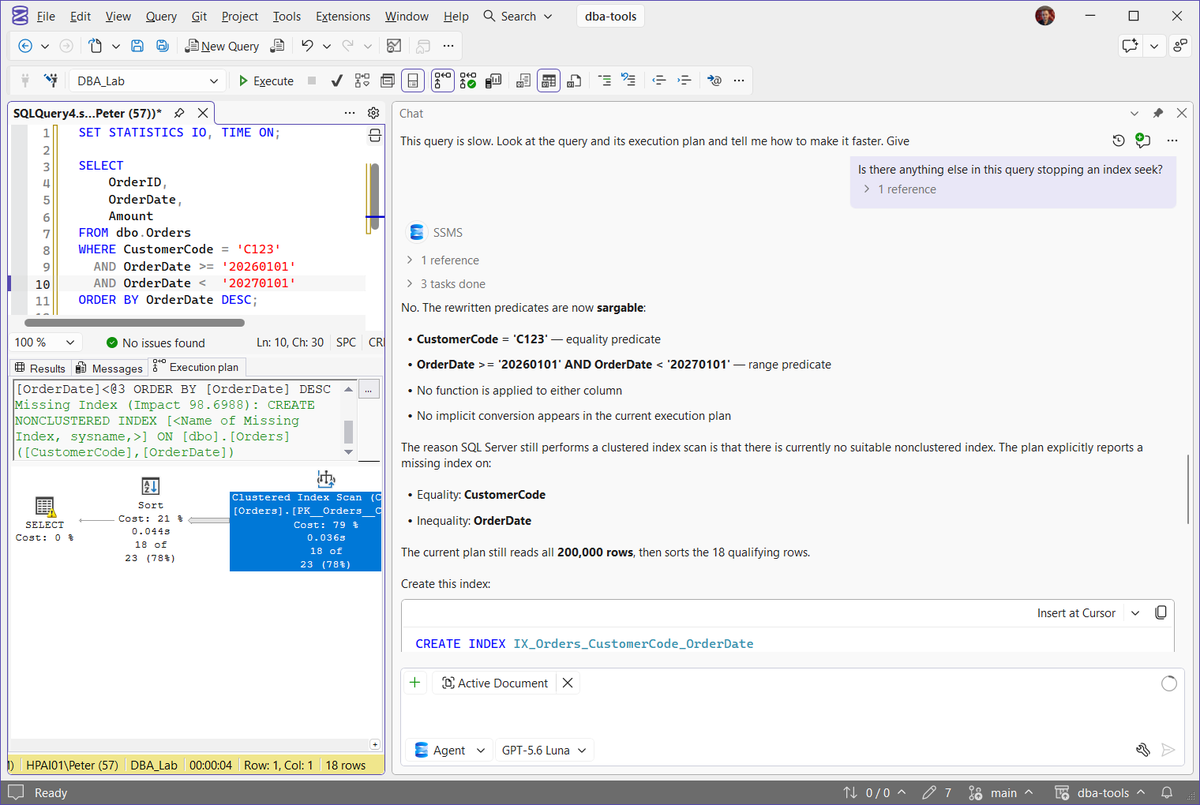
The plan was still a Clustered Index Scan and a Sort, now with a missing index suggestion on [CustomerCode],[OrderDate] at an impact of 98.7. Copilot read that plan again and got it right: the predicates are now sargable, and “The reason SQL Server still performs a clustered index scan is that there is currently no suitable nonclustered index.” It still read all 200,000 rows and sorted the 18 that matched.
That is the part a quick read of “fix the predicate” can miss. A sargable predicate only helps when there is an index to seek. The rewrite makes the index usable; the index removes the scan.
With the Index: an Index Seek
With its index created exactly as written, the same rewritten query:
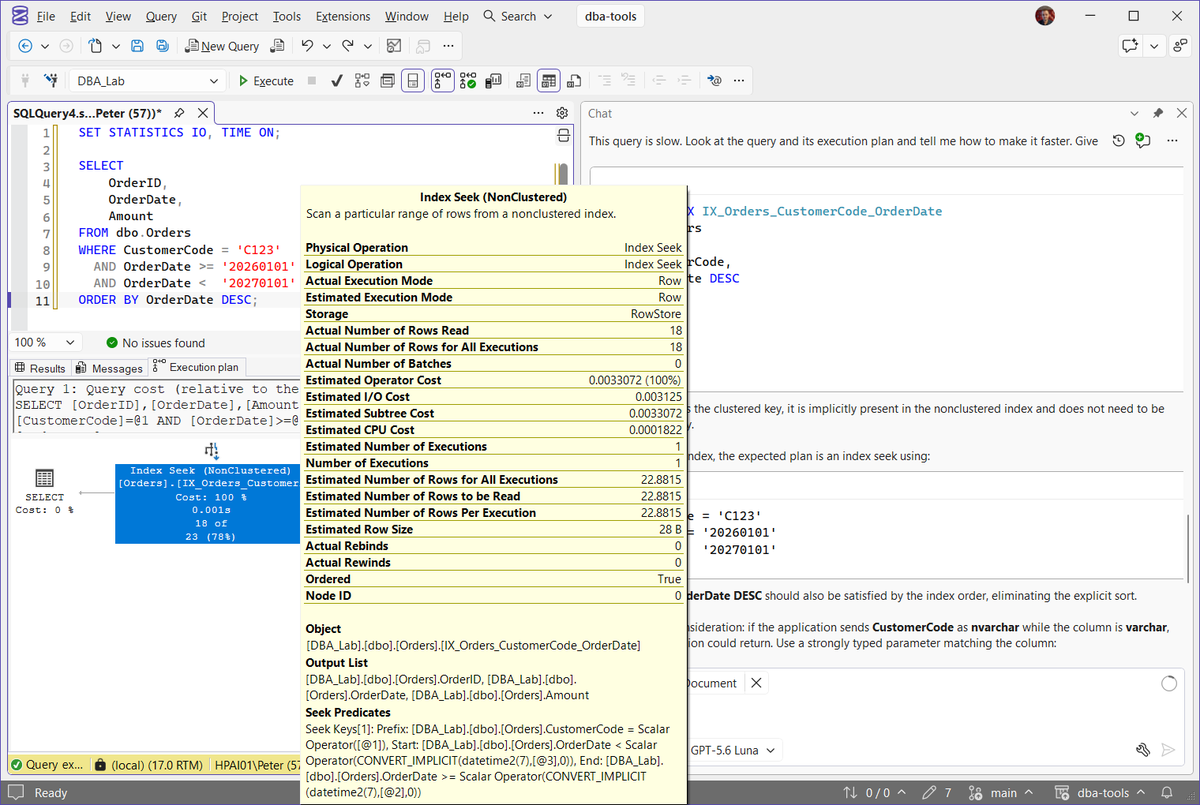
The plan is one Index Seek on IX_Orders_CustomerCode_OrderDate and nothing else. No Sort, because Ordered is True and the index already holds OrderDate descending. Copilot predicted exactly that plan.
Hover over the seek: Actual Number of Rows Read is 18, down from 200,000, and the estimated subtree cost fell from 0.935 to 0.0033.
Copilot quoted about 30 ms and 967 logical reads for the original. It also said the gain on a 200,000 row lab table would be small next to a production-sized one, which is fair: the scan cost grows with the table, the seek does not.
Send the Value as the Column’s Type
Copilot added a warning I did not ask for: “if the application sends CustomerCode as nvarchar while the column is varchar, an implicit conversion could return. Use a strongly typed parameter matching the column”:
DECLARE @CustomerCode varchar(20) = 'C123';
DECLARE @StartDate date = '20260101';
DECLARE @EndDate   date = '20270101';

SELECT
    OrderID,
    OrderDate,
    Amount
FROM dbo.Orders
WHERE CustomerCode = @CustomerCode
  AND OrderDate >= @StartDate
  AND OrderDate <  @EndDate
ORDER BY OrderDate DESC;
This is the one that bites in production. Fixing the literal in SSMS proves nothing if the application still sends every string as nvarchar, as many applications do. Set the parameter type in the application code to match the column. The Query Is Fast in SSMS but Slow From the Application covers that gap, and Get Implicit Conversions finds the cached plans already doing it.
Will Copilot Create the Index for You?
I dropped the index and asked:
Create that index for me
It did not run it. The first time it said it could not execute DDL with the tools it had, and noticed the query window held a DROP INDEX statement that “would remove the index”. Asked again, it gave the same answer:
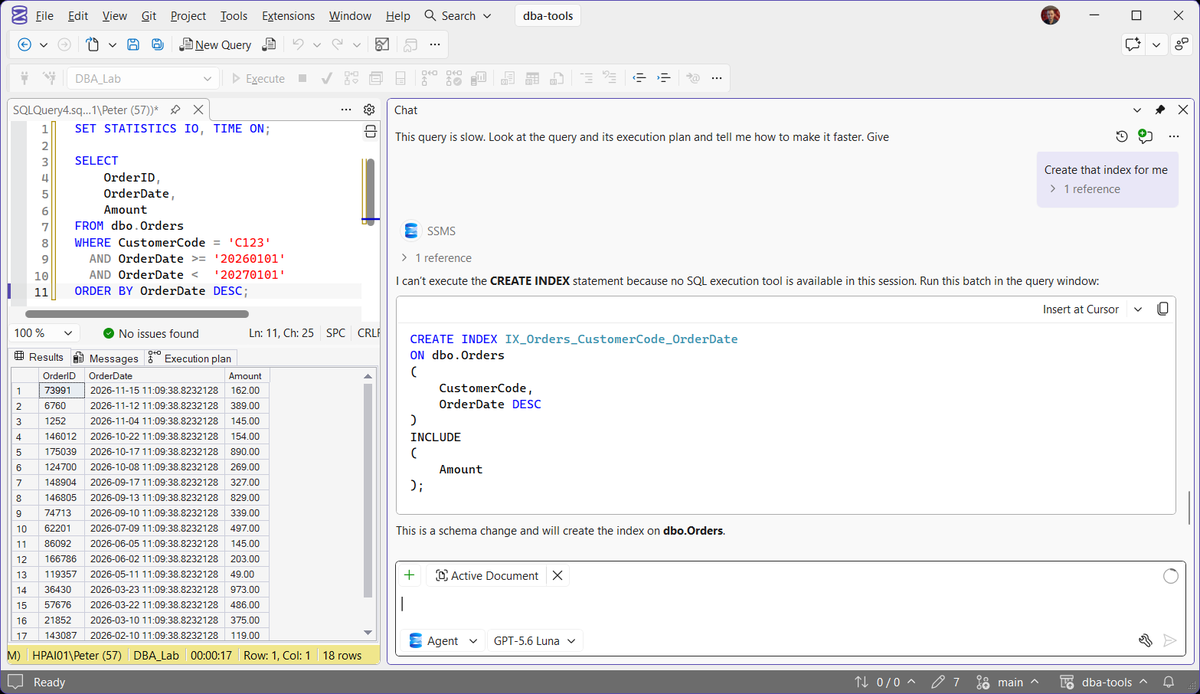
“I can’t execute the CREATE INDEX statement because no SQL execution tool is available in this session. Run this batch in the query window”, followed by the statement and “This is a schema change and will create the index on dbo.Orders.”
So in this session it wrote the change and left the decision with me, which is where a schema change belongs. Which tools Agent mode can call, and when it asks before running one, are in GitHub Copilot Tools, Skills and MCP Servers in SSMS. To limit what it can do when it does run SQL, see Restrict What GitHub Copilot Can Run in SSMS.
What to Check Yourself
Re-run the plan after every change. Copilot’s expected plan matched the real one here, but the rewrite on its own changed nothing. Only the actual plan tells you which change did the work.
Know which side is converted. The seek plan still shows CONVERT_IMPLICIT(datetime2(7), [@3], 0) in its seek predicates. That converts the date parameter to the column’s type, which is harmless. The problem is a conversion wrapped around the column.
Run the existing index check. Copilot told you to, and it is the step most likely to be skipped when the fix looks obvious.
Check the application, not just the query window. The nvarchar literal came from the test. In production it comes from the driver, and the fix is in the application code.
Copilot works from the open window. It read this plan because this query window was attached. With a different window open it answers about that one instead.
Reproduce It on a Lab Instance
This builds the 200,000 row table in a DBA_Lab database. Run it on a lab instance, never production. You need SSMS 22 with GitHub Copilot set up, see Install and Update SSMS, GitHub Copilot in SSMS and Microsoft’s Get started with GitHub Copilot in SSMS.
IF DB_ID(N'DBA_Lab') IS NULL CREATE DATABASE DBA_Lab;
GO
USE DBA_Lab;
GO
DROP TABLE IF EXISTS dbo.Orders;
CREATE TABLE dbo.Orders (
    OrderID      int IDENTITY PRIMARY KEY,
    CustomerCode varchar(20),
    OrderDate    datetime2,
    Amount       decimal(10,2)
);
INSERT dbo.Orders (CustomerCode, OrderDate, Amount)
SELECT TOP (200000)
       CONCAT('C', ABS(CHECKSUM(NEWID())) % 5000),
       DATEADD(day, -(ABS(CHECKSUM(NEWID())) % 1000), SYSDATETIME()),
       ABS(CHECKSUM(NEWID())) % 1000
FROM sys.all_objects a CROSS JOIN sys.all_objects b;
GO
The data is random, so your row count for C123 will differ from my 18. To tidy up afterwards:
USE master;
ALTER DATABASE DBA_Lab SET SINGLE_USER WITH ROLLBACK IMMEDIATE;
DROP DATABASE IF EXISTS DBA_Lab;
Frequently Asked Questions
Can Copilot in SSMS read my execution plan?
sql_editor_get_execution_plan and sql_editor_get_messages on its own and quoted the predicate and the rows read from the actual plan.Why is the query still scanning after I fixed the WHERE clause?
Does Copilot create indexes itself?
CREATE INDEX statement to run in the query window.Is every CONVERT_IMPLICIT in a plan a problem?
Related
- SQL Server Implicit Conversion, how CONVERT_IMPLICIT turns a seek into a scan
- Get Implicit Conversions, find the cached plans already converting columns
- Get Missing Indexes, what SQL Server has been asking for
- The Query Is Fast in SSMS but Slow From the Application, when the driver sends a different type
- GitHub Copilot in SSMS, installing it and what it is good for
Leave a Reply