
A query that should find 1 row by its code reads the whole index instead, and nothing in the WHERE clause looks wrong. Open the execution plan and look for CONVERT_IMPLICIT. When the value you compare against is a different data type from the column, SQL Server converts one side so they match, and when the side it converts is the column, the index on that column can no longer be seeked.
CONVERT_IMPLICIT wrapped around the column in an operator’s Predicate, with a warning triangle on the SELECT. The same query typed to match the column seeks and reads 1 row; typed as nvarchar against a varchar column it scanned all 100,000. The fix is to send the value as the column’s own type, not to change the index.The Test: One Table, Two Queries
A temp table with 100,000 rows, a varchar(20) code column and a nonclustered index on it. The script is collapsed below if you want to run the same test yourself; it works on any instance you can create a temp table on.
Show the setup script: a 100,000 row temp table with an indexed varchar column (16 lines)
DROP TABLE IF EXISTS #ConversionTest;

CREATE TABLE #ConversionTest
(
    ID          int IDENTITY(1,1) PRIMARY KEY,
    Code        varchar(20)  NOT NULL,
    Description varchar(100) NOT NULL
);

INSERT INTO #ConversionTest (Code, Description)
SELECT TOP (100000)
       'CODE' + RIGHT('000000' + CAST(ROW_NUMBER() OVER (ORDER BY (SELECT NULL)) AS varchar(10)), 6),
       'Test row'
FROM sys.all_objects AS a CROSS JOIN sys.all_objects AS b;

CREATE INDEX IX_ConversionTest_Code ON #ConversionTest (Code);
Then the same lookup twice, with Include Actual Execution Plan (Ctrl+M) switched on. The only difference is the N in front of the second literal, which makes it nvarchar:
SET STATISTICS IO ON;

-- Typed to match the column: varchar
SELECT *
FROM #ConversionTest
WHERE Code = 'CODE000123';

-- Typed as nvarchar, the way most applications send strings
SELECT *
FROM #ConversionTest
WHERE Code = N'CODE000123';
Matching Types: an Index Seek
With a varchar literal against a varchar column there is nothing to convert. The plan seeks IX_ConversionTest_Code straight to the one matching row, then a Key Lookup fetches the rest of the columns for SELECT *.
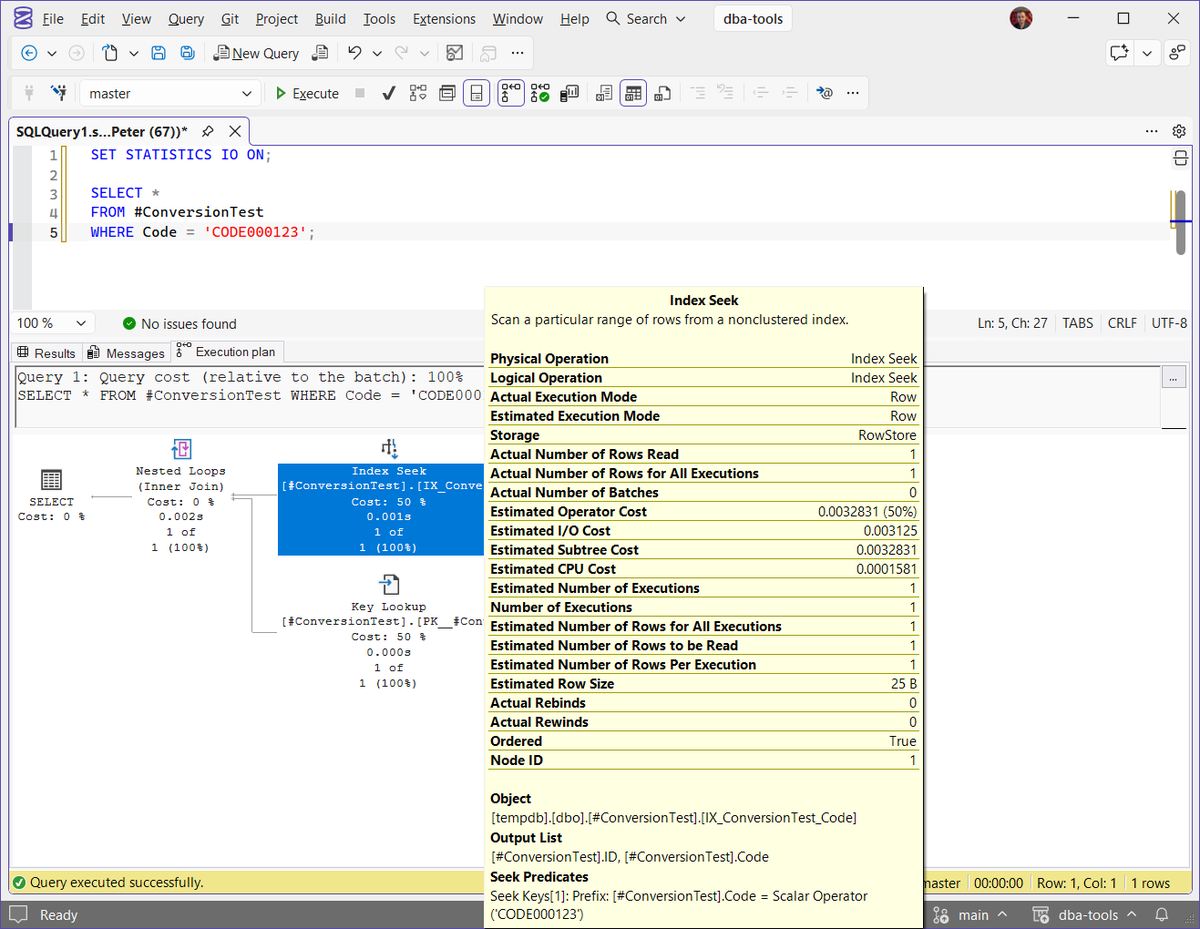
The tooltip on the Index Seek is the part to read. Actual Number of Rows Read is 1, Ordered is True, and at the bottom the filter sits under Seek Predicates, compared against the column as stored: [#ConversionTest].Code = Scalar Operator('CODE000123'). The SELECT operator has no warning on it, and the status bar shows SSMS found no issues with the batch.
Mismatched Types: CONVERT_IMPLICIT and an Index Scan
Add the N and the plan keeps the same shape, Nested Loops over the same index and a Key Lookup, but the Index Seek has become an Index Scan.
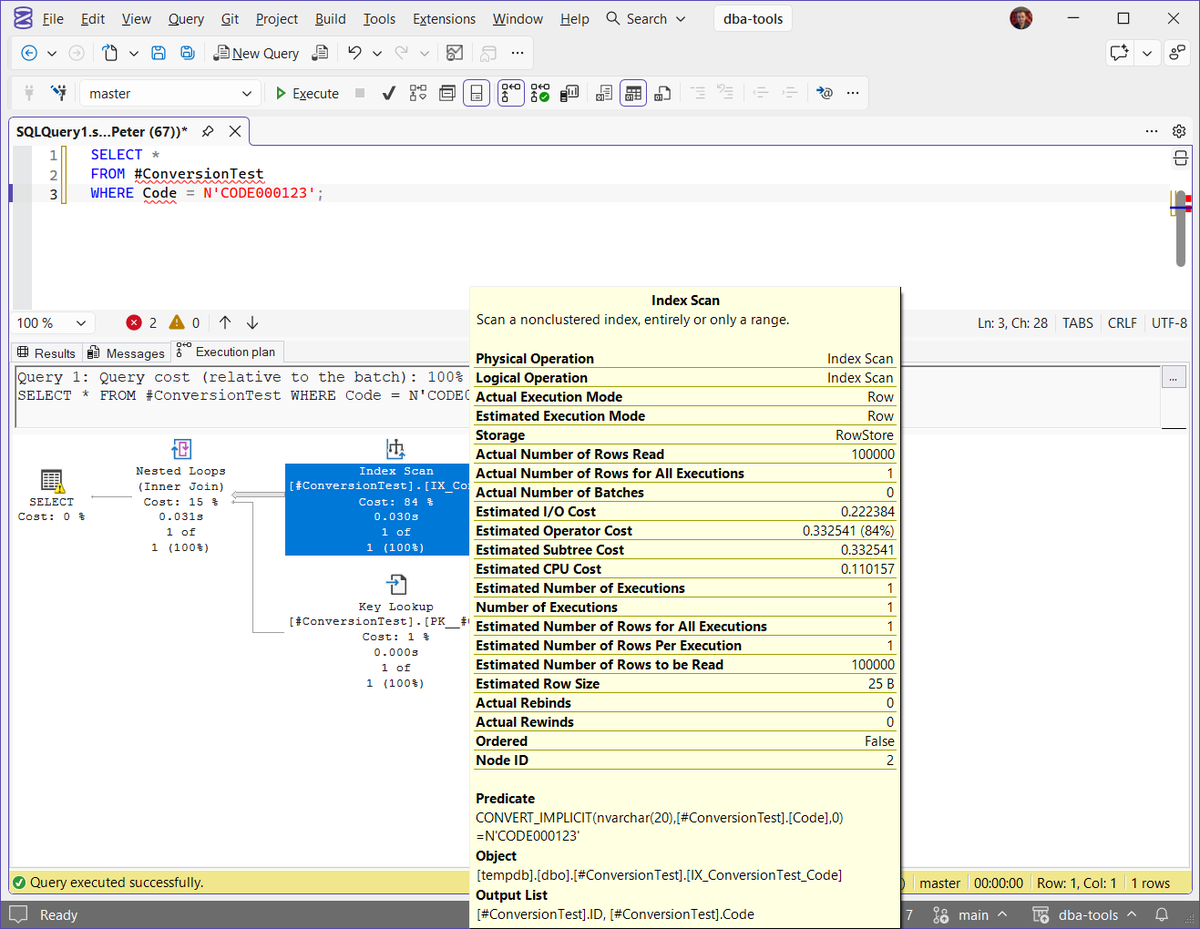
Same index, same single row returned, but Actual Number of Rows Read is now 100,000: every row in the index was read to find 1. There are no Seek Predicates any more. The filter has moved to Predicate, and it reads CONVERT_IMPLICIT(nvarchar(20),[#ConversionTest].[Code],0)=N'CODE000123'. That is SQL Server converting the stored column value, row by row, so it can compare it with your nvarchar. The SELECT operator now carries a yellow warning triangle, which is the plan telling you the same thing.
Side by side, from the 2 tooltips:
| Tooltip value | varchar literal | nvarchar literal |
|---|---|---|
| Physical Operation | Index Seek | Index Scan |
| Actual Number of Rows Read | 1 | 100,000 |
| Estimated Operator Cost | 0.0032831 | 0.332541 |
| Where the filter sits | Seek Predicates | Predicate, inside CONVERT_IMPLICIT |
| Warning on SELECT | None | Yes |
On 100,000 rows that is about 100 times the estimated cost for the same answer. On a table with tens of millions of rows, called hundreds of times a minute by an application, it is the difference between a quiet server and a CPU problem.
Why SQL Server Converts the Column
When the 2 sides of a comparison are different types, SQL Server does not pick the side that is cheapest to convert. It follows data type precedence: the type lower in the list is converted to the higher one. nvarchar ranks above varchar, so in a varchar column against an nvarchar value, it is the column that gets converted.
An index is sorted on the stored values. Once every stored value has to go through a function before it can be compared, that sort order is no use for finding your value, so SQL Server reads all of them. It is the same reason WHERE UPPER(Code) = 'CODE000123' or WHERE CONVERT(nvarchar(20), Code) = ... cannot seek; an implicit conversion is that function, added for you, where you cannot see it in the query text.
That gives you 3 quick rules for which mismatches hurt:
- The column is the lower type: it can hurt. A
varcharcolumn againstnvarchar, as here, is by far the most common case, because .NET, Java and most ORMs send strings asnvarcharunless told otherwise. - The value is the lower type: usually harmless. An
nvarcharcolumn searched with avarcharvalue converts the value once, leaves the column alone, and can still seek. - A string column against a number can fail outright.
WHERE Code = 123on avarcharcolumn converts every row toint, which scans, and the first value that is not a number stops the query with Conversion Failed When Converting the varchar Value to Data Type int (Error 245).
The collation of the column matters too. The scan above happens under a SQL collation, the names starting SQL_ such as SQL_Latin1_General_CP1_CI_AS. Under a Windows collation such as Latin1_General_CI_AS, the optimiser can often still seek on a range worked out from the converted value. The Query Is Fast in SSMS but Slow From the Application measures both collations on the same table, and it is the post to read if this showed up as an application being slower than SSMS.
How to Spot It in an Execution Plan
With the actual plan open in SSMS, these are the places to look, roughly in the order you will see them:
- A warning triangle on the SELECT operator. Right-click it and choose Properties (F4), then expand Warnings: a type conversion warning names the
CONVERT_IMPLICITexpression and whether it may affect the seek plan or only the cardinality estimate. - A scan where you expected a seek on an index whose leading column is the one in your WHERE clause or join.
CONVERT_IMPLICITaround a column name in that operator’s Predicate. Around a parameter or literal it is usually fine; around a column it is the problem.- Actual Number of Rows Read far above the rows returned. 100,000 read for 1 returned is the signature of a filter applied after the read rather than used to find the row.
Not every implicit conversion warning is worth chasing. A warning that only mentions the cardinality estimate, often from a CAST in the SELECT list, rarely changes the plan. The one that matters is the seek plan warning, on a query you already know is slow.
To find it across a whole instance rather than one query at a time, Get Implicit Conversions searches the plan cache for the same warning and lists the statements that lost an index seek first, with their reads and execution counts.
How to Avoid It
The fix is almost always to change the value, not the column. Start at the top and stop at the first one you can make:
SqlDbType.VarChar, 20Set the parameter’s type and length to match the column instead of letting the driver guess. In .NET that means Parameters.Add("@code", SqlDbType.VarChar, 20) rather than AddWithValue, which sends strings as nvarchar. In Entity Framework, map the property as non-Unicode (IsUnicode(false) or HasColumnType("varchar(20)")). The Microsoft JDBC driver has a connection property, sendStringParametersAsUnicode=false.
TakeawayNo schema change, and it fixes every call from that code path.
@Code varchar(20)Declare stored procedure parameters and variables with the column’s exact type, drop the N from literals compared with varchar columns, and make join columns the same type on both sides. If you cannot change what arrives, convert the value, never the column: WHERE Code = CONVERT(varchar(20), @Code) can seek.
TakeawayOnly convert to varchar when the data never needs characters outside the column’s code page.
ALTER COLUMN ... nvarchar(20)If the data really does need Unicode, the column is the wrong type and changing it is the right fix. It is a schema change that has to drop and recreate every index and constraint on the column and can double its storage, so plan it as a change, not a hotfix.
TakeawayOnly when the data itself needs it, never just to silence the warning.
Once the change is in, run the query again with the actual plan on and check the 3 things that changed above: Seek, Seek Predicates, and Rows Read back down to the rows returned.
Frequently Asked Questions
What does CONVERT_IMPLICIT mean in an execution plan?
It is SQL Server converting a value from one data type to another because the 2 sides of a comparison, join or assignment did not match and the query did not ask for a conversion itself. It appears in the operator’s Predicate or Seek Predicates, wrapped around whichever side was converted.
Is every implicit conversion a performance problem?
No. A conversion applied to a parameter or literal happens once and the index can still be seeked. It becomes a problem when it is applied to the column, because then every row has to be read and converted before it can be compared.
Why does the query run fast in SSMS but slow from the application?
Often because you typed the value as 'ABC' in SSMS, which is varchar, while the application sends it as an nvarchar parameter. Test it in SSMS with N'ABC' and you will usually see the same scan the application gets.
Will adding an index fix an implicit conversion?
No. The index already exists; the conversion is what stops it being seeked. Fix the data type of the value being compared and the existing index works again.
How do I find implicit conversions across the whole server?
Search the plan cache for the type conversion warning. Get Implicit Conversions does that and ranks what it finds, so the ones costing the most reads come first.
Summary
An implicit conversion never raises an error and never changes the results. It only shows in the plan: CONVERT_IMPLICIT around the column, a scan where a seek should be, rows read far above rows returned, and a warning on the SELECT. When the column is the side being converted, send the value as the column’s own type and the index works again.
Related
- Parameter Sniffing in SQL Server, the other reason one query has a good plan and a bad one
- Get Top CPU Queries, where a scan like this usually surfaces first
- Get Query Store Top Queries, the same view with history behind it
- Tune a Slow Query With Copilot in SSMS, the same CONVERT_IMPLICIT scan found by Copilot from the plan, then fixed
- SQL Server High CPU: What to Check First, when the scans have added up
- DBA Scripts: The Complete Guide
Leave a Reply