
Keep SQL Server Patched: Three Tools, One Job
Patching is the job that never finishes: a new Cumulative Update lands, every instance needs it, and “are we current?” needs an answer on demand. This post is that whole loop, run for real on my own lab server, from clone to current build.
Three tools do the work, smallest to largest: a status check, a one-shot patcher for the server you are on, and a config-driven patcher for whole estates. We walk through all three.
Why It Matters
- Patch status should be answerable in one command, not a per-server manual check.
patch-summary.ps1gives version, CU label, SSMS version, and recent activity for a machine in one pass. Invoke-SqlPatch.ps1never downloads or installs anything by accident.-WhatIfreports status only,-DownloadOnlystages installers without applying them, and even a real run prompts per-server before installing unless-Forceis explicitly passed.- The version comparison is genuinely useful in both directions. Behind means patch needed; ahead of the configured target is flagged too, worth knowing when someone patched a server manually and the config file wasn’t updated to match.
Step 1: Clone the Repo
Everything below ships in the dba-tools repo, self-contained, nothing to install:
git clone https://github.com/peterwhyte-lgtm/dba-tools
cd dba-tools
Step 2: Where Are We? Run the Status Check
One command answers “where is this machine?”: every SQL instance with its build mapped to a CU label, the SSMS version compared against the latest release, and recent patch activity from the logs. Read-only, no elevation needed.
.\powershell\patching\patch-summary.ps1 SQL Server Patch Summary - 2026-08-16 11:23
----------------------------------------------------------------------
SQL Server Instances
MSSQLSERVER 17.0.4045.5 SQL 2025 CU5 Enterprise Developer Edition (64-bit) BEHIND -> 17.0.4075.5
SSMS
SQL Server Management Studio 22 v22.7.0 BEHIND -> 22.9.0
Scripted update: .\powershell\patching\ssms\install-ssms.ps1
Guide: https://sqldba.blog/dba-scripts-install-and-update-ssms-via-powershell/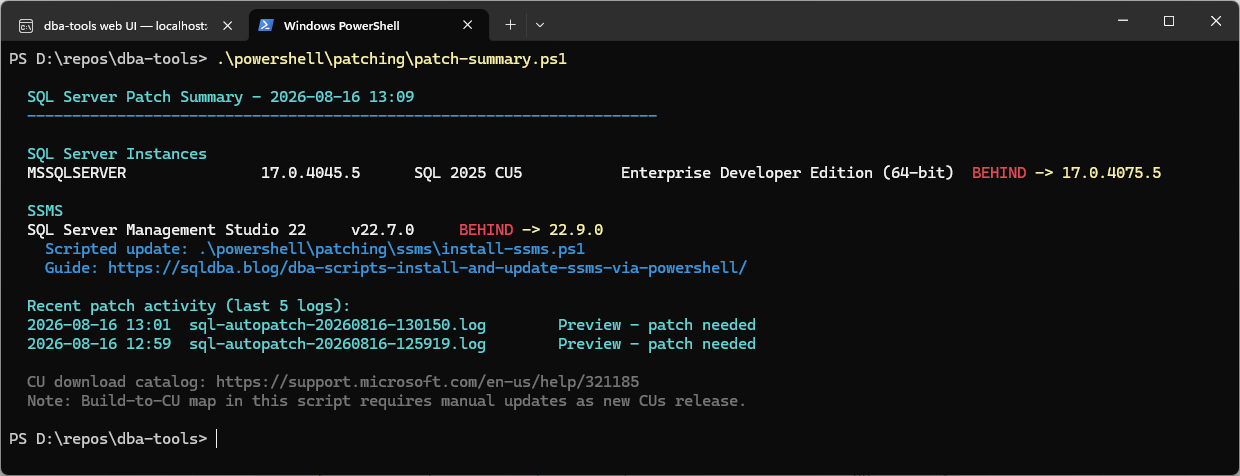
Two things behind on this lab box: the engine is on CU5, and SSMS wants 22.9. The SSMS side is its own one-script job, covered in the SSMS install and update post. The build-to-CU map here is hand-maintained; a build it does not know says “Unknown build” honestly rather than guessing.
Step 3: The Patch Script, and a Dry Run
The patcher is one self-contained file, no config and no repo needed if you just copy it. It finds every local instance, compares against the latest CU (the same data as the builds reference), resolves the installer from the Microsoft Update Catalog when no direct link is published, confirms once, installs quietly, and verifies itself. It also refuses to start an install it cannot finish: low disk on the system drive stops it before the installer can die mid-flight.
<#
.SYNOPSIS
Patch this machine's SQL Server to the latest Cumulative Update. One file, no config.

.DESCRIPTION
Self-contained single-server patcher:
  1. Detects every local SQL Server instance and its current build
  2. Compares against the embedded latest-CU table below (kept current with the
     sqldba.blog builds reference, regenerated each patch cycle)
  3. Uses your downloaded installer (-InstallerPath), a previously downloaded copy in
     the download folder, or downloads it when a direct URL is available
  4. Confirms, installs quietly (all instances of that version), and verifies after

For patching a whole estate from a config file, use sql\Invoke-SqlPatch.ps1 instead.

.PARAMETER InstallerPath
Path to an already-downloaded CU installer exe. Skips any download logic.

.PARAMETER DownloadFolder
Where installers are kept/downloaded. Default C:\SQLPatches.

.PARAMETER Preview
Show what would happen and exit. Never needs admin, never changes anything.

.PARAMETER Force
Skip the confirmation prompt.

.EXAMPLE
.\Patch-SqlServer.ps1 -Preview
.\Patch-SqlServer.ps1
.\Patch-SqlServer.ps1 -InstallerPath C:\Temp\SQLServer2025-KB5104822-x64.exe

.NOTES
Type      : runner
Scope     : single server (local machine only)
RiskLevel : HIGH IMPACT - installs a Cumulative Update; SQL Server restarts mid-install.
#>
param(
    [string]$InstallerPath,
    [string]$DownloadFolder = 'C:\SQLPatches',
    [switch]$Preview,
    [switch]$DownloadOnly,
    [switch]$Force
)

$ErrorActionPreference = 'Stop'

# Resolve a CU download link from the Microsoft Update Catalog when no direct
# link is published. Search by KB -> package GUID -> DownloadDialog -> exe URL.
function Get-CatalogUrl([string]$kb) {
    try {
        $sr = Invoke-WebRequest -Uri "https://www.catalog.update.microsoft.com/Search.aspx?q=$kb" `
                -UseBasicParsing -TimeoutSec 60
        $m = [regex]::Match($sr.Content, 'goToDetails\("([0-9a-f-]{36})"')
        if (-not $m.Success) { return $null }
        $guid = $m.Groups[1].Value
        $body = @{ updateIDs = "[{`"size`":0,`"languages`":`"`",`"uidInfo`":`"$guid`",`"updateID`":`"$guid`"}]" }
        $dr = Invoke-WebRequest -Uri 'https://www.catalog.update.microsoft.com/DownloadDialog.aspx' `
                -Method Post -Body $body -UseBasicParsing -TimeoutSec 60
        $u = [regex]::Match($dr.Content, "https?://[^'`"]+\.exe")
        if ($u.Success) { return $u.Value }
    } catch { }
    return $null
}

function Get-FreeGB([string]$path) {
    $root = [System.IO.Path]::GetPathRoot([System.IO.Path]::GetFullPath($path))
    $d = Get-PSDrive -Name $root.TrimEnd(':\') -ErrorAction SilentlyContinue
    if ($d) { [math]::Round($d.Free / 1GB, 1) } else { $null }
}

# -- BEGIN GENERATED LATEST-CU TABLE (source: sqldba.blog builds reference) -------
# Regenerated each patch cycle by gen-patch-map.py from sql-builds.json.
# Url is the direct installer link where Microsoft publishes one; when blank, the
# script opens the KB page for you and you rerun with -InstallerPath.
$latest = @{
    17 = @{ Label = 'SQL Server 2025 CU8';  Build = '17.0.4075.5'; KB = 'KB5104822'; KbUrl = 'https://support.microsoft.com/help/5104822'; Url = ''; FileName = 'SQLServer2025-KB5104822-x64.exe' }
    16 = @{ Label = 'SQL Server 2022 CU26'; Build = '16.0.4265.3'; KB = 'KB5093420'; KbUrl = 'https://support.microsoft.com/help/5093420'; Url = ''; FileName = 'SQLServer2022-KB5093420-x64.exe' }
    15 = @{ Label = 'SQL Server 2019 CU32'; Build = '15.0.4430.1'; KB = 'KB5054833'; KbUrl = 'https://support.microsoft.com/help/5054833'; Url = 'https://download.microsoft.com/download/6/e/7/6e72dddf-dfa4-4889-bc3d-e5d3a0fd11ce/SQLServer2019-KB5054833-x64.exe'; FileName = 'SQLServer2019-KB5054833-x64.exe' }
    14 = @{ Label = 'SQL Server 2017 CU31 + GDR'; Build = '14.0.3495.9'; KB = 'KB5058714'; KbUrl = 'https://support.microsoft.com/help/5058714'; Url = ''; FileName = 'SQLServer2017-KB5058714-x64.exe' }
}
# -- END GENERATED LATEST-CU TABLE ------------------------------------------------

function Write-Step([string]$msg, [string]$color = 'Cyan') { Write-Host "  $msg" -ForegroundColor $color }

Write-Host ''
Write-Step "Patch-SqlServer - $(Get-Date -Format 'yyyy-MM-dd HH:mm')"
Write-Host ('  ' + [string]::new('-', 68)) -ForegroundColor DarkCyan

# 1. Detect local instances + versions ---------------------------------------------
$regPath = 'HKLM:\SOFTWARE\Microsoft\Microsoft SQL Server\Instance Names\SQL'
if (-not (Test-Path $regPath)) { Write-Step 'No SQL Server instances found on this machine.' 'Yellow'; exit 0 }
$instNames = Get-ItemProperty $regPath | Get-Member -MemberType NoteProperty |
    Where-Object { $_.Name -notmatch '^PS' } | Select-Object -ExpandProperty Name

$found = @()
foreach ($inst in ($instNames | Sort-Object)) {
    $srv = if ($inst -eq 'MSSQLSERVER') { 'localhost' } else { "localhost\$inst" }
    $ver = $null
    try {
        $row = Invoke-Sqlcmd -ServerInstance $srv -QueryTimeout 8 -TrustServerCertificate `
            -Query "SELECT CAST(SERVERPROPERTY('ProductVersion') AS varchar(20)) AS pv"
        $ver = $row.pv
    } catch {
        $instId = (Get-ItemProperty $regPath).$inst
        $ver = (Get-ItemProperty "HKLM:\SOFTWARE\Microsoft\Microsoft SQL Server\$instId\MSSQLServer\CurrentVersion" -ErrorAction SilentlyContinue).CurrentVersion
    }
    if ($ver) { $found += [pscustomobject]@{ Instance = $inst; Build = $ver; Major = [int]($ver -split '\.')[0] } }
}
if ($found.Count -eq 0) { Write-Step 'Instances exist but no version could be read.' 'Yellow'; exit 1 }

# 2. Compare against the latest-CU table -------------------------------------------
$behind = @()
Write-Host ''
foreach ($f in $found) {
    $t = $latest[$f.Major]
    if (-not $t) {
        Write-Step ("{0,-22} {1,-15} no CU-train target for this version; see https://sqldba.blog/sql-server-builds-complete-version-list-and-support-lifecycle/" -f $f.Instance, $f.Build) 'Yellow'
        continue
    }
    if ([version]$f.Build -ge [version]$t.Build) {
        Write-Step ("{0,-22} {1,-15} already current ({2})" -f $f.Instance, $f.Build, $t.Label) 'Green'
    } else {
        Write-Host ("  {0,-22} {1,-15} " -f $f.Instance, $f.Build) -ForegroundColor White -NoNewline
        Write-Host "BEHIND" -ForegroundColor Red -NoNewline
        Write-Host (" -> {0} ({1})" -f $t.Build, $t.Label) -ForegroundColor Yellow
        $behind += $f
    }
}
if ($behind.Count -eq 0) { Write-Host ''; Write-Step 'Nothing to do.' 'Green'; exit 0 }

$target = $latest[($behind | Select-Object -First 1).Major]
Write-Host ''
Write-Step "Target: $($target.Label)  $($target.Build)  ($($target.KB))" 'Yellow'
Write-Step 'Latest builds reference: https://sqldba.blog/sql-server-builds-complete-version-list-and-support-lifecycle/' 'DarkCyan'

if ($Preview) { Write-Step '[Preview] Stopping here; nothing downloaded or installed.' 'Cyan'; exit 0 }

# 3. Safety guards: disk space and admin -------------------------------------------
# CU installers are ~1 GB and extract onto the system drive during install; running
# out of space mid-install is the worst outcome, so refuse early instead.
$sysFree = Get-FreeGB $env:SystemDrive
if ($null -ne $sysFree -and $sysFree -lt 5 -and -not $DownloadOnly) {
    Write-Step "System drive has only ${sysFree} GB free; the installer needs room to extract." 'Red'
    Write-Step 'Free up space first (or -Force if you accept the risk).' 'Red'
    if (-not $Force) { exit 1 }
}
if (-not $InstallerPath) {
    $dlFree = Get-FreeGB $DownloadFolder
    if ($null -ne $dlFree -and $dlFree -lt 2) {
        Write-Step "Download folder drive has only ${dlFree} GB free." 'Red'
        Write-Step '  Point it somewhere with room: .\Patch-SqlServer.ps1 -DownloadFolder D:\SQLPatches' 'Red'
        exit 1
    }
}
$isAdmin = ([Security.Principal.WindowsPrincipal][Security.Principal.WindowsIdentity]::GetCurrent()
           ).IsInRole([Security.Principal.WindowsBuiltInRole]::Administrator)
if (-not $isAdmin -and -not $DownloadOnly) { Write-Step 'Run from an ADMIN PowerShell to install (or use -DownloadOnly).' 'Red'; exit 1 }

# 4. Locate or fetch the installer -------------------------------------------------
$installer = $null
if ($InstallerPath) {
    if (-not (Test-Path $InstallerPath)) { Write-Step "InstallerPath not found: $InstallerPath" 'Red'; exit 1 }
    $installer = $InstallerPath
} else {
    $cached = Join-Path $DownloadFolder $target.FileName
    if (Test-Path $cached) {
        Write-Step "Using previously downloaded installer: $cached"
        $installer = $cached
    } else {
        $url = $target.Url
        if ($url) {
            Write-Step "Downloading $($target.KB) (direct link)..."
        } else {
            Write-Step "No direct link published; asking the Microsoft Update Catalog..."
            $url = Get-CatalogUrl $target.KB
            if ($url) { Write-Step "Catalog found it. Downloading $($target.KB)..." }
        }
        if ($url) {
            New-Item -ItemType Directory -Path $DownloadFolder -Force | Out-Null
            Start-BitsTransfer -Source $url -Destination $cached
            $installer = $cached
        } else {
            Write-Step 'Could not resolve a download link automatically.' 'Yellow'
            Write-Step 'Opening the KB page - use its download button, then rerun with:' 'Yellow'
            Write-Step "  .\Patch-SqlServer.ps1 -InstallerPath <path-to-$($target.FileName)>" 'Yellow'
            Start-Process $target.KbUrl
            exit 1
        }
    }
}
if ($DownloadOnly) { Write-Step "[DownloadOnly] Installer ready: $installer" 'Green'; exit 0 }

# 5. Confirm and install -----------------------------------------------------------

if (-not $Force) {
    Write-Host ''
    Write-Step "About to install $($target.Label). SQL Server restarts during the install." 'Yellow'
    if ((Read-Host '  Type Y to continue') -ne 'Y') { Write-Step 'Cancelled.' 'Yellow'; exit 0 }
}

Write-Step 'Installing (quiet, all instances of this version)...'
$proc = Start-Process -FilePath $installer `
    -ArgumentList '/quiet', '/IAcceptSQLServerLicenseTerms', '/allinstances' `
    -Wait -PassThru

switch ($proc.ExitCode) {
    0     { Write-Step 'Installer finished: success.' 'Green' }
    3010  { Write-Step 'Installer finished: success, REBOOT REQUIRED to complete.' 'Yellow' }
    default {
        Write-Step "Installer exit code $($proc.ExitCode) - check the newest Summary.txt under" 'Red'
        Write-Step '  C:\Program Files\Microsoft SQL Server\<nnn>\Setup Bootstrap\Log\' 'Red'
        exit $proc.ExitCode
    }
}

# 6. Verify ------------------------------------------------------------------------
Write-Host ''
Write-Step 'After:'
foreach ($f in $behind) {
    $srv = if ($f.Instance -eq 'MSSQLSERVER') { 'localhost' } else { "localhost\$($f.Instance)" }
    try {
        $row = Invoke-Sqlcmd -ServerInstance $srv -QueryTimeout 30 -TrustServerCertificate `
            -Query "SELECT CAST(SERVERPROPERTY('ProductVersion') AS varchar(20)) AS pv"
        $ok = [version]$row.pv -ge [version]$target.Build
        Write-Step ("{0,-22} {1,-15} {2}" -f $f.Instance, $row.pv, $(if ($ok) { 'CURRENT' } else { 'still behind?' })) $(if ($ok) { 'Green' } else { 'Yellow' })
    } catch { Write-Step ("{0,-22} (not answering yet - normal right after restart)" -f $f.Instance) 'Yellow' }
}
Write-Host ''
Preview first; it changes nothing and needs no elevation:
.\powershell\patching\Patch-SqlServer.ps1 -Preview Patch-SqlServer - 2026-08-16 12:13
--------------------------------------------------------------------
MSSQLSERVER 17.0.4045.5 BEHIND -> 17.0.4075.5 (SQL Server 2025 CU8)
Target: SQL Server 2025 CU8 17.0.4075.5 (KB5104822)
Latest builds reference: https://sqldba.blog/sql-server-builds-complete-version-list-and-support-lifecycle/
[Preview] Stopping here; nothing downloaded or installed.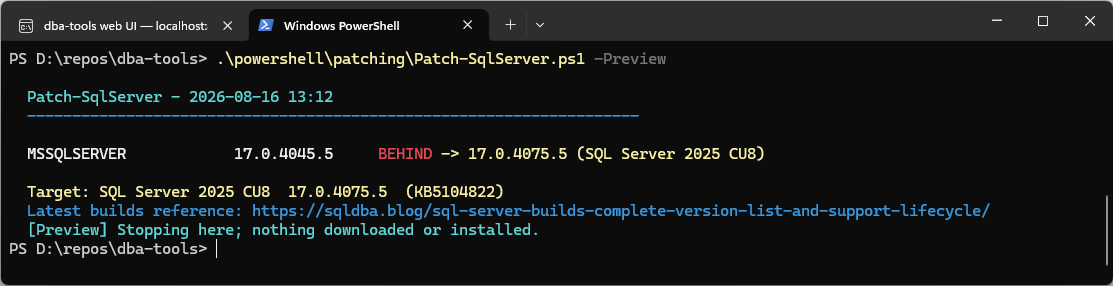
Step 4: Patch It
From an admin PowerShell. It asks once before installing, downloads the installer if it is not already staged, and SQL Server restarts during the install; plan for the blip.
-DownloadFolder can point anywhere. Keeping installers off the system drive is the habit worth having, C: needs its free space for the install extraction itself, so mine live on D:\\SQLPatches.
# Run from an ADMIN PowerShell; the script checks and stops if you are not
.\powershell\patching\Patch-SqlServer.ps1 -DownloadFolder D:\SQLPatches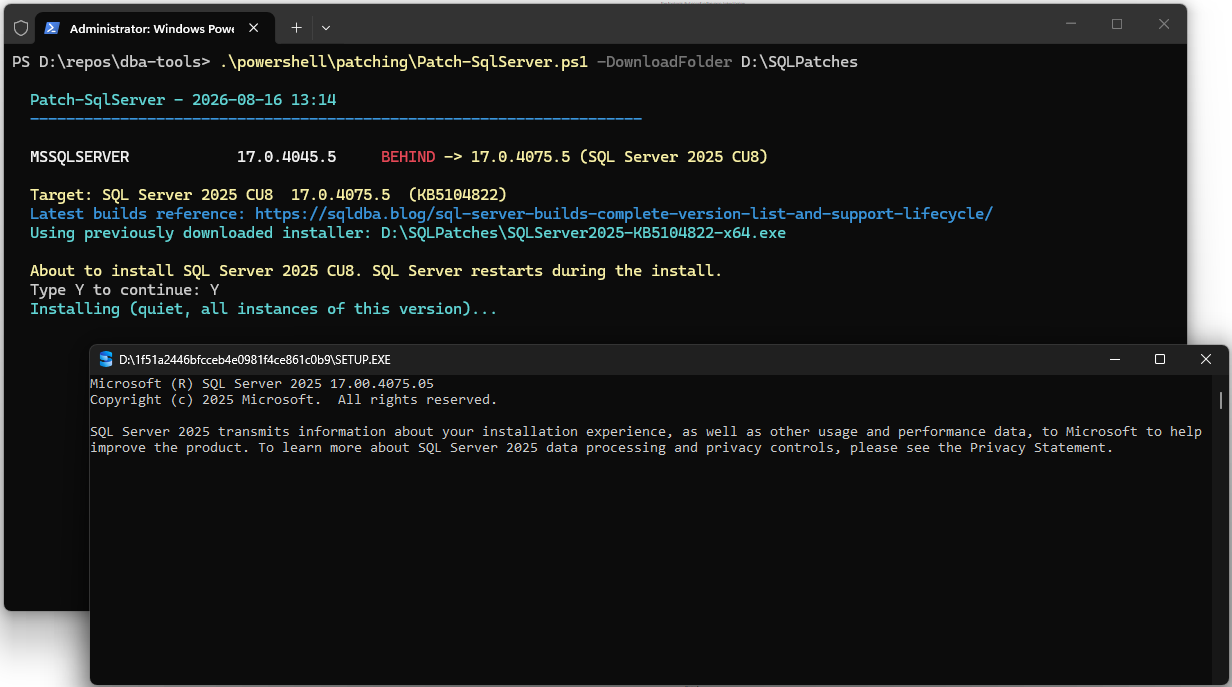
Exit code 0 is success; 3010 is success with a reboot required to finish. Anything else, the newest Summary.txt under the SQL Setup Bootstrap\Log folder says why.
Step 5: Prove It
The patcher prints before and after builds itself, and the status check confirms it from cold:
.\powershell\patching\patch-summary.ps1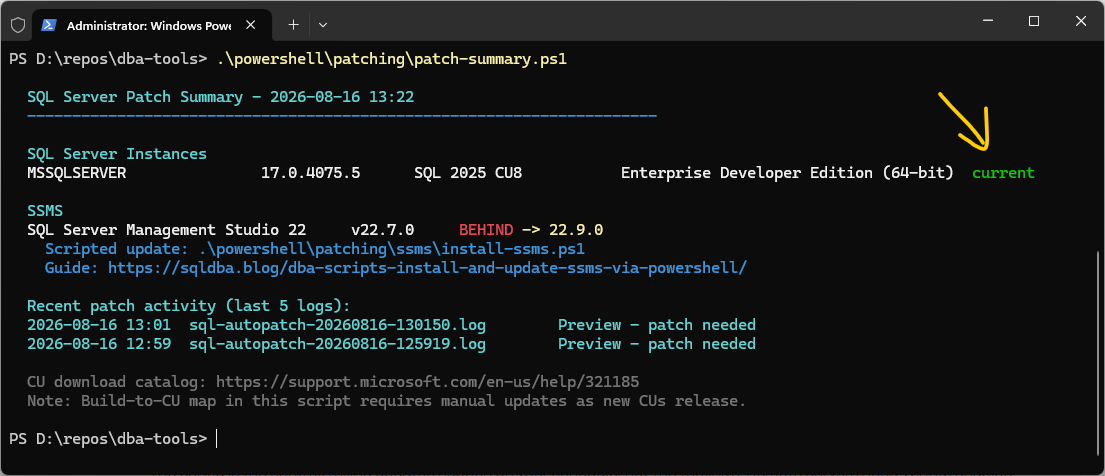
The arrow says it: SQL Server is green, current on CU8. But one block down, patch-summary is still flagging SQL Server Management Studio two minor versions behind. Different tool, same one-script treatment: the SSMS install and update post covers it, and that is exactly where this series goes next.
Patching a Fleet of SQL Servers
The one-shot above patches the machine you are on. To patch many servers, you switch scripts: Invoke-SqlPatch.ps1 (in the same folder, under sql\) does the same job across every server you point it at, and everything it needs lives in one config file next to it, patch-config.psd1.
Moving from one server to many is three steps:
- List your servers. In
patch-config.psd1, setServers = @('SQL01','SQL02','SQL03'). Or skip the file for a quick run and pass them on the command line:-Server SQL01,SQL02. - Set the target per version. One block per SQL Server version, like the one below. When you are ready to roll the fleet to a new CU, update the block with the new target and paste in the installer URL. Until you do, nothing moves.
- Preview, then run.
-WhatIfshows every server’s verdict without changing anything. The real run downloads the installer once and applies it to each server over WinRM, asking before each one unless you pass-Force.
SQL2025 = @{
    MajorVersion  = 17
    CU            = 'CU8'
    KB            = 'KB5104822'
    TargetVersion = '17.0.4075.5'
    Url           = ''   # direct download link, or blank to stage installers yourself
    FileName      = 'SQLServer2025-KB5104822-x64.exe'
}
# Preview the whole fleet, change nothing
.\powershell\patching\sql\Invoke-SqlPatch.ps1 -WhatIf
# Stage installers everywhere without installing
.\powershell\patching\sql\Invoke-SqlPatch.ps1 -DownloadOnly
# The real run, per-server confirmation built in
.\powershell\patching\sql\Invoke-SqlPatch.ps1The config is the control: rolling updates happen on your schedule, not the tooling’s. And if a server reports AHEAD, someone patched it by hand and the config drifted behind reality; update the block rather than treating it as an error. Remote servers need WinRM enabled (Test-WSMan SQL01 to check). Full script in the repo, linked below. And when the move is a new major version rather than a CU, that is a different job with its own order of operations: the Version Upgrade Runbook.
How To Run From The Repo
git clone https://github.com/peterwhyte-lgtm/dba-tools
cd dba-tools
.\Initialize-Environment.ps1

# Patch this machine (the Step 1-5 walkthrough above)
.\powershell\patching\Patch-SqlServer.ps1 -Preview

# Check status without changing anything
.\powershell\patching\sql\Invoke-SqlPatch.ps1 -WhatIf

# One-command overview of everything on this machine
.\powershell\patching\patch-summary.ps1

# Download the latest patch for a specified version
.\powershell\patching\sql\Invoke-SqlPatch.ps1 -DownloadOnly -Version SQL2025 -PatchRoot D:\SQLPatches

# Patch specific servers
.\powershell\patching\sql\Invoke-SqlPatch.ps1 -Server SQL01,SQL02
These scripts live in the repo:
Invoke-SqlPatch.ps1the fleet patcher, config-driven
patch-summary.ps1the status check
Best Practices
- Keep
patch-config.psd1‘s CU download URLs and target versions current manually, Microsoft doesn’t expose a queryable API for this, the note at the bottom of both scripts’ output says so plainly. The SQL Server builds reference here tracks the latest CU and build per version, updated each patch cycle. - Run
Invoke-SqlPatch.ps1 -WhatIfacross your whole server list before any real patch window, know what’s behind, current, and ahead before deciding what to actually apply. - Use
-DownloadOnlyahead of a maintenance window to stage installers, then run without it during the window itself to apply with less time pressure. - Run
patch-summary.ps1as a routine check independent of any patch cycle, it’s cheap, read-only, and catches CU-map gaps (like the SQL 2025 one here) the moment a new major version shows up as “Unknown.”
Related Scripts
You may also find these scripts useful:
- Login Failed: Server Is in Script Upgrade Mode (Error 18401), and How Long to Wait Before You Worry, the error every login sees while this script’s own upgrade step is still running
- Get Patch Level, the T-SQL check that turns a build number into a CU verdict across a fleet
- Version Upgrade Runbook, for when the answer is a new major version rather than a CU
- SQL Server Installation and Patching (hub)
- Install and Update SSMS via PowerShell
- Pre-Install and Post-Install Checks
- Get Version Upgrade Readiness
- DBA Scripts: The Complete Guide, the map across every script on this site
Frequently Asked Questions
My instance shows “Unknown build” even though I know the patch level, what’s wrong?
The build-to-CU lookup table in patch-summary.ps1 needs a manual entry added for that specific build. This isn’t unique to any one version, the table simply needs updating every time a new CU releases, exactly the gap the SQL 2025 fix in this post closes for that version.
What happens if Invoke-SqlPatch.ps1 finds an instance running a newer build than the configured target?
It reports Ahead and takes no action, it never downgrades. Update patch-config.psd1‘s target version to match reality if the newer build is intentional.
Do I need to install Cumulative Updates in order?
No. CUs are cumulative, the clue is in the name: the latest one contains every fix from all the earlier ones, so a server on CU2 goes straight to CU8 in a single install. There is no chain to walk.
My servers have no internet access. How do I patch them?
Stage the installer from a machine that does: Invoke-SqlPatch.ps1 -DownloadOnly -Version SQL2025 -PatchRoot D:\SQLPatches downloads it with no SQL Server needed locally, then copy the folder across and run the one-shot with -InstallerPath, or let the fleet tool copy it over the admin share. Nothing in these scripts requires the SQL Servers themselves to reach the internet.
Can I roll back a CU if something breaks?
Yes, CUs uninstall from Programs and Features (or wusa), and SQL Server drops back to the previous build after another restart. Two cautions: take backups before patching anyway, and if you raised any database compatibility level after patching, that is a separate change with its own rollback. The dry run and a test server first beat relying on rollback.
Summary
One status check that tells you where every instance and SSMS stands, one self-contained script that patches the server you are on (catalog download, quiet install, before-and-after proof), and one config-driven patcher that rolls a whole estate on your schedule. The status script’s CU map and the patcher’s target table are hand-maintained against the builds reference, updated each patch cycle.
Plan for this as a standing ad hoc job rather than a calendar slot: a current version ships a CU roughly monthly (SQL Server 2025 has landed eight in its first nine months), with occasional out-of-band GDR and emergency fixes on top, while OS patching keeps its own monthly Patch Tuesday rhythm. Read the KB notes before you roll; once in a while a CU carries a breaking change, and in a corporate environment the vulnerability scanner will flag missing CUs and GDRs long before anyone asks nicely. The builds reference tracks every release as it lands, so staying ready is a one-page check.
Leave a Reply