
SQL Server Management Studio 22 is the current line, it sits on the Visual Studio 2026 shell, and it has been shipping updates roughly monthly. That cadence is genuinely new for SSMS, and it means “what’s new” is a moving target. This post is the DBA filter over the release notes: the changes that alter how you work on a production estate, with the version each one landed in. I update it as releases come out.
Current as of SSMS 22.9, August 2026. For download links and the install mechanics, see Install and Update SSMS.
The Platform Move, in One Paragraph
SSMS 21 did the heavy lifting in 2025: 64-bit at last, installed and updated through the Visual Studio Installer, the first supported dark theme, and git built in. SSMS 22 builds on that and moves to the Visual Studio 2026 shell. If you are still on SSMS 18 or 19, you are two platform generations behind, and the connection security defaults changed on the way, so budget an hour for the move rather than five minutes.
The Changes That Matter Day to Day
| Change | Version | Why it matters |
|---|---|---|
| Modern connection dialog is the default | 22.0 | Recents and favourites now go to 60, and 22.9 added connection import and export, which makes a jump-host rebuild painless. |
| Execution plan in a new tab | 22.0 | Right-click a plan, Show Execution Plan in New Tab. Comparing two plans stops being a window-juggling exercise. |
| JSON viewer and results grid zoom | 22.0 | View JSON from the results grid properly, and zoom the grid independently of the editor. |
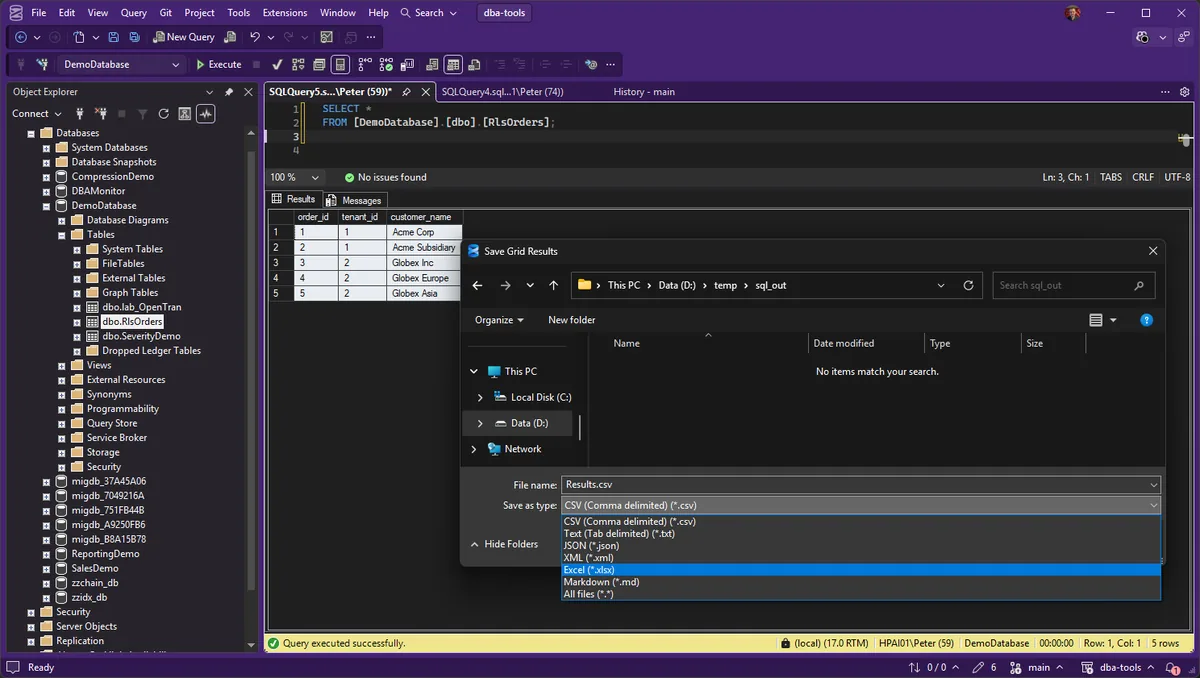
| Save Results As: Excel, JSON, Markdown, XML | 22.4.1 | The paste-into-a-spreadsheet detour is over. Since 22.8 it remembers the last format you used. |
| Group by schema in Object Explorer | 22.4.1 | The toggle sits between Refresh and Show Policy Health. On a database with hundreds of objects, this is the biggest navigation win in years. |
| GitHub Copilot generally available | 22.4.1 | An optional workload, off by default in the ways that matter. Full setup and my governance take in GitHub Copilot in SSMS. |
| Column data type on hover in the grid | 22.6 | Hover a column header and the tooltip tells you the type. Small, and you will use it weekly. |
| Native T-SQL formatter (preview) | 22.7 | By 22.9 the comma style, JOIN line breaks and alias style are configurable, with a before-and-after preview in the settings. |
| Schema compare (preview) | 22.7 | Databases, .dacpac files and SQL projects. The feature people kept third-party tools around for. |
| SSIS is back | 22.0 | SSMS 21 shipped without it. 22.0 reinstated SSISDB catalog management, package execution and the Import Export Wizard. |
Copilot, Properly
Copilot went GA in 22.4.1 as the separate AI Assistance workload, so it only exists on machines where you tick it. The defaults are the right way round for production work: code completions ship disabled since 22.5.2, and as of 22.9 Ask mode cannot execute arbitrary queries against the connected server. Agent Mode is in preview since 22.7 and picked up distinctly DBA-shaped skills in 22.8, wait category analysis, slow-query investigation and IO pressure among them. The setup walkthrough and where I would draw the governance lines are in GitHub Copilot in SSMS.
Removed, Returned, Renamed
- SSIS left in 21 and returned in 22.0, catalog management, package execution and the Import Export Wizard included.
- The Blue theme was retired in 22.0, with new themes added in its place.
- The
-Gand-Estartup options were removed in 22.0, replaced by-A. Worth checking if you launch SSMS from scripts or shortcuts with arguments.
Frequently Asked Questions
Is SSMS 22 free?
Yes. SSMS has been a free download for years and 22 does not change that. Copilot is the only part with a subscription attached, and it has a free tier.
Which SQL Server versions can SSMS 22 manage?
SQL Server 2014 and later, plus Azure SQL Database, Azure SQL Managed Instance, Azure Synapse Analytics and Fabric SQL workloads. For older instances, keep an older SSMS alongside.
How often does SSMS 22 update?
Roughly monthly through 2026 so far. Updates arrive through the Visual Studio Installer, and the scripted route is covered in the install post above.
Related
- SSMS “Saving Changes Is Not Permitted”: The Two Ways Out, and Why the Guard Exists, the designer dialog behind this guard is unchanged in the new SSMS
- SSMS: The Complete Guide, the hub this post belongs to
- Install and Update SSMS, download links and scripted installs
- Use Git in SSMS
- GitHub Copilot in SSMS
- How to Export SQL Server Query Results to CSV, for the CSV workflow behind the results grid
- SSMS Results Grid: Export to Excel, JSON and Markdown
Summary
SSMS 22 is the payoff for the platform pain of 21: a modern shell that updates monthly, a connection dialog you can export, execution plans in tabs, a grown-up results grid, git and Copilot built in, and SSIS back where it belongs. The features a DBA touches daily are stable and GA; the formatter, schema compare and Agent Mode are the preview tier worth watching. This post tracks the line as it moves.
Leave a Reply