
For twenty years the way query results left SSMS was copy, paste into a spreadsheet, fix the columns the paste mangled. SSMS 22 quietly ended that: the results grid now saves straight to Excel, JSON, Markdown and XML, alongside the CSV it always had. Add the JSON viewer, independent grid zoom and data types on hover, and the results grid finally caught up with the rest of the job.
Each of these is small. Together they remove a dozen daily frictions, which is why they are worth five minutes of your attention.
Save Results As: Excel, JSON, Markdown, XML
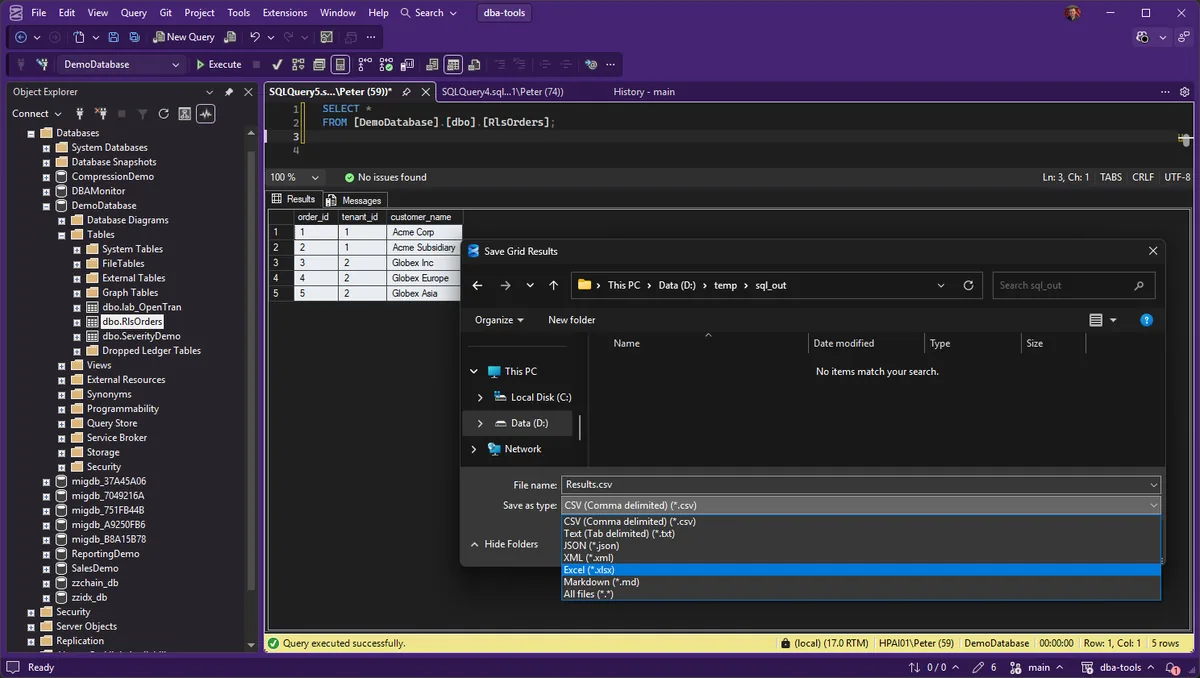
Right-click the results grid and choose Save Results As. Since SSMS 22.4.1 the file type list includes Excel, JSON, Markdown and XML, and since 22.8 it defaults to the last format you used.
The sleeper here is Markdown: query results that paste cleanly into a ticket, a wiki page, a pull request or a Teams message as a real table. An evidence table in an incident writeup now costs one right-click.
The JSON Viewer
Since 22.0 you can view JSON from the results grid properly instead of squinting at a single-line blob in a cell. If your estate has JSON columns, or you dump diagnostics as JSON, this alone justifies the upgrade from the copy-into-an-editor routine.
Zoom, and Types on Hover
- Grid zoom (22.0): zoom the results area independently of the editor. Useful at a wall-mounted screen or when walking someone through output.
- Column data type on hover (22.6): hover a column header in the grid and the tooltip includes the data type. Settles the “is that a varchar or a datetime” question without a detour to
sp_help.
The Old Trap That Still Applies
None of this changes the classic Results to Text limit: text output still truncates long values at 256 characters by default, which is a quiet way to mistake a cut-off value for the real one. The fix is in Fix Truncated Results in SSMS.
Frequently Asked Questions
Which SSMS version do I need for the Excel and Markdown export?
SSMS 22.4.1 or later for the new formats, and 22.8 or later for it to remember your last-used format. Anything current qualifies; see the install post below if you are behind.
Is this the same as copy with headers?
No. Ctrl+Shift+C (copy with headers) still exists and is still the quickest route for a few rows. Save Results As writes a proper file in the chosen format, which is what you want for anything that leaves your machine.
Related
- SSMS: The Complete Guide, the hub this post belongs to
- Fix Truncated Results in SSMS
- How to Export SQL Server Query Results to CSV, for a delimited text file when Excel, JSON or Markdown is not the target
- What’s New in SSMS 22 for DBAs
- Install and Update SSMS
Summary
Right-click, Save Results As, and pick Excel, JSON, Markdown or XML, available since SSMS 22.4.1 and sticky since 22.8. The JSON viewer, grid zoom and type-on-hover round out a results grid that finally matches how results actually get used. The 256-character Results to Text trap predates all of it and still bites, so keep that fix applied.
Leave a Reply