
Comparing Logins Between Two Servers, Attribute by Attribute
After a migration the logins on the target usually look right. The names are all there, the count matches, and the application connects. Then a week later somebody finds that a decommissioned account is enabled again, or a report that runs on the first of the month fails because a login’s default database was never created on the new server.
The reason those get through is that most migration checks count logins. A count is the one thing that survives almost every mistake you can make: recreate every login by name with fresh SIDs and no password policy, and the count still matches. This script compares the attributes instead. Run it on the source, run it on the target, diff the two CSVs, and the differences are the migration defects.
What a count check sees
Get-PostMigrationValidation and most runbooks
- 40 logins on the source, 40 on the target. PASS
- Nothing about which SID each one carries
- Nothing about whether a disabled account arrived enabled
- Nothing about a default database that does not exist here
- Passes a migration where every single login is wrong
What a parity check sees
One fingerprint row per login, diffed
sid_hexdiffers, so every database user mapped to it is orphanedis_disabledflipped from True to Falsedefault_db_statereads MISSINGpassword_hash_iddiffers, so somebody re-typed it- A row on the source with no matching row on the target
Where This Sits in a Migration
I spend a good part of my year migrating SQL Servers, from web hosting instances that carry thousands of small databases to corporate instances where one database runs into terabytes on a failover cluster or an Availability Group. The order of work is the same at both ends, and it is written up in the standalone instance runbook and the Availability Groups and failover clusters runbook. Logins are the step that looks finished long before it is.
My rule is that the login step is done when the target fingerprint matches the source, not when the script completes. Take the source CSV before the cutover, while the old server is still the one you trust. Disable the logins on the source at cutover, the way the login migration post walks through, run the generated DDL on the target, then run this script there and diff the 2 files before anyone is let back in.
A clean diff is the sign-off for that step. A row that differs is a login to fix before the first connection: a
changed sid_hex means its database users are orphaned, which
Get Orphaned Users will list, and a MISSING
default database means the first connection fails with error 18456
even though the login exists. Set the Default Database for a SQL Server Login
is the one-line fix for that second case.
Why Login Parity Matters
- A login recreated by name gets a brand new SID, so every database user mapped to the old one is orphaned. This is the single most common migration defect and it presents as a permissions problem, not as a migration problem
CREATE LOGINalways produces an enabled login. There is no syntax for creating one disabled, so a deliberately disabled account arrives on the target live, with its original password still valid- A default database that does not exist on the target stops the login connecting at all, and the error you get back reads like an authentication failure
- Password policy silently relaxing is a security finding, not a footnote, and nothing warns you
- This is a comparison, not a fixer. It changes nothing. It gives you 2 CSVs and a diff
The longer list of what a login script drops, and the order of work that avoids it, is in SQL Server Login Migration: What Gets Silently Left Behind.
When to Run This Script
- Before logins are re-enabled after a cutover, as the proof that the login step completed
- Immediately after any migration, restore-to-new-server, or DR build, before you hand it over
- Before a cutover, on the source, so you have a fingerprint to compare against afterwards
- When an application authenticates fine on the old server and fails on the new one
- Periodically against a DR replica that is supposed to mirror production’s logins
- After anyone has run a login-transfer script, including this repo’s own generator
The Script
Read-only, no cursors, no temp tables, and no connection between the two servers. That last part is deliberate: run it twice and diff, and it works across an air gap with no linked server to set up.
- Tested on: SQL Server 2025 (RTM CU8), Windows lab instance
- Last verified: 2026-10-12 (real run; the screenshots below are from it)
- Permissions: VIEW ANY DEFINITION; CONTROL SERVER for the password fingerprint, which otherwise reads no-permission
- Safety: read-only, impact low
/*
Script Name : Get-LoginMigrationParity
Category    : migration
Purpose     : Compare logins between two servers to verify a migration. Returns one comparable
              fingerprint row per login (SID, disabled state, deny connect, default database
              and language, password policy, password hash, server roles). Run on SOURCE and
              TARGET, export both as CSV, then diff. Catches what a login migration silently
              drops and a login count check cannot see.
Author      : Peter Whyte (https://sqldba.blog/dba-scripts-get-login-migration-parity/)
Requires    : VIEW ANY DEFINITION (VIEW SERVER STATE for full detail); CONTROL SERVER to
              compare password hashes, which are otherwise reported as 'no-permission'
Notes       : Get-PostMigrationValidation.sql compares COUNTS. A count matches while every
              login on the target is enabled, mapped to the wrong default database and
              carrying a fresh SID, so a count check passes a migration that is wrong.
              This script compares the attributes themselves.
*/
-- SAFE:ReadOnly
-- IMPACT:Low
SET NOCOUNT ON;
-- The server_roles column uses FOR XML PATH ... .value(), an XML data type method, which
-- requires QUOTED_IDENTIFIER ON. sqlcmd defaults it OFF, so without this the whole script
-- fails with Msg 1934 rather than returning a row.
SET QUOTED_IDENTIFIER ON;

/*
  DESIGN: deliberately one flat, ordered, deterministic row per login so a plain text diff
  of two CSVs is the whole comparison. No cursors, no temp tables, no server-to-server
  connection: run it twice and diff, which works across an air gap and needs no linked server.

  Columns chosen because each one is something a real migration loses quietly:
    sid_hex           - a login recreated BY NAME gets a fresh SID, orphaning every database
                        user mapped to it. The single most common migration defect.
    is_disabled       - CREATE LOGIN always produces an ENABLED login. A disabled account
                        comes back live on the target with its original password valid.
    connect_denied    - an explicit DENY CONNECT SQL is a separate object from is_disabled
                        and is not carried by CREATE LOGIN either.
    default_database  - if it does not exist on the target the login cannot connect at all.
    default_language  - changes date parsing and error message language for that session.
    check_policy /
    check_expiration  - password policy silently relaxing on the target is a security finding.
    password_hash_id  - short fingerprint of the stored hash, so you can compare without
                        putting a full hash in a CSV that gets emailed around. Read it
                        carefully: the hash is SALTED, so the same password typed twice
                        produces two different hashes. A matching fingerprint therefore
                        proves the login was scripted WITH PASSWORD = <hash> HASHED and the
                        hash carried across. A differing one means somebody re-typed the
                        password, even if they typed the same password.
    server_roles      - fixed and user-defined server role membership, comma separated.

  HOW TO USE
    1. Run on SOURCE, save CSV.
    2. Run on TARGET, save CSV.
    3. Diff. Every row should match except password_hash_id for Windows logins (always 'n/a').
    4. Rows present on source and missing on target are logins that did not migrate.

  This script never writes. Nothing here changes a login.
*/

SELECT
    p.name AS login_name,
    p.type_desc AS login_type,

    -- A login recreated by name gets a new SID. This column is the one that matters most.
    CONVERT(nvarchar(200), p.sid, 1) AS sid_hex,

    p.is_disabled,

    -- DENY CONNECT SQL is a permission, not a flag on the principal, so it is easy to miss.
    CASE WHEN EXISTS (
            SELECT 1
            FROM sys.server_permissions sp
            WHERE sp.grantee_principal_id = p.principal_id
              AND sp.permission_name      = N'CONNECT SQL'
              AND sp.state                = 'D')      -- D = DENY
         THEN 1 ELSE 0 END AS connect_denied,

    ISNULL(p.default_database_name, N'(none)') AS default_database,

    -- Does that default database actually exist here? Blank on the target means the login
    -- is created but cannot connect, which reads as an authentication problem.
    CASE WHEN p.default_database_name IS NULL THEN 'n/a'
         WHEN DB_ID(p.default_database_name) IS NULL THEN 'MISSING'
         ELSE 'present' END AS default_db_state,

    ISNULL(p.default_language_name, N'(none)') AS default_language,

    CASE WHEN p.type = 'S' THEN CAST(sl.is_policy_checked AS nvarchar(5)) ELSE 'n/a' END AS check_policy,
    CASE WHEN p.type = 'S' THEN CAST(sl.is_expiration_checked AS nvarchar(5)) ELSE 'n/a' END AS check_expiration,

    -- Fingerprint, not the hash: enough to prove the password came across, safe to share.
    CASE WHEN p.type <> 'S' THEN 'n/a'
         WHEN sl.password_hash IS NULL THEN 'no-permission'
         ELSE RIGHT(CONVERT(nvarchar(300), sl.password_hash, 1), 12)
    END AS password_hash_id,

    STUFF((
        SELECT N', ' + r.name
        FROM sys.server_role_members srm
        INNER JOIN sys.server_principals r ON srm.role_principal_id = r.principal_id
        WHERE srm.member_principal_id = p.principal_id
        ORDER BY r.name
        FOR XML PATH(''), TYPE).value('.', 'nvarchar(max)'), 1, 2, N'') AS server_roles,

    CONVERT(varchar(19), p.create_date, 120) AS create_date,
    CONVERT(varchar(19), p.modify_date, 120) AS modify_date
FROM sys.server_principals AS p
LEFT JOIN sys.sql_logins AS sl ON sl.principal_id = p.principal_id
-- 'S' = SQL_LOGIN, 'U' = WINDOWS_LOGIN, 'G' = WINDOWS_GROUP.
-- There is no type 'W'; using one silently returns no Windows logins at all.
WHERE p.type IN ('S', 'U', 'G')
  AND p.name NOT LIKE N'##%##'          -- certificate-backed internal principals
  AND p.name NOT LIKE N'NT SERVICE\%'   -- belong to the target's own installation
  AND p.name NOT LIKE N'NT AUTHORITY\%'
  AND p.name NOT LIKE N'BUILTIN\%'
ORDER BY p.name;
How To Run From The Repo
# Clone dba-tools repo:
git clone https://github.com/peterwhyte-lgtm/dba-tools

# Initialize environment:
cd dba-tools
.\Initialize-Environment.ps1

# Local instance, results in the terminal:
.\run.ps1 Get-LoginMigrationParity

# The real workflow: CSV from each server, then diff
.\powershell\wrappers\migration\Get-LoginMigrationParity.ps1 -ServerInstance SOURCE -OutputFormat Csv -OutputPath .\output-files\migration\source-logins.csv
.\powershell\wrappers\migration\Get-LoginMigrationParity.ps1 -ServerInstance TARGET -OutputFormat Csv -OutputPath .\output-files\migration\target-logins.csv
Then diff them with whatever you already use:
Compare-Object (Import-Csv .\output-files\migration\source-logins.csv) `
               (Import-Csv .\output-files\migration\target-logins.csv) `
               -Property login_name, sid_hex, is_disabled, default_database, default_language, password_hash_id
This script lives in the repo at:
sql/migration/Get-LoginMigrationParity.sqlpowershell/wrappers/migration/Get-LoginMigrationParity.ps1
Example Output
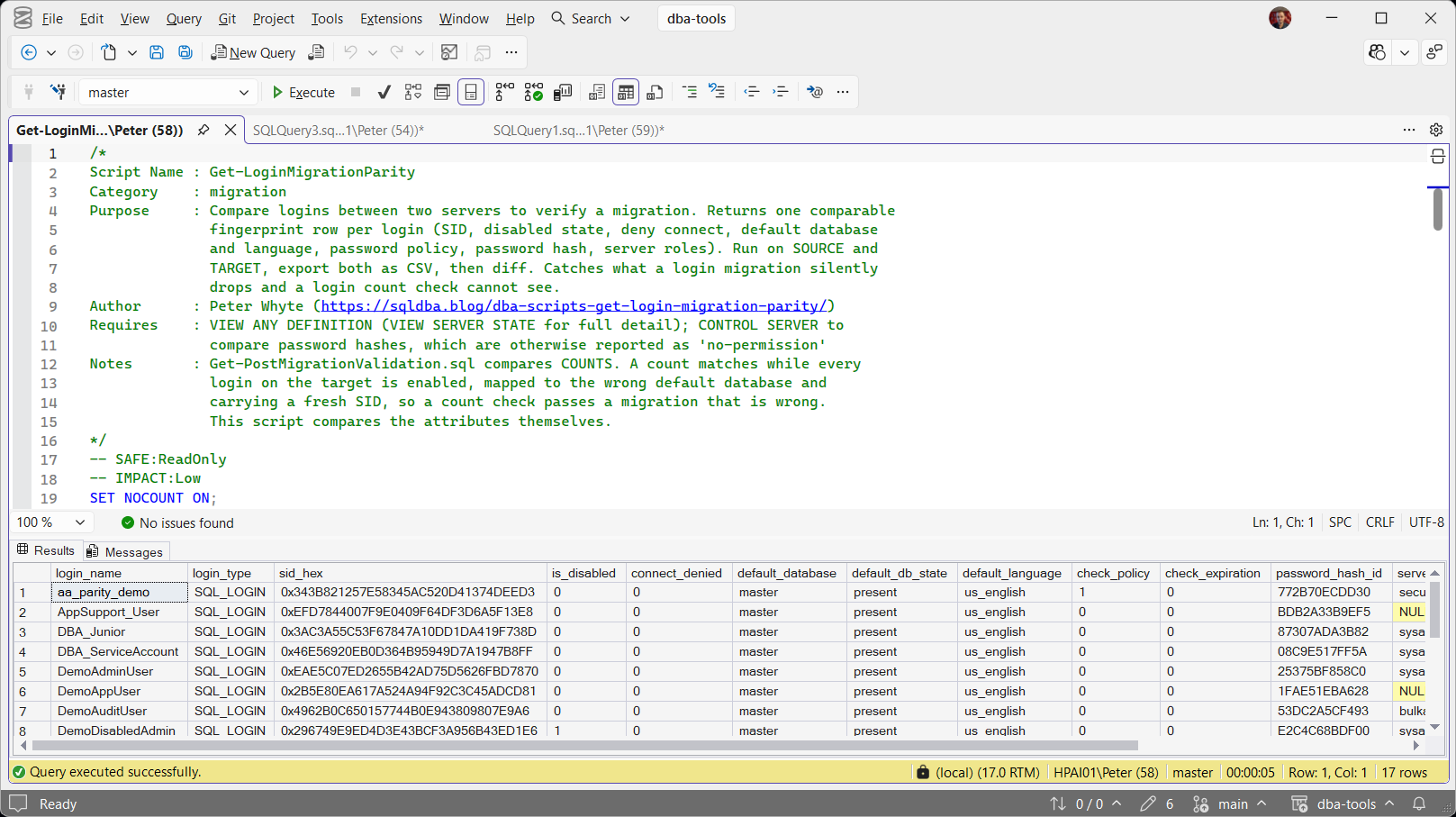
One row per login, ordered by name, so a plain text diff is the whole comparison. Run on the lab before a login was migrated the naive way:
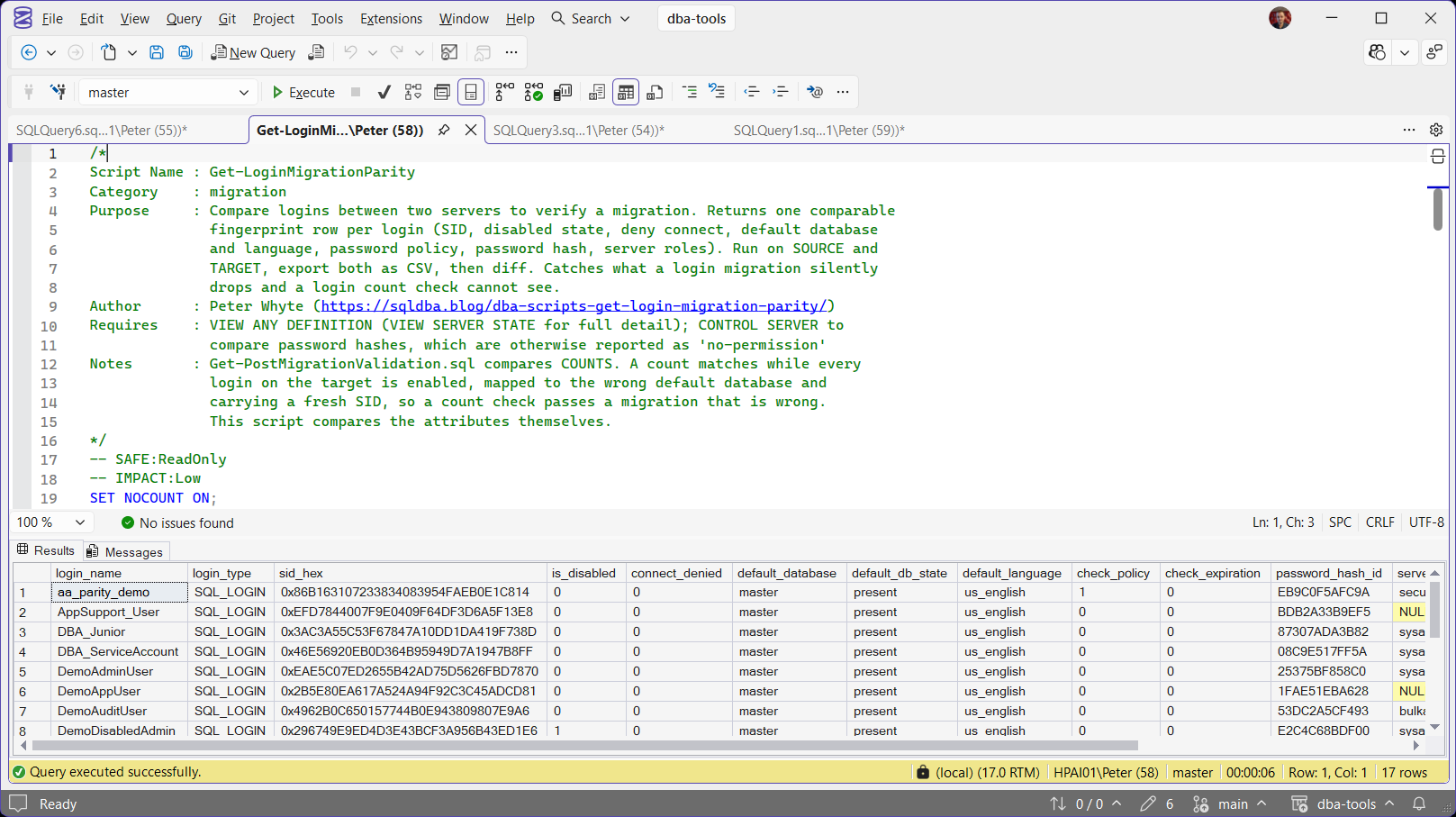
And again after aa_parity_demo was dropped and recreated by name with the same password. The name, the server role and the settings all survive. sid_hex and password_hash_id do not:
The case this was written for, measured
A throwaway login was set up the way a real one often is: disabled, in securityadmin, on the
British language, with password policy on. It was then migrated the naive way, recreated by name
with the same password typed in again. Here is what each check saw:
                   sid_hex                             is_disabled  language     policy  password_hash_id  roles
SOURCE             0x4E3C11409C4560468284478D71FFDA9F   True         British      True    B3856401B2FD      1
TARGET             0x948A5E6C96CF4F4B9671C50720AEB08D   False        us_english   True    2DF417F85CD9      1

count check        source 18  ->  target 18   PASSES, migration looks complete
The count check passes. 4 attributes are wrong: a new SID that orphans every database user mapped to it, a security account quietly re-enabled, a language change that alters date parsing, and a password hash that proves the password was re-typed rather than carried across.
Understanding the Results
sid_hexALTER USER ... WITH LOGIN. Running CREATE USER for a user that already exists fails with error 15023 instead.Act when it differs between source and target for the same login_name.is_disabledCREATE LOGIN always makes an enabled login, so a disabled account arrives live with its original password.Act when it is 1 on the source and 0 on the target. That is a security finding, not housekeeping.default_databasedefault_db_statecheck_policycheck_expirationserver_rolespassword_hash_idWITH PASSWORD = <hash> HASHED, a difference means somebody typed it again. Windows logins read n/a, and without CONTROL SERVER it reads no-permission.connect_deniedDENY CONNECT SQL. It is a permission, not a flag on the principal, so a login can be enabled and still correctly refused.default_languagelogin_namelogin_typecreate_datemodify_dateA row present on the source and absent from the target is the simplest finding of all: that login did not migrate.
Best Practices
- Before cutoverTake the source fingerprint before the cutover, not after. Once the old server is decommissioned you have nothing left to compare against
- EvidenceKeep both CSVs with the change record. They are small, they are plain text, and they are the evidence that the migration was complete
- DiffDiff on
login_nameandsid_hexfirst. Everything else is a detail next to a SID mismatch - ExpectExpect
password_hash_idto readn/afor Windows logins. There is no stored hash, and that is correct rather than a gap - PermissionsRun it as a sysadmin, or accept a gap. Without
CONTROL SERVERthe hash column readsno-permission, and the script says so rather than quietly reporting a blank - NextDo not stop at logins. Parity at the server level says nothing about database users. Pair it with Fix Orphaned Users
Microsoft Learn: sys.server_principals · sys.server_permissions · sys.server_role_members
Frequently Asked Questions
Why not just compare login counts?
Because a count survives nearly every mistake you can make. Recreate all 40 logins by name, with fresh SIDs, no password policy and every disabled account enabled, and the count is still 40. Counting tells you nothing arrived missing. It cannot tell you anything arrived wrong.
Do I need a linked server between the two instances?
No, and that is deliberate. The script runs standalone on one instance and writes a CSV. You compare the files, not the servers. That works across an air gap, across a firewall, and after the source has been taken off the network, as long as you captured its CSV first.
The password_hash_id differs but I know the password is the same. Is that a bug?
No, and it is the most useful column to understand properly. SQL Server salts the password hash, so creating two logins with an identical password produces two completely different hashes. A matching fingerprint proves the login was scripted with WITH PASSWORD = <hash> HASHED and the stored hash was carried across. A differing one tells you somebody re-typed the password by hand, which is worth knowing even when they typed the right one.
Why are NT SERVICE and BUILTIN logins excluded?
They belong to the target instance’s own installation rather than to your migration. Every SQL Server creates its own service accounts and built-in groups, so including them would guarantee a difference on every single run and train you to ignore the output.
What does connect_denied show that is_disabled does not?
They are two different mechanisms that look similar from the outside. is_disabled is a flag on the principal. DENY CONNECT SQL is a permission stored separately, and a login-transfer script that carries the principal will not carry the permission. A login can be enabled on the target and still correctly refused on the source, which is a difference worth seeing.
Can I run this against a server I only have read access to?
Mostly. VIEW ANY DEFINITION gets you every column except the password fingerprint, which needs CONTROL SERVER. Without it the column reads no-permission rather than blank, so you can tell the difference between "no hash" and "not allowed to look".
Summary
Counting logins proves nothing arrived missing. It cannot prove anything arrived correct. This
script produces one deterministic row per login covering the attributes a migration actually drops:
the SID, the disabled state, an explicit deny, the default database and language, the password
policy, a safe fingerprint of the stored hash, and server role membership. Run it on both servers,
diff the CSVs, and read sid_hex first.
Related
You may also find these useful:
- Generate Login Script, the generator that produces the DDL this script then verifies
- Migration Login Audit and Post-Migration Validation, the count-level companion to this one
- Generate User Mapping Script, the database users that go with the logins
- Creating SQL Logins on an Availability Group, the same SID on every replica
- Login Failed or Permission Denied in SQL Server, the router for the first connection that fails after a cutover
- Get Migration Risk Assessment, the pre-flight on the source
- Get Sysadmin Members, who holds sysadmin on the new server once the logins are across
- DBA Scripts: The Complete Guide, the map across every script on this site
Leave a Reply