
One Row Per Database, Every Issue Flagged in One Column
Checking every database on an instance one at a time, state here, recovery model there, backup age in a third window, doesn’t scale, and it’s exactly the kind of routine check that gets skipped when things are busy. The gaps that matter (a database nobody’s backed up, a log backup that quietly stopped running, auto-shrink left on from a migration years ago) hide in that skipped check.
Get-DatabaseSummary answers the “is everything actually fine” question in one query: every database on the instance, one row each, with a notes column that aggregates severity-prefixed issues (CRIT:, WARN:, INFO:) so you can scan for problems instead of reading every column by eye.
Why Database Summary Matters
This is the script for the daily or weekly “is anything quietly wrong” pass, distinct from a deep-dive into any one area:
- The
notescolumn does the triage for you.CRIT:not-online,WARN:never-backed-up,WARN:auto_shrink,WARN:log-backup-overdue, and anINFO:log-wait=...flag for any database stuck on an unexpected log reuse wait. A clean database has a blank notes column; anything else is worth 10 seconds of your attention. - Backup currency is checked per database, not assumed sitewide.
days_since_fulland the log-backup-overdue flag catch the one database that fell out of the maintenance plan without anyone noticing. auto_shrinkandauto_closeare 2 of the most common inherited misconfigurations on an older server. Both are cheap to flag here and expensive to leave running unnoticed.- File sizes are included so a database that’s grown unexpectedly shows up in the same pass as a database that’s stopped taking backups, rather than needing a second script.
When to Run This Script
- As a standing daily or weekly check, the fastest way to confirm nothing on the instance quietly broke
- After inheriting a server, to get an honest one-screen view of every database’s health before digging into any one of them
- Alongside Get Database Health when you want the full-instance view rather than a single database’s detail
- Before and after any maintenance window, to confirm the
notescolumn looks the same on both sides
The Script
Run the following script against your SQL Server instance.
- Tested on: SQL Server 2025 (RTM CU8), Windows lab instance
- Last verified: 2026-10-31 (real run, results captured below)
- Permissions: VIEW ANY DATABASE, SELECT on msdb.dbo.backupset
- Safety: read-only, impact low
The backup flags (a full older than 7 days, no log backup for 24 hours on a FULL recovery user database) are rules of thumb, not hard limits; tune them to your backup schedule.
/*
Script Name : Get-DatabaseSummary
Category    : monitoring
Purpose     : One-row-per-database view of every database on the instance: state,
              recovery model, log reuse wait, file sizes, backup currency, and
              configuration flags. Notes column aggregates actionable issues.
              Reads from system metadata and msdb only — no per-database scan.
              For used vs free space detail run Get-DatabaseSizesAndFreeSpace.
              For file-level detail run Get-DatabaseFilesDetail.
              Backup flags follow Microsoft's system database guidance: master, model and
              msdb need full backups (model's age is not checked), tempdb and database
              snapshots cannot be backed up. A distribution database is checked like a user
              database. Tested on SQL Server 2025.
Author      : Peter Whyte (https://sqldba.blog/dba-scripts-get-database-summary/)
Requires    : VIEW ANY DATABASE, SELECT on msdb.dbo.backupset
*/
-- SAFE:ReadOnly
-- IMPACT:Low
SET NOCOUNT ON;

WITH backup_dates AS (
    SELECT
        database_name,
        MAX(CASE WHEN type = 'D' THEN backup_finish_date END) AS last_full,
        /* Copy-only log backups do not truncate the log, so they must not satisfy the
           WARN:log-backup-overdue test below. Copy-only fulls stay counted above. */
        MAX(CASE WHEN type = 'L' AND is_copy_only = 0 THEN backup_finish_date END) AS last_log
    FROM msdb.dbo.backupset
    GROUP BY database_name
),
file_sizes AS (
    SELECT
        database_id,
        CAST(ROUND(SUM(CASE WHEN type = 0 THEN size * 8.0 / 1024 ELSE 0 END), 1) AS DECIMAL(18,1)) AS data_mb,
        CAST(ROUND(SUM(CASE WHEN type = 1 THEN size * 8.0 / 1024 ELSE 0 END), 1) AS DECIMAL(18,1)) AS log_mb,
        SUM(CASE WHEN type = 0 THEN 1 ELSE 0 END) AS data_file_count
    FROM sys.master_files
    GROUP BY database_id
)
SELECT
    d.name AS database_name,
    d.database_id,
    d.state_desc,
    d.recovery_model_desc AS recovery_model,
    d.log_reuse_wait_desc AS log_reuse_wait,
    d.compatibility_level AS compat_level,
    SUSER_SNAME(d.owner_sid) COLLATE DATABASE_DEFAULT AS owner,
    CAST(d.create_date AS DATE) AS create_date,
    fs.data_mb,
    fs.log_mb,
    fs.data_file_count,
    CASE d.is_auto_shrink_on WHEN 1 THEN 'YES' ELSE 'no' END AS auto_shrink,
    CASE d.is_auto_close_on WHEN 1 THEN 'YES' ELSE 'no' END AS auto_close,
    CASE d.is_read_only WHEN 1 THEN 'YES' ELSE 'no' END AS read_only,
    CAST(bd.last_full AS DATE) AS last_full_backup,
    CAST(bd.last_log AS DATE) AS last_log_backup,
    DATEDIFF(DAY, bd.last_full, GETDATE()) AS days_since_full,
    -- Severity-prefixed issue flags; NULL = clean
    NULLIF(RTRIM(
          CASE WHEN d.state_desc <> 'ONLINE'
               THEN 'CRIT:not-online ' ELSE '' END
        + CASE WHEN d.is_auto_shrink_on = 1
               THEN 'WARN:auto_shrink ' ELSE '' END
        + CASE WHEN d.is_auto_close_on = 1
               THEN 'WARN:auto_close ' ELSE '' END
        -- Full backup warnings cover master, model and msdb too: Microsoft lists all three as
        -- "backups required". tempdb (2) cannot be backed up, and a database snapshot
        -- (source_database_id set) cannot either, so both are skipped.
        + CASE WHEN d.database_id <> 2 AND d.source_database_id IS NULL AND bd.last_full IS NULL
               THEN 'WARN:never-backed-up ' ELSE '' END
        -- model rarely changes (back it up after customising it), so its age is not checked
        + CASE WHEN d.database_id NOT IN (2, 3) AND d.source_database_id IS NULL AND bd.last_full IS NOT NULL
                    AND DATEDIFF(DAY, bd.last_full, GETDATE()) > 7
               THEN 'WARN:full-' + CAST(DATEDIFF(DAY, bd.last_full, GETDATE()) AS VARCHAR) + 'd-ago '
               ELSE '' END
        -- Log backups: user databases only. master does not support them and model does not
        -- need them, even though model ships in FULL recovery.
        + CASE WHEN d.database_id > 4 AND d.source_database_id IS NULL AND d.recovery_model_desc = 'FULL'
                    AND (bd.last_log IS NULL OR DATEDIFF(HOUR, bd.last_log, GETDATE()) > 24)
               THEN 'WARN:log-backup-overdue ' ELSE '' END
        -- Log reuse waits other than NOTHING and LOG_BACKUP (expected) are worth noting
        + CASE WHEN d.log_reuse_wait_desc NOT IN ('NOTHING', 'LOG_BACKUP')
               THEN 'INFO:log-wait=' + d.log_reuse_wait_desc + ' ' ELSE '' END
    ), '') AS notes
FROM sys.databases d
LEFT JOIN file_sizes fs ON fs.database_id = d.database_id
LEFT JOIN backup_dates bd ON bd.database_name = d.name
ORDER BY d.database_id;
Joins sys.databases against sys.master_files (for size) and msdb.dbo.backupset (for backup currency), then builds the notes column from a set of severity-prefixed CASE checks. Reads system metadata and msdb only, no per-database scan, so it’s cheap to run often.
How To Run From The Repo
Clone DBA Tools, initialize and run the script:
# Clone dba-tools repo:
git clone https://github.com/peterwhyte-lgtm/dba-tools

# Initialize environment:
cd dba-tools
.\Initialize-Environment.ps1

# One-row-per-database health summary with an aggregated issues column:
.\run.ps1 Get-DatabaseSummary

# To run against a remote sql server:
.\run.ps1 Get-DatabaseSummary -ServerInstance SQLSERVER01
This script lives in the repo at:
Example Output
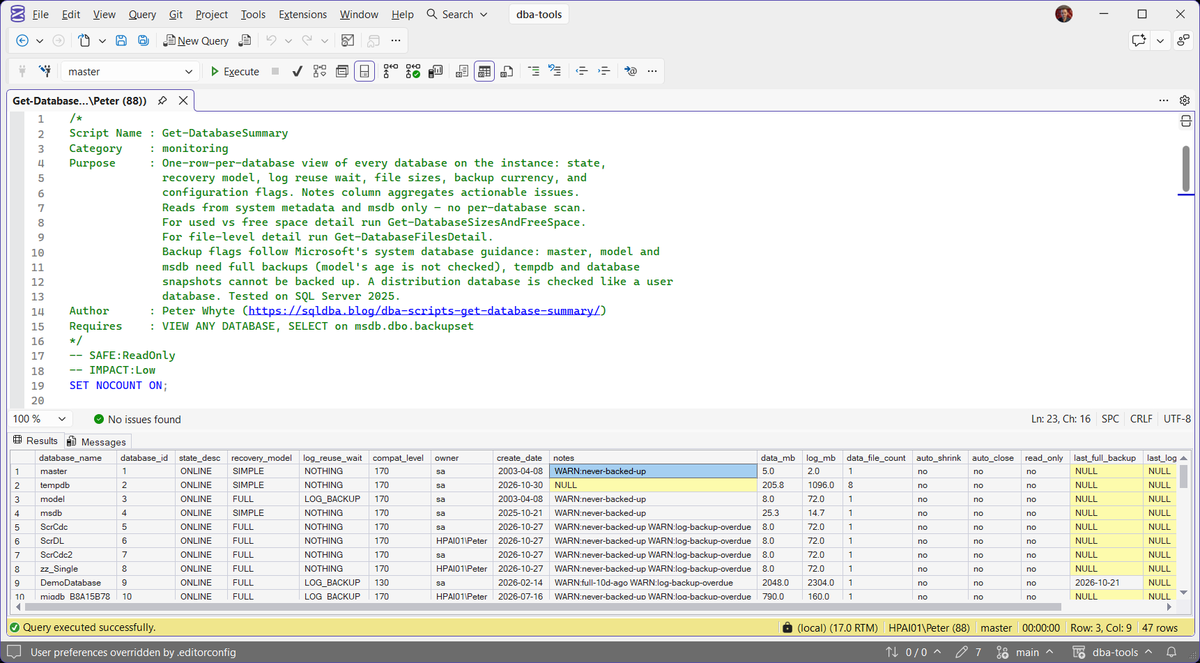
Understanding the Results
The capture above shows the shape you are reading for. The 4 system databases sit at the top, and master, model and msdb each read WARN:never-backed-up on a lab instance where none of them has been backed up. Microsoft lists all three as backups required, so the script holds them to the full backup check, while tempdb cannot be backed up and its notes read NULL. Database snapshots read NULL too, because a snapshot cannot be backed up; Database Snapshot Inventory is the script for those. Below them sit the user databases, and on this lab most of them have never been backed up at all. DemoDatabase shows the other shape: WARN:full-10d-ago WARN:log-backup-overdue, a full backup that has drifted past the 7 day line, and a FULL recovery database with no log backup in the last 24 hours.
Notes-column prefixes, in the order the script checks them:
CRIT:not-onlineONLINE. Everything else on the row is secondary until you understand this one.Act when this appears at all.WARN:never-backed-upmsdb.dbo.backupset. Raised for user databases and for master, model and msdb, never for tempdb or a database snapshot, since neither can be backed up. The most serious of the backup warnings, because there is nothing to restore from.WARN:full-Nd-agomodel is left out of this one, because it rarely changes and only needs a fresh full after you customise it.WARN:log-backup-overduemaster does not support log backups, and model ships in FULL recovery but does not need them.WARN:auto_shrink and WARN:auto_closeINFO:log-wait=...log_reuse_wait_desc is something other than the two steady states, NOTHING and LOG_BACKUP. Informational rather than a fault, but worth reading.And the columns themselves, one row per database:
notesCRIT:. That prefix means the database is not serving right now, and every other prefix on the row is secondary until it is understood.database_namedatabase_iddatabase_id 1 to 4 are master, tempdb, model and msdb. The full backup checks cover master, model and msdb as well as user databases, the log backup check covers user databases only, and tempdb and database snapshots are skipped because neither can be backed up. A distribution database is checked like any user database.state_descONLINE, or the reason it is not: RESTORING, RECOVERY_PENDING, SUSPECT, OFFLINE, EMERGENCY. Anything other than ONLINE is what raises the CRIT: flag in the notes column.recovery_modellog_reuse_waitLOG_BACKUP beside FULL is the expected shape of a database waiting on its log backup job, and beside SIMPLE it is a contradiction.Act when log_reuse_wait reads anything other than NOTHING or LOG_BACKUP. Those two are the expected steady states, and the rest each name a specific blocker.auto_shrinkauto_closeread_onlyYES or no. The first two are almost always inherited from an old build rather than chosen, and the third is here so a database that is meant to be read only does not get chased for a stale backup.Act when either of the first two reads YES. The health check reviewer raises a warning on each, one for fragmentation and random reads, the other for connection overhead.last_full_backuplast_log_backupdays_since_fullmsdb, as dates rather than timestamps. Copy-only log backups are excluded from last_log_backup, because one of those does not truncate the log and so must not satisfy the overdue test.Act when days_since_full is wider than your own schedule allows, or last_log_backup is blank on a FULL recovery database. Blank there means no log backup has ever run.data_mblog_mbdata_file_countcompat_levelownercreate_datesa is worth knowing before that account is ever disabled.Best Practices
- Run this on a schedule (daily is reasonable given how cheap the query is) rather than only when something’s already gone wrong.
- Treat a blank
notescolumn as the actual goal state for every database, system databases included, not just an absence of alarm. - Pair it with Get Database Health when a specific database’s
notescolumn flags something. This script tells you which database needs attention; that one goes deeper.
Microsoft’s reference covers sys.master_files and sys.databases in full.
Frequently Asked Questions
I renamed a database and now it reads WARN:never-backed-up.
msdb.dbo.backupset records the name the database had when the backup ran, and this script joins on that name, so a rename orphans the whole history until the next backup runs under the new name. You get the same effect after restoring onto a new server, where msdb starts empty and every database reads as never backed up on day one.
Does a blank notes column mean my backups are restorable?
No, and it is worth being clear about the difference. Every backup check here reads msdb history and asks 2 things: does a row exist, and is it recent enough. It says nothing about whether the file is still on disk, whether the chain has a gap, or whether a restore would actually succeed. A blank notes column means nothing has been missed recently, not that you are covered.
Do copy-only backups affect these warnings?
For log backups, deliberately not. The log-backup check ignores copy-only backups, because a copy-only log backup writes a valid file and truncates nothing, so counting it would clear WARN:log-backup-overdue while the log carried on growing. Full backups are treated the opposite way and copy-only fulls still count, because a copy-only full is a perfectly good restore base.
days_since_full is NULL. Is that the same as WARN:never-backed-up?
For a user database, master, model or msdb, yes, they are the same fact shown twice: no full backup means there is no date to count from. The exceptions are tempdb and database snapshots. Neither can be backed up, so an empty backup date there is expected and the notes column stays blank.
Summary
Get-DatabaseSummary is the script to run when you want one honest answer to “is anything on this instance quietly broken” without opening a single database properties dialog. The notes column does the triage work, so a clean run costs 10 seconds of reading and a genuine finding jumps straight off the page, the way DemoDatabase‘s WARN:log-backup-overdue did in the run behind the capture above.
It’s not a replacement for Get Database Inventory‘s migration-focused view or Get Database Health‘s single-database depth. Run this one on a schedule, and reach for those two when it flags something worth a closer look.
Related Scripts
You may also find these scripts useful:
- Database Snapshot Inventory
- Linked Server Inventory
- Login and Job Inventory
- OS and Hardware Info
- Patch Level
- Services Information
- DBA Scripts: The Complete Guide, the map across every script on this site
Leave a Reply