
There is no NOW() in SQL Server. Bring the habit over from MySQL or PostgreSQL and you get this:
TODAY() fails the same way (SQL Server 2025 adds CURRENT_DATE). These are the equivalents that work on every version, for now and for today:
-- The current date and time, and today's date
SELECT GETDATE() AS now_datetime,
       SYSDATETIME() AS now_datetime2,
       CAST(GETDATE() AS date) AS today;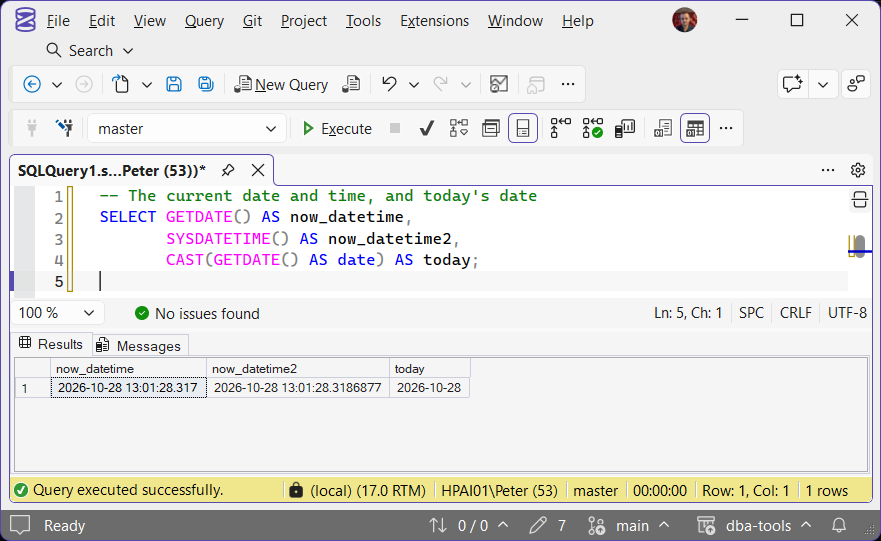
Every function that returns the current date and time reads the same clock, the operating system clock of the server. They differ in precision, in whether you get local time or UTC, and in whether the time zone comes with the value.
SYSUTCDATETIME() for anything you store. Both return datetime2(7). GETDATE() still works and returns the older datetime.All of them in one query, run on the same server in the same second, in London during British Summer Time:
-- Every current date and time function, one row each
SELECT 'GETDATE()' AS fn, CONVERT(varchar(40), GETDATE(), 121) AS value, 'datetime' AS returns
UNION ALL SELECT 'CURRENT_TIMESTAMP', CONVERT(varchar(40), CURRENT_TIMESTAMP, 121), 'datetime'
UNION ALL SELECT 'SYSDATETIME()', CONVERT(varchar(40), SYSDATETIME(), 121), 'datetime2(7)'
UNION ALL SELECT 'GETUTCDATE()', CONVERT(varchar(40), GETUTCDATE(), 121), 'datetime'
UNION ALL SELECT 'SYSUTCDATETIME()', CONVERT(varchar(40), SYSUTCDATETIME(), 121), 'datetime2(7)'
UNION ALL SELECT 'SYSDATETIMEOFFSET()', CONVERT(varchar(40), SYSDATETIMEOFFSET(), 121), 'datetimeoffset(7)';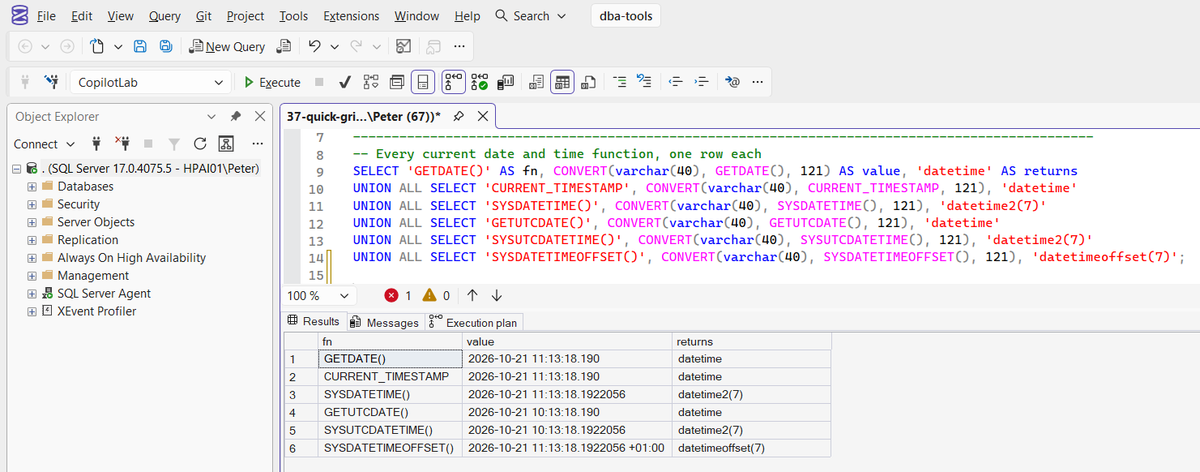
Read across the rows: the datetime pair stops at 3 decimal places and lands on .190 where the datetime2 pair reads .1922056, the UTC pair is an hour behind local time, and only the last one carries the +01:00 that says why.
GETDATE(): Returns datetime (Legacy Default)
-- get current date and time
SELECT GETDATE() AS CurrentDateTime;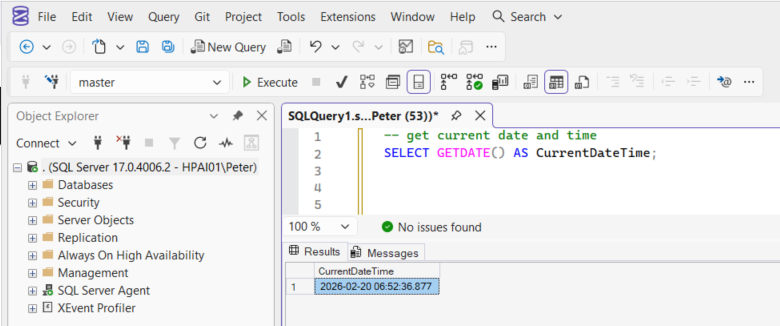
GETDATE() returns the current server date and time as datetime, read from the operating system of the server the instance runs on (GETDATE on Microsoft Learn).
- Precision: ~3 milliseconds
- Return type:
datetime
datetime uses rounded fractional seconds and is mainly seen in older schema designs. It stores time in increments of .000, .003, or .007 seconds due to internal rounding behaviour.
It still works. It just should not be your default today.
CURRENT_TIMESTAMP is the same function under its ANSI name. It returns the same datetime value, is written without brackets, and is what you will see in column defaults that were scripted from other databases.
SYSDATETIME(): Returns datetime2 (Modern Default)
-- get precise current date and time
SELECT SYSDATETIME() AS CurrentDateTime;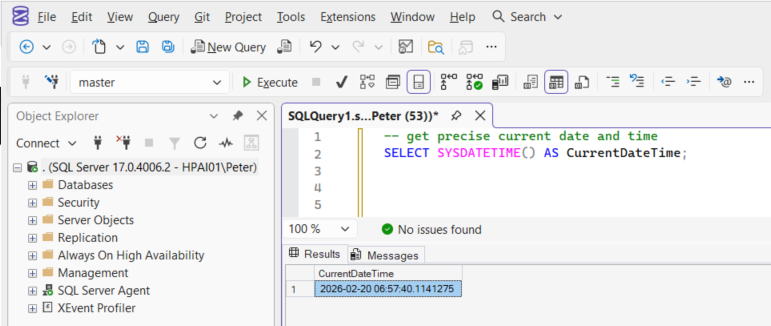
SYSDATETIME() returns the current date and time as datetime2(7).
- Precision: 100 nanoseconds
- Return type:
datetime2(7)
It is preferred because:
datetime2has higher precision- It avoids the rounding behaviour of
datetime - It supports a wider date range
- It aligns with modern schema design
It also allows you to explicitly control fractional precision (for example, datetime2(3) or datetime2(7)).
For new tables, use datetime2. For the audit column itself, use SYSUTCDATETIME() below.
UTC Variants
If your system spans regions or integrates with cloud services, use UTC.
SELECT GETUTCDATE() AS CurrentUtcDateTime;
SELECT SYSUTCDATETIME() AS CurrentUtcDateTimeHighPrecision;
These functions still rely on the server’s Windows clock, but return the time converted to Coordinated Universal Time (UTC).
UTC avoids:
- Daylight saving ambiguity (duplicate local timestamps)
- Cross-region confusion
- Log correlation problems across systems
For modern systems, SYSUTCDATETIME() stored in datetime2 is usually the safest default.
UTC standardises how time is represented. It does not change the underlying time source.
SYSDATETIMEOFFSET(): When You Need the Time Zone Attached
Returns datetimeoffset(7), the same precision as SYSDATETIME(), but with the server’s UTC offset stored alongside the value (for example 2026-07-30 14:22:01.1234567 +01:00). This is different from converting to UTC: the value stays in local time, but carries enough information for anything downstream to compute UTC or any other timezone without needing to know what timezone the server itself was in when the row was written.
SELECT SYSDATETIMEOFFSET() AS CurrentDateTimeWithOffset;Reach for this over SYSDATETIME() plus a separate UTC column when logs or audit rows might genuinely need to answer “what was local time at the point of capture,” not just “put everything on one common clock.”
The Time in Another Time Zone
AT TIME ZONE (SQL Server 2016 and later) converts a value to any Windows time zone and gets daylight saving right:
SELECT SYSDATETIMEOFFSET() AT TIME ZONE 'Eastern Standard Time' AS new_york,
       SYSUTCDATETIME() AT TIME ZONE 'UTC' AT TIME ZONE 'GMT Standard Time' AS london;
On the lab that returned 2026-10-13 08:32:52.9410689 -04:00 for New York. A value with no offset, such as SYSUTCDATETIME(), needs the first AT TIME ZONE 'UTC' to say what it is before it can be converted. sys.time_zone_info lists every name SQL Server accepts.
On Azure SQL Database every function above returns UTC by default, because the instance time zone is UTC there and cannot be changed. What can be set is a database or session time zone, with ALTER DATABASE SCOPED CONFIGURATION SET TIME_ZONE or SET TIME ZONE, and when one is set these functions return that local time instead (SET TIME ZONE on Microsoft Learn). If an app moved from a server in London to Azure and its timestamps went an hour out in summer, that is why. Use AT TIME ZONE for display, and store UTC. Azure SQL Managed Instance takes its time zone from a setting chosen when the instance is created.
Datetime vs Datetime2
| Feature | datetime | datetime2 |
|---|---|---|
| Precision | 3 ms | Up to 100 ns |
| Range | 1753 to 9999 | 0001 to 9999 |
| Storage | 8 bytes | 6 to 8 bytes |
| Rounding | Yes | No |
Key differences:
datetimerounds fractional secondsdatetime2stores exact fractional precisiondatetime2supports a wider rangedatetime2is the modern default
For new schema, use datetime2. There is rarely a reason to introduce datetime today.
Formatting
Formatting should be handled in the application layer where possible.
If you need formatting in T-SQL:
CONVERT() (faster)
SELECT CONVERT(char(10), GETDATE(), 23) AS ISODate; -- yyyy-mm-ddFORMAT() (slower)
SELECT FORMAT(GETDATE(), 'yyyy-MM-dd') AS FormattedDate;FORMAT() is CLR-based and significantly slower. Avoid it in large result sets.
Casting
SELECT CAST(GETDATE() AS date) AS CurrentDateOnly;
SELECT CAST(GETDATE() AS time) AS CurrentTimeOnly;
On SQL Server 2025, SELECT CURRENT_DATE; returns today’s date as date directly. On earlier versions, use the CAST above.
To standardise precision:
SELECT CAST(SYSDATETIME() AS datetime2(3)) AS CurrentDateTimeMs;Be explicit about precision if you need consistency across systems.
Final Recommendations
GETDATE(): returnsdatetime, the legacy defaultSYSDATETIME(): returnsdatetime2(7)in local timeSYSUTCDATETIME(): returnsdatetime2(7)in UTC, the safest choice for anything you store
For new development:
- Use
SYSUTCDATETIME() - Store values in
datetime2 - Avoid
FORMAT()in high-volume queries - Be explicit about precision
Choose the correct data type at design time. Changing timestamp types later can be a disruptive change.
Frequently Asked Questions
What is the difference between GETDATE() and CURRENT_TIMESTAMP?
CURRENT_TIMESTAMP is the ANSI SQL name for the same datetime value.Why does GETDATE() return the wrong time on Azure SQL Database?
AT TIME ZONE.How do I get just the date?
CAST(GETDATE() AS date) on any version, or CURRENT_DATE on SQL Server 2025.Which should I use for an audit column?
SYSUTCDATETIME() into a datetime2 column. UTC does not repeat an hour when the clocks go back, and every system can agree on it.Related
Date and time handling is where a lot of quiet SQL Server bugs begin. These cover the near neighbours.
- Get Last Database Restore Date and Time in SQL Server, the date question you ask after a restore.
- RAND() vs NEWID() in SQL Server, another pair of built-in functions that behave differently than they look.
- What the USE Command Does in SQL Server, an everyday statement with more going on than it appears.
- DBA Scripts: The Complete Guide
Leave a Reply