
Every time SQL Server builds an execution plan that could have been improved with a better index, it makes a note of it. Those notes accumulate in memory and are queryable through the sys.dm_db_missing_index_* DMVs, and combined into a single ranked list they are one of the fastest wins in SQL Server performance tuning.
The catch is that SQL Server’s suggestions are per-query, not per-workload. It will suggest an index for every query that wanted one, even if that means overlapping or near-duplicate indexes. Acting on every suggestion blindly creates index bloat and slows your writes down.
This script pulls the full recommendation list, ranks it by a composite impact score, and generates a ready-to-review CREATE INDEX statement for each row.
Why Missing Indexes Matter
Slow queries are usually slow because they are scanning when they could be seeking. A table scan reads every row; an index seek reads only the rows that match. On a large table that is the difference between milliseconds and minutes. SQL Server’s optimiser knows when it could not find a suitable index, and it records exactly what it would have needed.
The challenge is acting on that information without creating fifty new indexes that collectively hurt write performance. Every INSERT, UPDATE and DELETE on a table also has to maintain all of its indexes. The goal is to find the highest-impact, non-overlapping candidates in the noise, and this script’s ranking does the first pass of that filtering for you.
When to Run This Script
- Routine SQL Server health checks
- Performance tuning and workload review sessions
- When investigating high read activity or unexpected table scans
- After a significant application release changes the query patterns
- Before an index consolidation exercise, to see the full demand picture
The Script
Run the following script against your SQL Server instance.
/*
Script Name : Get-MissingIndexes
Category    : performance-troubleshooting
Purpose     : Missing index candidates from DMVs, ranked by impact score (seeks x cost x impact).
Author      : Peter Whyte (https://sqldba.blog/dba-scripts-get-missing-indexes/)
Requires    : VIEW SERVER STATE, VIEW ANY DATABASE
Notes       : Impact scores reset on SQL Server restart. Review carefully — DMVs suggest
              individual queries; creating every suggestion causes index bloat and write overhead.
HealthCheck : Yes
*/
-- SAFE:ReadOnly
-- IMPACT:Low
SET NOCOUNT ON;
-- Fixes : the suggested_statement column contains the ready-to-run CREATE INDEX command

SELECT
    mid.statement                                                                       AS table_name,
    mid.equality_columns,
    mid.inequality_columns,
    mid.included_columns,
    migs.user_seeks,
    migs.user_scans,
    CAST(migs.avg_total_user_cost   AS DECIMAL(10,2))                                  AS avg_query_cost,
    CAST(migs.avg_user_impact       AS DECIMAL(5,1))                                   AS avg_improvement_pct,
    CAST(migs.user_seeks * migs.avg_total_user_cost * migs.avg_user_impact / 100.0
         AS DECIMAL(14,0))                                                              AS impact_score,
    'CREATE INDEX [ix_missing_' + REPLACE(REPLACE(ISNULL(mid.equality_columns,'') +
        ISNULL('_' + mid.inequality_columns,''), '[',''), ']','') + ']'
    + ' ON ' + mid.statement
    + ' (' + ISNULL(mid.equality_columns,'')
    + CASE WHEN mid.inequality_columns IS NOT NULL THEN
        CASE WHEN mid.equality_columns IS NOT NULL THEN ', ' ELSE '' END
        + mid.inequality_columns ELSE '' END + ')'
    + CASE WHEN mid.included_columns IS NOT NULL
        THEN ' INCLUDE (' + mid.included_columns + ')' ELSE '' END
    + ';'                                                                               AS suggested_statement
FROM sys.dm_db_missing_index_group_stats AS migs
JOIN sys.dm_db_missing_index_groups      AS mig  ON migs.group_handle = mig.index_group_handle
JOIN sys.dm_db_missing_index_details     AS mid  ON mig.index_handle  = mid.index_handle
ORDER BY impact_score DESC;
It joins the three missing-index DMVs and returns one row per recommendation, ranked by how much workload time the index would likely save.
How To Run From The Repo
Clone DBA Tools, initialize and run the script:
# Clone dba-tools repo:
git clone https://github.com/peterwhyte-lgtm/dba-tools

# Initialize environment:
cd dba-tools
.\Initialize-Environment.ps1

# Check for missing index recommendations:
.\run.ps1 Get-MissingIndexes

# To run against a remote sql server:
.\run.ps1 Get-MissingIndexes -ServerInstance SQLSERVER01
This script lives in the repo at:
sql/performance/indexes/Get-MissingIndexes.sqlpowershell/wrappers/performance/indexes/Get-MissingIndexes.ps1
Example Output
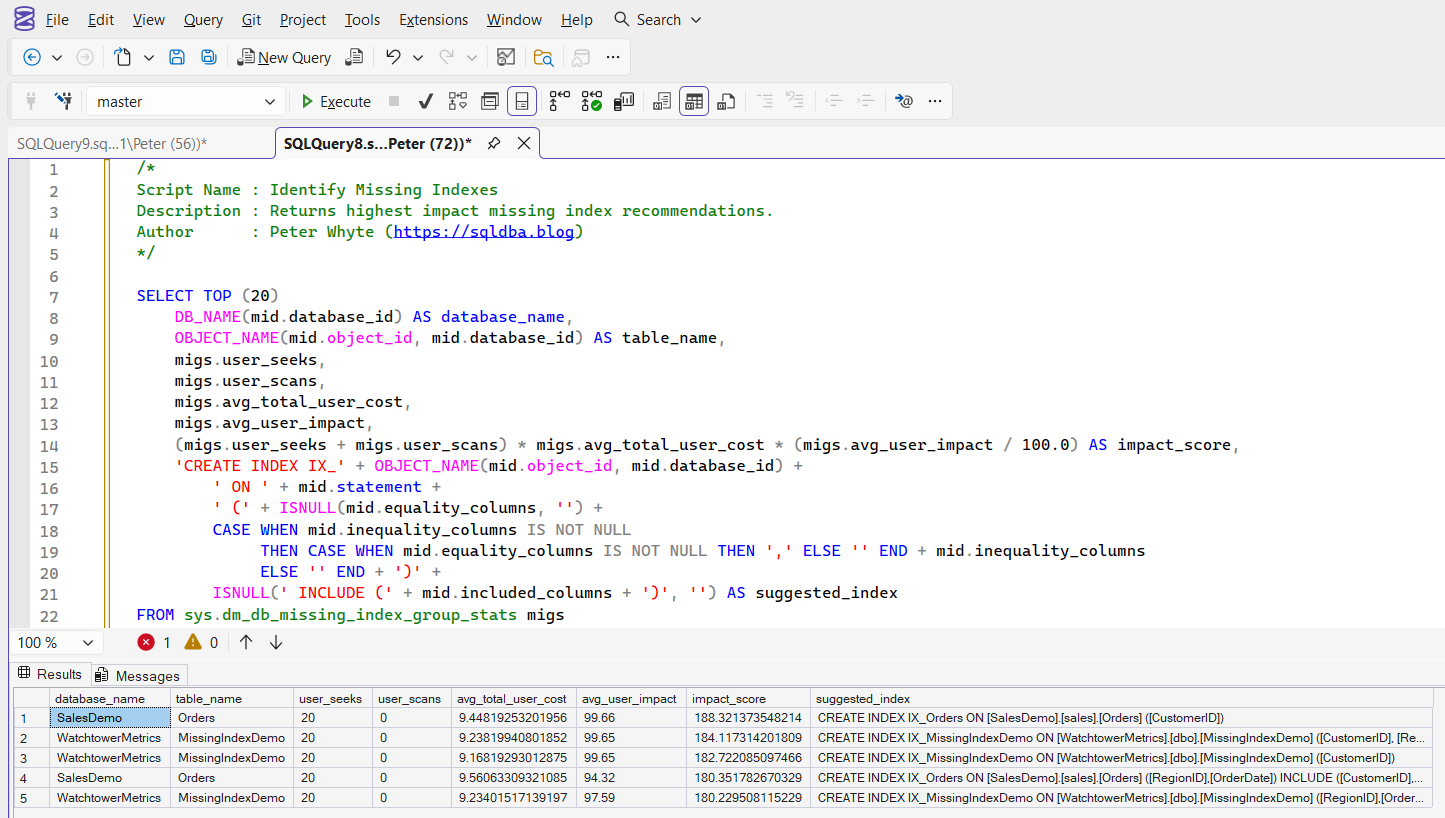
The result set shows the top missing index recommendations ordered by calculated impact score, including the table name, the columns the index would need, usage statistics, and a generated CREATE INDEX statement for each.
Understanding the Results
table_name[database].[schema].[table]. The script puts no filter on database, so a single run covers the whole instance.Act when the database is not one you expected. The suggestion is real, it just came from somewhere you were not looking.equality_columnsinequality_columnsincluded_columns=, columns matched by a range such as > or BETWEEN, and non-key columns it wants in INCLUDE to avoid a key lookup.Act when the included list is long. That is a wide index, and every insert and update pays for it.user_seeksuser_scansuser_seeks is the number that drives impact_score; user_scans is counted but not scored.Act when scans are high and seeks are low. The workload wanted a range scan, so a narrow seek index may not be the fix the score implies.avg_query_costavg_improvement_pctimpact_scoreuser_seeks × avg_query_cost × avg_improvement_pct / 100, the composite the result set is sorted by. It is a priority order, not a unit of anything.Act when the instance restarted recently. These DMVs reset on restart, so a low score can mean no evidence yet rather than no need.suggested_statementCREATE INDEX built from the columns above, with a generated name. A starting point: it does not consider existing indexes that already half-cover the query.Act when you are about to run any of them. Creating every suggestion is the classic way to end up with index bloat and slower writes.The impact_score is the primary sort key. It combines how often the index would have been used, how expensive the affected queries are, and how much better they would run. A suggestion with 10,000 seeks on a cheap query can score lower than one with 100 seeks on an expensive query, which is exactly the behaviour you want when prioritising.
How to Fix Missing Indexes
Start from the top. The highest impact_score rows are where query time is being lost most. Do not try to act on the whole list at once.
Look for overlapping suggestions. SQL Server might suggest (CustomerID), (CustomerID, OrderDate) and (CustomerID, OrderDate, StatusID) as three separate rows. These overlap, and a single composite index covering the widest key set often satisfies all three. Consolidate before creating anything.
Check existing indexes first. The suggestion might be nearly covered by an existing index that only needs an extra INCLUDE column.
Review the included columns. SQL Server adds them to avoid key lookups, but wide INCLUDE lists grow the index. Keep what the hot queries need and drop the rest.
The suggested_statement column gives you a working CREATE INDEX command, but treat it as a draft. Before running it, rename the index to your naming convention, test it on a non-production copy, and verify the improvement is real by running the triggering query before and after:
-- Generated statement (rename before using):
CREATE INDEX [ix_missing_CustomerID_OrderDate]
ON [dbo].[Orders] ([CustomerID], [OrderDate])
INCLUDE ([StatusID], [TotalAmount]);

-- Production-safe version with online rebuild:
CREATE INDEX [ix_Orders_CustomerID_OrderDate]
ON [dbo].[Orders] ([CustomerID], [OrderDate])
INCLUDE ([StatusID], [TotalAmount])
WITH (ONLINE = ON, SORT_IN_TEMPDB = ON);
Best Practices
- The counters reset on restart. On a freshly restarted server the list will be sparse; on a server that has been up for months it is a strong signal. Check
sqlserver_start_timeinsys.dm_os_sys_infobefore trusting the numbers. - SQL Server optimises for individual queries, not the workload. Your job is to design the index that serves the workload, not to implement every suggestion.
- Watch write-heavy tables. Adding indexes to an INSERT/UPDATE-heavy table costs write performance. Check existing index usage on the table before adding more.
- High
user_scanswith lowuser_seeksis a different problem. That query is reading large portions of the table, and the better fix may be rewriting the query rather than adding an index.
Microsoft’s reference covers sys.dm_db_missing_index_group_stats, sys.dm_db_missing_index_groups and sys.dm_db_missing_index_details in full.
Frequently Asked Questions
What are missing indexes in SQL Server?
They are index recommendations SQL Server records whenever the query optimiser builds a plan that would have benefited from an index that does not exist. They are exposed through the sys.dm_db_missing_index_* DMVs and reset when the instance restarts.
Should I create every index SQL Server suggests?
No. The suggestions are generated per query and frequently overlap. Creating them all causes index bloat and slows down writes. Rank by impact, consolidate overlapping suggestions, and verify each one against the table’s existing indexes first.
Why is my missing index list empty?
Either the instance restarted recently (the DMVs reset), the workload has not run yet, or the optimiser genuinely has the indexes it needs. Give a production workload a few days of uptime before reading too much into an empty list.
Summary
Missing index DMVs are the closest thing SQL Server gives you to a free performance consultant: the optimiser has already done the analysis, and this script just asks for the ranked answer. The value is in the review step, consolidating overlaps and confirming each candidate against the real workload before creating anything.
I run this as part of routine health checks rather than waiting for a slowdown. Trends matter more than snapshots, and a recommendation that persists week after week with a climbing impact score is the one worth acting on.
Related
You may also find these useful:
- DBA Scripts: Index Maintenance
- Get Duplicate Indexes
- Get Heaps
- Get Index Design Issues
- Get Index Fragmentation
- Get Index Fragmentation Across Databases
- Get Index Usage Stats
- Get Unused Indexes
- SQL Server High CPU: What to Check First, in Order, the symptom router: start here when CPU is pinned
- DBA Scripts: The Complete Guide, the map across every script on this site
Leave a Reply