
allow updates to 1, and until it goes back to 0 every RECONFIGURE on the instance fails. Run EXEC sp_configure 'allow updates', 0; RECONFIGURE; and then make your change again. The option has done nothing since SQL Server 2005.I hit this enabling show advanced options with sp_configure: the RECONFIGURE after it failed with Msg 5808, and every configuration change after that failed the same way. Nothing is corrupt and nothing is wrong with the engine. A leftover setting is blocking RECONFIGURE.
Why RECONFIGURE Fails
allow updates dates from SQL Server 2000, when you could update system tables directly. SQL Server 2005 removed that, but the option stayed in sp_configure. Microsoft’s page says the setting has no effect, and that changing it causes RECONFIGURE to fail.
The trap is the gap between the two values sp_configure keeps. Setting allow updates to 1 succeeds and only changes config_value. The RECONFIGURE that would install it fails, so the pending 1 stays there, and every later RECONFIGURE tries to install it again and fails too. On a SQL Server 2025 lab instance after the failed attempt:
EXEC sp_configure 'allow updates';name minimum maximum config_value run_value
allow updates 0 1 1 0That is why the error turns up on someone else’s change: enabling xp_cmdshell, Database Mail, or a build script that sets max server memory, long after whoever set allow updates has gone.
Example of the Failure
EXEC sp_configure 'allow updates', 1;
RECONFIGURE;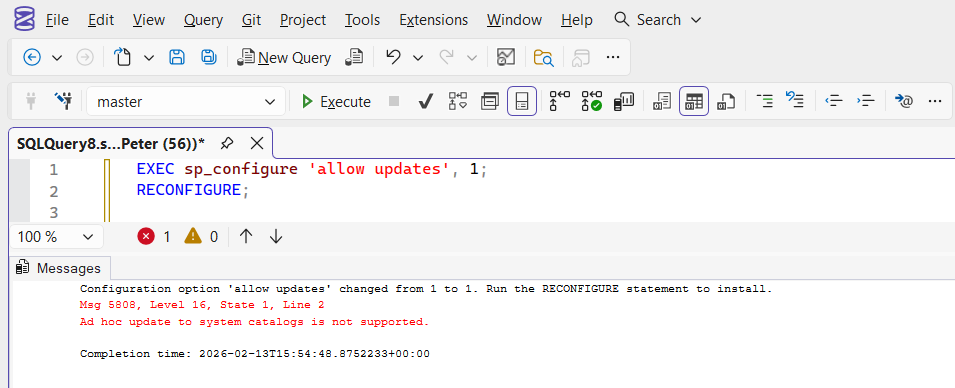
How to Fix It
Put allow updates back to 0 and run a plain RECONFIGURE. With nothing illegal pending, it succeeds:
EXEC sp_configure 'allow updates', 0;
RECONFIGURE;
Then run the change you were making in the first place. No WITH OVERRIDE needed.
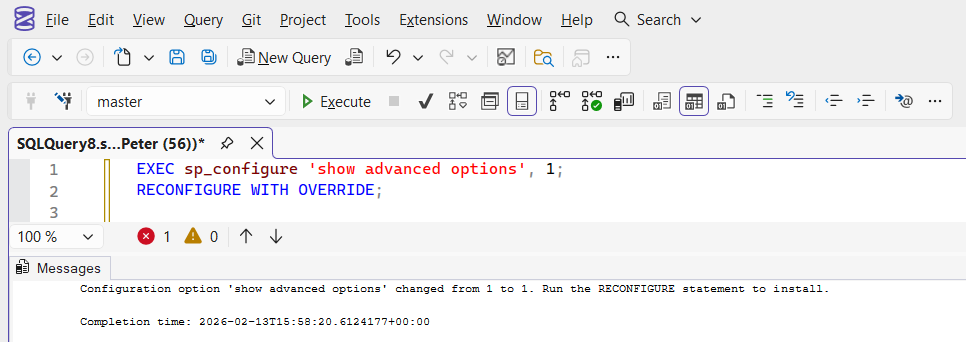
Why not just use RECONFIGURE WITH OVERRIDE? It does get past the error, as the capture shows. It also installs every pending value at once, allow updates included: on the lab, run_value went from 0 to 1. The setting does nothing, so that is harmless in itself, but the next plain RECONFIGURE anyone runs still needs the reset above. Use it only if you cannot change allow updates first (RECONFIGURE).
Checking for This Across a Whole Instance
allow updates is rarely set on purpose on a modern instance. It is usually left over from an old script, a migrated configuration, or settings copied from a much older server. This lists every option with a change waiting for RECONFIGURE, which is worth reading before you run one:
SELECT name, value, value_in_use
FROM sys.configurations
WHERE value <> value_in_use;
Get Instance Configuration Snapshot goes further and reports every sp_configure value against its default in one pass, which catches settings like this when you inherit a server, before they turn up as a confusing error mid-task.
Frequently Asked Questions
Does allow updates let me edit system tables?
Why does my change to a different option fail with 5808?
RECONFIGURE installs every pending sp_configure value, not just the one you changed. A pending allow updates = 1 fails the whole statement. Set it back to 0 and run RECONFIGURE again.Is RECONFIGURE WITH OVERRIDE safe?
sys.configurations where value <> value_in_use first and make sure every pending value is one you want.Does error 5808 appear in the SQL Server error log?
sys.messages shows is_event_logged = 0 for 5808, so the message only reaches the session that ran RECONFIGURE.Does this still happen on SQL Server 2025?
RECONFIGURE, the pending config_value of 1, and the reset to 0 succeeding.Where To Go Next
- Get Instance Configuration Snapshot, every sp_configure value against its default, including allow updates
- Get Database Mail and xp_cmdshell Configuration, two of the options people are usually enabling when 5808 appears
- Server and Configuration, the scripts for instance settings and the checks around them
- SQL Server Error Severities Explained, what Level 16 means and why this one is a user-correctable error
- SQL Server Errors: The Complete Guide, the index for the whole error series
Leave a Reply