
You need to read what a stored procedure actually does. Maybe it is failing, maybe it is undocumented, maybe you have inherited it. There are three ways to get the text and one of them will quietly lie to you about whether the procedure exists at all.
Everything here was run on a SQL Server 2025 instance.
The Quick Way
sp_helptext is the one most people learn first:
EXEC sp_helptext 'dbo.usp_YourProcedure';It returns the source split across many rows, one per line. That is fine for reading and awkward for anything else, because to use the text you have to stitch the rows back together in order.
The Better Way
OBJECT_DEFINITION hands back the entire definition as one value:
SELECT OBJECT_DEFINITION(OBJECT_ID('dbo.usp_YourProcedure')) AS definition;Comments, formatting and blank lines all survive. Verified: the text came back complete,
including a trailing comment, and it matched what
sys.sql_modules holds for the same object byte for byte.
In SSMS the grid will show that on a single line, which looks alarming and is only a display choice. Press Ctrl+T for text output, or click into the cell. The definition itself is intact.
The Way That Scales
sys.sql_modules is the one to reach for when the question is about more than one
object. Because it is a view, you can filter it:
SELECT  OBJECT_SCHEMA_NAME(m.object_id) AS [schema],
        OBJECT_NAME(m.object_id)        AS object_name,
        o.type_desc,
        m.definition
FROM    sys.sql_modules m
JOIN    sys.objects o ON o.object_id = m.object_id
WHERE   m.definition LIKE '%YourTableName%'   -- every module that references it
ORDER BY object_name;
That query answers the question people actually have, which is usually not “show me this procedure” but “what else touches this table before I change it”. It covers views, functions and triggers as well as procedures, because they are all modules.
Microsoft’s reference covers OBJECT_DEFINITION, sys.sql_modules and sp_helptext in full.
The Trap: NULL Does Not Mean Missing
Here is the one worth remembering. If you lack permission,
OBJECT_DEFINITION returns NULL. It does not raise an error.
Tested directly: a user with EXECUTE on a procedure but no
VIEW DEFINITION ran the same query and got NULL back. Nothing said “permission
denied”. The result is indistinguishable from a procedure that does not exist, so people go
looking for a deployment problem that was never there.
-- as a user with EXECUTE but not VIEW DEFINITION
SELECT OBJECT_DEFINITION(OBJECT_ID('dbo.usp_Plain'));   -- NULL

-- the fix, scoped to the one object
GRANT VIEW DEFINITION ON dbo.usp_Plain TO YourUser;
After that grant, the identical call returned the procedure text. So when you get NULL, check in this order:
SELECT OBJECT_ID('dbo.usp_YourProcedure') AS resolved_object_id;   -- NULL = name or schema wrong

SELECT name, is_ms_shipped
FROM   sys.objects
WHERE  name = 'usp_YourProcedure';                                 -- does it exist at all

SELECT HAS_PERMS_BY_NAME('dbo.usp_YourProcedure', 'OBJECT', 'VIEW DEFINITION') AS can_view;
HAS_PERMS_BY_NAME settles it in one line, and it is a lot faster than guessing.
Microsoft’s reference covers GRANT object permissions in full.
Encrypted Procedures
If the procedure was created WITH ENCRYPTION, both routes stop, and they stop
differently. OBJECT_DEFINITION returns NULL, the same NULL you get
from a permissions problem. sp_helptext is more helpful and tells you why:
The text for object 'dbo.usp_Secret' is encrypted.Note that it is a message, not an error, so a script will carry on regardless. That difference
is a good reason to reach for sp_helptext when you are diagnosing an unexplained NULL:
it distinguishes encrypted from forbidden, which OBJECT_DEFINITION cannot.
You can list them ahead of time:
SELECT OBJECT_SCHEMA_NAME(object_id) AS [schema],
       OBJECT_NAME(object_id)        AS object_name
FROM   sys.sql_modules
WHERE  definition IS NULL;   -- encrypted, or you cannot see it
That WHERE clause is deliberately ambiguous, because so is the data. A NULL
definition means encrypted or not visible to you, and the only way to tell them apart is
to check your permissions.
Scripting It Out Properly
Everything above gives you the text. It does not give you the object. The definition never
carries the permissions, so a procedure scripted out of OBJECT_DEFINITION and created
somewhere else arrives with nobody able to execute it. When you want the real thing, let SSMS write it.
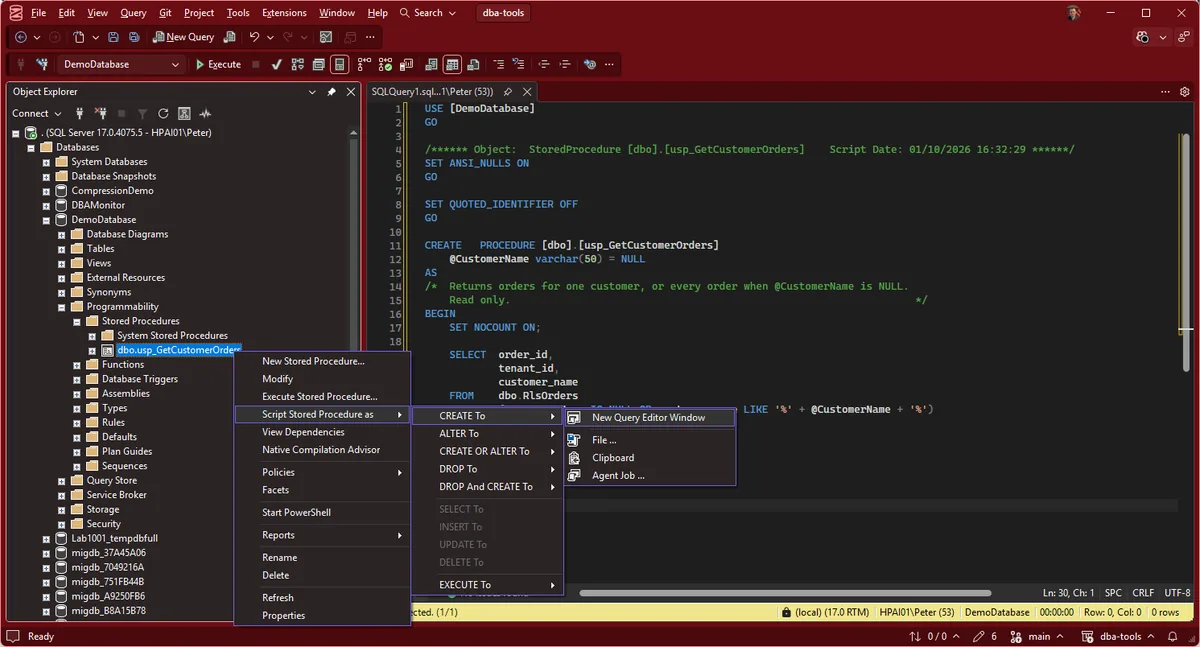
- In Object Explorer, expand the database, then Programmability → Stored Procedures
- Right-click the procedure, then Script Stored Procedure as → CREATE To → New Query Editor Window
- For a whole database, right-click the database instead, then Tasks → Generate Scripts, and turn on the option to include permissions in the advanced scripting options
Step 3 is the one that matters if you are moving code between environments. Scripting the definition alone is how a deployment lands a procedure nobody can run.
Frequently Asked Questions
Why does OBJECT_DEFINITION return NULL for a procedure I know exists?
Three possible reasons, and only one of them is obvious. The object name did not resolve, so OBJECT_ID returned NULL. Or the procedure was created WITH ENCRYPTION. Or, most often, you do not have VIEW DEFINITION on it. Tested on SQL Server 2025: a user with EXECUTE but no VIEW DEFINITION gets NULL back, not a permission error, which reads exactly like the object is missing.
What is the difference between sp_helptext and OBJECT_DEFINITION?
sp_helptext returns the text split across many rows, one per line of source. OBJECT_DEFINITION returns the whole thing as a single value. For reading, the procedure is fine. For anything programmatic, use the function, because reassembling rows in the right order is work you do not need to do.
How do I stop SSMS mangling the line breaks?
Switch the query results to text with Ctrl+T, or click the result cell in grid mode to open it. The grid renders a multi-line value on one line, which is a display choice rather than anything wrong with the definition itself. The text is intact either way.
Can I get the text of an encrypted procedure?
Not through these tools, by design. OBJECT_DEFINITION returns NULL and sp_helptext tells you The text for object is encrypted. WITH ENCRYPTION is obfuscation rather than real security, so tools exist that undo it with sysadmin access, but if you are the owner the right move is to find the source in version control.
Does this work for views, functions and triggers too?
Yes. OBJECT_DEFINITION and sys.sql_modules cover every T-SQL module: views, scalar and table-valued functions, triggers and procedures. That is why the search-every-module query above is worth keeping.
What permission should I actually grant?
VIEW DEFINITION on the specific object is the narrow one. VIEW ANY DEFINITION at server level covers everything and is usually too much. For a developer who needs to read code across a database, GRANT VIEW DEFINITION ON SCHEMA::dbo is normally the right size.
Summary
VIEW DEFINITION, and SQL Server does not tell you which. HAS_PERMS_BY_NAME settles it in one line.OBJECT_DEFINITION(OBJECT_ID('dbo.proc')) is the one to reach for, with
sys.sql_modules when you need to search across every module at once and
sp_helptext when you want a quick read.
Reading one definition is usually the start of a bigger question. These are the pages for where it goes.
- Search for a String in All Tables, the data-side equivalent when the code does not have your answer.
- Get Permissions and Role Membership, who actually holds
VIEW DEFINITION, across every principal. - SSMS Complete Guide, where the scripting dialogs on this page live, and the rest of the client.
- SSMS Query Shortcuts, bind
sp_helptextto a keystroke instead of typing it every time. - DBA Scripts: The Complete Guide, the whole library, grouped by what you are trying to find out.
Leave a Reply