
MAXRECURSION.A CTE (Common Table Expression), the WITH name AS (...) block before a query, is mostly a readability tool for the non-recursive case: a named, reusable result set instead of a nested subquery. The recursive form is a genuinely different capability: real self-referencing logic, and the standard way to walk a hierarchy in T-SQL (WITH common_table_expression on Microsoft Learn). This post covers both, with a real org chart, a real recursive walk, and a real runaway-recursion scenario most tutorials never bother to trigger.
Everything below was run on SQL Server 2025.
The Setup
CREATE TABLE dbo.OrgChart (employee_id INT PRIMARY KEY, employee_name VARCHAR(50), manager_id INT NULL);
INSERT INTO dbo.OrgChart (employee_id, employee_name, manager_id) VALUES
    (1, 'Colum MacKenzie', NULL),
    (2, 'Dougal MacKenzie', 1),
    (3, 'Jamie Fraser', 2),
    (4, 'Claire Beauchamp', 3),
    (5, 'Ian Murray', 3);
A classic self-referencing hierarchy: each row points at its own manager via manager_id, and Colum at the top has none.
Non-Recursive: Just a Named Subquery
WITH ManagerCounts AS (
    SELECT manager_id, COUNT(*) AS direct_reports
    FROM dbo.OrgChart
    WHERE manager_id IS NOT NULL
    GROUP BY manager_id
)
SELECT o.employee_name AS manager, mc.direct_reports
FROM ManagerCounts mc
JOIN dbo.OrgChart o ON o.employee_id = mc.manager_id
ORDER BY mc.direct_reports DESC;
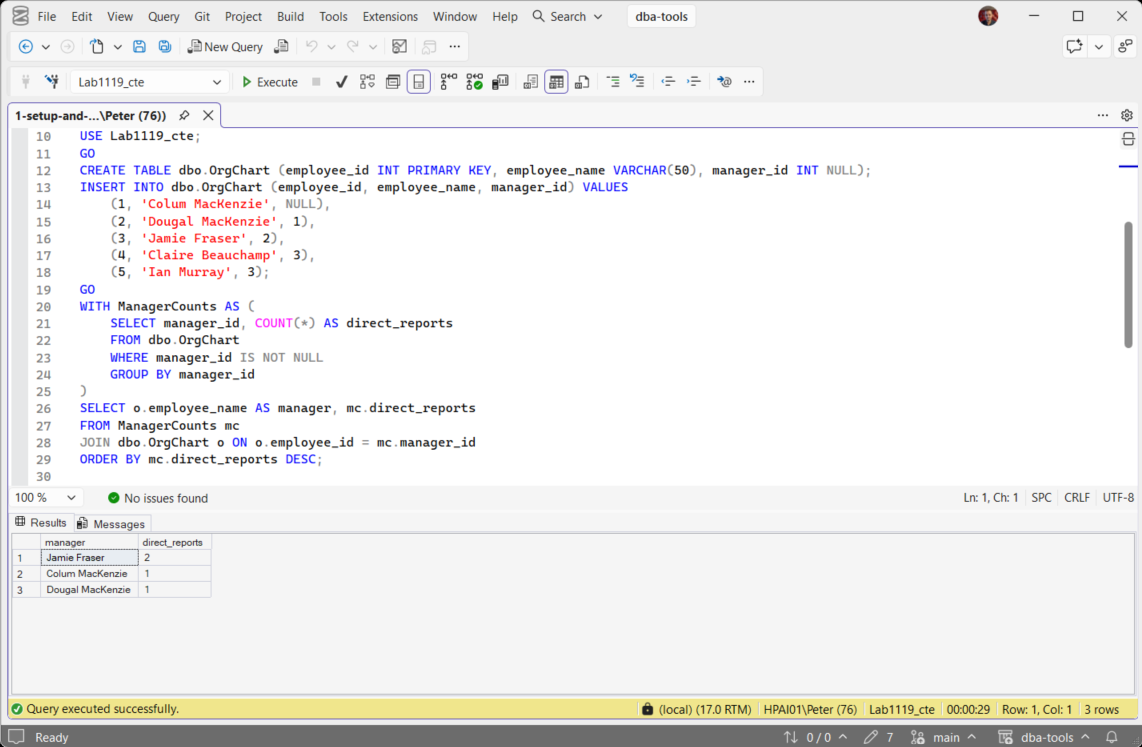
Nothing here a subquery or a derived table couldn’t do. The CTE just gives the intermediate result set a name, easier to read and easier to reference twice if needed. The optimizer treats this exactly like an equivalent subquery: no separate execution model, no special plan shape.
Recursive: Walking the Hierarchy
This is the genuinely different capability. An anchor member, then a recursive member that UNION ALLs against the CTE’s own name:
WITH ChainOfCommand AS (
    SELECT employee_id, employee_name, manager_id, 0 AS depth,
           CAST(employee_name AS VARCHAR(400)) AS chain
    FROM dbo.OrgChart
    WHERE employee_id = 4  -- Claire, walk up to the top
    UNION ALL
    SELECT o.employee_id, o.employee_name, o.manager_id, c.depth + 1,
           CAST(o.employee_name + ' -> ' + c.chain AS VARCHAR(400))
    FROM dbo.OrgChart o
    JOIN ChainOfCommand c ON o.employee_id = c.manager_id
)
SELECT depth, employee_name, chain FROM ChainOfCommand ORDER BY depth;
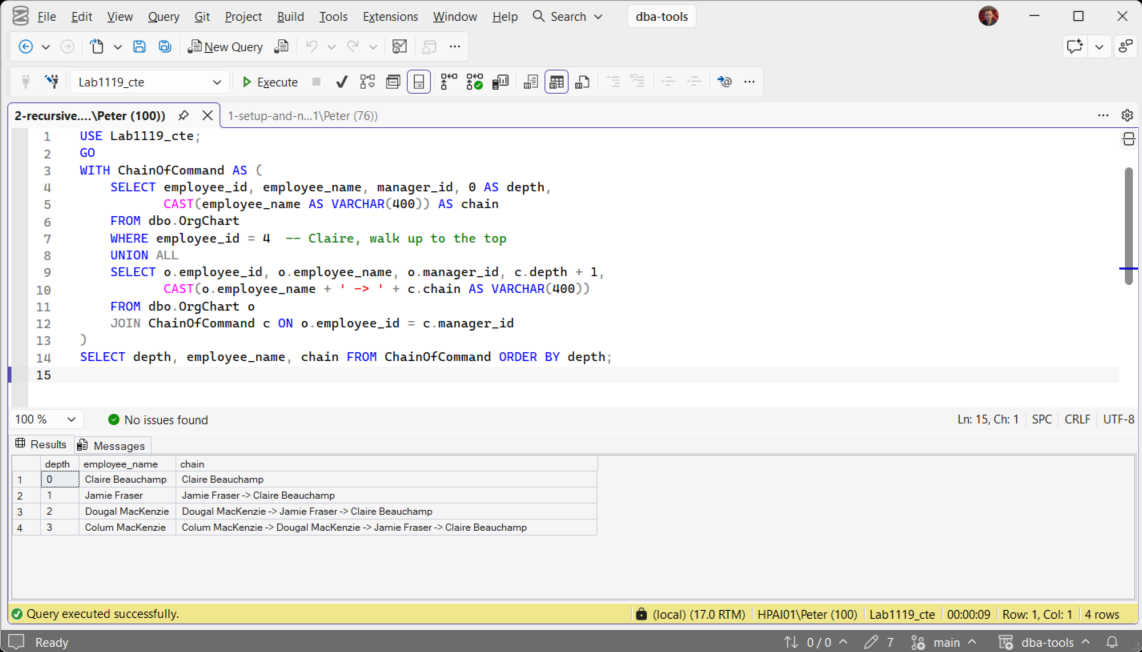
The anchor member runs once. The recursive member re-joins against the CTE’s own growing result set until a pass produces no new rows, in this case when it reaches Colum, who has no manager to join to. This is the standard T-SQL pattern for org charts, bill-of-materials explosions, category trees, anything genuinely hierarchical with an unknown depth.
The Gotcha: What Happens When the Hierarchy Has a Cycle
Real-world hierarchy data occasionally has a bug: someone’s manager field points back down the chain and creates a loop. Introduced exactly that:
-- data bug: Colum (the root) now reports to Ian, creating a cycle
UPDATE dbo.OrgChart SET manager_id = 5 WHERE employee_id = 1;
Re-ran the identical recursive query against the now-cyclic data, and it failed with Msg 530, Level 16: The statement terminated. The maximum recursion 100 has been exhausted before statement completion.
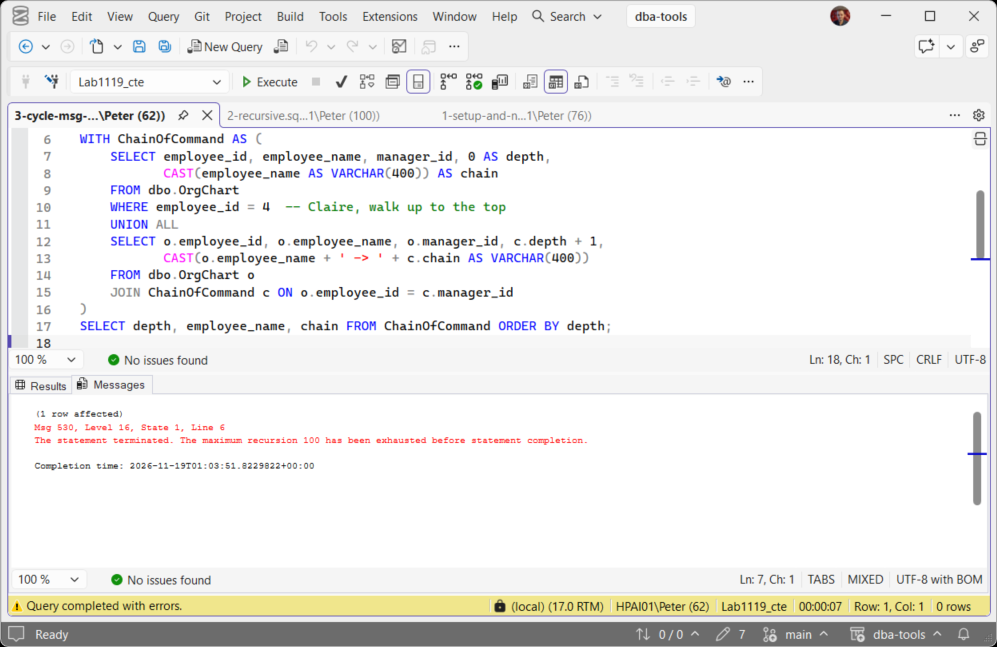
SQL Server didn’t hang or loop forever. It has a built-in MAXRECURSION guard, 100 by default, and stopped the statement cleanly once the cycle pushed past that depth. This is a real safety net, not primarily a performance tuning knob, though it’s controlled the same way, with a query hint (query hints on Microsoft Learn):
SELECT ... FROM ChainOfCommand OPTION (MAXRECURSION 500);   -- raise it
SELECT ... FROM ChainOfCommand OPTION (MAXRECURSION 0);     -- unlimited, dangerous against untrusted/dirty data
MAXRECURSION 0 genuinely means unlimited. If the hierarchy has a real cycle and no guard, that query will run until something else stops it (a query timeout, or it exhausts server resources first). Never set it to 0 against data whose integrity you haven’t verified.
Common Issues
- Msg 530 shows up in production against a hierarchy that’s usually fine. Don’t reflexively raise
MAXRECURSION. Treat it as a real signal to check the data for an actual cycle or an unexpectedly deep chain first. - A recursive CTE runs correctly but slowly against a large hierarchy. Each recursion level is a real join, and walking down the tree joins on
manager_id, so an unindexedmanager_idcolumn turns this into a table scan per level. Index the self-referencing foreign key. - Assuming the non-recursive form has special performance properties. It doesn’t. It’s sugar over a subquery, and the optimizer produces the same plan either way. Don’t reach for a CTE expecting a performance win over a well-written subquery: readability is the actual benefit.
Best Practices
- Index the self-referencing foreign key column (
manager_idhere) on any table a recursive CTE will walk regularly. - Set an explicit, deliberate
MAXRECURSIONvalue for production hierarchy queries rather than relying on the silent default of 100. Know what depth is actually expected and cap slightly above it. - Never use
MAXRECURSION 0against data whose integrity isn’t verified. A real cycle plus unlimited recursion is a genuine way to take down a query, or worse, that connection’s resources. - Use the depth/chain-tracking pattern shown here (an explicit
depthcolumn) even when not strictly needed. It makes debugging an unexpected result immediately obvious.
Frequently Asked Questions
Is a CTE faster than a subquery or a temp table?
Where does OPTION (MAXRECURSION) go?
What does Msg 530 mean?
MAXRECURSION limit, 100 unless set. Either the data has a cycle, as in the example above, or the hierarchy is genuinely deeper than the limit. Check for a cycle first.Related
- How to Delete Duplicate Rows in SQL Server, the everyday non-recursive CTE with
ROW_NUMBER(). - Table Variables vs Temp Tables, when an intermediate result should be stored rather than named.
- Execution Timeout Expired, what usually stops a runaway
MAXRECURSION 0query. - DBA Scripts: Get Missing Indexes, check whether the
manager_idcolumn a recursive walk joins on needs one. - WHERE 1=1 and WHERE 1=2, another T-SQL pattern that looks odd and has a reason.
Leave a Reply