
Full Log Versus Big Log
A transaction log that fills stops every write in the database with error 9002, and disk monitoring will not warn you first, because a log can fill up inside a file that never grew. A 500 GB log with 20 GB in use is fine. A 20 GB log at 99 percent used can stop an application within minutes.
This script shows every user database’s log in one result: size, used, free, percent used, why the space cannot be reused, the growth settings and the last log backup. It sorts by percent used, so the problem is the top row.
Why Log Space Used Matters
Every change is written to the log first. In FULL and BULK_LOGGED recovery models that space is only released for reuse after a log backup; in SIMPLE it is released at checkpoint. Anything still holding the log, an open transaction, an availability group replica that has fallen behind, replication or CDC that has not read it yet, stops reuse in any recovery model.
The file does not shrink on its own. It reuses the space inside it, or it grows, until it hits its maximum size or the disk is full.
Common Symptoms
- Error 9002, “The transaction log for database … is full due to …”
- INSERT, UPDATE and DELETE failing while reads still work
- Frequent autogrowth events on the log file
- A log file taking far more of the drive than expected
- Log backups suddenly much larger than usual
- An Always On secondary replica falling behind
When to Run This Script
- During routine health checks of SQL Server instances
- After large transaction volumes or significant database activity
- When experiencing disk space issues or log growth anomalies
- Before scheduled maintenance windows to assess current log sizes
- Following log backup failures or delays
The Script
Run the following script against your SQL Server instance to get detailed insights into transaction log sizes and usage:
- Tested on: SQL Server 2025 (RTM CU8), Windows lab instance
- Last verified: 2026-10-15 (real run on the lab, 36 databases, script unchanged; screenshot from a 2026-08-30 run)
- Permissions: VIEW SERVER STATE (DBCC SQLPERF), read on msdb.dbo.backupset
- Safety: read-only, impact low
/*
Script Name : Get-TransactionLogSizeAndUsage
Category    : storage-capacity-management
Purpose     : Show transaction log size, used space, free space, and percent used per database.
Author      : Peter Whyte (https://sqldba.blog/dba-scripts-get-transaction-log-size-and-usage/)
Requires    : VIEW SERVER STATE (DBCC SQLPERF), read on msdb.dbo.backupset
Notes       : Usage figures come from DBCC SQLPERF(LOGSPACE), which reports every database.
              FILEPROPERTY is current-database-scoped and silently returned 0 for all other
              databases (fixed 2026-07-19). Offline databases show NULL usage.
HealthCheck : Yes
*/
-- SAFE:ReadOnly
-- IMPACT:Low
SET NOCOUNT ON;

DECLARE @logspace TABLE
(
    database_name sysname NOT NULL PRIMARY KEY,
    log_size_mb FLOAT NOT NULL,
    log_space_used_pct FLOAT NOT NULL,
    status INT NOT NULL
);

INSERT INTO @logspace (database_name, log_size_mb, log_space_used_pct, status)
EXEC ('DBCC SQLPERF(LOGSPACE) WITH NO_INFOMSGS');

;WITH LogBackup AS
(
    SELECT
        database_name,
        MAX(backup_finish_date) AS last_log_backup
    FROM msdb.dbo.backupset
    /* Copy-only log backups excluded: this date is read as "when did the log last truncate",
       and a copy-only log backup does not truncate it. */
    WHERE type = 'L'
      AND is_copy_only = 0
    GROUP BY database_name
)

SELECT
    d.name AS database_name,

    d.state_desc,

    d.recovery_model_desc,

    d.log_reuse_wait_desc,

    COUNT(mf.file_id) AS log_file_count,

    STRING_AGG(mf.physical_name, '; ') AS log_file_paths,

    CAST(
        SUM(CAST(mf.size AS BIGINT)) * 8.0 / 1024
        AS DECIMAL(18,1)
    ) AS log_size_mb,

    CAST(
        MAX(ls.log_size_mb) * MAX(ls.log_space_used_pct) / 100.0
        AS DECIMAL(18,1)
    ) AS log_used_mb,

    CAST(
        MAX(ls.log_size_mb) * (100.0 - MAX(ls.log_space_used_pct)) / 100.0
        AS DECIMAL(18,1)
    ) AS log_free_mb,

    CAST(
        MAX(ls.log_space_used_pct)
        AS DECIMAL(5,1)
    ) AS log_used_pct,

    CASE
        WHEN COUNT(DISTINCT mf.is_percent_growth) > 1
            THEN 'Mixed'

        WHEN MAX(CAST(mf.is_percent_growth AS INT)) = 1
            THEN CAST(MAX(mf.growth) AS VARCHAR(20)) + '%'

        ELSE
            CAST(
                (MAX(CAST(mf.growth AS BIGINT)) * 8) / 1024
                AS VARCHAR(20)
            ) + ' MB'
    END AS autogrowth_setting,

    CASE
        WHEN COUNT(DISTINCT mf.is_percent_growth) > 1
            THEN 'Mixed'

        WHEN MAX(CAST(mf.is_percent_growth AS INT)) = 1
            THEN 'Percent'

        ELSE
            'Fixed MB'
    END AS autogrowth_type,

    CASE
        WHEN MAX(mf.max_size) = -1
            THEN 'Unlimited'

        ELSE
            CAST(
                (MAX(CAST(mf.max_size AS BIGINT)) * 8) / 1024
                AS VARCHAR(20)
            ) + ' MB'
    END AS max_size,

    lb.last_log_backup,

    CASE
        WHEN lb.last_log_backup IS NULL
            THEN NULL

        ELSE
            DATEDIFF(
                MINUTE,
                lb.last_log_backup,
                GETDATE()
            )
    END AS minutes_since_last_log_backup
FROM sys.master_files AS mf
JOIN sys.databases AS d
    ON mf.database_id = d.database_id
LEFT JOIN @logspace AS ls
    ON ls.database_name = d.name
LEFT JOIN LogBackup AS lb
    ON d.name = lb.database_name
WHERE mf.type_desc = 'LOG'
AND d.database_id > 4
GROUP BY
    d.name,
    d.state_desc,
    d.recovery_model_desc,
    d.log_reuse_wait_desc,
    lb.last_log_backup
ORDER BY
    log_used_pct DESC,
    log_size_mb DESC;
How To Run From The Repo
Clone the DBA Tools repository, initialize your environment, and execute the script:
# Clone dba-tools repo:
git clone https://github.com/peterwhyte-lgtm/dba-tools

# Initialize environment:
cd dba-tools
.\Initialize-Environment.ps1

# Run the transaction log size and usage check:
.\run.ps1 Get-TransactionLogSizeAndUsage

# To run against a remote SQL Server instance:
.\run.ps1 Get-TransactionLogSizeAndUsage -ServerInstance SQLSERVER01
This will execute the script and generate a detailed report on your transaction logs, helping you stay on top of disk space and log management.
Example Output
Run against a lab instance.
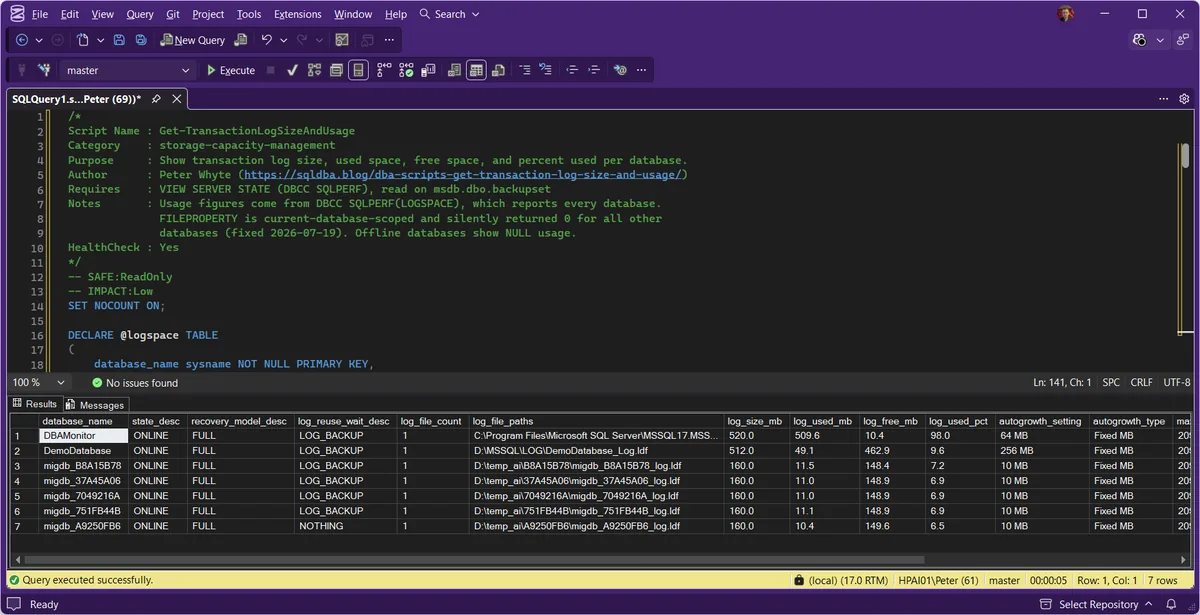
The top row is the finding. Its log is 98 percent full and log_reuse_wait_desc reads LOG_BACKUP, so the space is held by records waiting for a log backup that is not running. The rows below it sit under 10 percent, which is what a working log backup schedule looks like, and one reads NOTHING: nothing is holding its log space at all.
Understanding the Results
One row per user database. Read log_used_pct first, then the reason in log_reuse_wait_desc, then whether a log backup has run recently enough to release the space that reason is holding.
database_namestate_descrecovery_model_desclog_reuse_wait_descNOTHING and CHECKPOINT are the healthy steady states. LOG_BACKUP, ACTIVE_TRANSACTION, AVAILABILITY_REPLICA and REPLICATION each name a different cause and a different fix, which is what Log Reuse Waits covers in full.log_size_mblog_used_mblog_free_mbDBCC SQLPERF(LOGSPACE) while the size comes from sys.master_files, so the two can disagree by a fraction of a megabyte. Do not try to reconcile the three columns exactly. A log backup frees space inside the file; it does not make the file smaller.log_used_pctlog_file_countlog_file_pathsautogrowth_settingautogrowth_typeMixed means the log files on this database disagree with each other.Act when the type is Percent. A percentage of a large log is an unpredictable growth, and the health check reviewer flags it on any file.max_sizeUnlimited. A value of 2097152 MB is the 2 TB default a log file inherits rather than a limit anybody chose.Act when log_size_mb has reached it. The log cannot grow past this ceiling, so once the space inside is used the next write fails with 9002, however much disk is free.last_log_backupminutes_since_last_log_backupmsdb only, so on an availability group replica that does not take the backups itself the column is empty even while the primary is backing up on schedule. Copy-only log backups are excluded here, because a copy-only log backup preserves the archive point without releasing any space.Act when both are blank on a FULL or BULK_LOGGED database. Blank is not a small number. It means no log backup has ever released space in this log, and it sorts as nothing rather than to the top of the report.Common Causes
- Infrequent log backups leading to unbounded log growth
- Long-running transactions preventing log truncation
- Misconfigured autogrowth settings (too small or percent-based on large files)
- Large transaction volumes or bulk operations
- Replication backlog or CDC processing delays
- Insufficient disk space for log files
How to Fix Problems
The fix depends on why the log cannot be reused, which is the log_reuse_wait_desc column. Log Reuse Waits takes each value in turn.
- Schedule regular log backups (especially in FULL recovery model) to truncate inactive portions
- Adjust autogrowth settings based on workload and database growth patterns. Avoid very small increments and percentage based growth on large transaction logs
- Find a long-running transaction with Open Transactions, then commit, roll back or kill it
- Allow replication or Always On replicas to catch up
- Consider switching to SIMPLE recovery model for non-critical databases (if point-in-time recovery is not required)
- Increase disk capacity or move log files to larger drives if necessary
Best Practices
- Automate log backups for every FULL and BULK_LOGGED database
- Trend log size over time with Autogrowth History rather than relying on a single reading
- Set fixed-size autogrowth increments, balanced between frequent growth events and wasted disk
- Review recovery models with Recovery Model Audit, so no database sits in FULL without log backups
- Alert when a log passes 80 percent used, or when a FULL database goes longer than its log backup interval without one
Microsoft’s reference covers DBCC SQLPERF, sys.master_files and sys.databases in full.
Frequently Asked Questions
Why are the used and free columns NULL for one database?
The database is not ONLINE. DBCC SQLPERF(LOGSPACE) only reports databases it can open, so a database in RECOVERY_PENDING or OFFLINE comes back with its file size from sys.master_files and NULL for usage. Fix the state first; the log numbers can wait.
How often should I check transaction log sizes?
Daily for critical systems and weekly for the rest, plus after heavy batch work or whenever a drive holding log files gets tight.
Why does my log show 100% used even after a backup?
Those are two different columns, and the difference is the whole answer. A log backup frees space inside the file; it does not make the file smaller, so log_size_mb stays exactly where it was. What should move is log_used_pct: a backup that truncates successfully drops it.
So if the percentage is still near 100 after a log backup, truncation did not happen, and the reason is sitting in log_reuse_wait_desc: an open transaction, an availability replica that has not caught up, replication that has not read the log yet. Read that column next. DBCC SHRINKFILE is the wrong reach here: it cannot free space that something is still holding, and on a log that is genuinely full it does nothing at all.
Summary
Sort by log_used_pct, read log_reuse_wait_desc on anything high, then check the last log backup. On a FULL database the usual answer is a log backup that is not running; on any database it can be an open transaction holding the log.
Related
- Disk Is Full or the Log Will Not Truncate, step 2 of the space router, deciding log file against data file
- SQL Server Transaction Log Full, when error 9002 has already stopped writes
- Log Reuse Waits, why the space cannot be reused, one value at a time
- Open Transactions, the session holding the log open
- Recovery Model Audit, which databases need log backups at all
- Autogrowth History, when and how often each file grew
- VLF Counts, what a log that grew in small steps leaves behind
- Database Files Detail, every data and log file with its size and growth settings
- Database Free Space Summary, free space inside the files per database
- Database Growth Risk and Forecast, which files run out of room first
- Database Sizes and Free Space, size and free space per database
- Disk Space, free space on each volume
- Filegroup Space, space per filegroup
- Storage and Capacity, the hub for every storage and space script
- DBA Scripts: The Complete Guide, the map across every script on this site
Leave a Reply