
SQL Server autogrowth is one of those settings that is often ignored until it becomes a production problem.
A database file growing during normal business hours is usually a sign that SQL Server is reacting to a capacity issue. The engine pauses normal operations, extends the data or log file, then continues processing.
Depending on the file size, storage performance, and workload, this can take milliseconds or create noticeable application latency.
In production environments, autogrowth should be treated as a safety mechanism, not a capacity management strategy.
Regularly reviewing autogrowth history helps identify:
- Undersized database files.
- Incorrect growth settings.
- Unexpected workload increases.
- Storage capacity issues.
- Transaction log sizing problems.
This script reads autogrowth events from the SQL Server default trace and shows when files grew, how much space was added, and how long the operation took.
Why Autogrowth History Matters
Every autogrowth event is the engine telling you a file was sized too small, and the history of those events tells you exactly where, when, and what it cost.
Autogrowth problems hide well because nothing fails: the database stays online, the dashboards stay green, and no alert fires.
What users feel instead is the pause. When a file grows, the sessions that need the new space wait for the extension to finish, so the symptom surfaces as intermittently slow queries, commits that take longer than the workload justifies, and ETL windows that stretch for no visible reason. The history this script reads from the default trace turns those vague symptoms into dated, sized, timed events you can put next to your slow-query reports.
Common Production Examples
Small Growth Increment
A database left on FILEGROWTH = 10MB may grow hundreds of times per day.
The database keeps working, but SQL Server repeatedly pauses to extend files.
Transaction Log Growth During Peak Hours
Transaction logs growing during busy periods can increase:
- Commit latency.
- Log backup duration.
- Availability Group synchronisation delays.
- Recovery time.
ETL or Batch Processing Growth
Large data loads can expose incorrectly sized files when:
- Data files were created too small.
- Growth settings were inherited from defaults.
- Capacity planning did not include workload increases.
When to Run This Script
Run it as part of a regular health check or capacity review, before and after a migration, and any time a performance investigation or an unexpected jump in file size makes you ask what has been growing. The pattern to expect from a healthy production environment is that growth events are rare and deliberate, because files sized ahead of demand hardly ever need to grow during normal operation; a busy history in this output is itself the finding.
The Script
Run this against your SQL Server instance.
- Tested on: SQL Server 2025 (RTM CU8), Windows lab instance
- Last verified: 2026-10-03 (re-run after the filter change, 209 events returned)
- Permissions: VIEW SERVER STATE, ALTER TRACE (to read trace files)
- Safety: read-only, impact low
/*
Script Name : Get-AutogrowthHistory
Category    : monitoring
Purpose     : Reads autogrowth events from the SQL Server default trace.
              Autogrowth events during business hours indicate undersized files;
              frequent events indicate the growth increment is too small.
              Use this to right-size initial file sizes and growth increments.
Author      : Peter Whyte (https://sqldba.blog/dba-scripts-get-autogrowth-history/)
Requires    : VIEW SERVER STATE, ALTER TRACE (to read trace files)
HealthCheck : Yes
Notes       : Default trace rolls over: 5 files, 20 MB each, oldest discarded.
              History depth is therefore a function of how chatty the instance is,
              not of elapsed time. Measured on a quiet lab instance 2026-10-02:
              20 days and 83,931 events across the 5 files.
              sys.traces.path returns the CURRENT rollover file only, so the script
              strips the _nn suffix and reads the whole set (2 days vs 20 days here).
              EventClass 92 = Data File Autogrow, 93 = Log File Autogrow.
              DatabaseName comes from the trace, not DB_NAME(DatabaseID): database ids
              are reused, so DB_NAME was NULL on 96 and plainly wrong on 37 of 176
              user-database events on the lab instance (2026-10-02).
              DatabaseID NOT IN (1, 3, 4) keeps tempdb and every user database and
              excludes master, model and msdb. tempdb is included on purpose: a tempdb
              file growing mid-workload is the event people are usually chasing, and on
              the lab instance it was 16 of the 209 events the trace still held
              (2026-10-03). tempdb is recreated at every restart, so its growth history
              only reaches back to the last one.
              Fix: pre-size files to expected peak size and set a fixed MB growth
              increment (not percent) via ALTER DATABASE ... MODIFY FILE.
*/
-- SAFE:ReadOnly
-- IMPACT:Low
SET NOCOUNT ON;
SET QUOTED_IDENTIFIER ON;

DECLARE @tracepath NVARCHAR(256);

SELECT @tracepath = path
FROM   sys.traces
WHERE  is_default = 1;

IF @tracepath IS NULL
BEGIN
    SELECT 'Default trace is not running or has been disabled.' AS note;
    RETURN;
END

/* sys.traces.path names the current rollover file (log_64.trc). Stripping the
   _nn suffix reads every file still on disk, which is the whole retained window. */
IF CHARINDEX('_', REVERSE(@tracepath)) > 0
    SET @tracepath = LEFT(@tracepath, LEN(@tracepath) - CHARINDEX('_', REVERSE(@tracepath))) + N'.trc';

SELECT
    e.DatabaseName                                  AS database_name,
    e.FileName                                      AS file_name,
    CASE e.EventClass
        WHEN 92 THEN 'Data File Autogrow'
        WHEN 93 THEN 'Log File Autogrow'
    END                                             AS event_type,
    e.StartTime                                     AS grew_at,
    CAST(e.IntegerData * 8.0 / 1024 AS DECIMAL(10,2)) AS growth_mb,
    CAST(e.Duration / 1000.0 AS DECIMAL(10,1))      AS duration_ms,
    DATENAME(WEEKDAY, e.StartTime)                  AS day_of_week,
    DATEPART(HOUR,    e.StartTime)                  AS hour_of_day
FROM   sys.fn_trace_gettable(@tracepath, DEFAULT) AS e
WHERE  e.EventClass IN (92, 93)
  AND  e.DatabaseID NOT IN (1, 3, 4)   /* master, model, msdb out; tempdb stays in */
ORDER BY e.StartTime DESC;
How To Run From The Repo
Clone DBA Tools, initialize and run the script:
# Clone dba-tools repo:
git clone https://github.com/peterwhyte-lgtm/dba-tools

# Initialize environment:
cd dba-tools
.\Initialize-Environment.ps1

# Read autogrowth history from the default trace:
.\run.ps1 Get-AutogrowthHistory

# To run against a remote sql server:
.\run.ps1 Get-AutogrowthHistory -ServerInstance SQLSERVER01
This script lives in the repo at:
sql/monitoring/disk-space/Get-AutogrowthHistory.sqlpowershell/wrappers/monitoring/disk-space/Get-AutogrowthHistory.ps1
Example Output
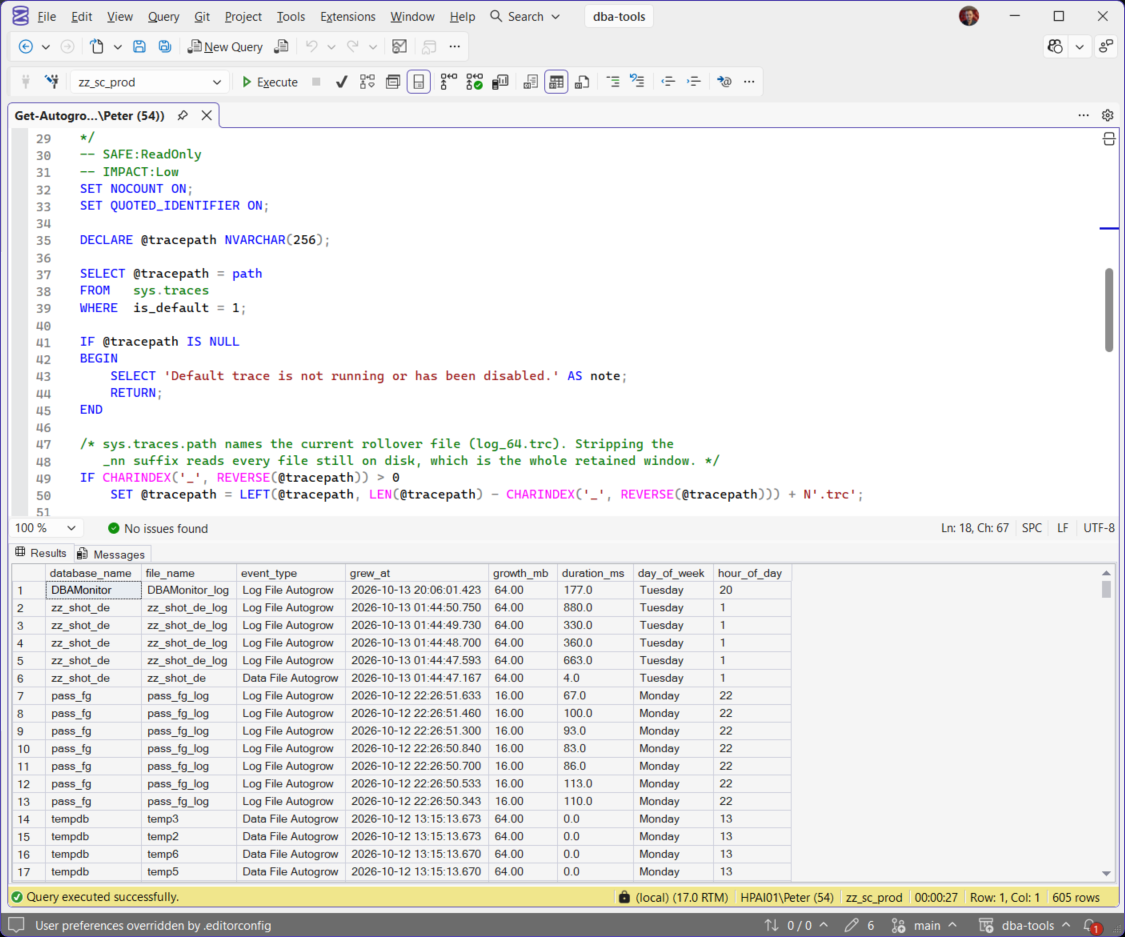
The script in SSMS on the lab instance on a later run, 605 growth events still in the default trace, newest first.
One run against the lab instance, 13 consecutive rows out of the 209 the trace still held.
Newest event first, and every row is one file extension, so a busy history is a long result set rather than a large number in a single row. The 8 tempdb rows are a single event between them: all 8 data files grew 64 MB in the same instant, which is the documented behaviour, because when tempdb has several data files they all autogrow at the same time and by the same amount. The Lab1001_logfull rows above are the other shape worth recognising, one log file taking 8 MB four times in 3.2 seconds, which is a growth increment set too small rather than a database running out of room.
Understanding the Results
The script returns one row per file extension, newest first. These are the columns.
database_namefile_nameevent_type rather than on its own.event_typegrew_atgrowth_mbduration_msday_of_weekhour_of_dayGrowth Events During Business Hours
Frequent growth during normal workload periods usually indicates:
- Files were created too small.
- Growth increments are too low.
- Database usage has increased.
- Capacity planning needs updating.
Growth Size
The growth_mb column shows how much space was added.
500 growth events at 10 MB each is 5 GB of expansion, delivered 10 MB at a time. That is SQL Server extending the file over and over instead of being given enough space up front.
A planned 5 GB growth operation is usually preferable to hundreds of smaller expansions.
Growth Duration
The duration_ms column is where this output teaches something you cannot see anywhere else, and the example output above makes the point better than a benchmark could. On the same instance, each tempdb data file grew by 64 MB in 0 to 4 milliseconds, while the Lab1001_logfull log grew 8 MB at a time and every growth took 33 to 80 milliseconds: eight times the space, in a tenth of the time. That gap is Instant File Initialization at work: with IFI enabled, a data file claims new space without zeroing it first, while a transaction log always writes zeroes over every new byte, because crash recovery depends on knowing where the log genuinely ends (Instant File Initialization, MS Docs). Long data-file durations therefore point at slow or contended storage, or at IFI not being enabled at all; long log durations are the log doing what it must, which is why log files deserve generous pre-sizing and fixed-MB growth more than any other file. If your data file growths also run hundreds of milliseconds, check Instant File Initialization before blaming the SAN.
How Far Back the Default Trace Goes
If the output stops short of the growth you are chasing, the trace has already thrown it away.
The default trace writes to 5 rollover files of 20 MB each in the instance Log folder, and deletes the oldest when it needs a new one. Your own limits are the max_size and max_files columns of sys.traces. That makes the window a budget in events rather than a number of days: a quiet instance can hold weeks of history, a busy one a few hours, and nothing warns you which you have.
There is one more reason the output can look shorter than it should. sys.traces.path returns only the file being written to right now, so passing it straight to sys.fn_trace_gettable reads a fifth of the retained history. The script strips the trailing file number so it reads the whole set, which on one quiet instance was the difference between 2 days of events and 20 days.
Two more boundaries worth knowing before you conclude that nothing grew. The filter is DatabaseID NOT IN (1, 3, 4), which keeps tempdb and every user database and leaves out master, model and msdb only: tempdb growth is in the output because it is usually the growth people are chasing. And if the default trace has been switched off the script tells you so instead of returning an empty grid, which are two very different findings.
For history that outlives the trace, collect file sizes on a schedule and keep them: Capacity and TempDB Baselines sets that up, and Database Growth Risk and Forecast reads it back as a trend.
Best Practices
Pre-size Database Files
Create files at a size that supports expected workload growth.
Avoid relying on repeated autogrowth events.
Use Fixed MB Growth
Prefer:
ALTER DATABASE YourDatabase
MODIFY FILE
(
    NAME = YourDatabase_Data,
    FILEGROWTH = 1024MB
);
over percentage growth.
Fixed MB values provide predictable behaviour.
Avoid Default Growth Settings
Default SQL Server settings are rarely suitable for production workloads.
The values worth hunting for are 1 MB, 10 MB and 10 percent: the first two are far too small for anything busy, and a percentage grows with the file, so each event takes longer than the last.
Review Growth Trends Regularly
Autogrowth history should be reviewed alongside:
- Database file sizes.
- Free disk space.
- Backup trends.
- Workload changes.
Frequently Asked Questions
How do I check SQL Server autogrowth history?
This script reads autogrowth events captured by the SQL Server default trace.
Are autogrowth events bad?
No.
Autogrowth is an important safety feature.
The problem is frequent unexpected growth during normal operation.
Should autogrowth be disabled?
No.
Autogrowth should remain enabled as protection against running out of space.
The goal is to configure it correctly, not remove it.
Does this show tempdb growth?
Yes. tempdb is in the output on purpose, because a tempdb data or log file growing in the middle of a workload is one of the things people most often arrive looking for. master, model and msdb are filtered out instead, because growth there is rare and almost never what you are chasing.
One caveat on reading it: tempdb is recreated every time the instance restarts, so its growth history only reaches back to the last restart, and the first growths after one are tempdb climbing back to its working size rather than a new problem. If that keeps happening, the fix is to pre-size the tempdb files to the size they always end up at.
Why does the script only show the last few days?
The default trace keeps 5 files of 20 MB and deletes the oldest when it needs room, so the window is a budget in events rather than a number of days. A chatty instance burns through it in hours.
If you need growth history that outlives the trace, collect file sizes on a schedule instead.
Should SQL Server autogrowth use percentages?
Usually no.
Fixed MB growth values provide more predictable behaviour, especially for large databases.
Summary
Autogrowth history is a simple but valuable SQL Server health check.
Regularly reviewing growth events helps identify undersized files, incorrect growth settings, and capacity issues before they affect production workloads.
A well-managed SQL Server environment should rarely depend on autogrowth.
Size files correctly, configure sensible growth increments, and use autogrowth as a safety net rather than a normal operating process.
Related
- Storage and Capacity (hub)
- Disk Is Full or the Log Will Not Truncate, step 7 of the space router, stopping it recurring
- Database Files Detail
- Database Sizes and Free Space
- Transaction Log Size and Usage
- VLF Count
- Database Free Space Summary
- Filegroup Space
- Disk Space
- Database Growth Risk and Forecast
- How to Right-Size SQL Server Database Files, size the files before growth becomes an incident
- Instant File Initialization, why one growth event takes seconds and another takes minutes
- DBA Scripts: The Complete Guide, the map across every script on this site
Leave a Reply