
What Msg 15517 Says
dbo, fix the database owner: ALTER AUTHORIZATION ON DATABASE::YourDb TO sa; That covers the overwhelmingly common case, a restored database whose owner no longer maps to a login on this instance. The message lists three possible causes in one breath; the owner is where to look first.This error has a talent for appearing far from the thing that caused it. A procedure that ran for years starts failing after a restore. Service Broker queues go quiet. A nightly job dies on a step nobody changed. The common thread is EXECUTE AS: something asked SQL Server to run as a database principal, and SQL Server could not make that identity work.
Check Which Principal SQL Server Cannot Execute As
| What you see | What it usually is |
|---|---|
The principal is dbo | The owner SID maps to no server login on this instance. This is common after a restore or attach; modules using EXECUTE AS OWNER are affected. |
| A named database user | The user is absent, or is a role, certificate-mapped user, or another principal that cannot be impersonated. |
| The principal exists | The caller may lack IMPERSONATE. Msg 15517 does not distinguish that permission failure from a missing principal. |
That third row is the trap. The wording sends you hunting for a missing principal that is not missing. If the principal obviously exists, stop reading the message as an existence claim and start reading it as a permission denial.
When a Restore Leaves the Owner SID Unmapped
A restore can preserve the owner SID from the source database. If no matching server login exists on the destination instance, a procedure that uses WITH EXECUTE AS OWNER can no longer impersonate that owner.
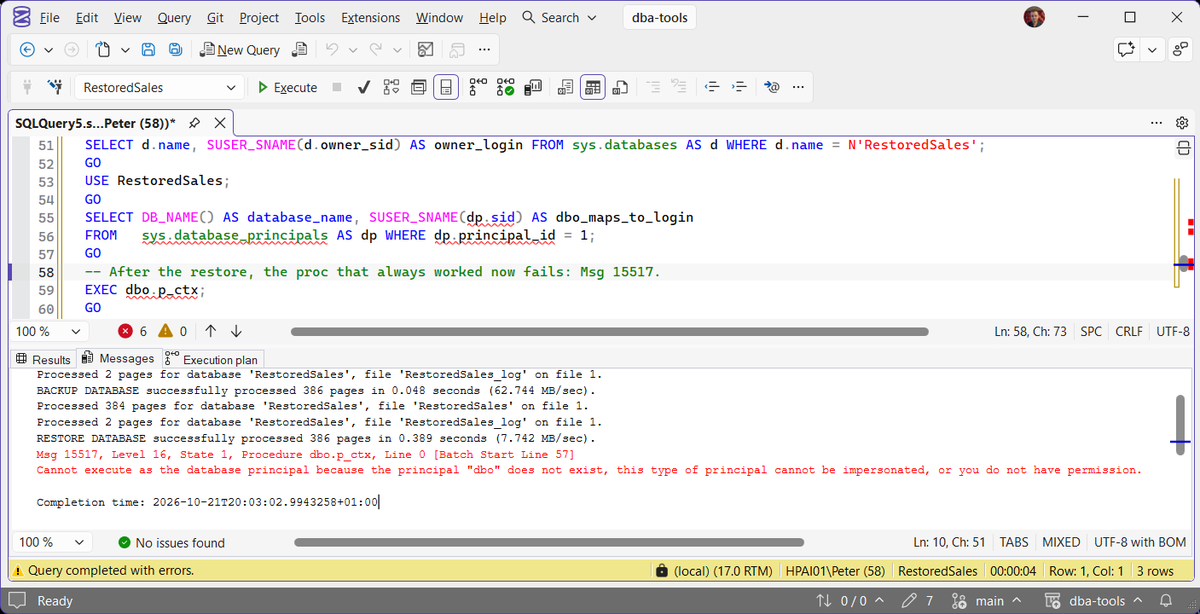
-- After the restore, the proc that always worked now fails:
EXEC dbo.p_ctx;Nothing inside the database changed. What changed is that EXECUTE AS OWNER now points at an owner SID this instance has never heard of. Confirm it in one query. A NULL owner name is the tell when the owning login was dropped; the restored-database case further down is the exception, where this query comes back empty and the database is still broken:
SELECT d.name, d.owner_sid, SUSER_SNAME(d.owner_sid) AS owner_login
FROM   sys.databases AS d
WHERE  SUSER_SNAME(d.owner_sid) IS NULL;
And the fix is one line. Repointing the owner to a real login made the failing procedure run again immediately, no restart, no rebuild:
ALTER AUTHORIZATION ON DATABASE::YourDb TO sa;Whether sa or a service account is the right owner is a policy question for your estate; what matters here is that the owner maps to a login that exists on this instance. The owner login can even be disabled and the fix still holds: EXECUTE AS OWNER resolves the identity, it does not sign in, so a disabled sa owns the database and the impersonation works. Verified on SQL Server 2025.
Microsoft’s reference covers EXECUTE AS and ALTER AUTHORIZATION in full.
Check the Owner SID Before Changing It
There is a catch in that check, and it is worth 30 seconds before you change anything. On this instance the restore left sys.databases.owner_sid pointing at the login that ran the RESTORE, not at the owner that vanished, so a filter on SUSER_SNAME(owner_sid) IS NULL finds nothing while the database is plainly broken. What dbo maps to inside the database is the thing that fails:
Read the first 2 results together. sys.databases says the owner resolves to a real login. sys.database_principals says the database’s own dbo, principal_id 1, maps to nothing. EXECUTE AS OWNER resolves the second, which is why the 15517 is real and the usual query is silent about it. Measured both ways round on SQL Server 2025 CU8: a restore that created the database, and a RESTORE ... WITH REPLACE over an existing one, ended up in the same state.
ALTER AUTHORIZATION resyncs the 2, and it takes effect on the next statement. The procedure that had been failing ran on the first attempt afterwards, with no restart and nothing recompiled by hand.
Why Dropping the Owner Login Is Refused
Trying to reproduce this by simply dropping the owning login gets refused: Msg 15174, Login owns one or more database(s). The engine defends the front door. A restore or attach walks in through the side: ownership arrives as a SID stamped in the backup, no login check is performed, and the orphan is created silently. That is why this error clusters around migrations, DR tests and environment refreshes, and why it deserves a place on any post-restore checklist next to orphaned users.
Avoid Broad Permission Changes
- Do not grant your way past it with CONTROL SERVER or sysadmin. If the principal is orphaned, no grant to the caller fixes the owner mapping; you will have widened permissions and kept the error.
- Do not recreate the procedure without EXECUTE AS to make it stop. The impersonation was presumably there for a reason, usually so callers do not need direct table rights. Removing it trades a clear error for a quieter permission problem.
- Do not confuse this with orphaned users. Same family, different member: an orphaned user is a database user whose login is gone and has its own error and fix. Both come from the same restore, so check for both while you are there.
Frequently Asked Questions
Why does it say dbo does not exist? dbo always exists.
The principal exists and I still get 15517. What now?
Which features hit this beyond EXECUTE AS in procedures?
Is TRUSTWORTHY involved?
is_trustworthy_on rather than assuming. Either way it is its own follow-up decision, not an automatic switch to flip.Where To Go Next
If the owner mapping is correct, use these pages for related login, orphaned-user, and permission checks.
- Login Failed or Permission Denied, the router for the other errors a restored database brings with it
- Get Orphaned Users, the same restore leaves both kinds of orphan; this finds the user kind
- Fix Orphaned Users, and this repairs them
- Get Permissions and Role Membership, for the IMPERSONATE-shaped case
- Get Database Summary, owner login for every database in one pass; a NULL there is a dropped owner, and the restore case on this page is the one it will not show
Leave a Reply