
A table has rows that should exist once and now exist two or three times: a load ran twice, an import fired again, and nothing on the table stopped it. Two queries fix it. A GROUP BY shows you the duplicate sets, and a ROW_NUMBER() delete removes every copy except one, whether or not the table has a key.
ROW_NUMBER(), partitioned by the columns that define a duplicate and ordered by the row to keep, then delete every row numbered above 1. The rows deleted should equal the duplicate count minus one per set. Add a unique index afterwards so it cannot happen again.Find the Duplicates First
Group by the columns that make two rows “the same” for this table, and keep the groups that appear more than once.
SELECT
    CustomerID,
    OrderDate,
    ProductID,
    COUNT(*) AS DuplicateCount
FROM dbo.Orders
GROUP BY CustomerID, OrderDate, ProductID
HAVING COUNT(*) > 1;
DuplicateCount includes the row you keep, so a set of 3 rows means 2 to delete, not 3. Get the exact number to check the delete against:
SELECT SUM(DuplicateCount - 1) AS RowsToDelete
FROM (
    SELECT COUNT(*) AS DuplicateCount
    FROM dbo.Orders
    GROUP BY CustomerID, OrderDate, ProductID
    HAVING COUNT(*) > 1
) AS d;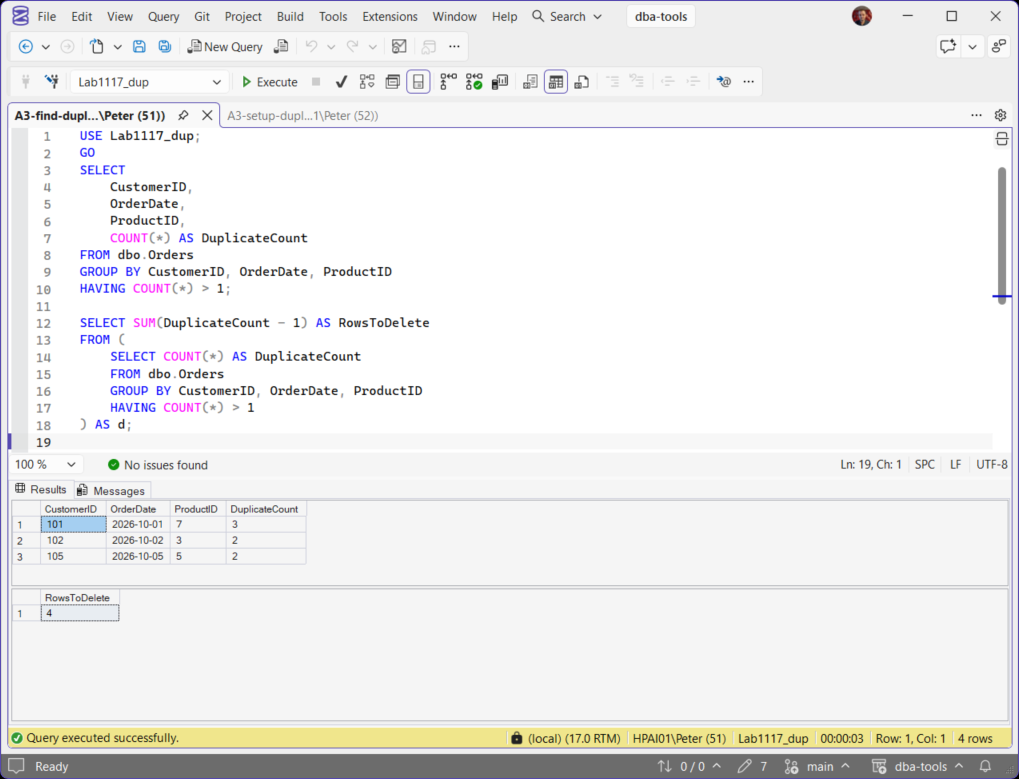
On the lab table, 3 duplicate sets hold 7 rows, so RowsToDelete comes back as 4.
Delete the Duplicates and Keep One Row
ROW_NUMBER() numbers the rows inside each group, so it can tell apart rows whose values are identical. Partition by the duplicate columns, order by the row you want to survive, and delete everything numbered above 1.
WITH DupeCTE AS (
    SELECT
        *,
        ROW_NUMBER() OVER (
            PARTITION BY CustomerID, OrderDate, ProductID
            ORDER BY OrderID
        ) AS RowNum
    FROM dbo.Orders
)
DELETE FROM DupeCTE
WHERE RowNum > 1;
PARTITION BY decides what counts as the same row. ORDER BY decides which copy survives: OrderID ascending keeps the first row inserted and DESC keeps the latest. Deleting from the CTE deletes the rows in dbo.Orders, because the CTE reads a single table. Microsoft Learn: ROW_NUMBER (Transact-SQL).
Check the Count Before You Commit
Run the same delete inside a transaction, read the row count, and only then commit.
BEGIN TRAN;

WITH DupeCTE AS (
    SELECT
        *,
        ROW_NUMBER() OVER (
            PARTITION BY CustomerID, OrderDate, ProductID
            ORDER BY OrderID
        ) AS RowNum
    FROM dbo.Orders
)
DELETE FROM DupeCTE
WHERE RowNum > 1;

SELECT @@ROWCOUNT AS RowsDeleted;

-- RowsDeleted matches RowsToDelete: COMMIT;
-- it does not: ROLLBACK;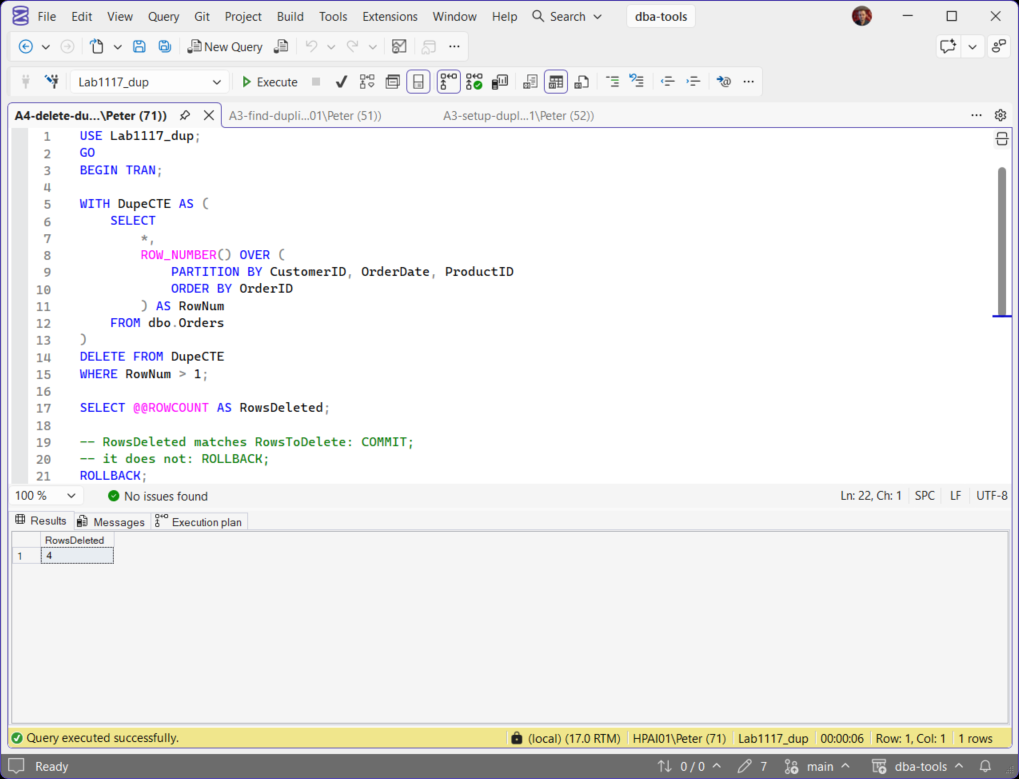
On the lab table above, RowsToDelete was 4 and the delete removed 4, keeping one row from each set. The lab run ends with ROLLBACK so the table stays as it was. If the numbers differ, roll back: the PARTITION BY columns are not the ones you counted with.
When There Is No Key at All
A heap loaded twice can have rows that are identical in every column, with no OrderID to order by. ROW_NUMBER() still numbers identical rows 1 and 2. It just needs an ORDER BY, so give it one that means “any order”:
WITH DupeCTE AS (
    SELECT
        *,
        ROW_NUMBER() OVER (
            PARTITION BY CustomerID, OrderDate, ProductID
            ORDER BY (SELECT NULL)
        ) AS RowNum
    FROM dbo.Imported
)
DELETE FROM DupeCTE
WHERE RowNum > 1;
Leave the ORDER BY out and the query fails with Msg 4112, “The function 'ROW_NUMBER' must have an OVER clause with ORDER BY.” Copy the keyed version onto a table without that column and it fails with Msg 207, Invalid column name. On the lab heap, 3 rows with one exact duplicate became 2.
Stop Them Coming Back
Duplicates usually mean the table is missing a rule. Once it is clean, add one:
CREATE UNIQUE INDEX UX_Orders_Customer_Date_Product
    ON dbo.Orders (CustomerID, OrderDate, ProductID);
If any duplicates are left, the index will not build: it fails with Msg 1505 and names the duplicate key, which makes it a quick check that the clean-up worked. Once the index is in place, the next duplicate insert fails with Msg 2601 instead of landing silently. Duplicate Key Errors 2627 and 2601 covers what the application sees then.
Production Notes
- Large tables: one delete over millions of rows is one transaction, one long lock and a lot of log. Run the same
ROW_NUMBER()logic in batches: Deleting Rows in Batches. - Busy tables: a large delete blocks other sessions on the table while it runs. Use a quiet window, and batch it either way.
- Check the keeper: before you commit, look at a few surviving rows to confirm the
ORDER BYkept the copy you meant to keep.
Frequently Asked Questions
Can I use SELECT DISTINCT into a new table instead?
ROW_NUMBER() delete changes only the duplicate rows and leaves everything else in place.Why not just use TRUNCATE?
Which duplicate does SQL Server keep?
ORDER BY inside OVER(). With ORDER BY (SELECT NULL) the choice is arbitrary, which is fine only when the rows are identical in every column.Related
- Difference Between DELETE and TRUNCATE, why TRUNCATE is not an option when you only want some of the rows gone
- Deleting Rows in Batches, how to remove the duplicates without a single transaction that fills the log
- Duplicate Key Errors 2627 and 2601, what the unique index raises when the next duplicate arrives
- RAND() vs NEWID() in SQL Server, why one gives you a value per query and the other per row
Leave a Reply