
Turning Change Data Capture off for a database takes one command, sys.sp_cdc_disable_db. It disables every tracked table itself, then drops the cdc schema, the change tables and both CDC Agent jobs. Disable tables one at a time only when you want CDC to stay on for the rest, or when the database has a lot of capture instances.
EXEC sys.sp_cdc_disable_db; in it. The captured change history goes with it, so copy out anything you still need first.Check What Is Tracked
Run this in the database first, so you know which tables lose their change history:
-- Every table CDC is tracking in the current database
SELECT s.name AS schema_name,
       t.name AS table_name,
       ct.capture_instance
FROM cdc.change_tables AS ct
INNER JOIN sys.tables AS t ON ct.source_object_id = t.object_id
INNER JOIN sys.schemas AS s ON t.schema_id = s.schema_id;
Run it in the right database: anywhere CDC is not enabled there is no cdc schema, so instead of an empty result you get:
That is the answer too: nothing in this database is tracked, so there is nothing to disable.
Get CDC and Change Tracking does the same for every database on the instance in one pass, which is the quicker check when you are not sure where CDC is on.
Disable CDC for the Whole Database
USE [YourDatabase];
EXEC sys.sp_cdc_disable_db;
There is no need to disable the tables first. On the lab, a database with 2 tracked tables went straight to sp_cdc_disable_db, with this state check either side of it:
-- CDC state for the current database: run it before and after
SELECT d.is_cdc_enabled,
       (SELECT COUNT(*) FROM sys.tables WHERE is_tracked_by_cdc = 1) AS tracked_tables,
       CASE WHEN SCHEMA_ID(N'cdc') IS NULL THEN 'no' ELSE 'yes' END AS cdc_schema,
       (SELECT COUNT(*) FROM msdb.dbo.sysjobs WHERE name LIKE N'cdc.' + DB_NAME() + N'[_]%') AS cdc_agent_jobs
FROM sys.databases AS d
WHERE d.name = DB_NAME();
It is a clean removal, not a pause. The change tables and everything captured in them are gone, and turning CDC back on later starts again from nothing. When this is the last CDC database on the instance, msdb.dbo.cdc_jobs is dropped as well, so a monitoring query that reads it will start failing with Msg 208.
It needs sysadmin on SQL Server and Azure SQL Managed Instance, and db_owner on Azure SQL Database (MS Docs).
A lot of capture instances? The whole removal runs as one transaction, and MS Docs warns that with many capture instances a long-running transaction can make it fail. In that case disable the tables first, a few at a time, then run sp_cdc_disable_db on what is left.
Disable CDC on One Table
To stop tracking one table and leave CDC on for the rest of the database:
USE [YourDatabase];
EXEC sys.sp_cdc_disable_table
    @source_schema = N'dbo',
    @source_name = N'Orders',
    @capture_instance = N'all';

-- What CDC still tracks, and the database is still enabled
SELECT capture_instance FROM cdc.change_tables;
SELECT name, is_cdc_enabled FROM sys.databases WHERE name = DB_NAME();
N'all' removes every capture instance for the table. A table can have 2 at once, which is how CDC is reconfigured without a gap in coverage. To remove only one of them, give its name from cdc.change_tables instead (MS Docs).
Check It Is Off
-- 0 means CDC is off for the database
SELECT name, is_cdc_enabled
FROM sys.databases
WHERE name = N'YourDatabase';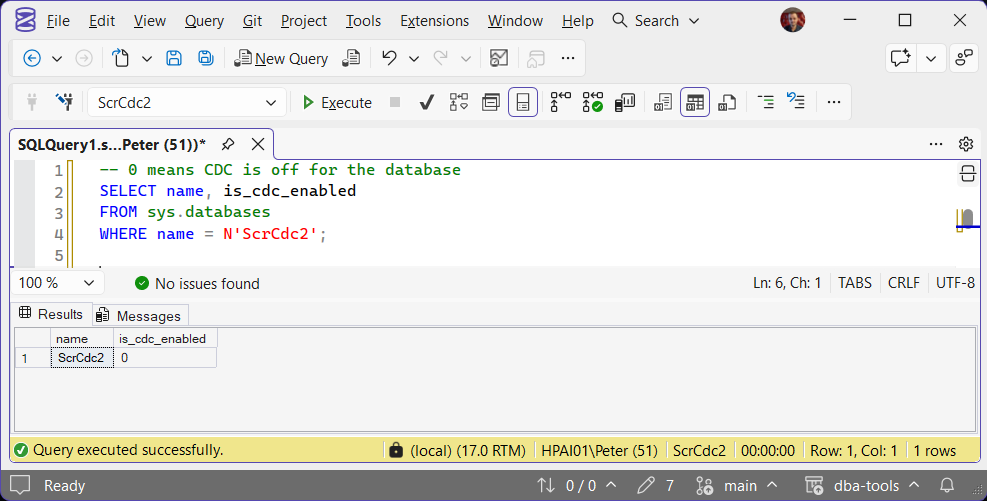
is_cdc_enabled = 0 confirms it. Querying cdc.change_tables afterwards fails with Invalid object name rather than returning no rows, because the schema itself is gone.
If It Fails With Msg 22902 or 22896
The error number tells you which one you have.
Not Sysadmin
Being db_owner is not enough on SQL Server or Managed Instance. A db_owner login that is not sysadmin gets this:
Run it as a sysadmin login. There is no lesser permission that will do.
The Database Owner No Longer Exists
Typically after a restore from another server. The CDC procedures run as dbo, and a dbo mapped to a login this server does not have makes them fail. SSMS shows it as a chain of three errors, and the one that matters is the last:
Check dbo itself, not the owner in sys.databases. After the restore on the lab, sys.databases already showed sa as the owner while dbo still pointed at the missing login:
-- Run in the database: NULL dbo_login = dbo maps to a login that does not exist here
SELECT dp.name AS db_user,
       SUSER_SNAME(dp.sid) AS dbo_login
FROM sys.database_principals AS dp
WHERE dp.name = N'dbo';

-- Give it an owner that exists, then run sp_cdc_disable_db again
ALTER AUTHORIZATION ON DATABASE::[YourDatabase] TO [sa];
Setting the owner to sa again, even though sys.databases already said sa, re-mapped dbo and the disable went through. The same 15517 is covered on its own in Cannot Execute As the Database Principal (Error 15517).
Before You Disable in Production
- Confirm nothing downstream still reads the change tables: an ETL job, a replication tool or a reporting feed. Disabling is immediate.
- There is no export step. If the captured history has any value, copy it out of the change tables before you disable, not after.
- If only some tables are finished with CDC, disable those tables rather than the whole database.
Frequently Asked Questions
Do I have to disable every table before the database?
sp_cdc_disable_db disables every tracked table itself. Disabling tables first is only worth it when there are many capture instances, because the single call runs as one long transaction.Does disabling CDC delete the captured changes?
Do the CDC Agent jobs need deleting by hand?
sp_cdc_disable_db removes the capture and cleanup jobs for that database. If they are still there afterwards, the disable did not finish.- How to Enable Change Data Capture (CDC) in SQL Server, to turn it back on, table by table.
- DBA Scripts: The Complete Guide
Leave a Reply