
Change Data Capture (CDC) allows SQL Server to track inserts, updates, and deletes on selected tables by reading the transaction log and storing changes in system tables.
From a DBA point of view, CDC is easy to enable but easy to underestimate. It adds background jobs, ongoing storage growth, and operational overhead that needs to be understood before enabling it on a production system.
This post shows how to enable CDC safely at both the database and table level, with the checks you should do first.
When CDC Is Useful
CDC is commonly enabled when:
- You need to track historical data changes
- A downstream system consumes row-level changes
- Audit or compliance requirements exist
- You want visibility into how data changes over time
If you’re unsure whether CDC fits your use case, review Microsoft’s documentation first and test on a non-production system.
Microsoft Learn: Change Data Capture (CDC)
Before You Enable CDC
Before enabling CDC on any database, check these first.
Is CDC Already Enabled?
This avoids confusion in larger or inherited environments.
-- Databases with CDC already on
SELECT name,
       is_cdc_enabled
FROM sys.databases
WHERE is_cdc_enabled = 1;
Does the Database Have a Valid Owner?
CDC does not need the owner to be sa. A database owned by an ordinary SQL login enabled cleanly on SQL Server 2025. What breaks it is a dbo that maps to a login this server does not have, which is exactly what you get after restoring a database from another server:
Check it before you enable. A NULL in dbo_login means the owner is orphaned:
-- Run in the database: who dbo really maps to
SELECT dp.name AS db_user,
       dp.sid,
       SUSER_SNAME(dp.sid) AS dbo_login
FROM sys.database_principals AS dp
WHERE dp.name = N'dbo';
The fix is to give the database an owner that exists. sa is the usual choice. sys.databases can already say sa while dbo is still orphaned, so run it anyway:
-- Give the database a valid owner
ALTER AUTHORIZATION ON DATABASE::[DemoDatabase] TO [sa];
GO
The same 15517 turns up outside CDC too, covered in Cannot Execute As the Database Principal (Error 15517).
Microsoft Learn: sys.sp_cdc_enable_db
Enable CDC on a Database
Once prerequisites are met, enabling CDC at the database level is straightforward.
-- Enable CDC for a database
USE [DemoDatabase];
GO

EXEC sys.sp_cdc_enable_db;
GO
SQL Server creates several system tables under the cdc schema to manage metadata and change tracking.
Verify it worked:
-- Verify CDC is enabled for a db
SELECT
    name,
    is_cdc_enabled
FROM sys.databases
ORDER BY 2 DESC;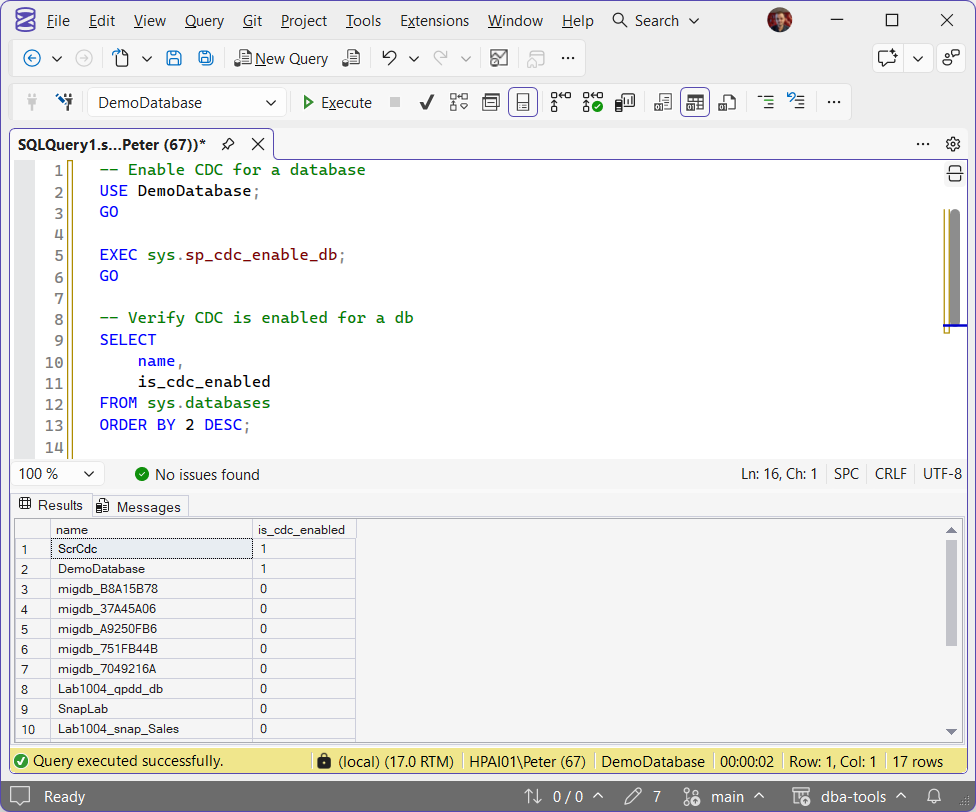
Enable CDC on a Table
CDC must be enabled per table.
First, check whether a table is already tracked:
-- Tables already tracked in this database
SELECT name,
       is_tracked_by_cdc
FROM sys.tables
WHERE is_tracked_by_cdc = 1;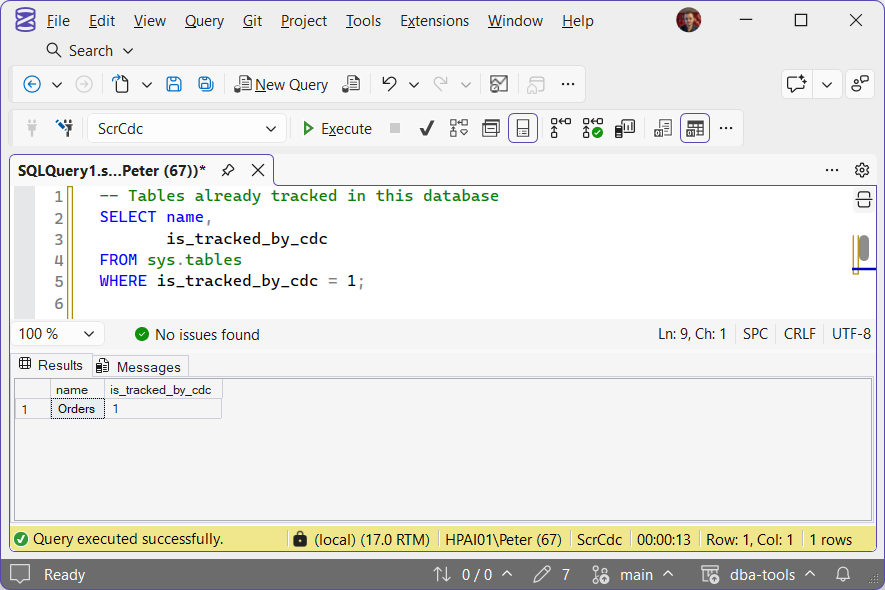
Filegroup Consideration
By default, CDC change tables are created in the database’s primary filegroup.
For databases that stay in service for a long time, this can become a problem. CDC tables grow continuously and can create unexpected storage pressure if they share space with core data files.
Microsoft recommends isolating CDC data into a separate filegroup when running CDC beyond short-term testing.
If you plan to do this, create the filegroup before enabling CDC on tables.
Create the dedicated filegroup first, then pass its name as @filegroup_name in sp_cdc_enable_table below. There is no way to move an existing capture instance to a different filegroup afterward without disabling and re-enabling CDC on that table.
Microsoft Learn: sys.sp_cdc_enable_table
Enable CDC for a Table
-- Enable CDC for a table
USE [DemoDatabase];
GO

EXEC sys.sp_cdc_enable_table
    @source_schema   = N'dbo',
    @source_name     = N'posts',
    @role_name       = NULL,
    @filegroup_name  = N'DemoBlog_CT'; -- optional but recommended
GO
When this runs successfully:
- CDC change tables are created
- SQL Agent jobs are started automatically:
cdc.<database>_capturecdc.<database>_cleanup
These jobs must remain enabled for CDC to function.
How CDC Works Behind the Scenes
- CDC reads committed transactions from the transaction log
- Changes are written asynchronously into change tables
- Inserts, updates, and deletes are recorded
- Schema changes do not automatically update CDC configuration
If both replication and CDC are enabled, the replication log reader handles population of CDC tables.
Verifying CDC Is Working
Enabling CDC without errors doesn’t confirm data is actually being captured. The capture job itself needs to be running and current. Check both:
-- Confirm the capture job exists and is enabled
SELECT name, enabled
FROM msdb.dbo.sysjobs
WHERE name LIKE 'cdc.%_capture';

-- Confirm captured rows are actually landing for a table
SELECT COUNT(*) AS captured_row_count
FROM cdc.dbo_posts_CT;
A disabled capture job is the most common way CDC looks “on” but isn’t actually recording anything: is_cdc_enabled and is_tracked_by_cdc both stay 1 even if the job itself has been stopped or is failing. For a fuller health check across every CDC and Change Tracking-enabled database on an instance, not just one table, see Get CDC and Change Tracking.
Reading the Changes
Query the change table directly for a quick look, but read changes through the functions CDC generates for each capture instance. They take an LSN range, so a consumer can pick up exactly where it left off. Here on a test table, dbo.Orders, after two inserts and an update:
-- Every change, and the net result per row, for dbo.Orders
DECLARE @from_lsn binary(10) = sys.fn_cdc_get_min_lsn(N'dbo_Orders'),
        @to_lsn binary(10) = sys.fn_cdc_get_max_lsn();

SELECT __$operation, OrderID, Customer, Amount FROM cdc.fn_cdc_get_all_changes_dbo_Orders(@from_lsn, @to_lsn, N'all');
SELECT __$operation, OrderID, Customer, Amount FROM cdc.fn_cdc_get_net_changes_dbo_Orders(@from_lsn, @to_lsn, N'all');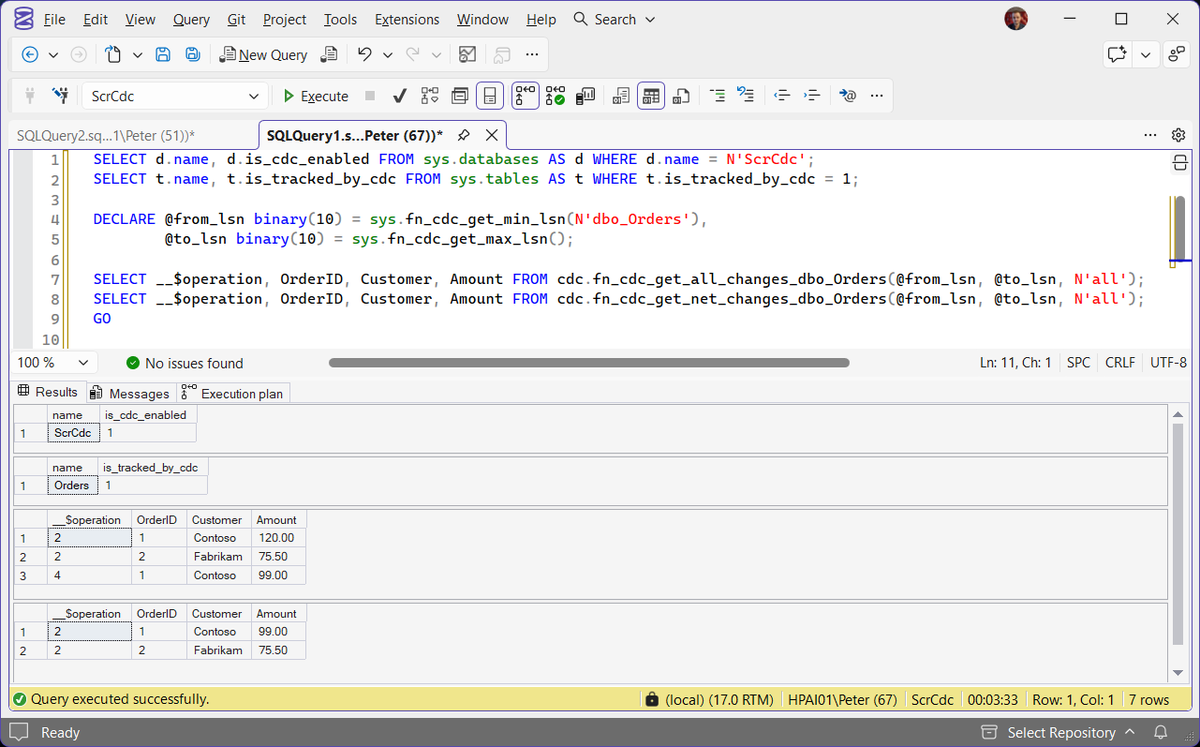
__$operation says what happened: 1 is a delete, 2 an insert, 4 the new values of an update. So all_changes returns three rows, and net_changes returns two inserts carrying the final values: Contoso at 99.00, not 120.00. Pass N'all update old' instead of N'all' to get the old values of an update too, as operation 3. The net function only exists when the table has a primary key or a unique index named in @index_name.
Run these straight after enabling and you can get an error that has nothing to do with arguments:
It means the LSN range is not valid yet, here because the capture job had not finished its first scan of the log. A few seconds later the same query returned the rows. If it persists, check the range you are passing. A @from_lsn below sys.fn_cdc_get_min_lsn gives the same message, and that minimum moves forward every time the cleanup job purges old changes, so a consumer that saved an LSN days ago can hit it.
CDC Holds the Transaction Log
Log records are not released until the capture job has read them, in any recovery model. With the capture job stopped, a SIMPLE recovery test database reported log_reuse_wait_desc = REPLICATION after a checkpoint, and went back to NOTHING once the job ran again. A stopped or failing capture job does not just miss changes. It grows the log until the disk fills.
-- REPLICATION on a CDC database usually means the capture job is behind or stopped
SELECT name,
       recovery_model_desc,
       log_reuse_wait_desc
FROM sys.databases
WHERE is_cdc_enabled = 1;
If you are already in that state, Disk Is Full or the Log Will Not Truncate walks through it.
Operational Warnings
Before enabling CDC in production, be aware:
- CDC increases disk usage over time, in the change tables and in the log
- Change tables grow until cleaned up
- SQL Agent job health matters
- Schema changes often require CDC to be disabled and re-enabled
- Poor planning can cause unexpected storage issues
CDC is easy to turn on and easy to forget about. Treat it as an ongoing operational feature, not a one-time switch.
Related
- Disable Change Data Capture in SQL Server, turning it off for one table or the whole database
- SSMS “Saving Changes Is Not Permitted”, a designer save on a CDC-enabled table drops tracking
- SQL Server Agent Will Not Start, no Agent, no capture job
- DBA Scripts: Get Log Reuse Waits, what is holding the log on every database
- SQL Server Transaction Log Full, where a stalled capture job ends up
- DBA Scripts: The Complete Guide
Leave a Reply