
TempDB is shared by every database on the instance, and it’s usually the first thing to show contention under load, long before any user database does. Setup has created 1 data file per core (up to 8) since SQL Server 2016, but an older instance or one upgraded in place can still be running a single data file, and it’s exactly the kind of setting that gets configured once at install time and never revisited.
This script checks the three things that actually matter: file count relative to CPU cores, whether the files are sized equally, and whether autogrowth is set as a fixed amount rather than a percentage.
Why TempDB Configuration Matters
TempDB backs far more than explicit #temp tables, it’s where SQL Server stores sort spills, hash join work tables, index rebuild intermediate data, cursor materialisation, triggers, and version store rows for snapshot isolation. Every session on the instance shares the same TempDB files, which makes its configuration a shared resource problem, not a per-database one:
- Too few data files relative to CPU cores creates allocation page (
PFS/GAM/SGAM) contention as multiple threads fight over the same allocation structures, this is the single most common TempDB misconfiguration. - Unequal file sizes break SQL Server’s proportional fill algorithm, which allocates more heavily to whichever file has the most free space, so uneven files end up unevenly used, defeating the point of having multiple files.
- Percentage-based autogrowth on files that are already large causes autogrowth events that take longer and longer as the file grows, a fixed MB amount keeps growth events predictable in duration.
Common Symptoms
- TempDB filling its drive or still growing, TempDB Is Full or Still Growing finds what is using it right now.
PAGELATCH_UPwaits on TempDB’s allocation pages under concurrent load.- TempDB growth events showing up in the default trace or error log at inconsistent, escalating intervals.
- An older or in-place-upgraded instance still running a single TempDB data file.
- General “everything is slow” symptoms during heavy batch or ETL windows that trace back to TempDB contention rather than the user database itself.
When to Run This Script
- Routine SQL Server health checks
- Immediately after standing up a new instance, TempDB’s defaults are rarely production-appropriate
- After a migration, to confirm the target server’s TempDB was configured to match the source (or better)
- Investigating
PAGELATCHcontention or general slowness under concurrent load
The Script
Run the following script against your SQL Server instance.
- Tested on: SQL Server 2025 (RTM CU8, 17.0.4075.5), Windows lab instance
- Last verified: 2026-09-02 (re-run against the lab, 9 rows, every status OK)
- Permissions: VIEW SERVER STATE
- Safety: read-only, impact low
/*
Script Name : Get-TempDbConfiguration
Category    : monitoring
Purpose     : Reviews TempDB file configuration — file count, sizing parity, autogrowth
              settings, and max server memory context. Surfaces common misconfigurations
              that cause allocation contention on busy OLTP servers.
Author      : Peter Whyte (https://sqldba.blog/dba-scripts-get-temp-db-configuration/)
Requires    : VIEW SERVER STATE
HealthCheck : Yes
*/
-- SAFE:ReadOnly
-- IMPACT:Low
SET NOCOUNT ON;

/*
  DESIGN: Best practice guidance embedded in status columns:
    - Equal file count to physical CPU cores (up to 8) prevents allocation hotspots
    - All data files should be equal size (unequal sizing causes uneven proportional fill)
    - Fixed-size autogrowth (not %) is strongly preferred for TempDB
    - Instant file initialization (IFI) cannot be detected here but matters for autogrowth speed
  Returns one row per TempDB file with a per-file status, plus a summary row (row_type='summary').
*/

WITH tempdb_files AS (
    SELECT
        mf.file_id,
        mf.name AS logical_name,
        mf.physical_name,
        mf.type_desc AS file_type,
        CAST(mf.size * 8.0 / 1024 AS decimal(10,2)) AS file_size_mb,
        CASE WHEN mf.max_size = -1 OR mf.max_size = 268435456
             THEN NULL
             ELSE CAST(mf.max_size * 8.0 / 1024 AS decimal(10,2))
        END AS max_size_mb,
        mf.is_percent_growth,
        CASE WHEN mf.is_percent_growth = 1
             THEN CAST(mf.growth AS varchar(10)) + '%'
             ELSE CAST(mf.growth * 8 / 1024 AS varchar(10)) + ' MB'
        END AS autogrowth_setting
    FROM sys.master_files mf
    WHERE mf.database_id = 2 -- TempDB
),
sizing_stats AS (
    SELECT
        file_type,
        COUNT(*) AS file_count,
        MIN(file_size_mb) AS min_size_mb,
        MAX(file_size_mb) AS max_size_mb,
        AVG(file_size_mb) AS avg_size_mb
    FROM tempdb_files
    GROUP BY file_type
)
SELECT
    f.file_type,
    f.file_id,
    f.logical_name,
    f.physical_name,
    f.file_size_mb,
    f.max_size_mb,
    f.autogrowth_setting,
    CASE WHEN f.is_percent_growth = 1
         THEN 'WARN — percent autogrowth; use fixed MB for TempDB'
         ELSE 'OK'
    END AS autogrowth_status,
    CASE WHEN s.min_size_mb = s.max_size_mb OR s.file_count = 1
         THEN 'OK — equal sizing'
         ELSE 'WARN — files are unequal (' + CAST(s.min_size_mb AS varchar) + '–' +
              CAST(s.max_size_mb AS varchar) + ' MB); equal sizing prevents allocation contention'
    END AS sizing_status,
    s.file_count AS total_files_this_type,
    (SELECT CAST(value_in_use AS varchar(20))
     FROM sys.configurations WHERE name = 'max degree of parallelism') AS maxdop,
    (SELECT cpu_count FROM sys.dm_os_sys_info) AS logical_cpu_count,
    CASE
        WHEN f.file_type = 'ROWS' AND s.file_count < (SELECT CASE WHEN cpu_count > 8 THEN 8 ELSE cpu_count END FROM sys.dm_os_sys_info)
            THEN 'WARN — ' + CAST(s.file_count AS varchar) + ' data file(s); recommend 1 per core up to 8'
        WHEN f.file_type = 'ROWS' AND s.file_count > 8
            THEN 'INFO — ' + CAST(s.file_count AS varchar) + ' data files; > 8 rarely helps'
        ELSE 'OK'
    END AS file_count_status
FROM tempdb_files f
JOIN sizing_stats s ON s.file_type = f.file_type
ORDER BY f.file_type DESC, f.file_id;
This reads every TempDB file from sys.master_files, computes sizing parity and autogrowth status per file, and cross-references the data file count against the instance’s logical CPU count to flag whether TempDB has enough files to avoid allocation contention.
How To Run From The Repo
Clone DBA Tools, initialize and run the script:
# Clone dba-tools repo:
git clone https://github.com/peterwhyte-lgtm/dba-tools

# Initialize environment:
cd dba-tools
.\Initialize-Environment.ps1

# Check TempDB file count, sizing parity, and autogrowth settings:
.\run.ps1 Get-TempDbConfiguration

# To run against a remote sql server:
.\run.ps1 Get-TempDbConfiguration -ServerInstance SQLSERVER01
This script lives in the repo at:
sql/monitoring/tempdb/Get-TempDbConfiguration.sqlpowershell/wrappers/monitoring/tempdb/Get-TempDbConfiguration.ps1
Example Output
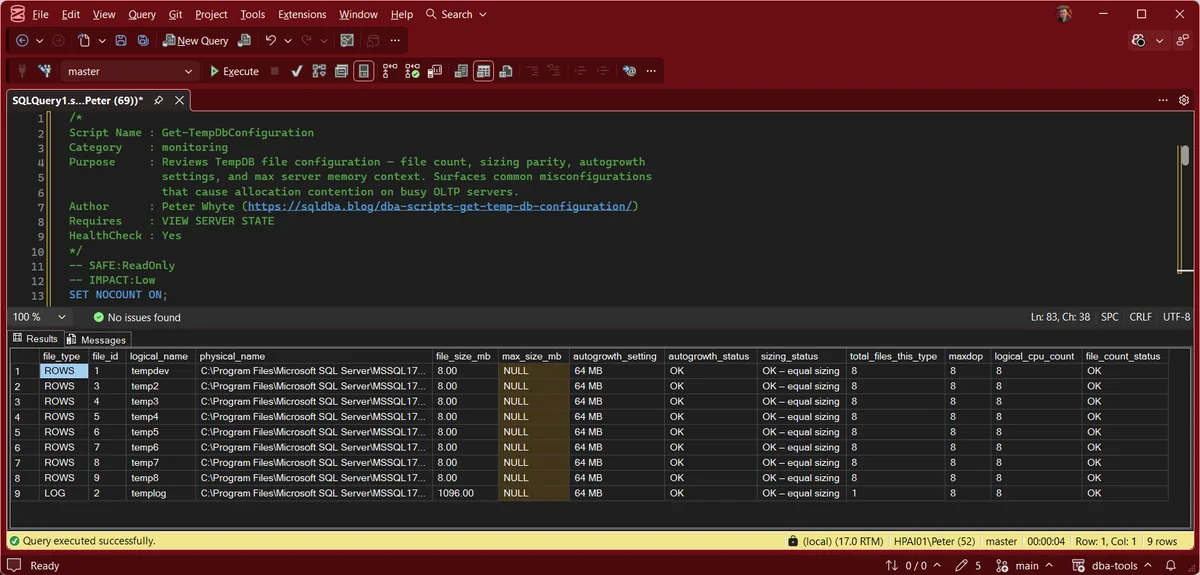
9 rows come back from the lab instance: 8 data files and 1 log file, every status column reading OK. 8 equally sized data files match its 8 logical cores, with fixed 64 MB autogrowth, so this is what a correctly configured box looks like.
2 things are worth reading past the OKs. The data files are 8 MB each with 64 MB autogrowth, which is exactly the SQL Server install default, so equal sizing is satisfied trivially: nothing has grown yet. And templog sits at 1,096 MB against 8 MB data files, so the log has grown while the data files have not. On a lightly used instance that is normal, and it is the shape to look at again once real work has run through it.
The sizing and file count columns repeat on every data file row because they describe the set rather than the file. Read 1 row for those, then read the rest for the per-file detail.
Understanding the Results
file_count_statustotal_files_this_typelogical_cpu_countsizing_statusfile_size_mbautogrowth_statusautogrowth_settingmax_size_mbfile_typefile_idlogical_namephysical_namephysical_name answers the question none of the status columns can: are the data files actually on the same volume? Equal sizing buys nothing if 1 file sits on a slower disk, because proportional fill keeps feeding it at the same rate as the others. Disk Space shows what each volume has left.maxdopCommon Causes
Most TempDB misconfiguration traces back to one root cause: nobody changed it after install. Setup before SQL Server 2016 created a single data file with autogrowth too small for a busy server, and an in-place upgrade keeps whatever layout it finds. Migrations and restores compound this, a database moved to new hardware doesn’t bring TempDB’s file layout with it, TempDB is rebuilt fresh on every instance and inherits whatever that instance’s install-time defaults were.
How to Fix TempDB Configuration
Add data files to match CPU count (up to 8, then reassess only if allocation contention persists):
ALTER DATABASE tempdb ADD FILE (
    NAME = tempdev2,
    FILENAME = 'D:\TempDB\tempdev2.ndf',
    SIZE = 8192KB,
    FILEGROWTH = 65536KB   -- fixed 64 MB, not percent
);
Repeat per file needed, keeping every file’s SIZE and FILEGROWTH identical to the existing ones. New files are usable straight away; only moving a file to a new path waits for the next restart, and How to Move TempDB Files in SQL Server covers that.
Fix percentage-based autogrowth to a fixed amount:
ALTER DATABASE tempdb MODIFY FILE (
    NAME = tempdev,
    FILEGROWTH = 65536KB   -- 64 MB, adjust to match your file size
);
Run this against every TempDB file individually, sys.master_files from the script above shows exactly which ones need it.
Best Practices
- Match TempDB data file count to logical CPU count, capped at 8, more files beyond that rarely helps and adds management overhead.
- Keep every TempDB data file the exact same size, always grow them together if you resize.
- Use fixed MB autogrowth, never percentage, for every TempDB file.
- Check this immediately after any new instance build, restore to new hardware, or migration, it’s a 5-minute fix that’s easy to forget under deadline pressure.
- Re-run this script as part of routine health checks, TempDB configuration doesn’t drift on its own, but a well-meaning “quick fix” file add during an incident sometimes leaves files unequal afterward.
Microsoft’s reference covers sys.master_files, sys.dm_os_sys_info and sys.configurations in full.
Frequently Asked Questions
How many TempDB files should SQL Server have?
One data file per logical CPU core, up to a maximum of 8. Beyond 8 cores, most guidance (including Microsoft’s own) says to only add more files if you can prove ongoing allocation contention, not by default.
Why does TempDB file size need to be equal across files?
SQL Server fills TempDB’s data files using a proportional fill algorithm that allocates more to whichever file has the most free space. If files are different sizes, that algorithm keeps favouring the file with the most room, and the files never even out on their own.
Should TempDB autogrowth be a percentage or a fixed size?
Fixed size. Percentage growth on a large file means each growth event moves progressively more data, taking progressively longer. A fixed MB amount keeps every growth event predictable, and predictable is what you want during a growth event that’s blocking other work.
Summary
TempDB is one of the few settings that’s genuinely install-once, verify-forever, it doesn’t change with the workload, so a misconfiguration found on day one is usually still there years later unless someone specifically checks. This script turns that check into 30 seconds: file count against CPU cores, sizing parity, and autogrowth type, all in one pass.
Run it after every new instance build and every migration, and again any time TempDB contention shows up as a symptom rather than a known cause.
Related Scripts
You may also find these scripts useful:
- TempDB Hotspots
- TempDB Usage and File Balance
- DBA Scripts: The Complete Guide, the map across every script on this site
Leave a Reply