
If a certificate protects TDE or backup encryption and you lose it, you lose the data. A TDE database cannot be restored anywhere else without the certificate and its private key, and an encrypted backup cannot be restored at all. The backup itself takes a minute. Do it straight after creating the certificate, and keep the files somewhere other than the server.
master, run BACKUP CERTIFICATE [name] TO FILE = '...cer' WITH PRIVATE KEY (FILE = '...pvk', ENCRYPTION BY PASSWORD = '...'), then copy both files off the server and keep the password with them.This post covers finding certificates that have never been backed up, the classic .cer and .pvk pair, the single-file PFX form, the errors each one throws, and proving the backup restores. Everything below was run on SQL Server 2025.
Find Certificates That Were Never Backed Up
Server certificates used for TDE and backup encryption live in master. pvt_key_last_backup_date is NULL until the private key has been exported:
USE [master];
GO
SELECT  name,
        subject,
        expiry_date,
        pvt_key_encryption_type_desc,
        pvt_key_last_backup_date      -- NULL = never exported to .pvk
FROM    sys.certificates
WHERE   name NOT LIKE '##%'           -- skip the internal certificates
ORDER BY name;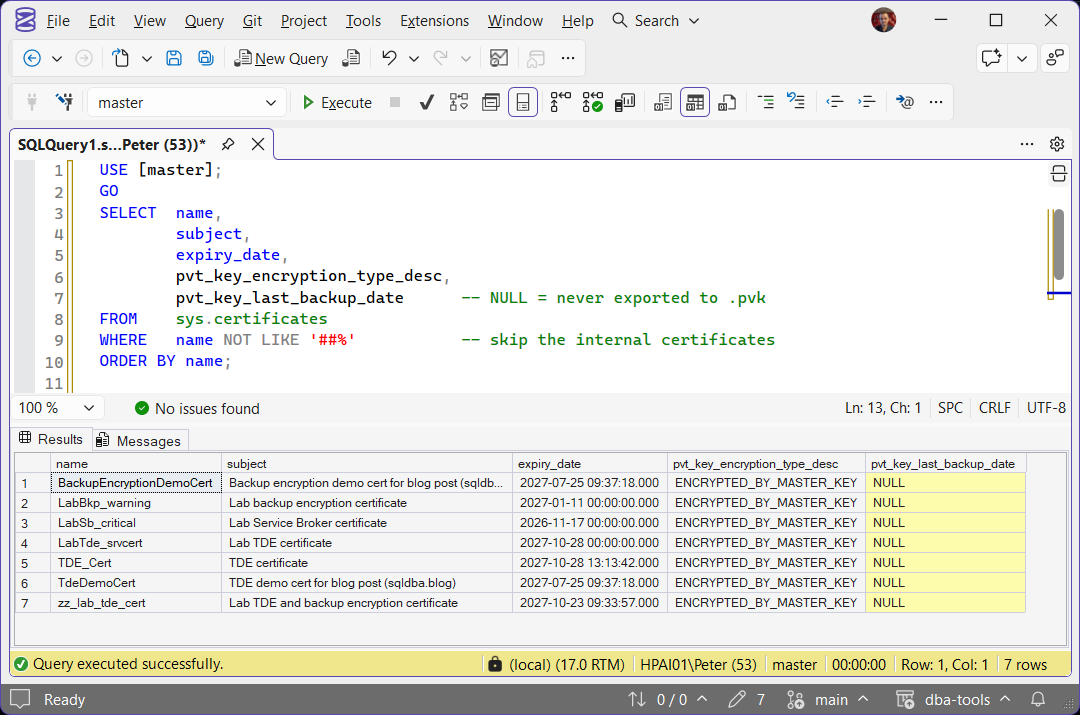
One catch, tested on SQL Server 2025: only the .pvk export stamps that column. A PFX export leaves it exactly as it was, so a certificate backed up only as PFX still shows NULL. Treat a NULL as “check”, not as proof of no backup.
To see which certificate protects which database, and which ones are close to expiry, use Get Certificates, Keys, and TDE Status.
Back Up to .cer and .pvk
This form works on every supported version. The certificate goes to the .cer file, the private key to the .pvk file, encrypted with a new password that you choose now:
USE [master];
GO
BACKUP CERTIFICATE [TDE_Cert]
TO FILE = N'D:\CertBackup\TDE_Cert_20261028.cer'
WITH PRIVATE KEY
(
    FILE = N'D:\CertBackup\TDE_Cert_20261028.pvk',
    ENCRYPTION BY PASSWORD = N'<long generated password>'
);
Without the WITH PRIVATE KEY block you get the public certificate only, which is no use for restoring TDE or encrypted backups.
The files are written by the SQL Server service account, which needs write access to the folder, and they are never overwritten. Run the same backup twice and the second one fails:
A date in the file name avoids it. If the private key is protected by its own password rather than by the database master key, the backup also needs that password:
Add DECRYPTION BY PASSWORD = N'<current key password>' inside the PRIVATE KEY ( ) block and it runs. pvt_key_encryption_type_desc in the query above tells you which kind you have: ENCRYPTED_BY_MASTER_KEY or ENCRYPTED_BY_PASSWORD.
Back Up to a Single PFX File
SQL Server 2022 added PKCS#12 export, the certificate and private key together in one .pfx file, which is easier to store and to hand to a vault:
USE [master];
GO
BACKUP CERTIFICATE [TDE_Cert]
TO FILE = N'D:\CertBackup\TDE_Cert_20261028.pfx'
WITH FORMAT = 'PFX',
PRIVATE KEY
(
    ENCRYPTION BY PASSWORD = N'<long generated password>',
    ALGORITHM = 'AES_256'
);
ALGORITHM is not optional here. Leave it out and the export fails:
And as above, a PFX export does not update pvt_key_last_backup_date. If your monitoring alerts on that column, take the .pvk form as well, or the alert never clears. Both exports in a row show it:
-- The .pvk export stamps pvt_key_last_backup_date; the .pfx export does not
USE [master];
BACKUP CERTIFICATE [TDE_Cert]
TO FILE = N'D:\CertBackup\TDE_Cert_20261028.cer'
WITH PRIVATE KEY (FILE = N'D:\CertBackup\TDE_Cert_20261028.pvk',
                  ENCRYPTION BY PASSWORD = N'<long generated password>');
SELECT name, pvt_key_last_backup_date FROM sys.certificates WHERE name = N'TDE_Cert';

WAITFOR DELAY '00:00:02';

BACKUP CERTIFICATE [TDE_Cert]
TO FILE = N'D:\CertBackup\TDE_Cert_20261028.pfx'
WITH FORMAT = 'PFX',
PRIVATE KEY (ENCRYPTION BY PASSWORD = N'<long generated password>', ALGORITHM = 'AES_256');
SELECT name, pvt_key_last_backup_date FROM sys.certificates WHERE name = N'TDE_Cert';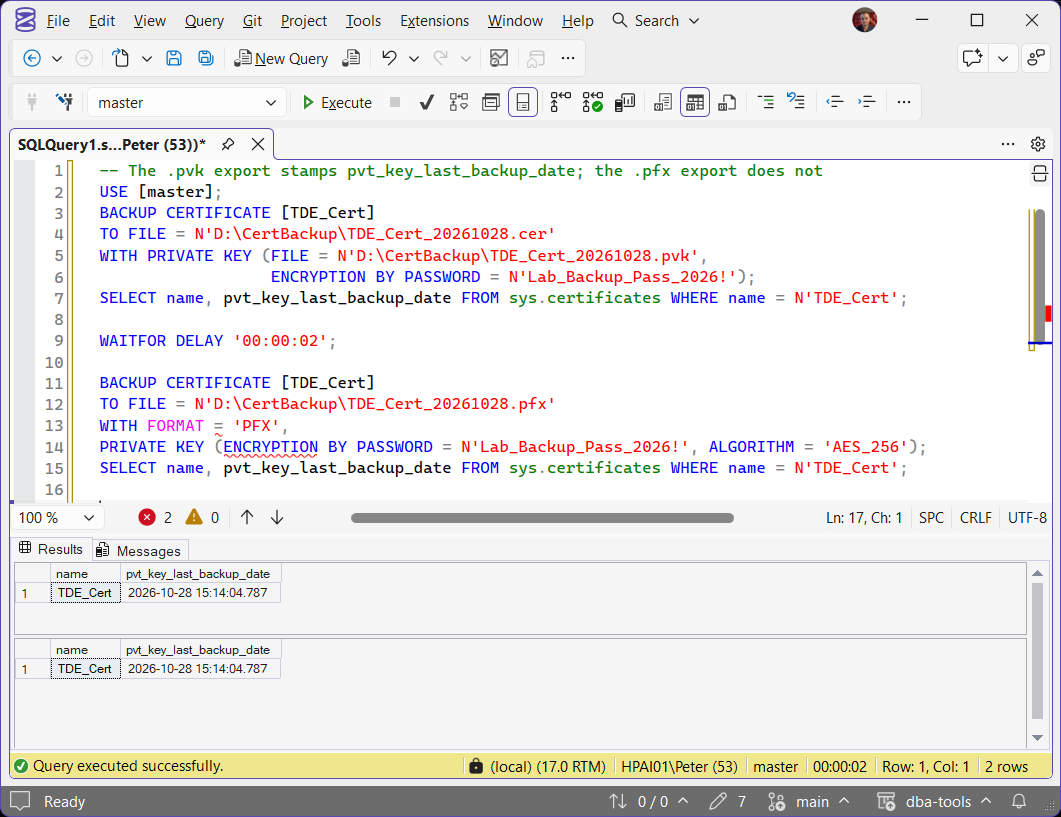
SSMS IntelliSense underlines the PFX options in red and counts two errors; the batch runs fine.
Microsoft Learn: BACKUP CERTIFICATE · CREATE CERTIFICATE
Get the Files Off the Server
A certificate backup on the same disk as the database protects you from nothing. Copy the files to secure storage, and keep the password somewhere else again: a password manager or vault, never a text file next to the backup. If you use backup encryption, the backup sets are useless without these files, so they deserve the same care as the backups.
The files belong to the service account, and an ordinary login cannot read them: opening the .pvk as a non-administrator returned Access is denied. Copy them as an administrator:
# Run as an administrator
Copy-Item -Path 'D:\CertBackup\TDE_Cert_20261028.*' -Destination '\\securestore\sql-certs\SQL01\'
Prove the Backup Restores
A certificate backup that has never been restored is a hope. On a test instance, create the certificate from the files and compare thumbprints with the source. The target database needs a database master key first, or the create fails:
USE [master];
GO
-- only if master has no database master key yet
-- CREATE MASTER KEY ENCRYPTION BY PASSWORD = N'<another long password>';

-- from .cer and .pvk
CREATE CERTIFICATE [TDE_Cert]
FROM FILE = N'D:\CertRestore\TDE_Cert_20261028.cer'
WITH PRIVATE KEY
(
    FILE = N'D:\CertRestore\TDE_Cert_20261028.pvk',
    DECRYPTION BY PASSWORD = N'<the backup password>'
);

-- or from the .pfx
-- CREATE CERTIFICATE [TDE_Cert]
-- FROM FILE = N'D:\CertRestore\TDE_Cert_20261028.pfx'
-- WITH FORMAT = 'PFX',
-- PRIVATE KEY (DECRYPTION BY PASSWORD = N'<the backup password>');

SELECT name, pvt_key_encryption_type_desc, thumbprint
FROM   sys.certificates
WHERE  name = N'TDE_Cert';
On the lab, with a second database standing in for the other server, the restore and the comparison looked like this:
-- Lab: a second database stands in for the other server
USE [CertLabRestore];
CREATE CERTIFICATE [TDE_Cert]
FROM FILE = N'D:\CertBackup\TDE_Cert_20261028.pfx'
WITH FORMAT = 'PFX',
PRIVATE KEY (DECRYPTION BY PASSWORD = N'<long generated password>');

SELECT 'source' AS copy, thumbprint FROM master.sys.certificates WHERE name = N'TDE_Cert'
UNION ALL
SELECT 'restored', thumbprint FROM sys.certificates WHERE name = N'TDE_Cert';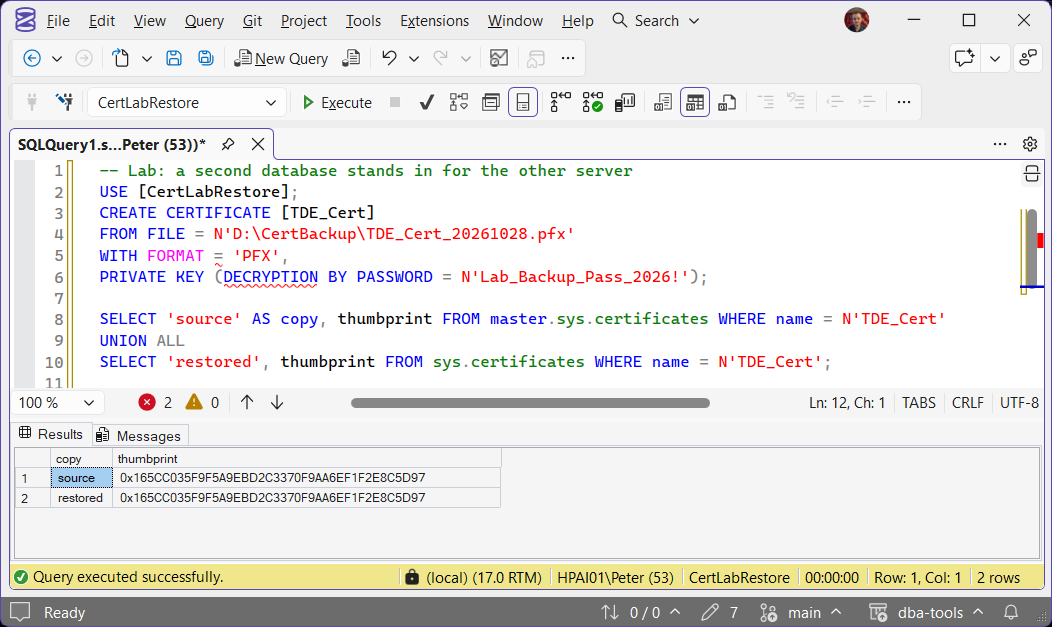
Both forms restored with the same thumbprint as the source and the key ENCRYPTED_BY_MASTER_KEY. A wrong password fails with Msg 15465, The private key password is invalid, which is worth finding out now rather than during an outage.
The final test is restoring a TDE database or an encrypted backup on that instance. TDE Restore Fails: Cannot Find Server Certificate (Error 33111) walks through that restore and what fails when the certificate is missing.
Frequently Asked Questions
Do I need to back up the master key as well?
When should I back it up?
What if the private key is already lost?
Is PFX better than .cer and .pvk?
Summary
Check sys.certificates for a NULL pvt_key_last_backup_date, remembering that only the .pvk export sets it. Back up with BACKUP CERTIFICATE ... WITH PRIVATE KEY, or as PFX on SQL Server 2022 and later with ALGORITHM stated. Copy the files off the server as an administrator, keep the password somewhere else, and prove it with CREATE CERTIFICATE ... FROM FILE and a matching thumbprint on a test instance.
Leave a Reply