
A linked server lets one SQL Server query another as if the remote tables were local. Two stored procedures create it. The reason this is worth a post in 2026 is that the two stored procedures now very often fail on the first attempt, for a reason that has nothing to do with the syntax.
Everything below was run on a SQL Server 2025 instance, including the failure.
The Two Statements
-- 1. define the link
EXEC sp_addlinkedserver
     @server     = N'REMOTE_SQL',            -- the name you will use in queries
     @srvproduct = N'',
     @provider   = N'MSOLEDBSQL',
     @datasrc    = N'SERVERNAME\INSTANCE';   -- the machine you are connecting to

-- 2. decide who it connects as
EXEC sp_addlinkedsrvlogin
     @rmtsrvname  = N'REMOTE_SQL',
     @useself     = N'True';                 -- pass the caller's Windows login through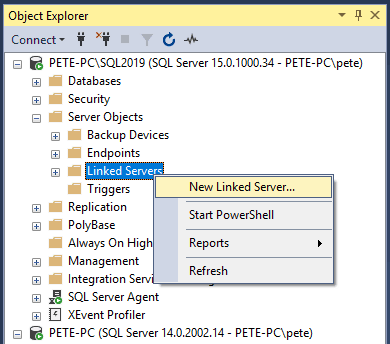
@useself = True is convenient rather than automatically correct. It passes the
caller’s Windows login through, which only works if that login exists on the remote instance with
the rights it needs, and it falls over on a double hop: an Agent job, a web app, or a link called
from another link. Most estates map a dedicated account instead:
EXEC sp_addlinkedsrvlogin
     @rmtsrvname  = N'REMOTE_SQL',
     @useself     = N'False',
     @locallogin  = NULL,                        -- applies to every local login
     @rmtuser     = N'svc_linked_reader',
     @rmtpassword = N'...';
Give that account the least it needs on the far side. Mapping everyone through a sysadmin to get the link working is a standing remote admin session nobody will revisit.
@server is a label, not a hostname. It is the name you type in your queries, and
keeping it different from the machine name is often clearer.
Before You Blame the Linked Server
If the link cannot connect at all, check the network before you start changing providers and login mappings. One line settles whether the instance is even reachable on its port:
Test-NetConnection -ComputerName sqlserver.yourdomain.com -Port 1433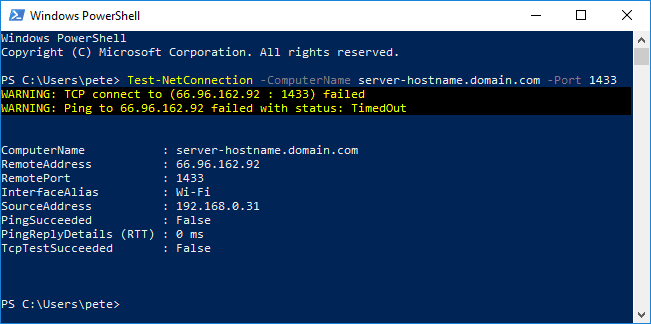
TcpTestSucceeded : False. Nothing about the linked server configuration can fix this one, and it is worth ruling out in ten seconds rather than an hour.1433 is only right for a default instance. A named instance usually listens on
a dynamic port, so testing 1433 against one tells you nothing useful. Get its real port from
sys.dm_tcp_listener_states on the target, or the error log line beginning
Server is listening on. If you rely on SQL Browser to resolve the instance name, that is
UDP 1434 and it has to be running.
TcpTestSucceeded : True means the port is open and you can go on to the
configuration. False means a firewall, the wrong port, a named instance using a dynamic port, or
the SQL Browser service being off. Note that PingSucceeded being False on its own
means very little, because ICMP is blocked on plenty of networks that happily serve SQL.
The Failure You Will Probably Hit First
Run exactly that, then query it, and on a lot of estates you get this:
Nothing is wrong with your syntax. The modern driver encrypts by default.
MSOLEDBSQL 18 and 19 changed the default to Encrypt=yes, so the link now insists on a
TLS certificate that the calling server trusts. Most internal SQL Servers are using a
self-signed certificate, which nothing else trusts, and the connection is refused.
Note the version in the message. You asked for MSOLEDBSQL and the error is
reported against MSOLEDBSQL19, which is the first clue as to what is really being
used.
The Fix
The correct fix is to install a certificate on the target that your calling server trusts, issued by your own internal CA. That is a real piece of work and it is the right answer for production.
The quick fix, and the one most people want at 4pm, is to tell the link to trust the certificate anyway:
EXEC sp_addlinkedserver
     @server     = N'REMOTE_SQL',
     @srvproduct = N'',
     @provider   = N'MSOLEDBSQL',
     @provstr    = N'Encrypt=Mandatory;TrustServerCertificate=Yes',   -- the line that matters
     @datasrc    = N'sqlserver.yourdomain.com\INSTANCE';
Three forms were tested on the same SQL Server 2025 instance and all three worked:
TrustServerCertificate=yes on its own,
Encrypt=Mandatory;TrustServerCertificate=Yes, and Encrypt=Optional.
Only omitting the provider string entirely failed. So the short form is not broken, but
name Encrypt anyway: being explicit says what you meant instead of
relying on a driver default that has already changed once, and it is the form Microsoft’s own
examples use. Encrypt=Optional is the closest thing to the old behaviour and the one
to be most careful with, because it will quietly stop encrypting.
Use the fully qualified name in @datasrc. A short name is how you later get a
certificate that is valid but does not match, at which point HostNameInCertificate in
the provider string is the fix rather than another round of trust-bypassing.
Verified: with that provider string the same link worked immediately, returning rows from the
remote instance and serving OPENQUERY as well. Understand what you have done, though.
The traffic is still encrypted, but you are no longer checking who you are encrypting it to, which
removes the protection against an interposed server. Fine on a trusted internal segment as a
stop-gap, not something to leave forever on a link carrying sensitive data.
This is the same underlying change that produces the certificate error in SSMS, covered in SSMS Certificate Chain Not Trusted. If you would rather fix it properly than trust it, Forcing Encrypted Connections Using Certificates walks through the certificate side.
Going Back to the Old Provider Does Not Work
The obvious dodge is to ask for the older SQLNCLI provider, which did not force
encryption. Tested, and it does not help: the instance substituted MSOLEDBSQL19
anyway and the connection failed with the identical certificate error. SQL Native Client is out of
support and it is not an escape route from this.
Microsoft’s reference covers sp_addlinkedserver, OLE DB Driver for SQL Server and Encryption and certificate validation in full.
Check It Before You Trust It
EXEC sp_testlinkedserver N'REMOTE_SQL';   -- throws if the link cannot connect

SELECT  name,
        product,
        provider,
        data_source,
        is_data_access_enabled,
        is_rpc_out_enabled
FROM    sys.servers
WHERE   is_linked = 1;

-- and who each link actually connects as
SELECT  s.name              AS linked_server,
        p.name              AS local_login,
        ll.remote_name,
        ll.uses_self_credential
FROM    sys.servers s
JOIN    sys.linked_logins ll ON ll.server_id = s.server_id
LEFT JOIN sys.server_principals p ON p.principal_id = ll.local_principal_id
WHERE   s.is_linked = 1;
uses_self_credential = 1 against a NULL local login means every caller is
impersonated. That is the row that surprises people when an Agent job starts running as the Agent
service account.
Those last two columns are the ones to read. On a freshly created link,
is_data_access_enabled is 1 and is_rpc_out_enabled is
0. That default is behind the next problem.
Querying It: Four-Part Names and OPENQUERY
-- four-part name: resolved locally
SELECT TOP 100 *
FROM   REMOTE_SQL.SalesDB.dbo.Orders
WHERE  OrderDate >= '2026-01-01';

-- OPENQUERY: the text runs on the REMOTE server, only the result comes back
SELECT *
FROM   OPENQUERY(REMOTE_SQL,
       'SELECT * FROM SalesDB.dbo.Orders WHERE OrderDate >= ''2026-01-01''');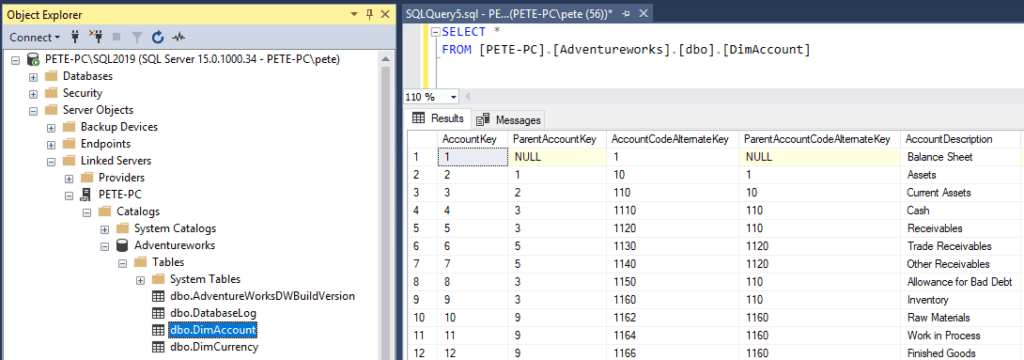
They look equivalent and they are not. A four-part name is planned locally, and SQL Server may
decide to drag a great deal more across the link than you intended before applying your
WHERE clause here. OPENQUERY hands the whole statement to the remote
optimiser and brings back only the rows. On anything with a filter, a join or an aggregate,
OPENQUERY is usually the faster option by a wide margin.
The cost is that the string is literal. Parameters have to be built into it, which means
sp_executesql and proper quoting rather than string-concatenating user input.
Executing Remote Procedures: Msg 7411
Running a procedure on the other side needs a setting that is off by default:
EXEC ('EXEC SalesDB.dbo.usp_Rebuild') AT REMOTE_SQL;Enable it, and it works:
EXEC sp_serveroption @server = N'REMOTE_SQL', @optname = N'rpc out', @optvalue = N'true';Verified on both sides of that change: the same statement failed before and succeeded after.
Leave rpc out off unless you actually need it, because it widens what the link can do
on the remote server.
Microsoft’s reference covers OPENQUERY and sp_serveroption in full.
Errors Worth Recognising
| Error | What it means |
|---|---|
Msg 7202Could not find server ‘X’ in sys.servers |
The name in your four-part reference is not defined. Nearly always a typo, or the link was
created under a different name from the machine. Check
SELECT name FROM sys.servers. |
Msg 15028The server ‘X’ already exists |
You tried to create a linked server using a name already in sys.servers, and the
local instance’s own name is always in there. Pick a distinct label. |
Removing One, Carefully
EXEC sp_dropserver @server = N'REMOTE_SQL', @droplogins = 'droplogins';Read the name twice before you run it. sp_dropserver does not only
drop linked servers. Pass the local instance’s own name and it removes the instance’s own row from
sys.servers, leaving that view empty and breaking anything that relies on the local
entry. If it happens, this puts it back:
EXEC sp_addserver @server = N'YourInstanceName', @local = 'LOCAL';

SELECT server_id, name, is_linked FROM sys.servers;   -- server_id 0 is the local entry
A safe habit is to check is_linked = 1 for the name you are about to drop, rather
than trusting that a cleanup script only ever created what it is now removing.
Frequently Asked Questions
Why does my brand new linked server fail with a certificate error?
Because the modern OLE DB driver encrypts by default. MSOLEDBSQL 18 and 19 set Encrypt=yes, so unless the target has a certificate your server trusts, the connection is refused with SSL Provider: The certificate chain was issued by an authority that is not trusted. Reproduced on SQL Server 2025. The correct fix is a trusted certificate; the quick fix is Encrypt=Mandatory;TrustServerCertificate=Yes in the provider string. The short form without Encrypt also worked when tested, but naming it is clearer and matches Microsoft’s own examples.
Can I go back to the old SQLNCLI provider to avoid it?
Not really, and it is worth knowing why before you try. Asking for SQLNCLI on a current instance does not get you the old driver: SQL Server substituted MSOLEDBSQL19 and the connection failed in exactly the same way. SQL Native Client is out of support and it is not an escape route.
What is the difference between a four-part name and OPENQUERY?
A four-part name (Server.Database.Schema.Object) is resolved locally, so SQL Server may pull far more data across the link than you expect before filtering it here. OPENQUERY sends your query text to the remote server and brings back only the result. For anything with a WHERE clause or an aggregate, OPENQUERY is usually much faster.
Why can I select but not execute a procedure?
Remote procedure calls are off by default. A new linked server has is_data_access_enabled = 1 but is_rpc_out_enabled = 0, so EXEC (...) AT fails with Msg 7411, Server 'X' is not configured for RPC until you enable rpc out. Verified on both sides of the change.
What does Msg 7202 mean?
Could not find server 'X' in sys.servers. The name in your four-part reference does not exist as a linked server. Usually a typo, or you created the link with a different name from the machine name. Check SELECT name FROM sys.servers.
Careful with sp_dropserver
sp_dropserver will happily drop the row for the local instance if you pass its own name, which leaves sys.servers empty and breaks anything that depends on the local entry. If that happens, EXEC sp_addserver 'YourInstance', 'LOCAL' puts it back. Drop by the linked server’s name, and check what you are dropping first.
Summary
sp_addlinkedserver then sp_addlinkedsrvlogin, and expect the first
attempt to fail with a certificate error, because MSOLEDBSQL 18 and 19 encrypt by default.
Encrypt=Mandatory;TrustServerCertificate=Yes in the provider string gets you moving; a properly trusted
certificate is the real answer. Asking for the old SQLNCLI provider does not avoid it. After that,
remember that rpc out is off by default, that OPENQUERY usually beats a
four-part name for anything filtered, and that sp_dropserver will remove your local
server entry if you hand it the wrong name.
Related
- SSMS Certificate Chain Not Trusted Error (Trust Server Certificate Fix)
- Forcing Encrypted Connections in SQL Server Using Certificates
- Linked Server: Login Failed for User NT AUTHORITY\ANONYMOUS LOGON, and Error 7391 Distributed Transactions, when the default security option fails from a desktop connection
- DBA Scripts: Get Linked Servers
- DBA Scripts: Generate Linked Server Script
- DBA Scripts: The Complete Guide
Leave a Reply