
If RESTORE ends with Msg 3013, find the SQL Server message immediately before it. That is the one to investigate.
What Msg 3013 Says
Msg 3013 means the RESTORE operation stopped; it does not name the cause. Microsoft Docs describes it as a generic error that appears with more specific messages.
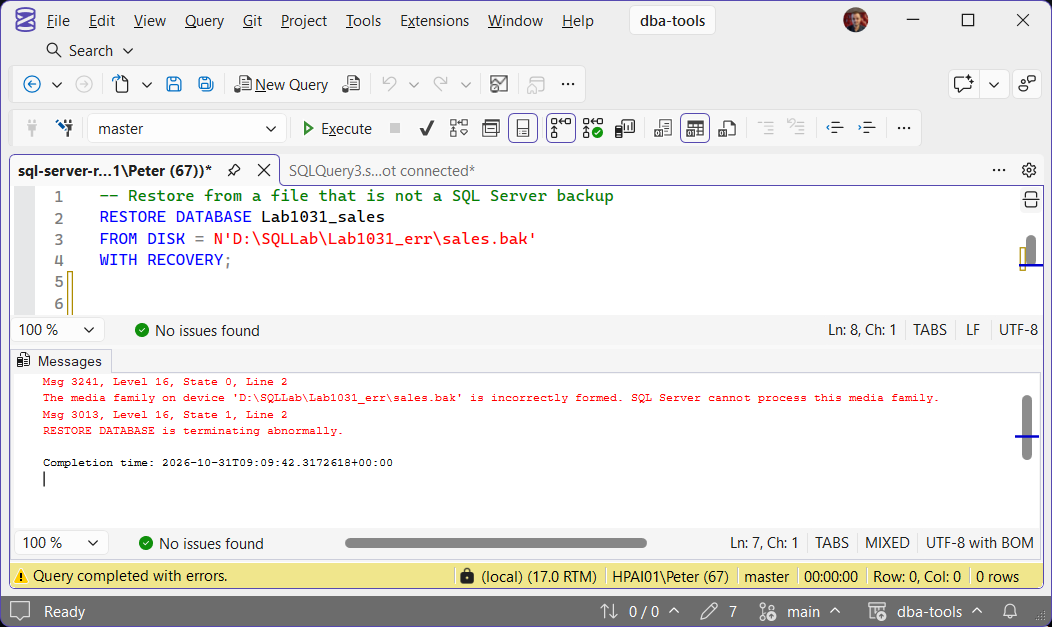
The five failures below show why the preceding message matters: the same 3013 line followed different errors, while the backup restored once the target and connection were correct.
Lab1117_rst with its backup Lab1117_rst.bak for
the rest, where Lab1117_other is the different existing database. Every message in the
screenshots is what that instance returned.
Find the Cause Before 3013
| What was wrong | The real error | What it tells you |
|---|---|---|
| The file is not a backup at all | 3241 | Wrong file, a download that failed, or a backup written by something else. The file is unreadable as a backup. |
| The backup file is truncated | 3287 | The copy did not finish. Different error to 3241, and it names the file ID it could not read. |
| The target path is not usable | 5133, then 3156 | Nothing wrong with the backup. Operating system error 5 means the service account cannot write to the folder; error 2 means the folder does not exist. |
| The database is in use | 3102 | Nothing wrong with anything. You are connected to the database you are restoring over. |
| Backup is of a different database | 3154 | Right file, wrong target, or a target that already exists under that name. |
Only two of those five are a problem with the backup file. The other three are a problem with where you are restoring it to, or what you are connected to, and those are free to fix. Treating every 3013 as “the backup is corrupt” sends you looking for a new backup when the one you have is fine.
This is the pairing people mean when they say “3013”, and it is the screenshot at the top of this page. In practice it is the wrong file, a download that failed, or a backup taken by a third-party tool that writes its own format. A backup from a newer version of SQL Server is not this case: that restore stops with 3169, which names both versions, so it never looks like corruption.
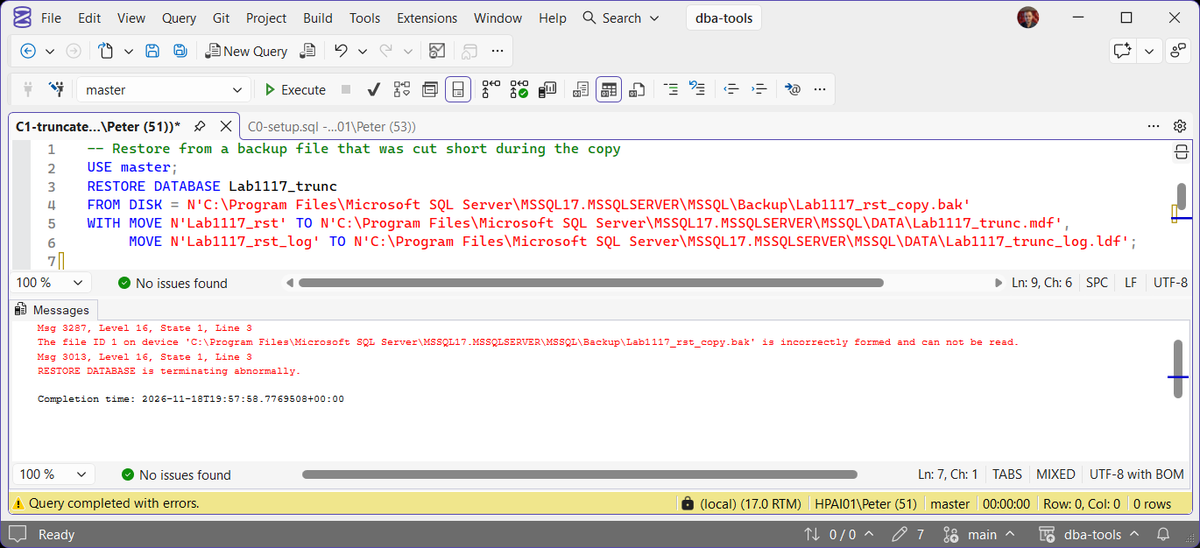
A genuinely different error from 3241, produced here by cutting a good backup short. SQL Server recognised the header and then ran out of file. If you see 3287, compare the file size against the source before concluding anything about corruption. This is usually a copy that was interrupted.
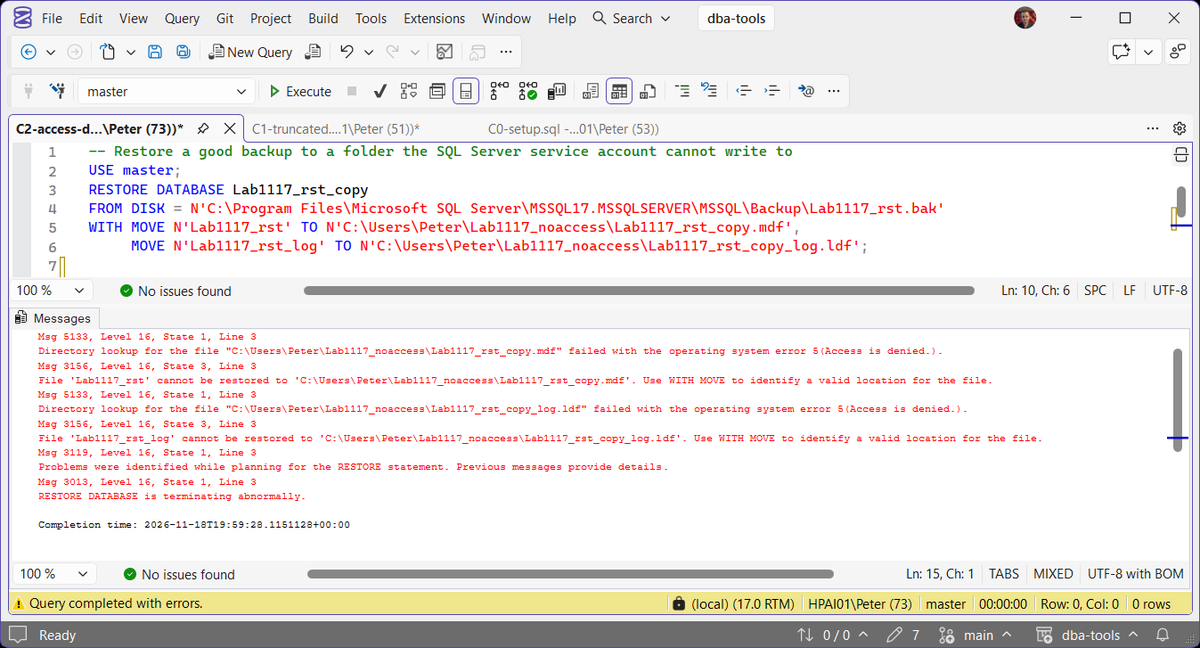
Read the line above 3013. Msg 3119, “Previous messages provide details”, is SQL Server saying, in its own words, that 3013 is not the answer and the answer is further up. Above it sit a 5133 and a 3156 for each file, data and log. The 5133 carries operating system error 5, Access is denied: the SQL Server service account cannot write to that folder. The backup here was perfectly good. A folder that does not exist fails the same way, with operating system error 2 in the 5133 instead.
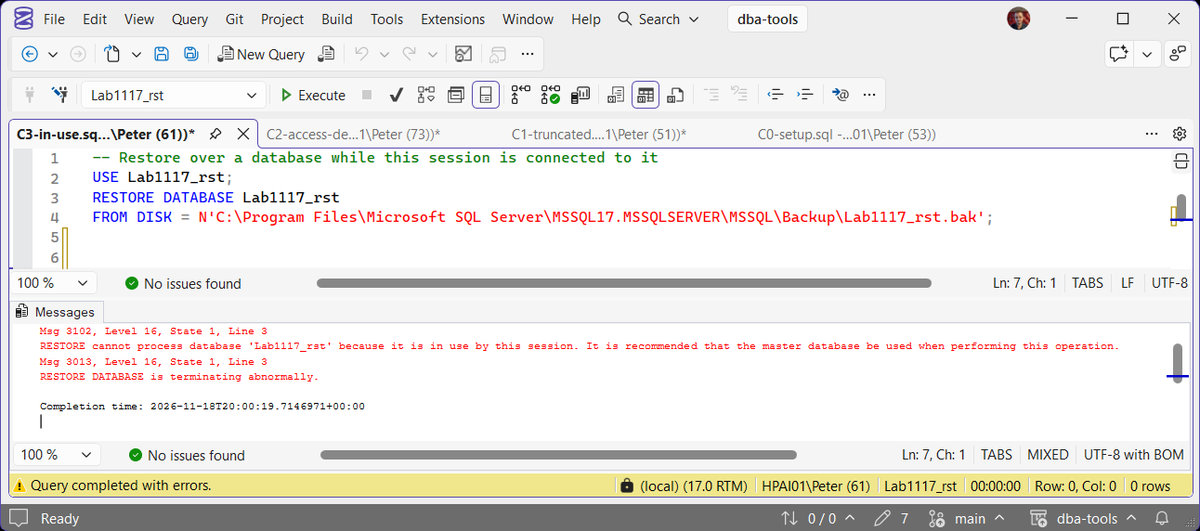
The most embarrassing and probably the most common. Your query window is connected to the database
you are restoring over. The fix is in the message: connect to master first. Other
sessions holding the database produce a similar refusal, which is what SINGLE_USER WITH
ROLLBACK IMMEDIATE is for.
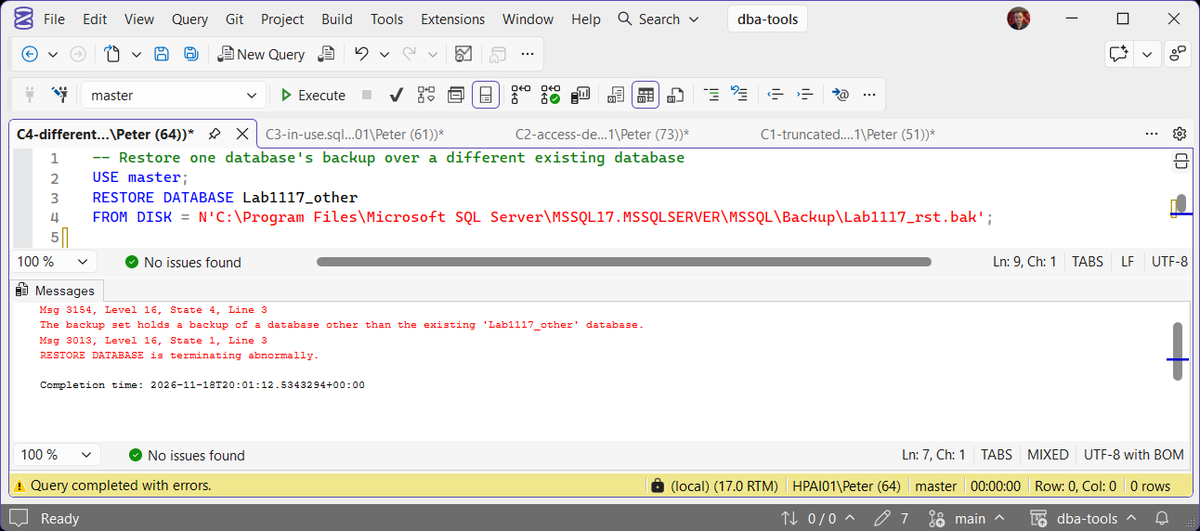
Restoring one database’s backup over a different existing database. This one has a page of its own, because the safe fix and the dangerous fix look very similar.
Check Whether the Backup File Is Readable
Before restoring anything, three read-only statements tell you whether the file is the problem. Neither writes anything and neither needs the target database.
-- What is actually in this file? Database name, size, LSNs, version it came from.
RESTORE HEADERONLY FROM DISK = 'D:\Backups\sales.bak';

-- The logical file names, which is what WITH MOVE needs.
RESTORE FILELISTONLY FROM DISK = 'D:\Backups\sales.bak';

-- Read the whole backup and check it, without restoring it.
RESTORE VERIFYONLY FROM DISK = 'D:\Backups\sales.bak';
This splits the diagnosis in one step. Run HEADERONLY against the file that failed:
- It fails too, and the problem is the file. On the lab instance,
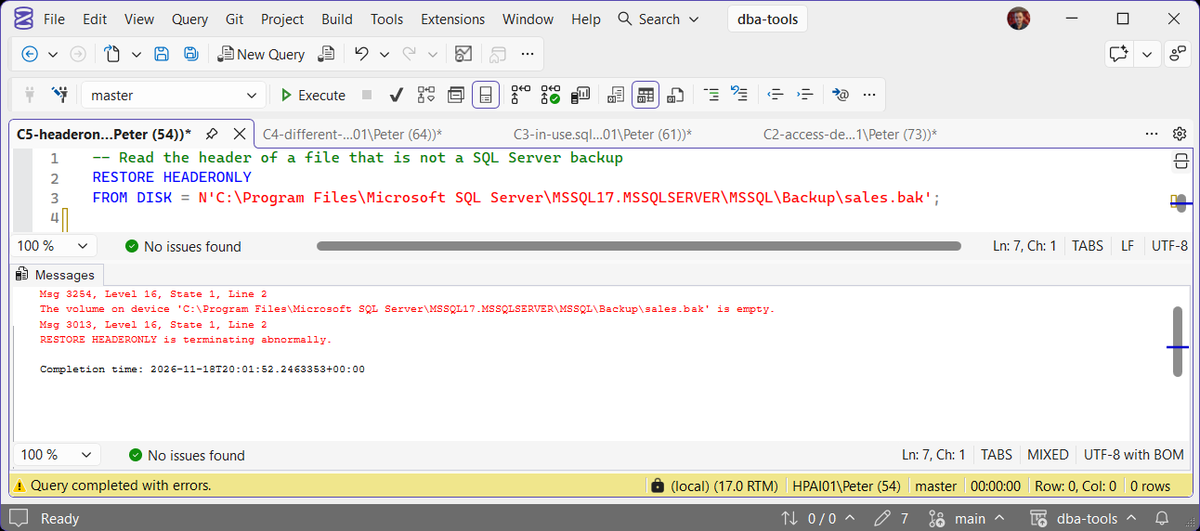
HEADERONLYagainst a one-line text file saved assales.bakreturned Msg 3254, the volume on the device is empty, followed byRESTORE HEADERONLY is terminating abnormally. Two files that were not backups gave two different messages, 3241 at the top of this page and 3254 here, so read the message rather than expecting one number. - It succeeds, and the file is fine. Your problem is the target, the paths, or the session, which is three of the five cases above.
One exception: an encrypted backup. A backup taken WITH ENCRYPTION and read on a server that does not hold its certificate fails HEADERONLY as well, with Msg 33111 “Cannot find server certificate with thumbprint” above the 3013, and nothing is wrong with the file. A TDE database’s backup restored without its certificate stops on the same 33111. Cannot Find Server Certificate (Error 33111) covers putting the certificate back.
Note that 3013’s text follows the statement you ran. It says RESTORE HEADERONLY is terminating abnormally there rather than RESTORE DATABASE, which is a small confirmation that it is a closing line rather than a diagnosis.
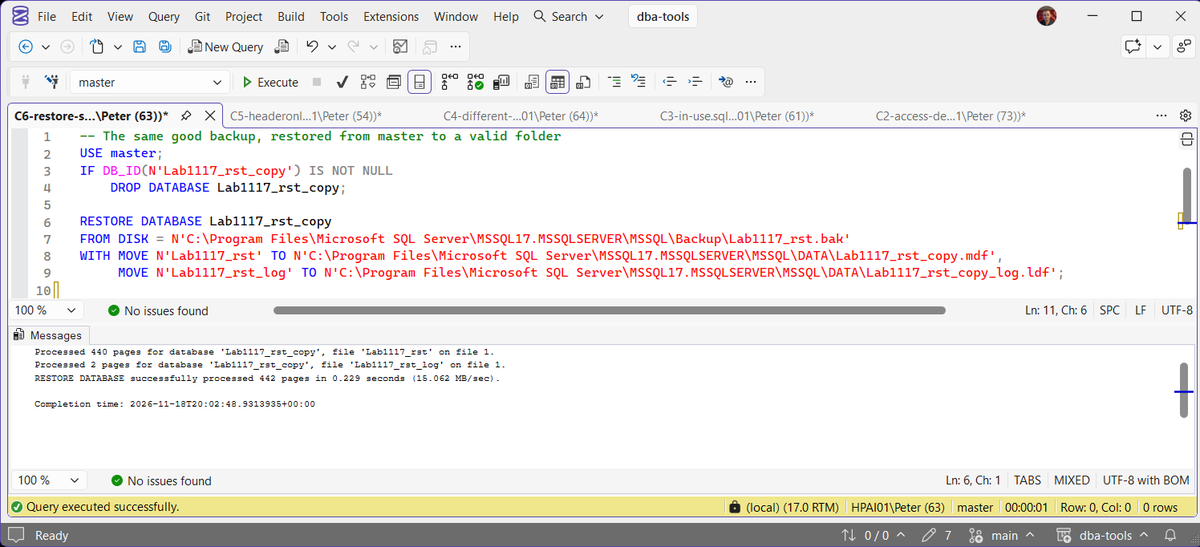
And to close the loop: the same backup behind the path, in-use and different-database failures restored cleanly the moment it was pointed at a valid folder from a session on master.
Get the Full Message Text
If all you have is 3013, the useful line was thrown away before it reached you. Where to find it:
- SQL Agent job history truncates. Open the step’s output file if it has one, or set one, rather than reading the summary.
- The SQL Server error log has the real error even when the client only showed the last line. Restore failures are written there with their causes.
- Applications and ORMs often surface only the final message. Rerun the restore by hand in SSMS or
sqlcmdand read the whole output. - In PowerShell, capture the verbose stream, because
Invoke-Sqlcmdputs informational and error detail there rather than in the return value.
Avoid These Restore Mistakes
- Do not conclude the backup is corrupt from a 3013. Three of the five reproduced causes had nothing wrong with the backup file at all.
- Do not go looking for an older backup first. Run
RESTORE VERIFYONLYon the one you have. It takes seconds and answers the question. - Do not add
WITH REPLACEto make an error go away. It suppresses the safety check behind 3154, and its whole job is to stop you overwriting the wrong database. - Do not retry the identical statement. Every case here failed the same way every time. Read the line above the 3013 instead.
- Do not restore from the database you are replacing. Connect to
master. That is the database-in-use case.
Frequently Asked Questions
How do I fix error 3013?
My tool only shows 3013. Now what?
sqlcmd and read the whole output, or open the SQL Server error log, which records the real error even when the client showed only the closing line. Agent job history in particular truncates the useful part.Does 3241 always mean the backup is corrupt?
What is the difference between 3241 and 3287?
Can I check a backup without restoring it?
RESTORE VERIFYONLY reads and checks the whole backup, RESTORE HEADERONLY tells you what is in it, and RESTORE FILELISTONLY gives the logical file names for WITH MOVE. All three are read-only and none need the target database to exist.Why did several errors appear before 3013?
Start with the message before 3013, then follow the specific restore failure or check you need.
- The Backup Set Holds a Backup of a Database Other Than the Existing One (3154), case 5 in full.
- Restore From a Newer SQL Server Version (Error 3169), the fifth case behind that error family, when the mismatch is the SQL Server version and not the file or media.
- Cannot Open Backup Device, when the restore cannot even reach the file.
- Backup Failed or the Restore Is Stuck, the router that takes the real error from the line above 3013 and sends it somewhere.
- RESTORE VERIFYONLY Fails: Reached the End of the File (Error 3203), when the line above 3013 is a 3203 and the backup file is truncated or incomplete.
- Backup & Recovery scripts, coverage and restore readiness before you need them.
- SQL Server Errors: The Complete Guide, the index for the whole error series.
- DBA Scripts: Get Last Restore History, was the restore that failed ever recorded, and what did the last good one look like.
Leave a Reply