
“Bump the compatibility level after a migration” is standard advice, and Version Upgrade Readiness already tells you which databases are behind. What that advice usually skips is what the number actually controls, and one part of it is more counter-intuitive than most people assume.
This post runs a real test on a lab database to show it directly, then covers what genuinely does change.
The Test: Does Dropping Compat Level Change the Database’s Own Settings?
A common assumption is that compatibility level is a kind of master switch, drop it and a bunch of newer engine behaviors switch off with it. Testing that directly, on a real database rather than trusting the assumption:
-- Before: DemoDatabase at its native level
SELECT name, compatibility_level FROM sys.databases WHERE name = 'DemoDatabase';
-- name: DemoDatabase, compatibility_level: 170

SELECT name, value FROM sys.database_scoped_configurations ORDER BY name;
-- (41 rows, captured for comparison)

ALTER DATABASE DemoDatabase SET COMPATIBILITY_LEVEL = 130;

SELECT name, value FROM sys.database_scoped_configurations ORDER BY name;
-- (41 rows, re-captured)
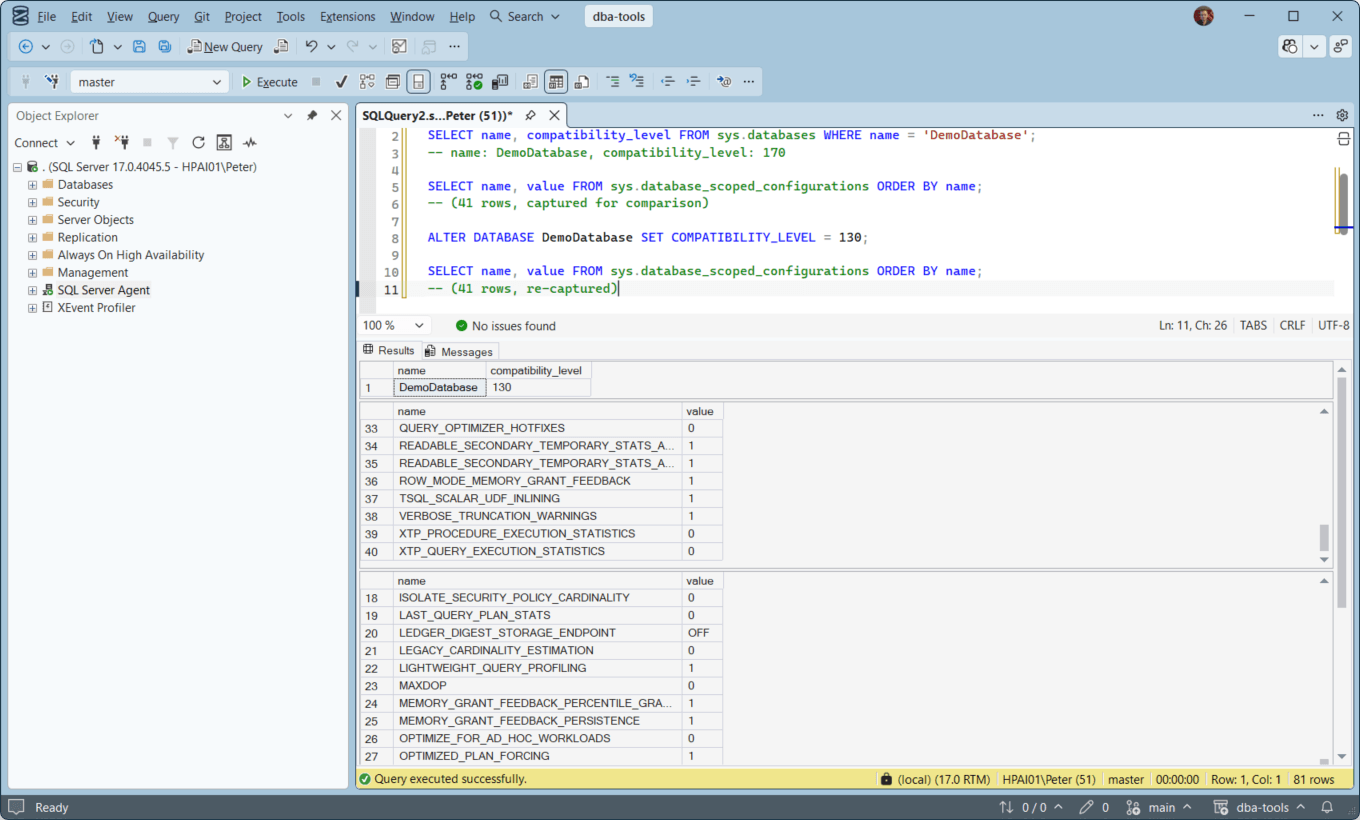
Real Result:
Dropping DemoDatabase from compatibility level 170 (SQL Server 2025) all the way down to 130 (SQL Server 2016) changed zero of the 41 rows in sys.database_scoped_configurations. BATCH_MODE_ADAPTIVE_JOINS, CE_FEEDBACK, DOP_FEEDBACK, LEGACY_CARDINALITY_ESTIMATION, all identical before and after. LEGACY_CARDINALITY_ESTIMATION stayed False at compat level 130, which is expected: the newer cardinality estimator arrived at level 120 with SQL Server 2014 (MS Docs), and the scoped setting is a separate switch the level never touches.
The database was restored to compatibility level 170 immediately after, this was a real, reversible test on a lab database, not a production change.
Why That’s Not a Bug
sys.database_scoped_configurations settings and compatibility level are two separate mechanisms that happen to overlap in what they influence.
The scoped configuration options (MAXDOP, LEGACY_CARDINALITY_ESTIMATION, PARAMETER_SNIFFING, and the rest) are explicit overrides you set independently, introduced specifically so features could be toggled without changing the compat level wholesale, exactly because DBAs needed a way to enable a new engine improvement without re-testing the entire T-SQL surface a compat level bump can touch.
LEGACY_CARDINALITY_ESTIMATION = ON works as an override even on a database sitting at the newest compat level; it doesn’t require dropping the level to get old-CE behavior for troubleshooting a regression.
What compatibility level actually gates is different, and doesn’t show up in that view.
What Actually Changes When You Bump It
- The cardinality estimation model used by default.
- Since SQL Server 2014 (compat level 120), the CE model version the optimizer defaults to is tied directly to the database’s compatibility level, not to the instance’s version. A database sitting at compat level 110 on a SQL Server 2025 instance still gets the old (pre-2014) cardinality estimator, CE 70.
LEGACY_CARDINALITY_ESTIMATIONonly works in the other direction: it forces the old model onto a database at a newer level, and it cannot give a 110 database the newer one.
- Since SQL Server 2014 (compat level 120), the CE model version the optimizer defaults to is tied directly to the database’s compatibility level, not to the instance’s version. A database sitting at compat level 110 on a SQL Server 2025 instance still gets the old (pre-2014) cardinality estimator, CE 70.
- The T-SQL language surface.
- Some syntax is only valid, or behaves differently, at specific compat levels.
STRING_SPLITis the common example: below level 130 the Database Engine cannot find the function at all (MS Docs), so a query that works in one database fails in another on the same instance with Msg 208, the error covered in Invalid Object Name in SQL Server (Error 208).
- Some syntax is only valid, or behaves differently, at specific compat levels.
- Which optimizer improvements a query is even eligible for.
- Interleaved execution, adaptive joins, batch mode on rowstore, and similar features were introduced tied to specific compat levels when they first shipped. A database several levels behind the instance’s native level misses out on the optimizer improvements that came with each version, even though the instance itself supports them.
- What it does not change: the scoped configuration overrides.
- As the test above shows directly. If you’re troubleshooting “did the compat level bump actually apply the setting I expected,” check
sys.database_scoped_configurationsas its own thing, not as a byproduct of the compat level.
- As the test above shows directly. If you’re troubleshooting “did the compat level bump actually apply the setting I expected,” check
How to Actually Test a Compat Level Change
- Change it on a non-production copy first, ideally with production-representative data and a captured Query Store baseline to compare plans before and after.
- Use
ALTER DATABASE ... SET COMPATIBILITY_LEVEL(MS Docs). It takes effect immediately for new query compilations, no restart required. - If a specific query regresses after the bump,
LEGACY_CARDINALITY_ESTIMATION = ONat the scoped-config level (or theQUERY_OPTIMIZER_COMPATIBILITY_LEVEL_nquery hint for one statement) lets you isolate whether the new CE model is the actual cause, without reverting the whole database’s compat level to find out. - Don’t assume dropping compat level is a safe rollback for an unrelated engine setting, as this post’s test shows, it isn’t one lever for everything.
Related
- Version Upgrade Readiness, includes the Compatibility Level Audit script that finds every database’s current level in one pass
- The Query Is Fast in SSMS but Slow From the Application, ARITHABORT and the other SET options that page lists are the other lever that changes plan choice without changing compatibility level
- Parameter Sniffing in SQL Server, a cardinality/estimate problem the CE model version directly affects
- Migration Risk Assessment, if this flags compat-level drift as a risk, run Compatibility Level Audit for further review
- JSON in SQL Server, a feature set that depends on the version you are actually on
Leave a Reply