
Query Store is one of the most useful features for troubleshooting query performance in SQL Server, but it is not always enabled or usable in the way people expect.
In practice, Query Store might be:
- disabled entirely
- enabled but not collecting data
- enabled and healthy
- enabled but in an error state
This post walks through how to check whether Query Store is enabled, how to see its current state, and how to interpret what you find. These checks are especially useful after database restores, upgrades, or migrations.
A Quick Word on Query Store
Query Store was introduced in SQL Server 2016 and provides historical insight into query execution, plan changes, and runtime statistics over time.
From SQL Server 2022 onwards, Query Store is enabled by default for new databases, but that does not mean it will be enabled, writable, or healthy on existing databases. Restores, upgrades, and workload changes can all affect its state.
Because of that, it’s always worth checking rather than assuming.
Checking Whether Query Store Is Enabled
The fastest way to see whether Query Store is enabled across an instance is to query sys.databases.
SELECT
    name,
    is_query_store_on
FROM sys.databases;
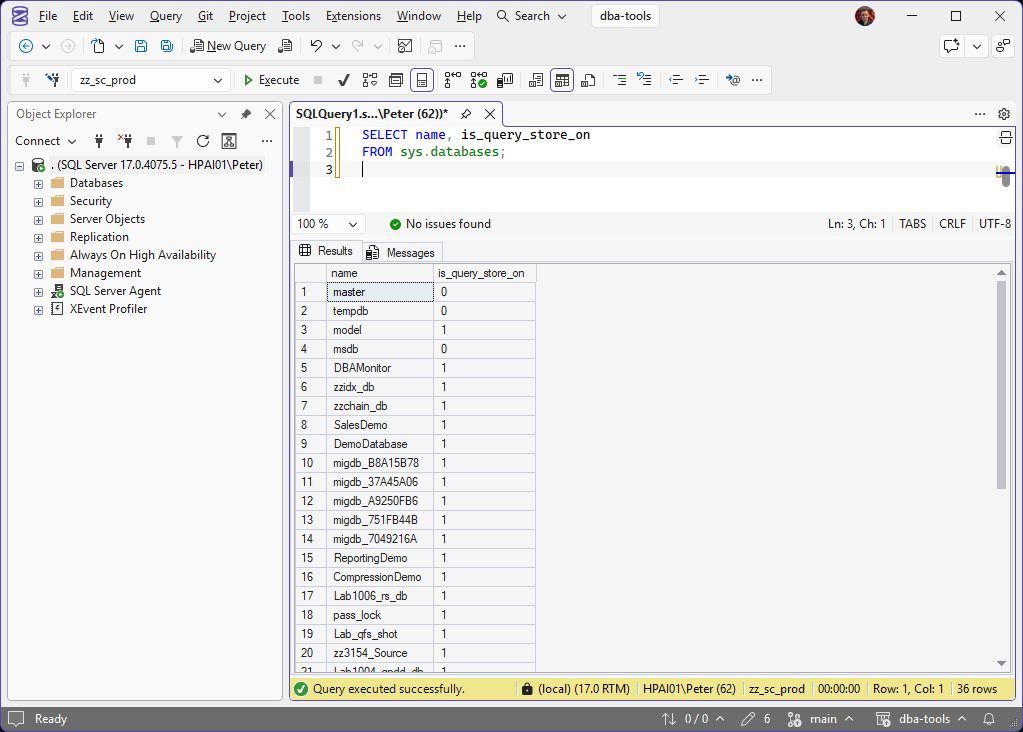
On the lab: 1 for model and every user database, so new databases start with Query Store on. 0 for master, tempdb and msdb.
This gives you a quick, instance-wide view.
If is_query_store_on is 0, Query Store is disabled for that database.
If it is 1, Query Store is enabled, but that alone does not guarantee it is collecting data.
To understand whether Query Store is actually usable, you need to look one level deeper.
Checking the Current Query Store State
Query Store has several operating states, and only one of them represents a healthy, fully functioning setup.
To see the current state and configuration for a database, query the Query Store catalog view:
SELECT *
FROM sys.database_query_store_options
OPTION (RECOMPILE);
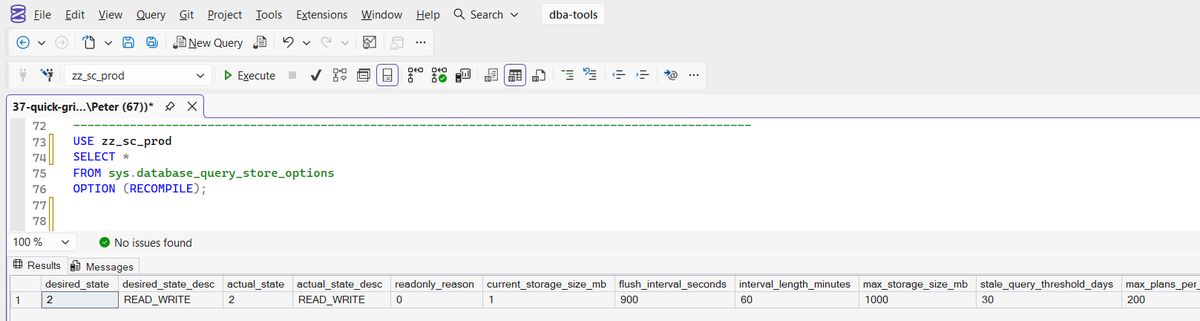
This view tells you whether Query Store is actively collecting data, operating in a limited mode, or in trouble.
The most important column to pay attention to is the actual state, which indicates how Query Store is behaving right now.
Interpreting Query Store States
In a healthy environment, Query Store should be in READ_WRITE mode. Anything else is worth understanding.
If Query Store is OFF, it is disabled and collecting nothing.
If it is READ_ONLY, Query Store is enabled but no longer capturing new data. This commonly happens when the Query Store size limit is reached or cleanup cannot keep up with the workload. Existing data remains available, but nothing new is written.
If it is in ERROR state, Query Store has encountered an internal issue. This is not a query performance problem and usually requires Query Store to be disabled and re-enabled to recover.
A simple recovery looks like this:
ALTER DATABASE YourDatabase SET QUERY_STORE = OFF;
ALTER DATABASE YourDatabase SET QUERY_STORE = ON;
This resets Query Store and allows it to start collecting data again.
Checking Query Store Using SSMS
If you prefer using the UI, you can see the same information in SQL Server Management Studio.
Right-click the database, open Properties, and select the Query Store page. The state and configuration shown here map directly to the values exposed in sys.database_query_store_options.
This can be useful for quick checks, but the catalog view is usually faster and easier to script.
SQL Server 2022 and Later Considerations
Although Query Store is enabled by default for new databases created on SQL Server 2022, it is not automatically enabled for restored or upgraded databases.
It is also possible for Query Store to be enabled but sitting in READ_ONLY or ERROR state without it being immediately obvious. This is why checking both whether Query Store is enabled and how it is behaving matters.
Summary
Query Store is often the first place to look when investigating performance issues, but it needs to be both enabled and writable to be useful.
A simple check of sys.databases tells you whether Query Store is enabled.
A query against sys.database_query_store_options tells you whether it is actually working.
These checks should be routine after restores, upgrades, and whenever performance behaviour changes unexpectedly.
Related Scripts
- Get Query Store Status, the scripted version of this check across every database
- Get Query Store Top Queries, what to do with it once it is on
- Get Query Store Regressions and Forced Plans, the plan regressions Query Store exists to catch
Leave a Reply