
Adding a column is one line of T-SQL, and on most tables it finishes at once. The incidents come from two places: an ALTER TABLE that waits for a schema lock and blocks every query that arrives behind it, and a default value that makes SQL Server rewrite every row. This post covers the safe forms, measured on a 100,000-row table, and how to spot the blocking one while it is happening.
NOT NULL column with a constant default, wrote about 2 KB of log on 100,000 rows (Developer edition, which behaves as Enterprise). A default that changes per row, such as NEWID(), rewrote every row and wrote 33 MB. Every ALTER TABLE needs a schema modification (Sch-M) lock, so it waits behind any open transaction on the table, and new queries queue behind it.When Adding Columns Needs Extra Care
Slow down before running ALTER TABLE if:
- The table is busy, or a long transaction may be open on it
- The default value is not a constant (
NEWID(),NEWSEQUENTIALID()), or the server is not Enterprise edition - The table participates in replication
- The change is going in during business hours
Schema changes are fast to type and slow to undo.
Add a Column to a Table in SQL Server
USE WatchtowerMetrics;
GO
ALTER TABLE dbo.DatabaseBackupHistory
ADD BackupSource sysname NULL;
GO
This is the form to aim for by default. Existing rows are not rewritten: SQL Server records the new column in the table’s metadata and returns NULL for the rows that were already there. On the lab table it wrote 1,124 bytes of log. New columns always go after the existing ones.
Verify the Column Exists
After any schema change, check it. sp_help shows the column, its data type, its nullability and any default or constraint created with it:
EXEC sp_help 'dbo.DatabaseBackupHistory';
GO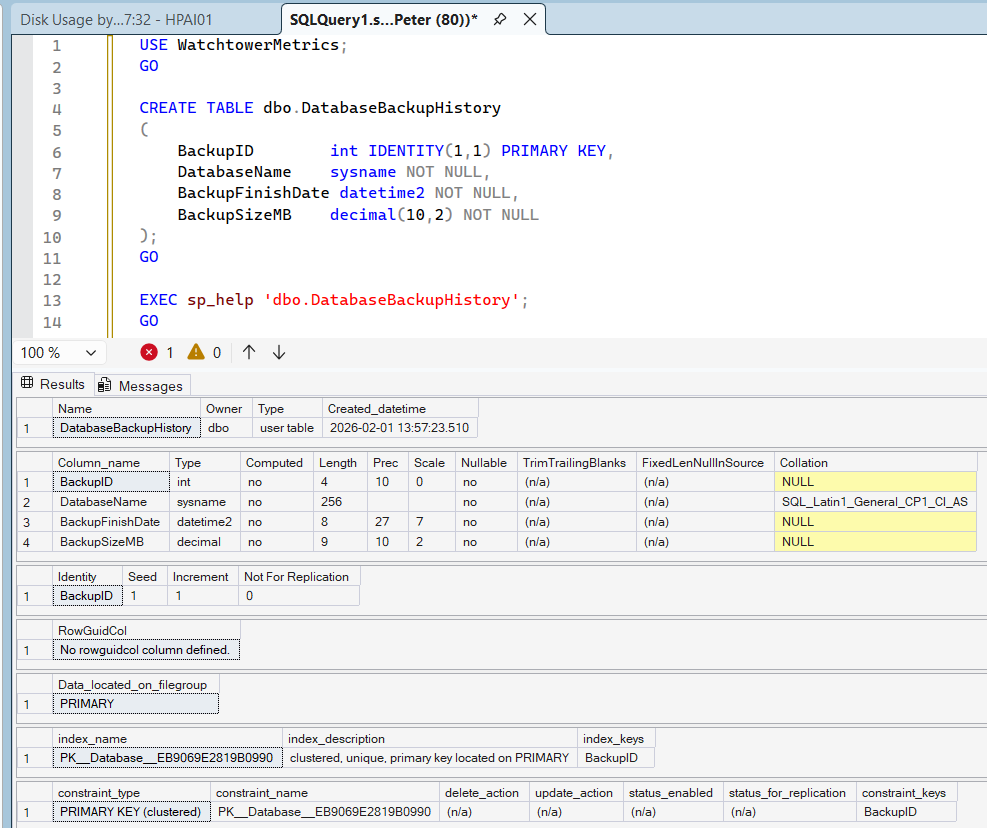
For a script or a deployment check, query sys.columns instead. It reads metadata only, never the table’s data:
SELECT c.column_id, c.name, TYPE_NAME(c.user_type_id) AS type_name, c.max_length, c.is_nullable
FROM sys.columns AS c
WHERE c.object_id = OBJECT_ID(N'dbo.DatabaseBackupHistory')
ORDER BY c.column_id;
Adding a Column with a Default Value
ALTER TABLE dbo.DatabaseBackupHistory
ADD BackupType varchar(20) NOT NULL
    CONSTRAINT DF_DatabaseBackupHistory_BackupType
    DEFAULT 'FULL';
GO
Whether this rewrites every row depends on the default. Microsoft’s ALTER TABLE reference says that on Enterprise edition, adding a NOT NULL column with a default that is a runtime constant (a literal, or a function such as GETUTCDATE() that returns one value for the whole statement) is an online, metadata-only change. The default is stored once in metadata and read from there for the old rows. A default that produces a different value per row, such as NEWID(), is applied offline, row by row, under a Sch-M lock for the whole operation.
Measured on a 100,000-row table on SQL Server 2025 Developer edition, which has the Enterprise feature set:
The NEWID() line is the one that hurts: a log record for every row, and a lock held until the last one is written. On Standard edition, Microsoft lists online schema change as Enterprise-only in every version from 2016 to 2025, so plan for a full row rewrite whenever the default has to fill the existing rows: a NOT NULL column with a default, or WITH VALUES. A nullable column with no WITH VALUES is metadata-only on every edition. Some column types are always added offline, including varchar(max), nvarchar(max), varbinary(max) and xml, and so is any column that would take the maximum row size past 8,060 bytes.
When ALTER TABLE Blocks Everything
Even a metadata-only add needs a Sch-M lock, and it cannot get one while any other session holds a lock on the table: a query still running against it, or an open transaction that has written to it or read it under HOLDLOCK. While it waits, every new query on the table queues behind it. On the lab, one open transaction held a lock on the table, the ALTER TABLE waited behind it, and a plain SELECT COUNT(*) waited behind the ALTER TABLE:
SELECT r.session_id, r.command, r.wait_type, r.wait_time AS wait_ms, r.blocking_session_id
FROM sys.dm_exec_requests AS r
WHERE r.database_id = DB_ID()
  AND r.session_id <> @@SPID;
The head blocker is the open transaction (58), not the ALTER TABLE. Let it finish or end it (see how to kill a SPID), or cancel the ALTER TABLE to release the queue. Get Blocking Chains finds the head blocker on a busy server, and LCK_M_SCH_M covers the wait itself. To stop the change from queuing at all, give it a lock timeout:
SET LOCK_TIMEOUT 5000;  -- give up after 5 seconds instead of queuing

ALTER TABLE dbo.DatabaseBackupHistory
ADD BackupSource sysname NULL;
With an open transaction on the table, that ALTER TABLE gave up after 5 seconds with Msg 1222, “Lock request time out period exceeded”, and nothing queued behind it. Retry it when the table is quiet.
Safer Pattern for Large or Busy Tables
When the new column needs values that are not a constant (a per-row GUID, or values computed from other columns), or the server is Standard edition, split the change. Add the column as nullable with no default, backfill it in controlled batches, then add the default constraint and, if needed, make it NOT NULL. Each step is short, and you decide how fast the backfill runs instead of SQL Server doing it all in one transaction.
Replication Considerations
If the table participates in SQL Server Replication:
- Schema changes usually propagate to subscribers automatically
- The
ALTER TABLEitself is replicated and re-run at each Subscriber, so a default that rewrites every row does it again on every Subscriber - A default built on a nondeterministic function (
GETDATE(),NEWID()) is not supported in a replicated schema change: each Subscriber computes its own values and the data stops converging - Large updates increase pressure on the distributor
Before making the change, confirm that schema changes are allowed for the publication, watch Replication Monitor while it runs, and be careful with defaults on large articles.
Microsoft Learn: Considerations for Schema Changes, Replicate Schema Changes
Dropping a Column
ALTER TABLE dbo.DatabaseBackupHistory
DROP COLUMN BackupSource;
GO
Dropping a column is also metadata-only (1,040 bytes of log on the lab table), and it is permanent: the data is gone without a restore. The space it used is not given back until the table or its clustered index is rebuilt. In replicated environments the drop propagates downstream. Run sp_help again afterwards to confirm the table looks as expected.
Microsoft Learn: ALTER TABLE (Transact-SQL)
Practical DBA Checklist
Before adding a column to a business-critical table:
- Check for long open transactions on the table, and set
LOCK_TIMEOUTso the change cannot queue - Use a constant default, or none, unless you have planned for a full row rewrite
- Confirm the edition and the replication setup
- Schedule it for a quiet window
- Verify after execution
Most incidents come from assuming the change is “instant”. The change usually is. Getting the lock is the part that is not.
Frequently Asked Questions
Can I add a column in a specific position?
ALTER TABLE always adds the column after the existing ones. The SSMS Table Designer can place it elsewhere only by creating a new table and copying the data across, which is what its “Saving changes is not permitted” warning protects you from. Queries that name their columns do not care about order.Does adding a column lock the table?
Does dropping a column free the space?
Where To Go Next
Adding a column is a schema change, and schema changes are where a lot of production incidents start. These are the checks either side of one.
- SQL Server Change Management, what to capture before and after a change goes in.
- Get Schema Change History, prove what changed on an instance, and when.
- Get Blocking Chains, find the head blocker when an
ALTER TABLEis stuck behind it. - SSMS: Saving Changes Is Not Permitted, when the Table Designer wants to rebuild the table to place a column.
- Deleting Rows in Batches in SQL Server, the same care applied to large data changes.
Leave a Reply