
A full backup is the starting point for everything else: restores, log backups, migrations and DR tests all begin from one, and in the FULL recovery model BACKUP LOG refuses to run until a full backup exists (Msg 4214).
The statement is short. The work is in the server around it: whether the edition can compress, whether the target disk has room for the file, and on a tight server sometimes adding a temporary disk just to hold the backup. This post covers a full backup in T-SQL and in SSMS, the options worth typing every time, and the checks that prove the file is usable. It is the companion to How to Restore a Database in SQL Server.
Where the Backup File Goes
Back up to a different disk from the data files, and copy the file off the server afterwards. A backup on the same volume as the .mdf goes down with it.
The file is written by the SQL Server service account, not by you, so that account needs write access to the folder. When it does not, the backup fails with operating system error 5, covered in Cannot Open Backup Device.
If you leave the path off, SQL Server uses the instance default backup folder:
SELECT SERVERPROPERTY('InstanceDefaultBackupPath') AS default_backup_path;A Full Backup With T-SQL
This is the form worth typing every time. CHECKSUM validates page checksums as the pages are read and writes a checksum into the backup, COMPRESSION shrinks the file, INIT overwrites any older backup sets in the same file, and STATS prints progress.
BACKUP DATABASE [SalesDB]
TO DISK = N'D:\SQLBackups\SalesDB_FULL_20261028.bak'
WITH CHECKSUM,
     COMPRESSION,
     INIT,
     STATS = 10;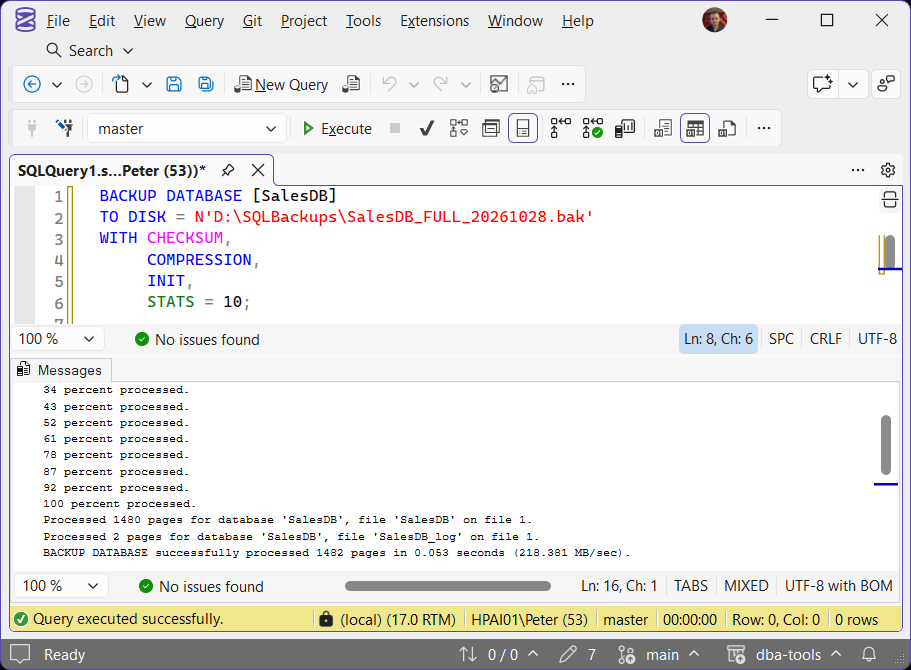
Leave INIT off and the backup is appended to the file instead: a second backup to the same file name lands as backup set 2, and the file keeps growing. Put the date in the file name and the question does not come up.
The older habit of WITH FORMAT rewrites the media header as well. For a single disk file that is not needed, and INIT does the job.
Backup Options at a Glance
The options worth knowing on a BACKUP DATABASE, all from Microsoft’s BACKUP reference:
| Option | What it does | When to use it |
|---|---|---|
CHECKSUM | Checks each page checksum as it reads, and writes a checksum for the whole backup | Every backup. Make it the instance default |
COMPRESSION | Compresses the backup as it is written | Enterprise, Standard and Developer only. Express cannot create a compressed backup, though any edition can restore one |
COMPRESSION (ALGORITHM = ZSTD) | Picks the algorithm: MS_XPRESS, QAT_DEFLATE (2022 and later) or ZSTD (2025) | SQL Server 2025, when you want to measure ZSTD against the default |
INIT | Overwrites the backup sets already in the file | Reusing a file name. Without it the backup is appended as another set and the file grows |
COPY_ONLY | Takes a backup that does not reset the differential base | Any one-off backup on a server with a backup schedule |
STATS = 10 | Reports progress every 10 percent | Anything you run by hand |
FORMAT | Writes a new media header as well as overwriting | Rarely needed for a single disk file; INIT is enough |
Copy-Only Backups
For a one-off backup on an instance that already has a schedule, say to refresh a test copy, use COPY_ONLY. A normal full backup becomes the new base for the next scheduled differential; a copy-only backup does not, so the schedule carries on as if it never happened.
BACKUP DATABASE [SalesDB]
TO DISK = N'D:\SQLBackups\SalesDB_COPYONLY_20261028.bak'
WITH COPY_ONLY, CHECKSUM, COMPRESSION, STATS = 10;
Differential vs Log Backup shows what a stray full backup does to the differential base, measured.
Backup Compression
Compression nearly always pays for itself: a smaller file, and usually a faster backup because there is less to write, at the cost of some CPU. It needs Enterprise, Standard or Developer edition (backup compression on Microsoft Learn); on Express, leave COMPRESSION out. Make it and checksums the instance defaults so a hand-typed backup gets them without anyone remembering:
EXEC sys.sp_configure N'backup compression default', 1;
EXEC sys.sp_configure N'backup checksum default', 1;
RECONFIGURE;
SQL Server 2025 adds a newer compression algorithm, ZSTD (Zstandard), alongside the long-standing default MS_XPRESS and the Intel QuickAssist option QAT_DEFLATE from SQL Server 2022. ZSTD usually produces a smaller file. Ask for it per backup:
BACKUP DATABASE [SalesDB]
TO DISK = N'D:\SQLBackups\SalesDB_FULL_ZSTD_20261028.bak'
WITH CHECKSUM,
     COMPRESSION (ALGORITHM = ZSTD, LEVEL = MEDIUM),
     INIT,
     STATS = 10;
To make ZSTD the default for every compressed backup, set the backup compression algorithm server option to 3:
EXEC sys.sp_configure N'backup compression algorithm', 3;
RECONFIGURE;
On SQL Server 2025 with the option at 3, a plain WITH COMPRESSION backup is recorded in msdb as ZSTD. SQL Server 2022 and earlier have no ZSTD, so keep version-specific scripts apart.
The size difference depends entirely on your data, so measure it on a real database rather than trusting anyone’s ratio. Take a copy-only backup with each algorithm, so the test does not disturb your backup chain:
BACKUP DATABASE [SalesDB]
TO DISK = N'D:\SQLBackups\SalesDB_COPY_XPRESS_20261028.bak'
WITH COPY_ONLY, CHECKSUM, COMPRESSION (ALGORITHM = MS_XPRESS), INIT;

BACKUP DATABASE [SalesDB]
TO DISK = N'D:\SQLBackups\SalesDB_COPY_ZSTD_20261028.bak'
WITH COPY_ONLY, CHECKSUM, COMPRESSION (ALGORITHM = ZSTD, LEVEL = MEDIUM), INIT;
msdb records which algorithm each backup used, and what it saved:
-- Compare two copy-only backups of the same database, one per algorithm
SELECT TOP (2)
       bs.compression_algorithm,
       CAST(bs.backup_size / 1048576.0 AS decimal(12,1)) AS size_mb,
       CAST(bs.compressed_backup_size / 1048576.0 AS decimal(12,1)) AS compressed_mb,
       bmf.physical_device_name
FROM msdb.dbo.backupset AS bs
JOIN msdb.dbo.backupmediafamily AS bmf ON bmf.media_set_id = bs.media_set_id
WHERE bs.database_name = N'SalesDB'
  AND bs.is_copy_only = 1
ORDER BY bs.backup_set_id DESC;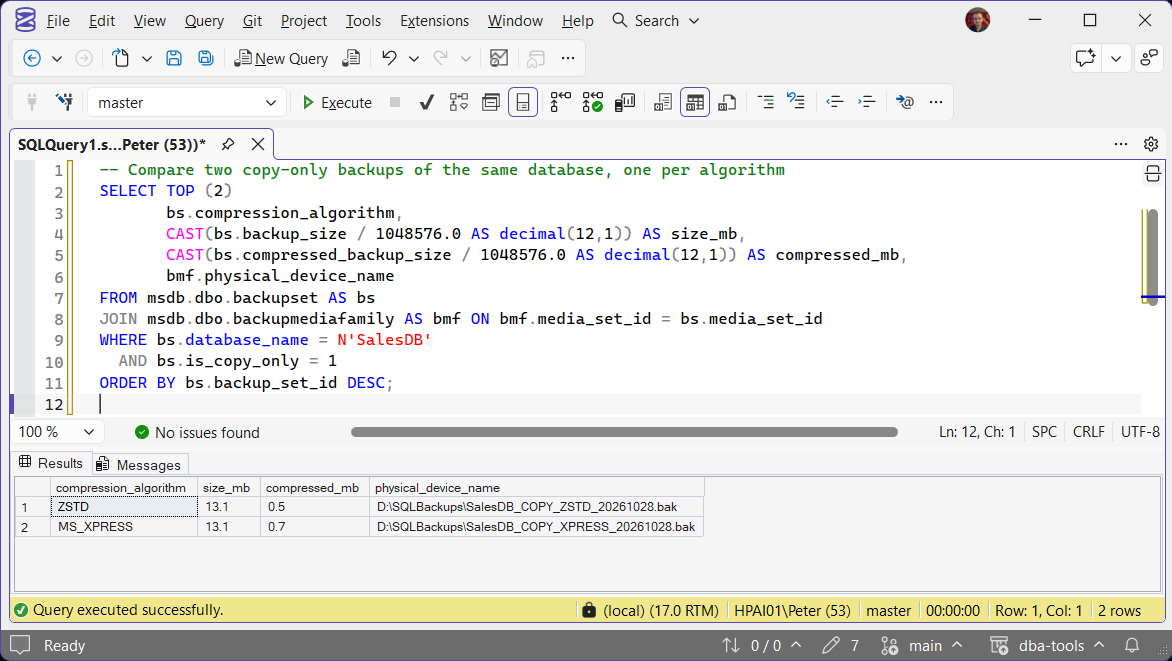
Microsoft Learn: BACKUP (Transact-SQL) · Backup compression
A Full Backup With SSMS
The wizard is fine for a one-off, and its Script button is a good way to see the T-SQL it is about to run.
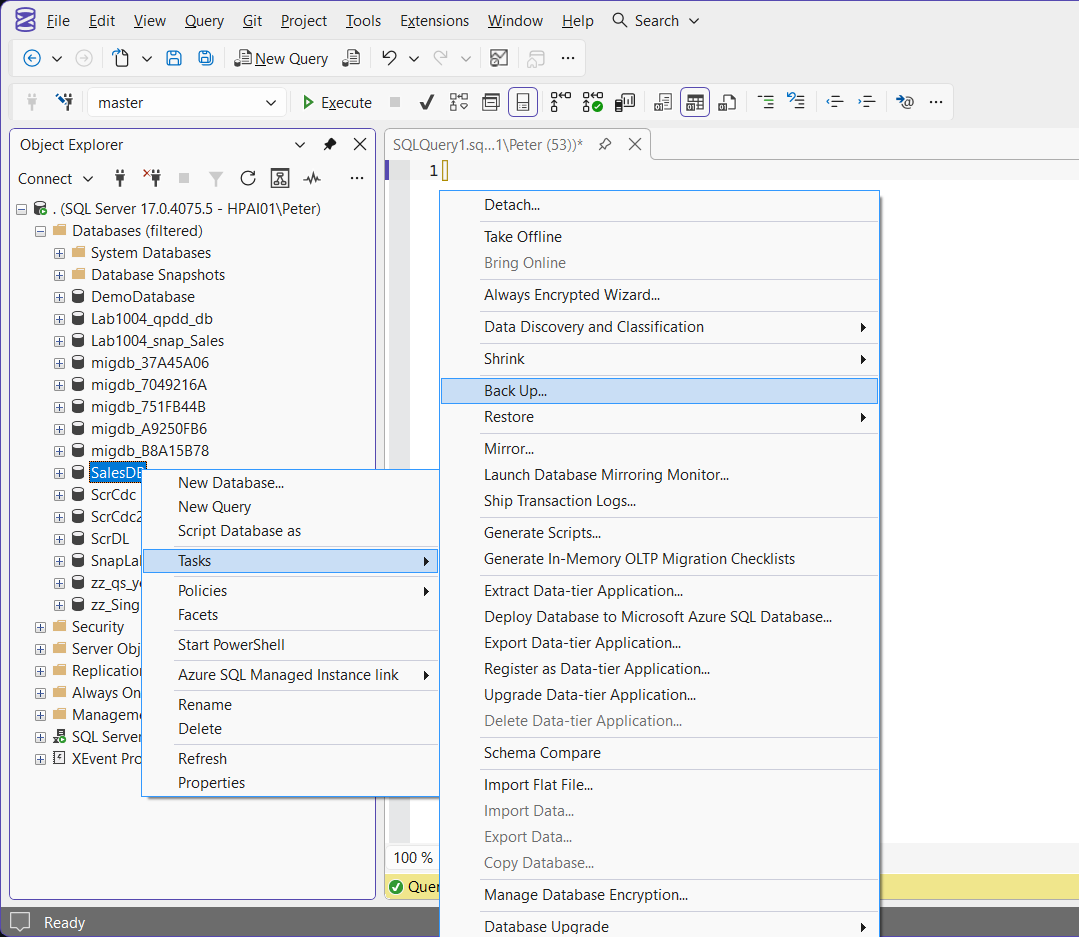
- In Object Explorer, right-click the database and select Tasks > Back Up…
- On the General page, check that Backup type is Full. Remove the default destination and add your own path and file name ending in
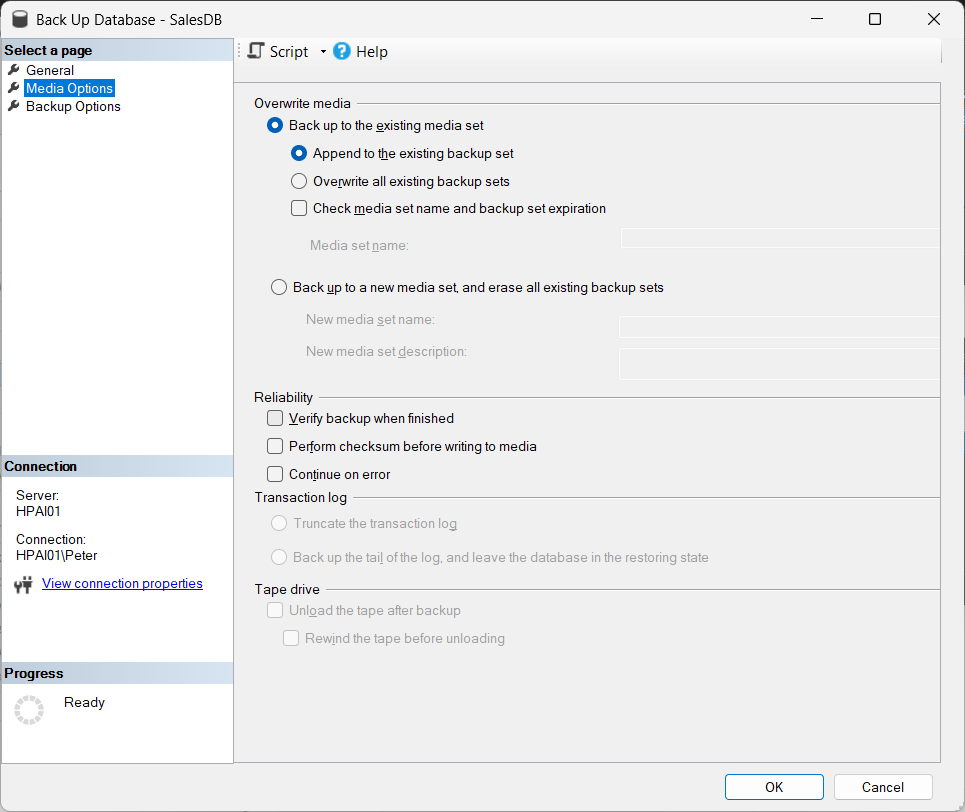
.bak. - On Media Options, choose Overwrite all existing backup sets if you are reusing a file, then tick Verify backup when finished and Perform checksum before writing to media.
- On Backup Options, set compression to Compress backup.
- Click Script > Script Action to New Query Window if you want the T-SQL, then click OK.
Verify the Backup File
RESTORE VERIFYONLY checks that the backup set is complete and readable, and with CHECKSUM it rechecks the page checksums. It catches a truncated or damaged file without running a full restore:
RESTORE VERIFYONLY
FROM DISK = N'D:\SQLBackups\SalesDB_FULL_20261028.bak'
WITH CHECKSUM;
A good file returns The backup set on file 1 is valid. That proves the file, not the database. The only real proof is a restore, and Restore Testing covers a repeatable way to do one.
Confirm It Was Recorded
Every backup is logged in msdb. This shows the last few for one database, with the size before and after compression and whether checksums were written:
SELECT TOP (10)
       bs.database_name,
       bs.type,                  -- D = full, I = differential, L = log
       bs.is_copy_only,
       bs.backup_start_date,
       bs.backup_finish_date,
       CAST(bs.backup_size / 1048576.0 AS decimal(12,1)) AS size_mb,
       CAST(bs.compressed_backup_size / 1048576.0 AS decimal(12,1)) AS compressed_mb,
       bs.has_backup_checksums,
       bmf.physical_device_name
FROM msdb.dbo.backupset AS bs
JOIN msdb.dbo.backupmediafamily AS bmf
  ON bmf.media_set_id = bs.media_set_id
WHERE bs.database_name = N'SalesDB'
ORDER BY bs.backup_finish_date DESC;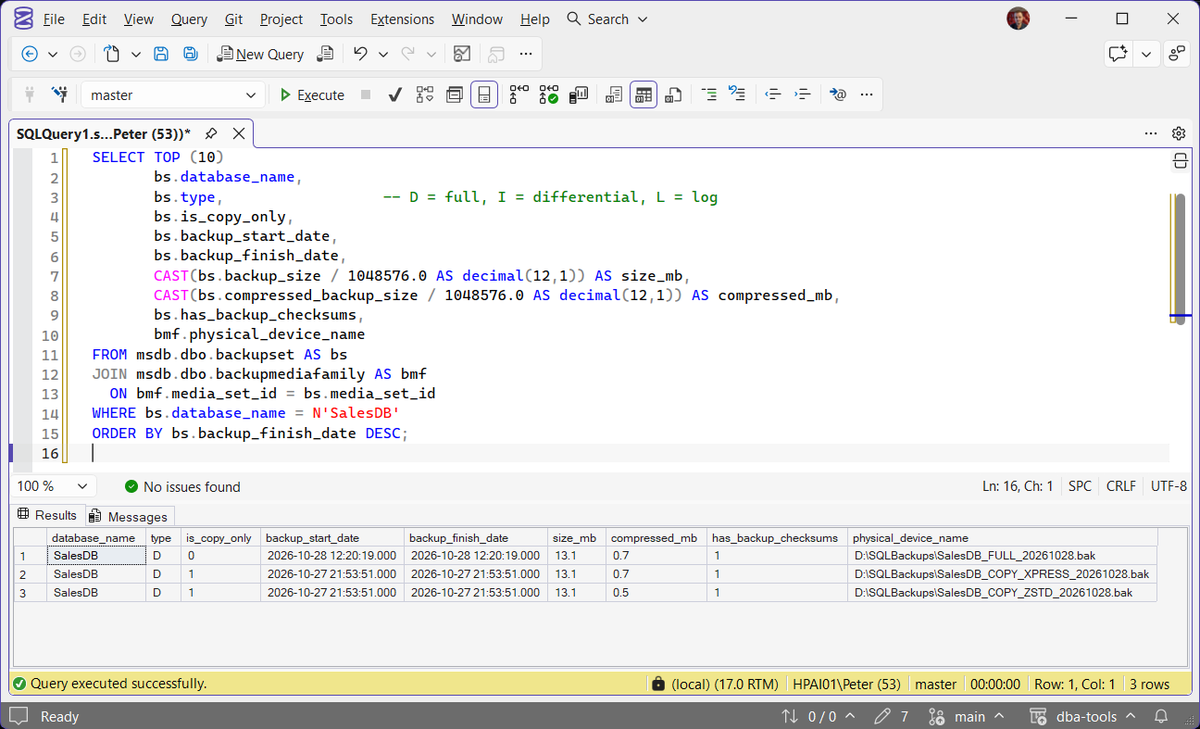
For every database on the instance, Get Database Backup History does the same job. For a big backup that is still running, Get Backup Restore Progress shows percent complete and an estimated finish.
Frequently Asked Questions
What is a copy-only backup, and when do I need one?
COPY_ONLY for any one-off backup on a server that already has a schedule: refreshing a test copy, a safety net before a risky change, or a file to hand to a developer. More in Copy-Only Backups.Why does BACKUP LOG fail with Msg 4214?
How do I see how far a running backup has got?
STATS = 10 reports progress on your own session. For a backup someone else started, percent_complete in sys.dm_exec_requests shows it, and Get Backup Restore Progress adds an estimated finish time.Does a full backup truncate the transaction log?
Can I back up while users are working?
Can I take backups on an Availability Group secondary?
COPY_ONLY full backup and regular log backups, but not a differential, and not a copy-only log backup. SQL Server 2025 adds normal full and differential backups on any secondary. Either way the secondary has to be SYNCHRONIZED or SYNCHRONIZING, and the availability group’s backup preference decides where your jobs should run: check sys.fn_hadr_backup_is_preferred_replica(N'YourDatabase') at the start of each backup job. Microsoft Learn has the details in backups on secondary replicas.Should I encrypt backups?
Can SQL Server Express compress backups?
Summary
BACKUP DATABASE ... WITH CHECKSUM, COMPRESSION, INIT, STATS covers most needs, and COPY_ONLY keeps an ad hoc backup out of the scheduled chain. On SQL Server 2025, try COMPRESSION (ALGORITHM = ZSTD) and measure it against MS_XPRESS on your own data. Run RESTORE VERIFYONLY straight after, check msdb recorded it, and prove the file with a real test restore.
Leave a Reply