
RESTORE is refused because another session has the target database open. The backup is not the reason for Msg 3101. Stop the application or job reconnecting to the database, clear the other sessions during a maintenance window, and run the restore again.
Read the Error Before 3013
Msg 3101 says SQL Server could not take exclusive access to the database. The usual cause is an application, job, or second query window still connected to it. Msg 3013 often follows as the restore’s closing message; it does not mean the backup file is corrupt.
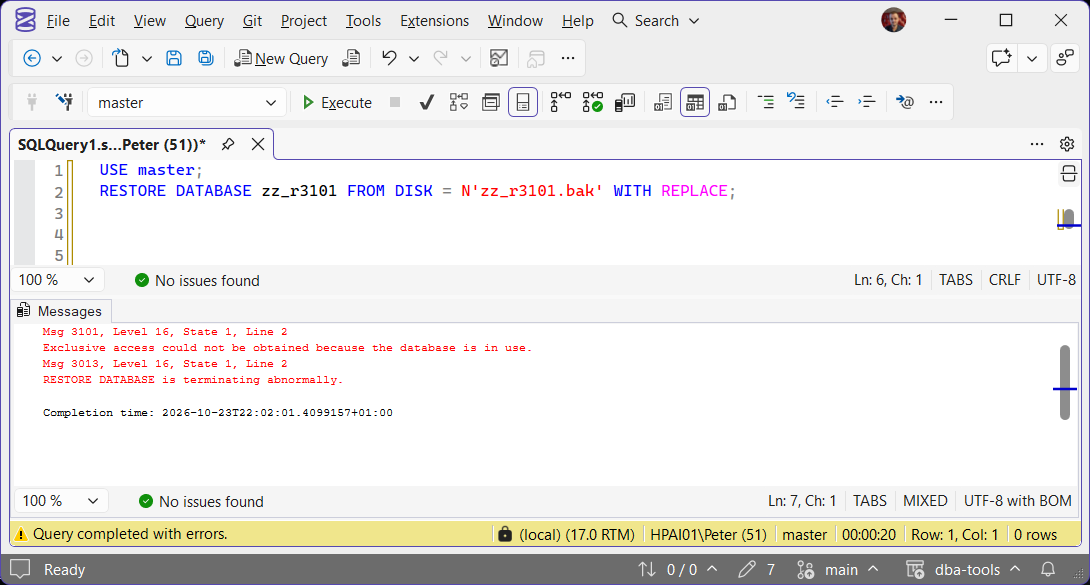
On HPAI01, the restore succeeded after the connected session was cleared. The restored test table contained its row, so this reproduction isolated database access rather than a bad backup.
Clear Sessions and Retry During a Window
First stop the application, connection pool, or job that can reconnect. Check that you have the right target database and backup. The next command disconnects every session and rolls back its active transactions.
USE master;
GO
ALTER DATABASE [YourDatabase] SET SINGLE_USER WITH ROLLBACK IMMEDIATE;
GO
RESTORE DATABASE [YourDatabase]
FROM DISK = N'D:\Backups\YourDatabase.bak'
WITH RECOVERY, CHECKSUM;
GO
ALTER DATABASE [YourDatabase] SET MULTI_USER;
GO
Run this only in an approved maintenance window. Add WITH REPLACE only when you have confirmed that overwriting the existing database is intended and the backup is the correct one. If RESTORE fails after SINGLE_USER is set, return the database to MULTI_USER when safe, then investigate that new error.
MS Docs: ALTER DATABASE SET options documents SINGLE_USER and ROLLBACK IMMEDIATE. MS Docs: RESTORE statements documents the restore options.
If 3101 Comes Back
A client may reconnect as soon as you clear the current sessions. Stop the service, job, or pool that owns that connection before setting SINGLE_USER. If the next error changes, follow that message instead; the access problem may be cleared and a separate restore issue may now be visible.
Frequently Asked Questions
Does Msg 3101 mean the backup is corrupt?
Is Msg 3013 the cause?
Can I use ROLLBACK IMMEDIATE without warning users?
Where To Go Next
Follow the message that stopped the restore, not just its final line.
- RESTORE Is Terminating Abnormally (Errors 3013 and 3241), when 3013 is the last line and the useful error came before it.
- SQL Server Backup Failed or the Restore Is Stuck, the route through common backup and restore failures.
Leave a Reply