
When Jobs Run, and Whether They’re Taking Longer to Do It
SQL Agent Job Failure Summary tells you what broke. These two scripts answer two quieter but just as important questions: Get-JobScheduleSummary shows exactly when every enabled job is scheduled to run next, useful for spotting overlapping windows or confirming a schedule change actually took effect. Get-JobDurationTrends compares each job’s most recent run against its own 30-day average, flagging jobs that are quietly taking longer than they used to, before that becomes a missed maintenance window or an overlap with something else.
Why Job Schedules and Duration Trends Matter
- Two maintenance jobs scheduled into the same window can silently compete for I/O and CPU, neither one fails, but both run slower than expected, and nothing in a failure report catches it
- A job that succeeds every time can still be quietly getting slower, run duration trending upward is an early signal worth catching before it turns into a real problem (an overrun into business hours, a missed backup window)
next_run_date/next_run_timeis the fastest way to confirm a schedule change actually took effect, rather than assuming it didtrend_status = SPIKEorGROWINGgives you an objective, threshold-based signal instead of having to eyeball raw duration numbers across dozens of jobs
When to Run These Scripts
- Get-JobScheduleSummary, after any schedule change, to confirm the new next-run time is correct; when reviewing an unfamiliar server, to see what’s actually running and when
- Get-JobDurationTrends, as a routine weekly or monthly check, alongside Job Failure Summary, to catch degrading jobs before they fail outright
- When investigating a maintenance window overrun or unexpected resource contention during a specific time slot
- Before adding a new scheduled job, to check what’s already running in the target window
The Scripts
1. Get-JobScheduleSummary — Enabled Jobs, Schedules, and Next Run Time
- Tested on: SQL Server 2025 (RTM CU8), Windows lab instance
- Last verified: 2026-08-30 (all 2 scripts on this page run, saved outputs from real runs)
- Permissions: db_datareader on msdb · db_datareader on msdb (or sysadmin); SQLAgentReaderRole alone cannot SELECT the job tables
- Safety: read-only, impact low
/*
Script Name : Get-JobScheduleSummary
Category    : configuration-and-environment
Purpose     : Show enabled SQL Agent jobs with their schedules and next scheduled run time.
Author      : Peter Whyte (https://sqldba.blog/dba-scripts-get-job-schedules-and-duration-trends/)
Requires    : db_datareader on msdb
*/
-- SAFE:ReadOnly
-- IMPACT:Low
SET NOCOUNT ON;

SELECT
    j.name AS job_name,
    sc.name AS schedule_name,
    CASE sc.freq_type
        WHEN 1 THEN 'Once'
        WHEN 4 THEN 'Daily'
        WHEN 8 THEN 'Weekly'
        WHEN 16 THEN 'Monthly'
        WHEN 32 THEN 'Monthly (relative)'
        WHEN 64 THEN 'On Agent start'
        WHEN 128 THEN 'When CPU idle'
        ELSE CAST(sc.freq_type AS VARCHAR(10))
    END AS freq_type,
    sc.freq_interval,
    STUFF(STUFF(RIGHT('000000' + CAST(sc.active_start_time AS VARCHAR(6)), 6), 5, 0, ':'), 3, 0, ':') AS scheduled_start_time,

    /* msdb stores these as yyyymmdd + HHmmss integers; return real datetimes so the output
       reads without decoding (matches Get-JobDurationTrends on the same page) */
    CASE WHEN jsch.next_run_date = 0 THEN NULL
         ELSE CONVERT(DATETIME,
                  STUFF(STUFF(CAST(jsch.next_run_date AS CHAR(8)), 7, 0, '-'), 5, 0, '-') + ' ' +
                  STUFF(STUFF(RIGHT('000000' + CAST(jsch.next_run_time AS VARCHAR(6)), 6), 5, 0, ':'), 3, 0, ':'))
    END AS next_run_at,

    CASE jss.last_run_outcome
        WHEN 0 THEN 'Failed'
        WHEN 1 THEN 'Succeeded'
        WHEN 3 THEN 'Cancelled'
        ELSE 'Unknown'
    END AS last_outcome,

    CASE WHEN jss.last_run_date IS NULL OR jss.last_run_date = 0 THEN NULL
         ELSE CONVERT(DATETIME,
                  STUFF(STUFF(CAST(jss.last_run_date AS CHAR(8)), 7, 0, '-'), 5, 0, '-') + ' ' +
                  STUFF(STUFF(RIGHT('000000' + CAST(jss.last_run_time AS VARCHAR(6)), 6), 5, 0, ':'), 3, 0, ':'))
    END AS last_run_at,

    /* packed HHMMSS integer -> HH:MM:SS */
    CASE WHEN jss.last_run_date IS NULL OR jss.last_run_date = 0 THEN NULL
         ELSE RIGHT('0' + CAST(jss.last_run_duration / 10000 AS varchar(4)), 2) + ':'
            + RIGHT('0' + CAST((jss.last_run_duration % 10000) / 100 AS varchar(2)), 2) + ':'
            + RIGHT('0' + CAST(jss.last_run_duration % 100 AS varchar(2)), 2)
    END AS last_run_duration
FROM msdb.dbo.sysjobs AS j
JOIN msdb.dbo.sysjobschedules AS jsch ON j.job_id = jsch.job_id
JOIN msdb.dbo.sysschedules AS sc ON jsch.schedule_id = sc.schedule_id
LEFT JOIN msdb.dbo.sysjobservers AS jss ON j.job_id = jss.job_id
WHERE j.enabled = 1
  AND sc.enabled = 1
ORDER BY jsch.next_run_date, jsch.next_run_time;
2. Get-JobDurationTrends — Duration vs 30-Day Average
/*
Script Name : Get-JobDurationTrends
Category    : monitoring
Purpose     : SQL Agent job duration over the last 30 days — flags jobs that are running significantly longer than their average.
Author      : Peter Whyte (https://sqldba.blog/dba-scripts-get-job-schedules-and-duration-trends/)
Requires    : db_datareader on msdb (or sysadmin); SQLAgentReaderRole alone cannot SELECT the job tables
*/
-- SAFE:ReadOnly
-- IMPACT:Low
SET NOCOUNT ON;

WITH history AS (
    SELECT
        j.job_id,
        j.name AS job_name,
        j.enabled,
        j.category_id,
        /* Convert HHMMSS integer to total seconds */
        (h.run_duration / 10000) * 3600
        + ((h.run_duration / 100) % 100) * 60
        + (h.run_duration % 100) AS duration_sec,
        /* sysjobhistory.run_date/run_time is when the run STARTED, not when it finished */
        CONVERT(DATETIME,
            STUFF(STUFF(CAST(h.run_date AS CHAR(8)),7,0,'-'),5,0,'-') + ' ' +
            STUFF(STUFF(RIGHT('000000' + CAST(h.run_time AS VARCHAR(6)),6),5,0,':'),3,0,':')
        ) AS run_started_at,
        ROW_NUMBER() OVER (
            PARTITION BY j.job_id
            ORDER BY h.run_date DESC, h.run_time DESC
        ) AS rn
    FROM msdb.dbo.sysjobhistory h
    JOIN msdb.dbo.sysjobs j ON j.job_id = h.job_id
    WHERE h.step_id = 0
      AND h.run_status = 1 /* successful completions only */
      AND h.run_date >= CAST(CONVERT(CHAR(8), DATEADD(DAY, -30, GETDATE()), 112) AS INT)
),
agg AS (
    SELECT
        job_id, job_name, enabled,
        COUNT(*) AS runs_last_30d,
        MAX(CASE WHEN rn = 1 THEN duration_sec END) AS last_run_sec,
        MAX(CASE WHEN rn = 1 THEN run_started_at END) AS last_run_started_at,
        CAST(AVG(CAST(duration_sec AS FLOAT)) AS DECIMAL(10,1)) AS avg_sec_30d,
        MAX(duration_sec) AS max_sec_30d,
        MIN(duration_sec) AS min_sec_30d
    FROM history
    GROUP BY job_id, job_name, enabled
    HAVING COUNT(*) >= 2
)
SELECT
    job_name,
    enabled,
    runs_last_30d,
    CONVERT(VARCHAR(8), DATEADD(SECOND, last_run_sec, 0), 108) AS last_run_duration,
    CONVERT(VARCHAR(8), DATEADD(SECOND, CAST(avg_sec_30d AS INT), 0), 108) AS avg_duration_30d,
    CONVERT(VARCHAR(8), DATEADD(SECOND, max_sec_30d, 0), 108) AS max_duration_30d,
    CAST(
        CASE WHEN avg_sec_30d > 0
             THEN (CAST(last_run_sec AS FLOAT) - avg_sec_30d) / avg_sec_30d * 100
             ELSE 0
        END AS DECIMAL(6,1)) AS pct_vs_avg,
    CASE
        WHEN avg_sec_30d > 0
             AND last_run_sec > avg_sec_30d * 2
             AND (last_run_sec - avg_sec_30d) > 30 THEN 'SPIKE'
        WHEN avg_sec_30d > 0
             AND last_run_sec > avg_sec_30d * 1.25
             AND (last_run_sec - avg_sec_30d) > 10 THEN 'GROWING'
        ELSE 'OK'
    END AS trend_status,
    /* Raw seconds for charting */
    last_run_sec,
    CAST(avg_sec_30d AS INT) AS avg_sec_30d,
    max_sec_30d,
    /* was CONVERT(VARCHAR(16), ..., 120): style 120 is 19 chars, so VARCHAR(16) silently
       truncated the seconds. Return the real datetime, matching Get-JobScheduleSummary
       on the same post. */
    last_run_started_at
FROM agg
ORDER BY pct_vs_avg DESC, job_name;
How To Run From The Repo
Clone DBA Tools, initialize and run whichever script answers your question:
# Clone dba-tools repo:
git clone https://github.com/peterwhyte-lgtm/dba-tools

# Initialize environment:
cd dba-tools
.\Initialize-Environment.ps1

# Enabled jobs, schedules, and next run time:
.\run.ps1 Get-JobScheduleSummary

# 30-day job duration trend, flags SPIKE/GROWING jobs:
.\run.ps1 Get-JobDurationTrends

# Either against a remote sql server:
.\run.ps1 Get-JobDurationTrends -ServerInstance SQLSERVER01
These scripts live in the repo at:
Example Output
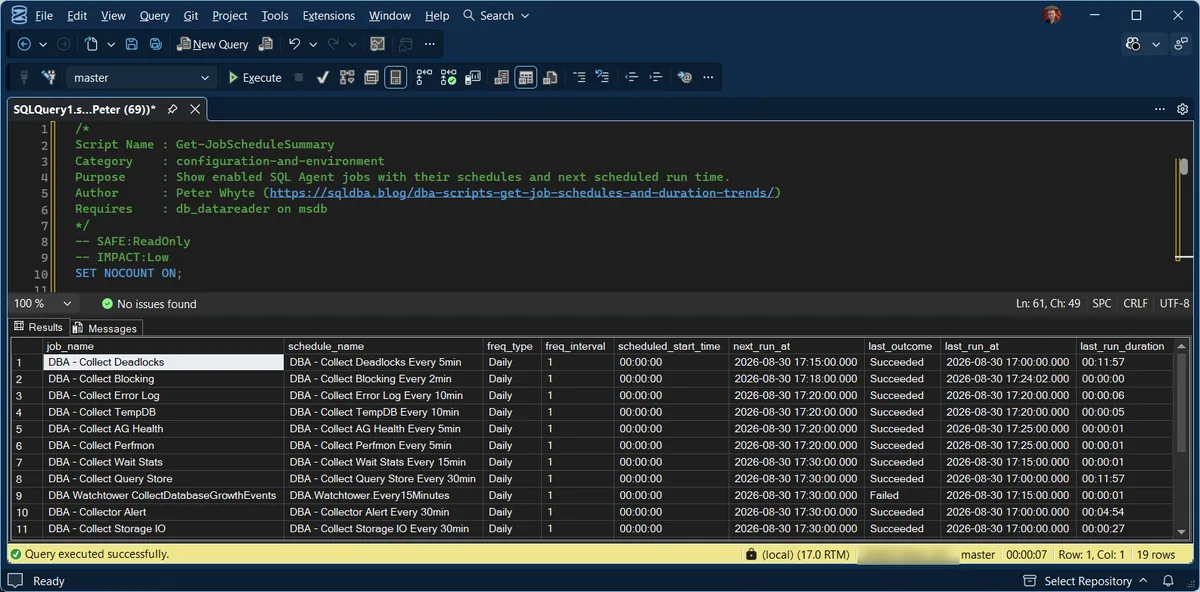
1. The schedules. Nineteen enabled jobs on this instance, every schedule reading in plain datetimes rather than the packed integers msdb stores. The row worth noticing is the one whose last_outcome says Failed: the schedule is healthy and firing, and the job itself is not, which is precisely the distinction this pair of scripts exists to keep separate.
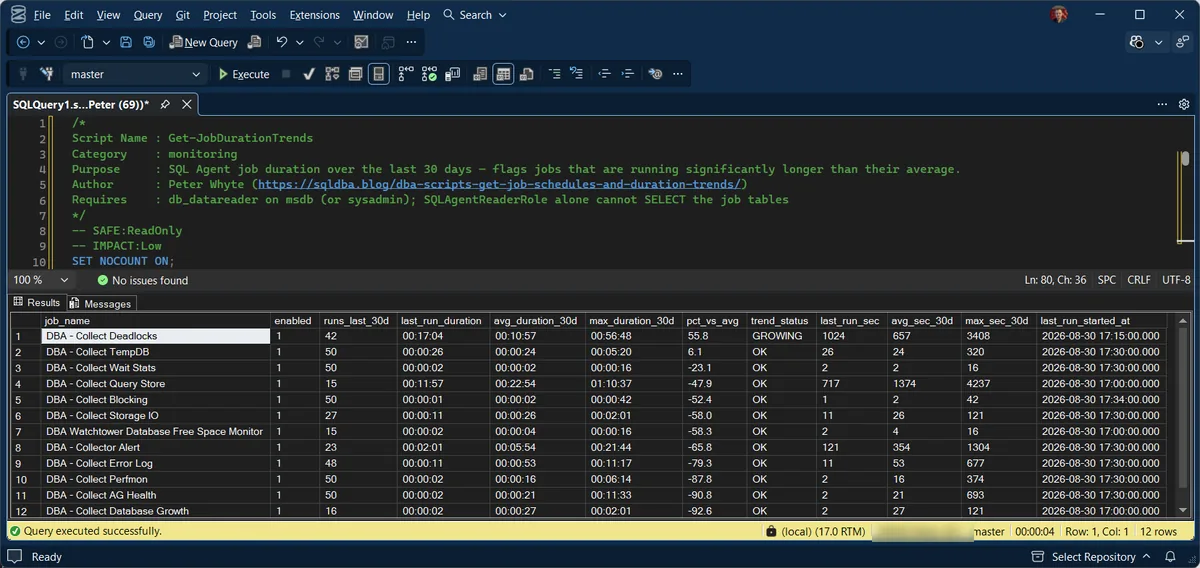
2. The trends. The same jobs judged against their own 30-day history. Most sit at OK, several comfortably faster than average, and one is flagged GROWING at 55.8% above its baseline. That job has not failed and would not appear in any failure report; it is simply taking longer than it used to, which is the quiet signal that usually arrives before the loud one.
Understanding the Results
job_nameschedule_namefreq_typefreq_intervalscheduled_start_timenext_run_atlast_outcomelast_run_atlast_run_durationHH:MM:SS. All three are blank for a job that has never run. Note these are start times, not completion times, which is why the trends script names its equivalent column last_run_started_at: on a job that ran for hours, reading it as a finish time mis-places the incident by the length of the run.runs_last_30davg_duration_30dmax_duration_30dmin_duration_30dtrend_statusOK means the last run sits within about 25% of the average. GROWING means at least 25% longer, and more than ten seconds slower in absolute terms. Act when SPIKE appears: the last run took at least double its 30-day average, and more than thirty seconds longer. Check blocking, resource contention, or a data volume change that legitimately explains it, the same day rather than at the weekly review.Best Practices
- Run
Get-JobScheduleSummaryafter any schedule change to confirm the new next-run time is what you expect, don’t assume a change in SSMS took effect correctly - Treat
trend_status = SPIKEas worth same-day investigation, not filed away for a weekly review - Check
Get-JobScheduleSummary‘sscheduled_start_timecolumn across all jobs before adding a new one, to avoid stacking maintenance work into an already-busy window - Pair with Job Failure Summary for the full picture, failures are the loud signal, duration trends are the quiet one that precedes them
Microsoft’s reference covers dbo.sysschedules, dbo.sysjobschedules, and dbo.sysjobhistory in full.
Related Scripts
You may also find these scripts useful:
- SQL Agent and Jobs (hub)
- SQL Agent Job Failure Summary
- msdb Is Growing: Purge Backup, Job and Mail History Safely, how much sysjobhistory to keep so this trending still has something to read
- Maintenance Job Status
- SQL Server Agent Jobs Queued on Maximum User Working Threads, when jobs scheduled for the same minute sit queued instead of starting
- DBA Scripts: The Complete Guide, the map across every script on this site
Frequently Asked Questions
Why does last_run_duration in Get-JobScheduleSummary differ from Get-JobDurationTrends?
Get-JobScheduleSummary pulls last_run_duration straight from msdb.dbo.sysjobservers, an HHMMSS integer covering the whole job regardless of outcome. Get-JobDurationTrends only counts successful completions (run_status = 1) at the job level (step_id = 0) over a rolling 30-day window, so a recent failed run or a run older than 30 days won’t appear in the trend calculation even though it’s reflected in the schedule summary.
What counts as “significantly longer” for the SPIKE threshold?
At least double the 30-day average AND more than 30 seconds of absolute difference, both conditions have to be true. This avoids flagging a job that normally takes 2 seconds and one day takes 5, technically “more than double” but not actually meaningful.
Summary
A job that succeeds every time can still be quietly heading toward trouble, either through schedule overlap that nothing reports as a failure, or through duration creep that only becomes visible once you compare against its own history. These two scripts turn both into a direct, readable check: what’s scheduled and when, and whether today’s run matches the last 30 days or is heading somewhere worse.
Run Get-JobScheduleSummary after any schedule change and Get-JobDurationTrends as a routine weekly check alongside job failure monitoring, catching a GROWING trend early is a lot cheaper than fixing a missed maintenance window after the fact.
Leave a Reply