
Which Query Is the Problem
CPU is pinned and you need the statement behind it. Get-TopCpuQueries ranks the plan cache by total CPU. The two scripts beside it rank the same cache by logical reads and by average duration, because a query can be expensive in a way the CPU column never shows.
Why This Matters
- A query can be CPU-heavy without being I/O-heavy, or the reverse, ranking by the wrong metric can point you at the wrong query entirely
total_worker_time(CPU),total_logical_reads(I/O), and average elapsed time (habitual slowness) are three genuinely different signals, all derived from the samesys.dm_exec_query_statsDMV- All three read from the plan cache, so each row covers activity since that plan was compiled, not since the last restart and not just what’s running right now, complementary to a live-session check like Long-Running Queries
- On a memory-starved instance the plan cache itself is a moving target, and a plan that has been evicted takes its history with it. The FAQ below covers what that looks like
The Scripts
Get-TopCpuQueries: Ranked by Total CPU Time
- Tested on: SQL Server 2025 (RTM CU8), Windows lab instance
- Last verified: 2026-10-23 (Get-TopCpuQueries run on the lab; the screenshot below is from it. Get-TopIoQueries and Get-SlowQueriesFromCache last run 2026-10-04)
- Permissions: VIEW SERVER STATE, or VIEW SERVER PERFORMANCE STATE on SQL Server 2022 and later
- Safety: read-only, impact low
/*
Script Name : Get-TopCpuQueries
Category    : performance-troubleshooting
Purpose     : List top 20 CPU-consuming queries with execution counts and timing metrics.
Author      : Peter Whyte (https://sqldba.blog/dba-scripts-get-top-cpu-queries/)
Requires    : VIEW SERVER STATE
HealthCheck : Yes
*/
-- SAFE:ReadOnly
-- IMPACT:Low
SET NOCOUNT ON;

SELECT TOP (20)
    DB_NAME(st.dbid) AS database_name,
    qs.execution_count,
    qs.total_worker_time / 1000 AS total_cpu_ms,
    qs.total_worker_time / NULLIF(qs.execution_count, 0) / 1000 AS avg_cpu_ms,
    SUBSTRING(st.text, (qs.statement_start_offset / 2) + 1,
              ((CASE qs.statement_end_offset
                    WHEN -1 THEN DATALENGTH(st.text)
                    ELSE qs.statement_end_offset
                END - qs.statement_start_offset) / 2) + 1) AS statement_text
FROM sys.dm_exec_query_stats AS qs
CROSS APPLY sys.dm_exec_sql_text(qs.sql_handle) AS st
ORDER BY qs.total_worker_time DESC;
Get-TopIoQueries: Ranked by Total Logical Reads
/*
Script Name : Get-TopIoQueries
Category    : performance-troubleshooting
Purpose     : Top 20 queries by total logical reads since last restart — primary I/O pressure source.
Author      : Peter Whyte (https://sqldba.blog/dba-scripts-get-top-cpu-queries/)
Requires    : VIEW SERVER STATE
*/
-- SAFE:ReadOnly
-- IMPACT:Low
SET NOCOUNT ON;

SELECT TOP 20
    DB_NAME(st.dbid) AS database_name,
    qs.execution_count,
    qs.total_logical_reads,
    CAST(qs.total_logical_reads / NULLIF(qs.execution_count, 0) AS BIGINT) AS avg_logical_reads,
    qs.total_physical_reads,
    CAST(qs.total_physical_reads / NULLIF(qs.execution_count, 0) AS BIGINT) AS avg_physical_reads,
    qs.total_logical_writes,
    CAST(qs.total_worker_time / NULLIF(qs.execution_count, 0) / 1000 AS BIGINT) AS avg_cpu_ms,
    qs.creation_time AS plan_cached,
    SUBSTRING(
        st.text,
        (qs.statement_start_offset / 2) + 1,
        ((CASE qs.statement_end_offset
              WHEN -1 THEN DATALENGTH(st.text)
              ELSE qs.statement_end_offset
          END - qs.statement_start_offset) / 2) + 1
    ) AS statement_text
FROM sys.dm_exec_query_stats AS qs
CROSS APPLY sys.dm_exec_sql_text(qs.sql_handle) AS st
ORDER BY qs.total_logical_reads DESC;
Get-SlowQueriesFromCache: Ranked by Average Elapsed Time
/*
Script Name : Get-SlowQueriesFromCache
Category    : performance-troubleshooting
Purpose     : Top 20 queries by average elapsed time from the plan cache — identifies habitually slow queries.
Author      : Peter Whyte (https://sqldba.blog/dba-scripts-get-top-cpu-queries/)
Requires    : VIEW SERVER STATE
Notes       : Covers cached plans since last restart or plan eviction. Complements
              Get-LongRunningQueries (live requests) and Get-TopCpuQueries (total CPU).
*/
-- SAFE:ReadOnly
-- IMPACT:Low
SET NOCOUNT ON;

SELECT TOP 20
    DB_NAME(st.dbid) AS database_name,
    qs.execution_count,
    CAST(qs.total_elapsed_time / NULLIF(qs.execution_count, 0) / 1000.0 AS DECIMAL(12,1)) AS avg_elapsed_ms,
    CAST(qs.max_elapsed_time / 1000.0 AS DECIMAL(12,1)) AS max_elapsed_ms,
    CAST(qs.total_elapsed_time / 1000.0 AS DECIMAL(14,1)) AS total_elapsed_ms,
    CAST(qs.total_worker_time / NULLIF(qs.execution_count, 0) / 1000.0 AS DECIMAL(12,1)) AS avg_cpu_ms,
    qs.total_logical_reads / NULLIF(qs.execution_count, 0) AS avg_logical_reads,
    qs.creation_time AS plan_cached,
    SUBSTRING(
        st.text,
        (qs.statement_start_offset / 2) + 1,
        ((CASE qs.statement_end_offset
              WHEN -1 THEN DATALENGTH(st.text)
              ELSE qs.statement_end_offset
          END - qs.statement_start_offset) / 2) + 1
    ) AS statement_text
FROM sys.dm_exec_query_stats AS qs
CROSS APPLY sys.dm_exec_sql_text(qs.sql_handle) AS st
WHERE qs.execution_count > 1
ORDER BY qs.total_elapsed_time / NULLIF(qs.execution_count, 0) DESC;
Same underlying DMV, three different ORDER BY clauses, each answering a genuinely different question about what “expensive” means for that query.
How To Run From The Repo
Clone DBA Tools, initialize and run whichever ranking you need:
# Clone dba-tools repo:
git clone https://github.com/peterwhyte-lgtm/dba-tools

# Initialize environment:
cd dba-tools
.\Initialize-Environment.ps1

# Rank by CPU, I/O, or habitual slowness:
.\run.ps1 Get-TopCpuQueries
.\run.ps1 Get-TopIoQueries
.\run.ps1 Get-SlowQueriesFromCache

# To run against a remote sql server:
.\run.ps1 Get-TopCpuQueries -ServerInstance SQLSERVER01
These scripts live in the repo at:
sql/performance/queries/Get-TopCpuQueries.sqlsql/performance/queries/Get-TopIoQueries.sqlsql/performance/queries/Get-SlowQueriesFromCache.sql
Example Output
One run on the lab instance straight after a short mixed workload: 2 stored procedures, 1 parameterised statement, and one ad hoc query sent 8 times with a different literal each time. These are the first 11 of 14 rows (the last 3 were Query Store background statements at 2 ms each), and the second statement is cut at the dots.
A NULL database_name is ad hoc or internal SQL with no database behind it. Query Store’s own background statements show up this way.
The top row is the called-constantly pattern: 25 executions at 44 ms each, 1,109 ms in total. The second is the opposite, a single execution at 828 ms, which makes it the one to tune per run.
Rows 4 to 11 are one query. Each literal value got its own plan and its own row, and between them those 8 rows used 1,341 ms of CPU, more than the top row. Ranked one statement at a time, the heaviest query on the instance came in 4th to 11th. When the list ends in near-identical statements, add them up before choosing what to tune.
sys.dm_exec_sql_text only carries a database id for objects, which is why 9 of the 11 rows here read NULL: none of them ran inside a stored procedure. The statement text is the clue, and the FAQ below has the column that does carry the database.
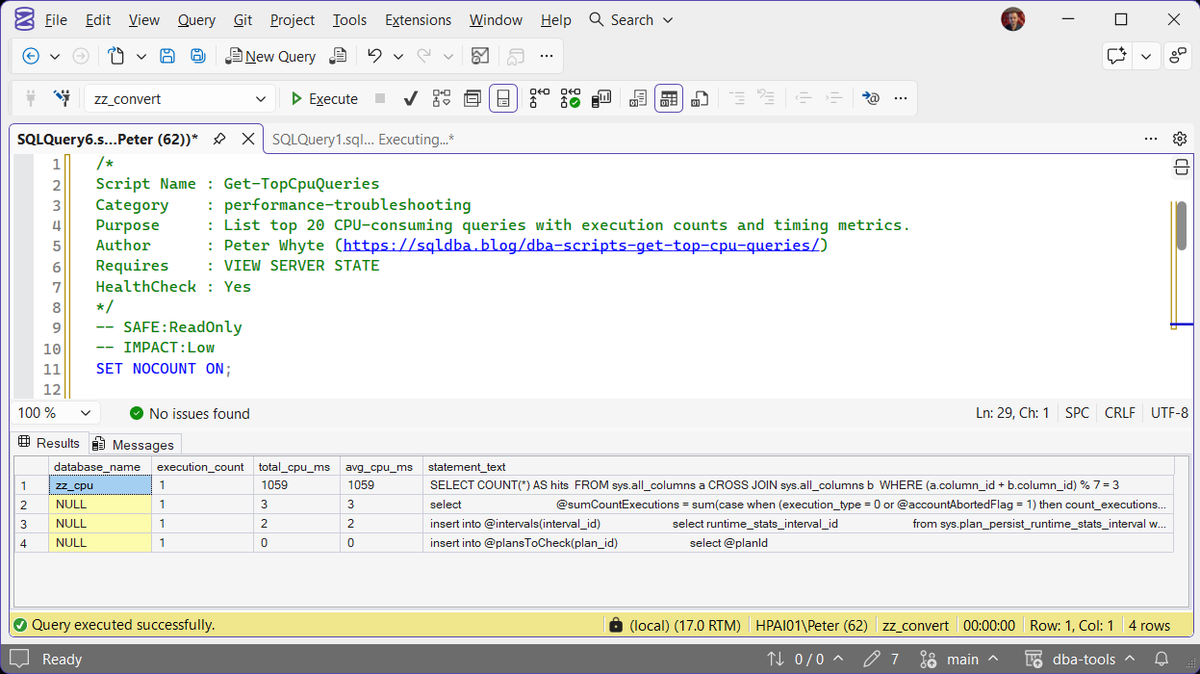
The same script in SSMS on a quieter run, with one seeded query in the plan cache: it ran once for 1,059 ms of CPU, and the three NULL rows under it are Query Store background statements at 3 ms or less.
Understanding the Results
total_cpu_msexecution_countavg_cpu_msdatabase_namesys.dm_exec_sql_text does not record a database for them, so on an application that sends its own SQL most rows will read NULL.Act when it is NULL and you need the database. Read it from the statement text, or from the dbid attribute in sys.dm_exec_plan_attributes for that row’s plan.total_logical_readsavg_logical_readsavg_elapsed_msavg_cpu_msplan_cachedBest Practices
- Check all three, not just one, a query can rank low on CPU and still be the worst I/O offender on the instance
- Cross-reference with Statistics Health and Implicit Conversions, both are common root causes behind a query that ranks high here for no obvious reason in the query text itself
- Remember these three only see what’s currently cached, a plan that’s already been evicted (memory pressure, a recompile, a restart) won’t show up, however expensive it actually was
MS Docs: sys.dm_exec_query_stats · sys.dm_exec_sql_text · sys.dm_exec_plan_attributes
Frequently Asked Questions
Why do all three scripts return the same columns from a different order?
They read the same underlying DMV, sys.dm_exec_query_stats, which tracks every metric for every cached plan at once. Ranking by a different column answers a different question without needing three separate data sources.
Why did my query disappear from the results between two runs?
Its plan was evicted from cache, most commonly from memory pressure, a recompile (a stats update or schema change invalidates the plan), or a server restart. The DMV only reflects what’s currently cached, not a permanent history.
A plan that comes back starts counting from zero. In the Example Output the parameterised statement ran 5 times and reports an execution_count of 3, because its plan was compiled again part way through and the count restarted with it. On an instance short of memory the list can come back with only a handful of rows; that is the cache being emptied, not the script failing. Recent Error Log Entries confirms it: a line reading “A significant part of SQL Server process memory has been paged out” means the operating system took the memory the plans were living in.
Why is database_name NULL on most rows?
The script takes the database from sys.dm_exec_sql_text, which only records one for stored procedures, functions and triggers. Ad hoc and prepared statements come back NULL, and on an application that sends its own SQL that is most of the list. The plan keeps the database it was compiled in as its dbid attribute, readable through sys.dm_exec_plan_attributes with the row’s plan_handle.
Why does the same query appear on several rows?
Ad hoc SQL is cached by its exact text, so the same query with a different literal value is a different plan and a different row. In the Example Output one query sent with 8 values took rows 4 to 11, and together they used more CPU than the row at the top. sys.dm_exec_query_stats carries a query_hash column for exactly this: rows that share it are the same query, and summing them gives its real cost.
What permission does it need?
VIEW SERVER STATE, or VIEW SERVER PERFORMANCE STATE on SQL Server 2022 and later. Either one returns the same rows. A login with neither gets an error rather than an empty list:
Msg 300, Level 14, State 1: VIEW SERVER PERFORMANCE STATE permission was denied on object 'server', database 'master'.
Summary
CPU, I/O, and habitual slowness are three different ways a query can be the one causing a problem, and ranking by the wrong metric can send an investigation in the wrong direction. These three scripts, one DMV, three ORDER BY clauses, cover all three questions directly.
Run all three together as part of a performance investigation rather than picking one, and remember they only see what’s still in the plan cache right now.
Related
You may also find these useful:
- SQL Server Is Slow: What to Check First, in Order, the symptom page above this script, with CPU as step 4
- DBA Scripts: Query and Performance Tuning
- Get Long-Running Queries
- Get Statistics Health
- Get Implicit Conversions
- Get Wait Statistics
- Get Query Store Top Queries
- Get Query Performance Deep-Dive
- SQL Server MAXDOP and Cost Threshold: What To Set, and Why 5 Is Not a Recommendation
- SQL Server High CPU: What to Check First, in Order, the walkthrough that decides working versus waiting before any setting is touched
- DBA Scripts: The Complete Guide, the map across every script on this site
Leave a Reply