
When SQL Server raises an error, it includes more than just a message. Every Database Engine error contains the following:
- Error number
- Error message
- Severity (shown as Level in SSMS)
- State
- Procedure name
- Line number
Out of all of these, severity is the fastest way to understand how serious the issue is and who is likely responsible for fixing it.
Severity levels range from 0 to 24 and indicate whether the issue is informational, user-correctable, resource-related, or critical, as defined in the official SQL Server documentation.
SQL Server Error Severity Levels
| Severity | Meaning |
|---|---|
| 0–9 | Informational messages. Not actual errors. |
| 10 | Informational message (returned as severity 0 to the client). |
| 11 | Object or entity does not exist. |
| 12 | Query using non-locking hints; potential inconsistent reads. |
| 13 | Deadlock detected. |
| 14 | Security-related error (permission denied). |
| 15 | Syntax error in T-SQL. |
| 16 | General user-correctable error. |
| 17 | Resource exhaustion (memory, locks, disk space). |
| 18 | Nonfatal internal software error. |
| 19 | Nonconfigurable resource limit exceeded. |
| 20 | Fatal error affecting the current task. |
| 21 | Fatal error affecting all tasks in the current database. |
| 22 | Table or index corruption. |
| 23 | Database integrity in question. |
| 24 | Media failure or hardware-related issue. |
Operational notes:
- Severity 19 and higher is written to the SQL Server error log.
- Severity 20 and above usually terminates the connection.
- TRY…CATCH cannot handle errors if the connection is terminated.
How to Read an Error in SSMS
Here’s a simple example you can reproduce quickly.
Run this as a login that does not have permission on a database:
-- Assume user for example denied read of a table
EXECUTE AS USER = 'DemoSeverityUser';
GO
SELECT * FROM dbo.SeverityDemo;
GO
REVERT;
GO
If the login does not have access, you’ll see something like:
Msg 229, Level 14, State 5, Line 4
The SELECT permission was denied on the object 'SeverityDemo', database 'DemoDatabase', schema 'dbo'.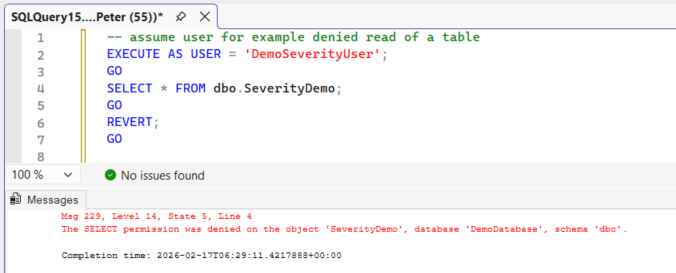
From this we get:
- Severity (Level): 14
- State: 5
- Line Number: 4
Severity 14 tells you immediately this is a security-related error. The engine is fine. The issue is permissions.
That distinction is the value of severity.
Severity Ranges in Production Terms
Instead of memorising every definition, think of severity in ownership terms:
0–10 → Informational
Not a failure. No action required unless specifically monitored.
11–16 → Application or query issue
Bad T-SQL, missing objects, permissions, constraint violations, deadlocks.
Usually owned by development or query logic.
17–19 → Capacity or engine pressure
Memory exhaustion, lock limits, resource constraints, rare engine limits.
Owned by the DBA. Investigate configuration and workload.
20–24 → Stability or data risk
Connection termination, corruption, database integrity issues, storage failure.
Immediate investigation required. May involve CHECKDB, restore strategy, or storage review.
That is the practical hierarchy most production teams operate under.
TRY…CATCH and ERROR_SEVERITY()
TRY…CATCH captures runtime errors with severity greater than 10, provided the error does not terminate the connection.
If the error is severe enough to kill the session (typically severity 20 and above), execution stops and control never reaches the CATCH block.
Inside a CATCH block, you can retrieve the severity of the error using ERROR_SEVERITY():
-- Generates severity 16
BEGIN TRY
    SELECT 1 / 0;  -- Generates severity 16
END TRY
BEGIN CATCH
    SELECT
        ERROR_NUMBER()    AS ErrorNumber,
        ERROR_SEVERITY()  AS ErrorSeverity,
        ERROR_STATE()     AS ErrorState,
        ERROR_MESSAGE()   AS ErrorMessage;
END CATCH;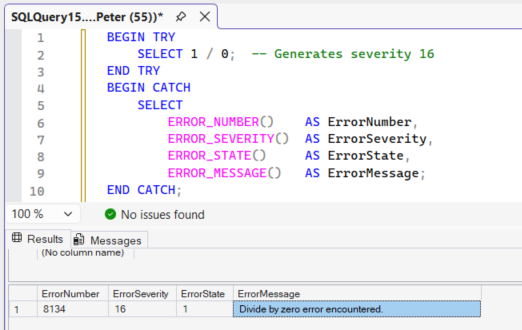
In this case, severity 16 confirms the error is user-correctable. The connection remains active and execution flows into the CATCH block as expected.
ERROR_SEVERITY() returns the severity of the error that triggered that specific CATCH block. If it is called outside the scope of a CATCH block, it returns NULL.
Microsoft documents the exact behaviour of ERROR_SEVERITY() and how it behaves within nested TRY…CATCH constructs in the official Transact-SQL reference.
Where Errors Are Stored
Reading the log itself. Severity tells you how bad one message is; the log tells you whether it is happening repeatedly, and at what time of day.
- Recent Error Log Entries, read the log without scrolling it
- Error Log Patterns, find what repeats, rather than what happened once
All system and user-defined error messages are stored in the sys.messages catalog view.
This view contains the definition of each error, not a history of when errors occurred. You can inspect the catalog with the following query:
-- Review SQL Server error message definitions and their associated severity
SELECT
    message_id,
    severity,
    is_event_logged,
    text
FROM sys.messages
WHERE language_id = 1033
ORDER BY severity DESC;
If you need to determine when an error actually happened, you would look in:
- The SQL Server error log
- Windows Event Viewer
- Extended Events
- Custom logging tables
sys.messages defines the structure and default severity of errors the engine can raise. It does not record runtime events.
User-defined messages can be added using sp_addmessage and raised with RAISERROR, where you explicitly control the severity level. This allows custom application errors to align with SQL Server’s severity model.
In practice, many teams combine this with simple logging. Inside a CATCH block, you might capture ERROR_NUMBER(), ERROR_SEVERITY(), ERROR_MESSAGE(), and GETDATE() into an error table. That gives you both the severity classification and the timestamp of when the failure occurred.
Common Questions
Which severity levels should actually wake someone up?
Why do some errors never reach my application?
Can TRY…CATCH handle every error?
The error number is not in any of these posts. What now?
sys.messages holds every message text and severity the instance knows about.Summary
Severity is the quickest triage signal SQL Server gives you.
- 16 usually means fix the code.
- 17 means check resources.
- 22 or 23 means check integrity.
- 24 means check storage.
Reading severity first tells you who likely owns the issue and how worried you should be before you even dig into the full message text.
That is why it is the first number worth paying attention to.
Where To Go Next
- Get Error Log Patterns, find the errors already repeating on your instance before anyone reports them
- Get Agent Job Failure Summary, for the severities that only ever surface in a failed job
- The Script Finder, 100+ scripts organised by the symptom rather than the script name
Leave a Reply