
GRANT VIEW SERVER STATE TO [login]; It is read-only and safe. If the grant appears to do nothing, look for a DENY, which always wins.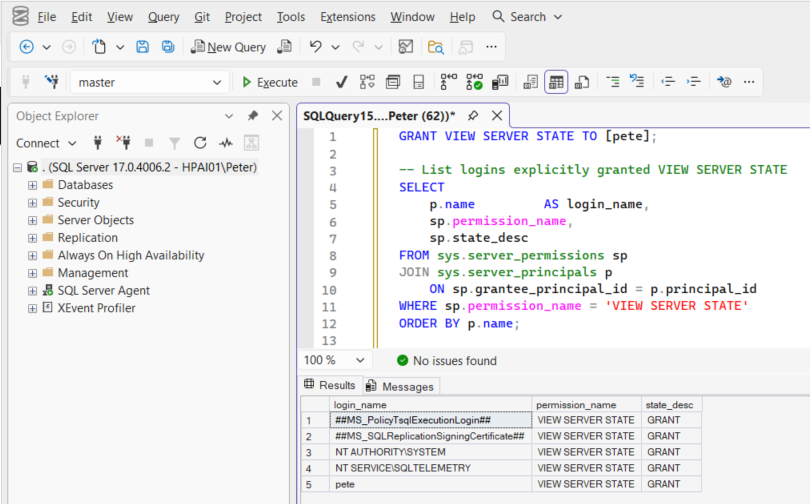
You hit this the moment you try to look at what the server is doing rather than what it holds. Every interesting DMV, running requests, waits, connections, query plans, memory, is gated behind VIEW SERVER STATE.
The reason it surprises people is that db_datareader, db_owner, even full control of a database, grant none of it. Server state is a server-level permission and database roles cannot reach it.
Confirm What You Actually Have
-- What am I, and what am I allowed to do at server level?
SELECT SUSER_NAME()                              AS login_name,
       IS_SRVROLEMEMBER('sysadmin')              AS is_sysadmin,
       HAS_PERMS_BY_NAME(NULL, NULL, 'VIEW SERVER STATE') AS has_view_server_state,
       HAS_PERMS_BY_NAME(NULL, NULL, 'VIEW ANY DEFINITION') AS has_view_any_definition;
has_view_server_state returning 0 is your answer.
To see it for someone else, read the grant directly:
SELECT  pr.name        AS principal_name,
        pr.type_desc,
        pe.permission_name,
        pe.state_desc   -- GRANT, DENY, GRANT_WITH_GRANT_OPTION
FROM    sys.server_permissions pe
JOIN    sys.server_principals  pr ON pr.principal_id = pe.grantee_principal_id
WHERE   pe.permission_name = 'VIEW SERVER STATE'
ORDER   BY pr.name;
The Fix
GRANT VIEW SERVER STATE TO [DOMAIN\your_login];That is it, and it is genuinely safe to grant. VIEW SERVER STATE is read-only. It exposes what the server is doing, sessions, waits, query text, plans, and grants no ability to change anything, read user data, or alter security.
For a monitoring account, this is usually the right minimum set:
GRANT VIEW SERVER STATE     TO [DOMAIN\monitoring_account];   -- DMVs
GRANT VIEW ANY DEFINITION   TO [DOMAIN\monitoring_account];   -- object definitions
GRANT CONNECT SQL           TO [DOMAIN\monitoring_account];
Do not solve this with sysadmin. It is the reflex, it works, and it hands over the entire instance to something that only needed to read a DMV.
The One That Catches Everyone: DENY
If a GRANT appears to do nothing, look for a DENY, including one inherited from a Windows group the login belongs to. DENY always beats GRANT, no matter which is more specific or which came last.
-- Any DENY that could be overriding the grant, direct or via a group
SELECT  pr.name AS principal_name, pr.type_desc, pe.permission_name, pe.state_desc
FROM    sys.server_permissions pe
JOIN    sys.server_principals  pr ON pr.principal_id = pe.grantee_principal_id
WHERE   pe.state_desc = 'DENY'
  AND   pe.permission_name IN ('VIEW SERVER STATE', 'CONNECT SQL');
Remove it rather than layering another grant on top:
REVOKE VIEW SERVER STATE FROM [DOMAIN\the_group];
GRANT  VIEW SERVER STATE TO   [DOMAIN\your_login];
Partial Results Instead of an Error
A subtler version: the query runs, returns rows, and quietly shows you only your own sessions. Several DMVs behave that way, with VIEW SERVER STATE you see the whole instance, without it you see yourself.
If sys.dm_exec_requests shows one row and you were expecting a busy server, you are looking at a permissions problem, not an idle instance. That one has cost me real time.
Azure SQL Database Is Different
There is no server-level VIEW SERVER STATE in Azure SQL Database. The equivalent is granted inside the database:
GRANT VIEW DATABASE STATE TO [your_user];Managed Instance behaves like the boxed product and uses VIEW SERVER STATE.
Stopping It Recurring
- Grant to a group, not a person. The recurring version of this incident is a new starter, or somebody’s account being recreated, and the individual grant not existing.
- Give monitoring tools their own login with the three grants above. Shared accounts are how
sysadmincreeps in. - Audit for
DENYafter any security review. Hardening passes add denies that surface weeks later as this error.
Common Questions
Is VIEW SERVER STATE safe to grant?
I granted it and nothing changed.
The DMV returns one row instead of the whole instance.
Related Scripts
- Get Permissions and Role Membership, one login’s effective access across the instance
- Get Sysadmin Members, who holds the keys
- Get Wait Statistics, one of the many things this permission unlocks
VIEW SERVER STATE is the permission most monitoring scripts need. Once it is granted, these are what you run.
- SQL Server Security Scripts, permissions, logins and role membership auditing.
- Get Permissions and Role Membership, audit who has what, including this grant.
- DBA Scripts, the full script library, most of which needs this permission.
Leave a Reply