
Two Messaging Systems That Run Quietly Until They Don’t
Service Broker and Database Mail are both messaging infrastructure, and both are easy to forget. Database Mail itself runs on Service Broker in msdb, and it sits idle until something needs to send an alert. Neither gets attention until a message gets stuck.
Service Broker Health checks every user database, and msdb, for disconnected conversation endpoints piling up and for a transmission queue backlog: the 2 ways Service Broker degrades quietly. Database Mail Queue checks for failed, retrying or unsent mail: the difference between “the alert was configured” and “the alert arrived”.
Why Service Broker Health and Database Mail Queue Matter
- Disconnected conversation endpoints pile up quietly. An application that never ends its side of a conversation leaves one behind every time, and nobody notices until there are tens of thousands.
- Service Broker is in use on many instances that never chose it: Database Mail, query notifications and event notifications all run on it.
- A failed alert email is usually found when someone asks why they were not paged, long after the alert was needed.
- Both checks answer whether something is working, not just whether it is configured.
When to Run These Scripts
- Service Broker Health: as a routine check on any instance with an application that uses Service Broker, query notifications or event notifications.
- Database Mail Queue: whenever an expected alert email did not arrive, and as a routine check that alerting works.
- After enabling anything that uses Service Broker: Database Mail, query notifications or a messaging application.
- When a job succeeded but nobody got the notification: Database Mail Queue shows whether the mail was even sent.
The Scripts
Get-ServiceBrokerHealth — Endpoints and Queues Across Every Database
- Tested on: SQL Server 2025 (RTM CU8), Windows lab instance
- Last verified: 2026-10-13 (both scripts run; the screenshot and output below are from it)
- Permissions: VIEW ANY DATABASE, VIEW DATABASE STATE · msdb access (DatabaseMailUserRole or sysadmin)
- Safety: read-only, impact low
/*
Script Name : Get-ServiceBrokerHealth
Category    : monitoring
Purpose     : Service Broker health across all user databases. Orphaned/disconnected
              conversation endpoints accumulate silently over months, eventually degrading
              SB infrastructure. SB is implicitly active on many instances (Database Mail,
              AG health checks use it). Surfaces conversation endpoint counts by state,
              transmission queue depth, and queue activation status.
Author      : Peter Whyte (https://sqldba.blog/dba-scripts-get-service-broker-health-and-database-mail-queue/)
Requires    : VIEW ANY DATABASE, VIEW DATABASE STATE
HealthCheck : Yes
*/
-- SAFE:ReadOnly
-- IMPACT:Low
SET NOCOUNT ON;

CREATE TABLE #sb_health (
    database_name SYSNAME,
    sb_enabled BIT,
    total_endpoints INT,
    endpoints_active INT,
    endpoints_error INT,
    endpoints_disconnected INT,
    endpoints_closed_stale INT,
    transmission_queue_total INT,
    transmission_queue_errors INT,
    queues_active INT,
    queues_disabled INT,
    activated_tasks_running INT,
    status NVARCHAR(500)
);

DECLARE @db SYSNAME;
DECLARE @sql NVARCHAR(MAX);

DECLARE db_cursor CURSOR FAST_FORWARD FOR
    -- msdb is included: Database Mail runs on Service Broker there, so it is the one
    -- database where Service Broker is in use on most instances
    SELECT name FROM sys.databases WHERE (database_id > 4 OR name = N'msdb') AND state = 0;

OPEN db_cursor;
FETCH NEXT FROM db_cursor INTO @db;

WHILE @@FETCH_STATUS = 0
BEGIN
    SET @sql = N'
    INSERT INTO #sb_health
    SELECT
        N' + QUOTENAME(@db, N'''') + N',
        d.is_broker_enabled,
        (SELECT COUNT(*)
         FROM ' + QUOTENAME(@db) + N'.sys.conversation_endpoints)
            AS total_endpoints,
        (SELECT COUNT(*)
         FROM ' + QUOTENAME(@db) + N'.sys.conversation_endpoints
         WHERE state_desc IN (''STARTED_OUTBOUND'',''STARTED_INBOUND'',''CONVERSING''))
            AS endpoints_active,
        (SELECT COUNT(*)
         FROM ' + QUOTENAME(@db) + N'.sys.conversation_endpoints
         WHERE state_desc LIKE ''%ERROR%'')
            AS endpoints_error,
        (SELECT COUNT(*)
         FROM ' + QUOTENAME(@db) + N'.sys.conversation_endpoints
         WHERE state_desc LIKE ''DISCONNECTED%'')
            AS endpoints_disconnected,
        (SELECT COUNT(*)
         FROM ' + QUOTENAME(@db) + N'.sys.conversation_endpoints
         WHERE state_desc = ''CLOSED''
           AND DATEDIFF(DAY, lifetime, GETDATE()) > 0)
            AS endpoints_closed_stale,
        (SELECT COUNT(*)
         FROM ' + QUOTENAME(@db) + N'.sys.transmission_queue)
            AS transmission_queue_total,
        (SELECT COUNT(*)
         FROM ' + QUOTENAME(@db) + N'.sys.transmission_queue
         WHERE transmission_status IS NOT NULL AND transmission_status <> '''')
            AS transmission_queue_errors,
        (SELECT COUNT(*)
         FROM ' + QUOTENAME(@db) + N'.sys.service_queues
         WHERE is_receive_enabled = 1)
            AS queues_active,
        (SELECT COUNT(*)
         FROM ' + QUOTENAME(@db) + N'.sys.service_queues
         WHERE is_receive_enabled = 0)
            AS queues_disabled,
        (SELECT COUNT(*)
         FROM sys.dm_broker_activated_tasks t
         WHERE t.database_id = DB_ID(N' + QUOTENAME(@db, N'''') + N'))
            AS activated_tasks_running,
        ''OK''
    FROM sys.databases d
    WHERE d.name = N' + QUOTENAME(@db, N'''') + N';';

    BEGIN TRY EXEC sp_executesql @sql; END TRY
    BEGIN CATCH END CATCH;

    FETCH NEXT FROM db_cursor INTO @db;
END;

CLOSE db_cursor;
DEALLOCATE db_cursor;

UPDATE #sb_health SET status =
    CASE
        WHEN sb_enabled = 0
            THEN 'INFO - Service Broker disabled on this database'
        WHEN endpoints_disconnected > 10000
            THEN 'CRITICAL - ' + CAST(endpoints_disconnected AS VARCHAR) +
                 ' disconnected endpoints; run END CONVERSATION ... WITH CLEANUP to reclaim resources'
        WHEN endpoints_disconnected > 1000
            THEN 'WARN - ' + CAST(endpoints_disconnected AS VARCHAR) +
                 ' disconnected endpoints accumulating; schedule cleanup'
        WHEN endpoints_error > 100
            THEN 'WARN - ' + CAST(endpoints_error AS VARCHAR) + ' conversation endpoints in ERROR state'
        WHEN transmission_queue_errors > 0
            THEN 'WARN - ' + CAST(transmission_queue_errors AS VARCHAR) +
                 ' messages stuck in transmission queue with delivery errors'
        WHEN transmission_queue_total > 1000
            THEN 'WARN - ' + CAST(transmission_queue_total AS VARCHAR) +
                 ' messages queued for transmission; check SB connectivity and activation'
        WHEN sb_enabled = 1
            THEN 'OK'
        ELSE 'OK'
    END;

SELECT
    database_name,
    sb_enabled,
    total_endpoints,
    endpoints_active,
    endpoints_error,
    endpoints_disconnected,
    endpoints_closed_stale,
    transmission_queue_total,
    transmission_queue_errors,
    queues_active,
    queues_disabled,
    activated_tasks_running,
    status
FROM #sb_health
ORDER BY
    CASE WHEN status LIKE 'CRITICAL%' THEN 1
         WHEN status LIKE 'WARN%' THEN 2
         WHEN status LIKE 'INFO%' THEN 3
         ELSE 4 END,
    database_name;

DROP TABLE #sb_health;
Get-DatabaseMailQueue — Did the Alert Actually Send
/*
Script Name : Get-DatabaseMailQueue
Category    : monitoring
Purpose     : Database Mail items that are failed, retrying, or unsent — plus last 24 hours of sent mail for context. Shows error detail for failed items.
Author      : Peter Whyte (https://sqldba.blog/dba-scripts-get-service-broker-health-and-database-mail-queue/)
Requires    : msdb access (DatabaseMailUserRole or sysadmin)
*/
-- SAFE:ReadOnly
-- IMPACT:Low
SET NOCOUNT ON;

SELECT
    m.mailitem_id,
    m.subject,
    LEFT(m.recipients, 200) AS recipients,
    m.sent_status,
    m.send_request_date,
    m.sent_date,
    DATEDIFF(MINUTE, m.send_request_date, COALESCE(m.sent_date, GETDATE())) AS queue_minutes,
    m.send_request_user,
    LEFT(l.description, 500) AS error_detail
FROM msdb.dbo.sysmail_allitems m
LEFT JOIN (
    SELECT mailitem_id, MAX(log_id) AS latest_log_id
    FROM msdb.dbo.sysmail_event_log
    WHERE event_type = 'error'
    GROUP BY mailitem_id
) latest ON latest.mailitem_id = m.mailitem_id
LEFT JOIN msdb.dbo.sysmail_event_log l ON l.log_id = latest.latest_log_id
WHERE m.sent_status IN ('failed', 'retrying', 'unsent')
   OR m.send_request_date >= DATEADD(HOUR, -24, GETDATE())
ORDER BY
    CASE m.sent_status WHEN 'failed' THEN 1
                       WHEN 'retrying' THEN 2
                       WHEN 'unsent' THEN 3
                       ELSE 4 END,
    m.send_request_date DESC;
How To Run From The Repo
Clone DBA Tools, initialize and run either script:
# Clone dba-tools repo:
git clone https://github.com/peterwhyte-lgtm/dba-tools

# Initialize environment:
cd dba-tools
.\Initialize-Environment.ps1

# Service Broker health across every database:
.\run.ps1 Get-ServiceBrokerHealth

# Failed, retrying, or unsent Database Mail items:
.\run.ps1 Get-DatabaseMailQueue

# To run against a remote sql server:
.\run.ps1 Get-ServiceBrokerHealth -ServerInstance SQLSERVER01
These scripts live in the repo at:
sql/monitoring/features/Get-ServiceBrokerHealth.sqlsql/monitoring/features/Get-DatabaseMailQueue.sql
Example Output
Get-ServiceBrokerHealth on a lab instance, 22 databases:
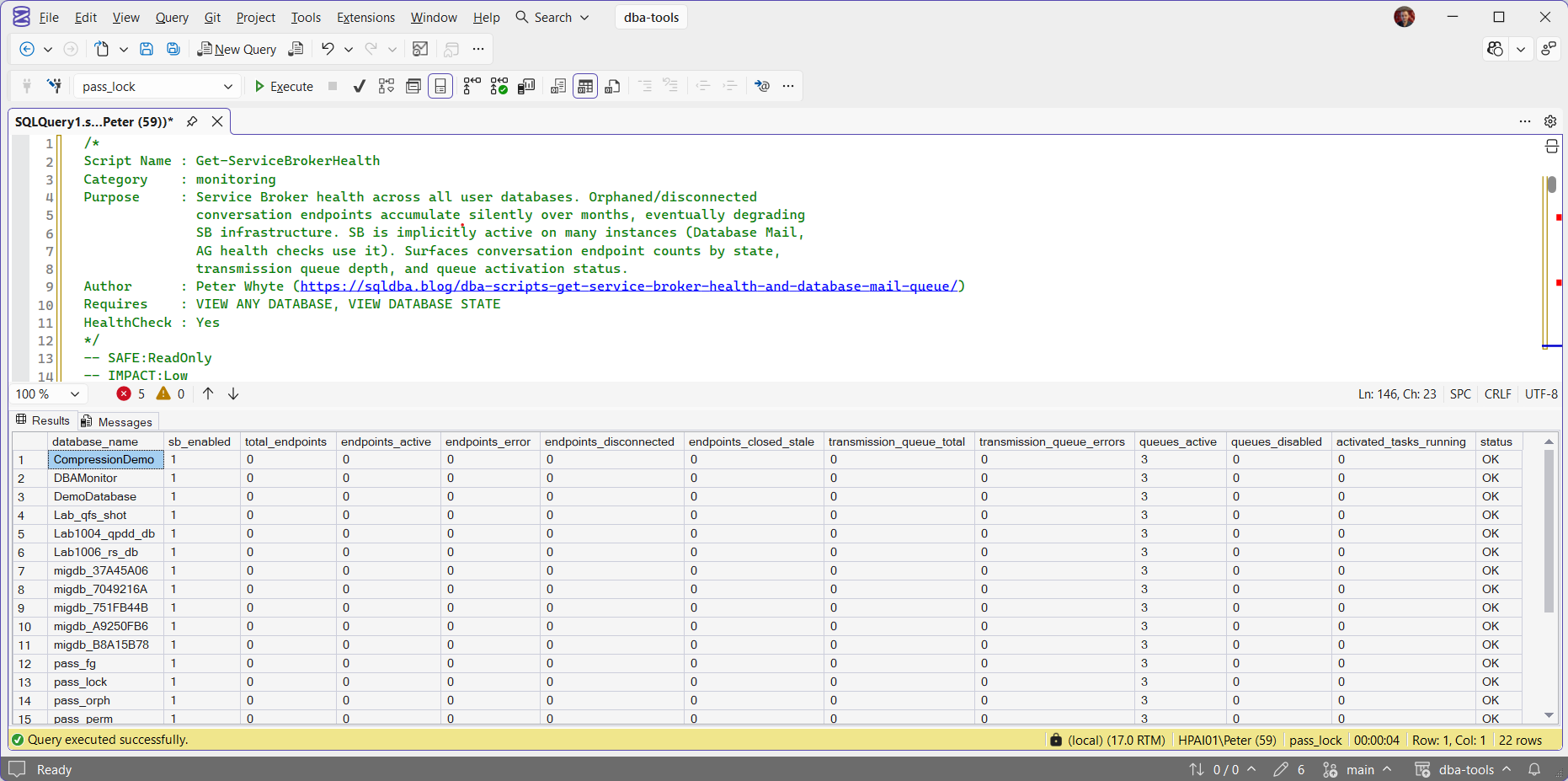
Service Broker is enabled everywhere and idle: no conversation endpoints in any state, nothing waiting in a transmission queue, and status OK on every row. The 3 active queues in each database are the built-in set every database has (QueryNotificationErrorsQueue, EventNotificationErrorsQueue and ServiceBrokerQueue), not anything an application created.
Get-DatabaseMailQueue on the same instance:
0 rows means no mail is stuck, and none was sent in the last 24 hours. On an instance that should be sending routine alerts, that silence is the finding.
Understanding the Results
Get-ServiceBrokerHealth
statusendpoints_disconnectedEND CONVERSATION ... WITH CLEANUP removes them, but fix the code that never ends its side first, or they come straight back.Act when status reads CRITICAL.transmission_queue_totaltransmission_queue_errorssys.transmission_queue.transmission_status.Act when transmission_queue_errors is above 0. Read transmission_status for the reason.endpoints_errorendpoints_activetotal_endpointsendpoints_closed_stalequeues_activequeues_disabledactivated_tasks_runningdatabase_namesb_enabledGet-DatabaseMailQueue
sent_statuserror_detailqueue_minutesmailitem_idsubjectrecipientssend_request_datesent_datesend_request_userBest Practices
- Run Service Broker Health wherever an application uses Service Broker, and treat a rising disconnected count as a code defect to fix, not only a number to clean.
- Clean up disconnected endpoints deliberately once you know why they built up.
- Treat a missing alert email as a 2-step check: first Database Mail Queue, to see whether it tried to send, then the SMTP and relay settings if the queue looks clean.
- Re-run both now and then without a known problem. Neither raises an alert of its own when it degrades.
Microsoft Learn: sys.conversation_endpoints · sys.databases · sys.transmission_queue
Related Scripts
You may also find these scripts useful:
- High Availability (hub)
- Security (hub)
- DBA Scripts: The Complete Guide, the map across every script on this site
Frequently Asked Questions
Why is Service Broker enabled on databases that don’t use it directly?
is_broker_enabled is a database setting, and a database created with CREATE DATABASE gets it switched on, even though model itself reads 0. So enabled says nothing about use: check total_endpoints for that.
What actually causes disconnected conversation endpoints to accumulate?
Usually applications that begin a Service Broker conversation and don’t explicitly end it, or a receiving service that stops running (activation procedure error, queue disabled) while senders keep opening new conversations. The fix is ending the accumulated conversations with cleanup, and then fixing whatever stopped closing them properly going forward.
Summary
Service Broker and Database Mail are both messaging systems that work silently until they don’t, and neither alerts you proactively when something’s wrong. Service Broker Health catches the resource drain of accumulating disconnected endpoints before it becomes a real problem. Database Mail Queue answers the specific, practical question that matters when an expected alert doesn’t arrive: did it even try to send.
Run both as routine checks, especially on any AG-enabled instance, and treat a growing disconnected-endpoint count or a failed mail item as worth acting on the same day it’s found.
Leave a Reply