
Two Different Questions: “Is It Close?” and “When Will It Hit?”
“How close is this database to its configured size limit?” and “at its current growth rate, when will it actually get there?” are two different questions, and answering them needs two different scripts. The first is a snapshot you can run right now, no history required. The second needs a trend, which means it needs history someone was already collecting.
Run Growth Risk everywhere, always. Run Growth Forecast once the collector has recorded a file changing size at least twice.
Why Growth Risk and Forecast Matter
- A file with no configured ceiling is not safe, it has swapped a limit that warns you for a disk that does not. On the lab instance this page was run against, 13 of 15 user databases report
UNLIMITED, which is the normal state of a default install, not a misconfiguration - A database sitting at 85%+ of a configured max file size is one bulk load away from a hard wall: inserts start failing the moment autogrow cannot proceed
- Raw current size tells you nothing about urgency, a database at 40% of its limit growing 50 MB/day is a very different problem from one at 85% growing 2 MB/day
- Forecasting needs a real growth rate over a real time window, not a guess, and that is what the collector history in
DBAMonitor.collector.DatabaseGrowthCurrentprovides
When to Run These Scripts
- Growth Risk: routine health checks, on every database, it needs no setup and runs in milliseconds
- Growth Forecast: capacity planning conversations, once the collector has recorded at least 2 size changes for the file you care about, to put an actual date on a trend rather than a feeling
- Before a licensing or hardware conversation where “we will need more space eventually” needs a number attached
- After Growth Risk flags
NEAR_LIMITorAT_LIMIT, to see whether that is a slow trend or an imminent one
The Scripts
Get-DatabaseGrowthRisk: Right Now, No Setup Required
- Tested on: SQL Server 2025 (RTM CU8), Windows lab instance
- Last verified: 2026-10-03 (both scripts re-run after the dropped-database filter change, 41 forecast rows from 101); Growth Forecast re-run in SSMS 2026-10-14, 81 rows
- Permissions: Growth Risk needs VIEW ANY DATABASE · Growth Forecast needs SELECT on
DBAMonitor.collector.DatabaseGrowthCurrentand its history table - Safety: read-only, impact low
/*
Script Name : Get-DatabaseGrowthRisk
Category    : storage-capacity-management
Purpose     : Flag databases approaching their configured file size limits.
Author      : Peter Whyte (https://sqldba.blog/dba-scripts-get-database-growth-risk-and-forecast/)
Requires    : VIEW ANY DATABASE
HealthCheck : Yes
Notes       : max_size of -1 and of 268435456 both mean "no configured ceiling": MS Docs
              documents 268435456 as the 2 TB default cap SQL Server gives a log file, so a
              default install would otherwise report a fake 2097152 MB limit and a false OK.
              Same convention as Generate-CollectorJob-DatabaseGrowth.sql. A file deliberately
              capped at exactly 2 TB is indistinguishable from the default and reads as unlimited.
              growth_limit_mb sums only the files that have a real ceiling, so read
              unlimited_files first: any value above 0 means the limit is partial.
              Driven from sys.databases, so a database that has been dropped cannot appear
              here at all. Get-DatabaseGrowthForecast reads collector history, which
              outlives the database, and filters dropped databases out to match.
*/
-- SAFE:ReadOnly
-- IMPACT:Low
SET NOCOUNT ON;
SET QUOTED_IDENTIFIER ON;

WITH db_sizes AS (
    SELECT
        d.name AS database_name,
        CAST(SUM(CASE WHEN mf.type_desc = 'ROWS'
            THEN mf.size * 8.0 / 1024 END) AS DECIMAL(18,2)) AS data_mb,
        CAST(SUM(CASE WHEN mf.type_desc = 'LOG'
            THEN mf.size * 8.0 / 1024 END) AS DECIMAL(18,2)) AS log_mb,
        CAST(SUM(CASE WHEN mf.max_size IN (-1, 268435456) THEN 0
            ELSE mf.max_size * 8.0 / 1024 END) AS DECIMAL(18,2)) AS growth_limit_mb,
        SUM(CASE WHEN mf.max_size IN (-1, 268435456) THEN 1 ELSE 0 END) AS unlimited_files
    FROM sys.databases AS d
    LEFT JOIN sys.master_files AS mf ON d.database_id = mf.database_id
    WHERE d.database_id > 4
    GROUP BY d.name
)
SELECT
    database_name,
    data_mb,
    log_mb,
    CAST(data_mb + log_mb AS DECIMAL(18,2)) AS total_mb,
    growth_limit_mb,
    unlimited_files,
    CASE
        WHEN growth_limit_mb = 0 THEN 'UNLIMITED'
        WHEN data_mb + log_mb >= growth_limit_mb THEN 'AT_LIMIT'
        WHEN data_mb + log_mb >= growth_limit_mb * 0.85 THEN 'NEAR_LIMIT'
        ELSE 'OK'
    END AS growth_status
FROM db_sizes
ORDER BY total_mb DESC;
growth_limit_mb = 0 means no file on that database has a configured ceiling, so the script reports UNLIMITED. Two different stored values mean that, and the second one catches people out: MS Docs on max_size gives -1 as “file can grow until the disk is full” and 268435456 as “log file can grow to a maximum size of 2 TB”. That second value is what SQL Server stores for a log file created with MAXSIZE = UNLIMITED, so a script that only tests for -1 treats it as a real 2097152 MB ceiling and reports a comfortable OK. Both values are excluded here, and unlimited_files tells you how many files on the row have no ceiling: any value above 0 means growth_limit_mb is a partial figure covering only the capped files.
Treat UNLIMITED as its own category to check against actual disk free space, not as automatically safe.
Get-DatabaseGrowthForecast: Real Trend, Needs Collector History
This one reads the collector, not the live files. It needs the growth collector installed, and it needs that collector to have seen a file change size more than once.
/*
Script Name : Get-DatabaseGrowthForecast
Category    : storage-capacity-management
Purpose     : Project when database files will exhaust their configured size limits,
              using historical file size changes recorded by the DatabaseGrowth temporal collector.
              Calculates MB/day growth rate from the first and last observed size within the
              window, then projects forward to the configured file limit.
Author      : Peter Whyte (https://sqldba.blog/dba-scripts-get-database-growth-risk-and-forecast/)
Requires    : SELECT on DBAMonitor.collector.DatabaseGrowthCurrent (and its history table)
Depends On  : sql\collectors\Generate-CollectorJob-DatabaseGrowth.sql
              (temporal collector must be installed and have recorded at least 2 size changes
              for a file, 1 hour or more apart, before that file gets a growth rate)
Notes       : Projects file-limit exhaustion only, not physical disk exhaustion.
              snapshot_count counts temporal row VERSIONS, not collection runs: the collector
              writes a version only when a file's size, limit or state changes, so a file that
              has not moved reads snapshot_count = 1, days_observed = 0.0 and STABLE however
              long the job has been running.
              growth_limit_mb is NULL for any file the collector saw as uncapped, which includes
              a log file on its 2 TB default (max_size 268435456), so those read UNLIMITED with
              no projected date.
              mb_per_day spans the first to the LAST recorded change, not to now, so it does not
              decay: a file that grew hard then stopped keeps its old rate. Read last_change
              (SysStartTime, UTC) with it.
              days_observed and mb_per_day both use DATEDIFF(hour, ...), which counts HOUR
              BOUNDARIES CROSSED, not elapsed time. Two versions 59 minutes apart inside one
              clock hour give 0 and read STABLE; two versions 2 minutes apart either side of
              the hour give 1, and the day rate is then that 2 minutes multiplied by 24.
              So a short-lived series can produce a confident CRITICAL beside
              days_observed = 0.0. Read snapshot_count and days_observed before the projection.
              days_observed can also exceed @WindowDays, because FOR SYSTEM_TIME BETWEEN
              returns the version already open at @WindowStart.
              The collector keeps history for databases that no longer exist, which is the
              point of history: its MERGE has no WHEN NOT MATCHED BY SOURCE branch, so a
              dropped database keeps its last row for good. This script filters those rows
              out against sys.databases, because a dropped database is not a capacity risk.
              60 of the 101 file rows on the lab instance belonged to dropped databases
              (2026-10-03), and one of them was reporting STABLE at 2176 MB. Query the
              collector table
              directly when you want the history of something that is gone.
              The filter only applies to rows whose server_name is this instance. Rows
              collected by another instance into the same DBAMonitor are kept, because
              sys.databases here cannot say whether they still exist there.
              Both comparisons are COLLATE DATABASE_DEFAULT, the same convention as
              Generate-CollectorJob-DatabaseGrowth.sql: sys.databases carries the server
              collation and the collector columns carry DBAMonitor's, so an instance where
              those differ would otherwise fail with a collation conflict rather than a row.
              The collector records master, model, msdb and tempdb; Get-DatabaseGrowthRisk
              excludes them with database_id > 4, so the two do not cover the same set.
              Every time on the result set is UTC: the window, last_change and
              projected_limit_date, which is a date so it carries no time at all.
              One-off bulk loads within @WindowDays inflate the growth rate.
              Reduce @WindowDays to 7 to focus on recent steady-state growth only.
              Requires SQL Server 2016 or later.
*/
-- SAFE:ReadOnly
-- IMPACT:Low
SET NOCOUNT ON;
SET QUOTED_IDENTIFIER ON;

DECLARE @WindowDays int = 30;
DECLARE @WindowStart DATETIME2 = DATEADD(DAY, -@WindowDays, SYSUTCDATETIME());
DECLARE @WindowEnd DATETIME2 = SYSUTCDATETIME();

-- Existence checks
IF NOT EXISTS (SELECT 1 FROM sys.databases WHERE name = N'DBAMonitor')
BEGIN
    RAISERROR('DBAMonitor database not found. Run sql\collectors\Generate-CollectorJob-DatabaseGrowth.sql to set up the growth collector.', 16, 1);
    RETURN;
END

IF NOT EXISTS (
    SELECT 1 FROM DBAMonitor.sys.objects o
    JOIN DBAMonitor.sys.schemas s ON s.schema_id = o.schema_id
    WHERE o.name = N'DatabaseGrowthCurrent' AND s.name = N'collector')
BEGIN
    RAISERROR('collector.DatabaseGrowthCurrent not found in DBAMonitor. Run the collector generator and allow at least one job run.', 16, 1);
    RETURN;
END

IF NOT EXISTS (SELECT 1 FROM DBAMonitor.collector.DatabaseGrowthCurrent)
BEGIN
    RAISERROR('collector.DatabaseGrowthCurrent has no data yet. Allow the collection job to run at least once before forecasting.', 16, 1);
    RETURN;
END

-- Forecast
;WITH history AS (
    SELECT
        server_name,
        database_name,
        logical_name,
        file_type,
        file_size_mb,
        growth_limit_mb,
        SysStartTime AS snapshot_time
    FROM DBAMonitor.collector.DatabaseGrowthCurrent
    FOR SYSTEM_TIME BETWEEN @WindowStart AND @WindowEnd AS g
    /* The collector never deletes, so a dropped database keeps its last row forever.
       A database that no longer exists is not a capacity risk. Rows written by another
       instance are left alone: local sys.databases cannot speak for them. */
    WHERE  g.server_name COLLATE DATABASE_DEFAULT <> @@SERVERNAME COLLATE DATABASE_DEFAULT
       OR  EXISTS (SELECT 1 FROM sys.databases AS d
                   WHERE  d.name COLLATE DATABASE_DEFAULT
                        = g.database_name COLLATE DATABASE_DEFAULT)
),
ranked AS (
    SELECT *,
        ROW_NUMBER() OVER (PARTITION BY server_name, database_name, logical_name
                           ORDER BY snapshot_time ASC) AS rn_asc,
        ROW_NUMBER() OVER (PARTITION BY server_name, database_name, logical_name
                           ORDER BY snapshot_time DESC) AS rn_desc,
        COUNT(*) OVER (PARTITION BY server_name, database_name, logical_name) AS snapshot_count
    FROM history
),
first_last AS (
    SELECT
        server_name,
        database_name,
        logical_name,
        file_type,
        MAX(growth_limit_mb) AS growth_limit_mb,
        MAX(snapshot_count) AS snapshot_count,
        MIN(snapshot_time) AS first_time,
        MIN(CASE WHEN rn_asc = 1 THEN file_size_mb END) AS first_size_mb,
        MAX(snapshot_time) AS last_time,
        MIN(CASE WHEN rn_desc = 1 THEN file_size_mb END) AS current_size_mb
    FROM ranked
    GROUP BY server_name, database_name, logical_name, file_type
),
projections AS (
    SELECT
        server_name,
        database_name,
        logical_name,
        file_type,
        snapshot_count,
        growth_limit_mb,
        current_size_mb,
        last_time,
        CAST(DATEDIFF(hour, first_time, last_time) / 24.0 AS decimal(6,1)) AS days_observed,
        CASE
            WHEN DATEDIFF(hour, first_time, last_time) > 0
            THEN (current_size_mb - first_size_mb) /
                 (DATEDIFF(hour, first_time, last_time) / 24.0)
            ELSE 0
        END AS mb_per_day
    FROM first_last
)
SELECT
    server_name,
    database_name,
    logical_name,
    file_type,
    snapshot_count,
    days_observed,
    last_time AS last_change,
    CAST(current_size_mb AS decimal(10,1)) AS current_size_mb,
    CAST(mb_per_day AS decimal(10,2)) AS mb_per_day,
    growth_limit_mb,
    CASE
        WHEN mb_per_day > 0 AND growth_limit_mb IS NOT NULL
        THEN CAST((growth_limit_mb - current_size_mb) / mb_per_day AS int)
        ELSE NULL
    END AS days_to_limit,
    CASE
        WHEN mb_per_day > 0 AND growth_limit_mb IS NOT NULL
        THEN CAST(DATEADD(day,
                 CAST((growth_limit_mb - current_size_mb) / mb_per_day AS int),
                 SYSUTCDATETIME()) AS date)
        ELSE NULL
    END AS projected_limit_date,
    CASE
        WHEN mb_per_day > 0 AND growth_limit_mb IS NOT NULL
             AND (growth_limit_mb - current_size_mb) / mb_per_day < 30 THEN 'CRITICAL'
        WHEN mb_per_day > 0 AND growth_limit_mb IS NOT NULL
             AND (growth_limit_mb - current_size_mb) / mb_per_day < 90 THEN 'WARNING'
        WHEN mb_per_day > 0 AND growth_limit_mb IS NULL THEN 'UNLIMITED'
        WHEN mb_per_day <= 0 THEN 'STABLE'
        ELSE 'OK'
    END AS forecast_status
FROM projections
ORDER BY
    CASE
        WHEN mb_per_day > 0 AND growth_limit_mb IS NOT NULL
             AND (growth_limit_mb - current_size_mb) / mb_per_day < 30 THEN 1
        WHEN mb_per_day > 0 AND growth_limit_mb IS NOT NULL
             AND (growth_limit_mb - current_size_mb) / mb_per_day < 90 THEN 2
        WHEN mb_per_day > 0 AND growth_limit_mb IS NULL THEN 3
        WHEN mb_per_day <= 0 THEN 5
        ELSE 4
    END,
    CASE WHEN mb_per_day > 0 AND growth_limit_mb IS NOT NULL
         THEN (growth_limit_mb - current_size_mb) / mb_per_day
         ELSE NULL END,
    current_size_mb DESC;
How To Run From The Repo
Clone DBA Tools, initialize and run either script:
# Clone dba-tools repo:
git clone https://github.com/peterwhyte-lgtm/dba-tools

# Initialize environment:
cd dba-tools
.\Initialize-Environment.ps1

# Check every database against its configured file size limit, right now:
.\run.ps1 Get-DatabaseGrowthRisk

# Set up the growth collector (once), then forecast once it has recorded size changes:
.\run.ps1 Generate-CollectorJob-DatabaseGrowth
.\run.ps1 Get-DatabaseGrowthForecast

# To run against a remote sql server:
.\run.ps1 Get-DatabaseGrowthRisk -ServerInstance SQLSERVER01
These scripts live in the repo at:
sql/monitoring/disk-space/Get-DatabaseGrowthRisk.sqlsql/monitoring/disk-space/Get-DatabaseGrowthForecast.sql
Example Output
Growth Risk against a lab instance with 15 online user databases, every row as it came back. Read the unlimited_files column alongside the status.
Thirteen of the 15 databases come back UNLIMITED with unlimited_files = 2, which is a default install speaking: nobody set a ceiling on either file. One database has a real 1024 MB cap on its data file and sits at half of it, so it reads OK with unlimited_files = 1, the 1 being its log file. One sits at 176 MB of a 192 MB ceiling, past the 85% threshold, so it reads NEAR_LIMIT. That spread is the point of the script: the statuses are not interchangeable and UNLIMITED is not a pass mark.
Run the same query with only max_size = -1 excluded, which is the obvious way to write it, and the picture inverts: 14 of the 15 report OK, nothing reports UNLIMITED at all, and 13 of those OK rows are measured against a growth_limit_mb of 2097152.00. That 2 TB is not a limit anybody chose. It is the stored default on 13 of the 15 user log files on this instance, counted.
What the Forecast Returns, and What It Leaves Blank
Growth Forecast on the same instance, with the collector installed and holding history. One row per file rather than per database, worst projection first, and unlike Growth Risk it includes master, model, msdb and tempdb. Databases that no longer exist are the one thing it leaves out: the collector keeps their rows for good, which is the point of history, but a database somebody dropped is not a capacity risk.
41 rows came back, trimmed to 9 here, in the order the script returns them. The top row is the only one carrying a projection, and the two columns before it are the reason to distrust it: snapshot_count of 2 and days_observed of 0.0. A rate of 48.00 MB/day drawn through 2 observations an hour apart is arithmetic, not a trend, and days_observed says so in the same row as the CRITICAL. That is why those columns come first.
Underneath it, four files are genuinely growing and have nothing to hit, so they read UNLIMITED with no date. Look at the log file growing 42.08 MB/day: its last_change is three weeks before the run. The rate spans the first recorded change to the last one, not to today, so it does not decay. A file that grew hard and then stopped keeps its old number until something moves it again, which is what last_change is there to tell you.
The bottom row is the deliberate blank: a capped file at 8.0 MB of a 64.00 MB limit with mb_per_day of 0.00, so there is no rate to project and the script leaves the date empty rather than inventing one.
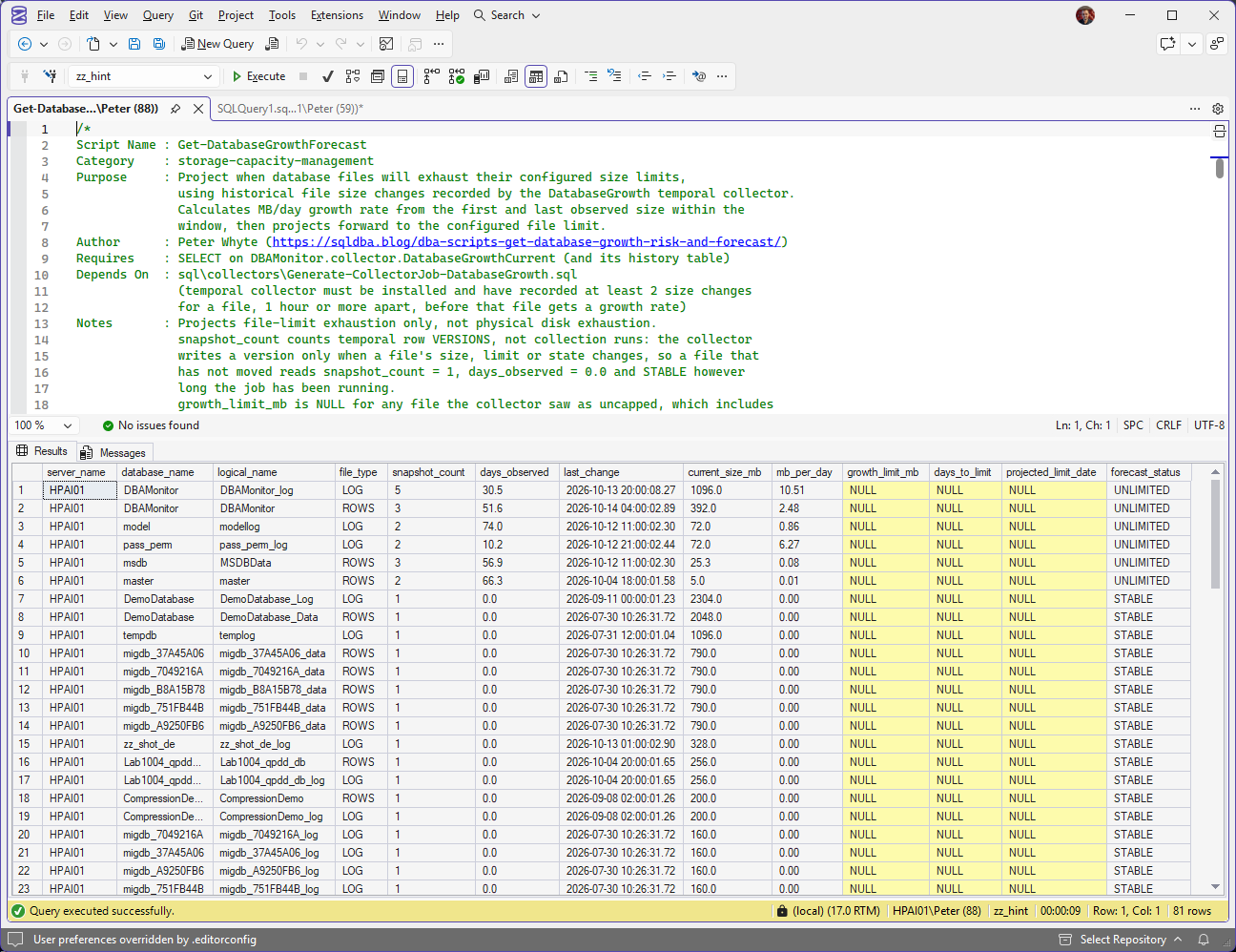
Get-DatabaseGrowthForecast in SSMS on 14 October 2026, 81 file rows. On every row on screen growth_limit_mb, days_to_limit and projected_limit_date are NULL, so each file reads UNLIMITED or STABLE. The DBAMonitor log leads at 10.51 MB a day across 5 snapshots and 30.5 days, the best-evidenced rate on the instance, and it still gets no date: there is no ceiling to project to. That is the ordinary picture on an instance where nobody set MAXSIZE, and it is why the disk itself needs watching, with Disk Space.
One set of rows is missing on purpose. The collector updates and inserts but never deletes, so a database dropped months ago keeps its last row for good, and that is what makes the table history rather than a snapshot. It also means a database nobody can touch any more was being reported as a capacity risk: 60 of the 101 file rows in the collector table belonged to databases that no longer exist, one of them sitting at 2176 MB and reading STABLE. The script now checks every row against sys.databases, which is why 41 rows came back instead of 101. When the history of something that has been dropped is exactly what you want, query DBAMonitor.collector.DatabaseGrowthCurrent directly.
Understanding the Results
database_namedata_mblog_mbtotal_mbgrowth_limit_mbunlimited_filesgrowth_statusUNLIMITED when nothing is capped, AT_LIMIT once size has reached the ceiling, NEAR_LIMIT from 85% of it, otherwise OK.Act when unlimited_files is above 0 and the status is not UNLIMITED. The limit is then partial: it covers the capped files only, and the uncapped ones are bounded by the disk instead. Pair it with Disk Space.server_namelogical_namefile_typeROWS from LOG, and keys on the instance as well. A database with several data files appears several times, and each is forecast on its own.snapshot_countdays_observedlast_changesnapshot_count is 1. That is not a quiet collector, it is a file that has not changed size since the collector was installed: the collector writes a new version on change, not on schedule, so a file sitting still for a month still counts 1 and shows days_observed of 0.0.current_size_mbmb_per_daySTABLE.Act when last_change is weeks old and mb_per_day is high. The rate spans first change to last change, not first change to today, so it does not decay. A file that grew hard in August and stopped keeps its August rate until something moves it again.days_to_limitprojected_limit_dateforecast_statusCRITICAL under 30 days to the limit, WARNING under 90, UNLIMITED when it is growing with no limit to hit, STABLE when it is not growing, otherwise OK.Act when you are triaging a list. Sort on this rather than on size: the biggest file is very often the least urgent one, because it has been big and stable for a year.Best Practices
- Run Growth Risk on every routine health check, it needs no setup and catches configured-limit problems immediately
- Set up the growth collector early, even before you need forecasting, so history is already there when a capacity conversation comes up
- Treat
UNLIMITEDas “check the disk,” not as “no risk,” the practical ceiling is still the volume underneath - When Growth Forecast shows a short
days_to_limit, checklast_changeandsnapshot_countbefore acting on it, and check whether the window included a one-off bulk load; reducing@WindowDaysto 7 helps isolate recent steady-state growth
Microsoft’s reference covers sys.databases, sys.master_files and temporal tables in full.
Related Scripts
You may also find these scripts useful:
- Storage and Capacity (hub)
- Capacity and TempDB Baselines, installs the growth collector this forecast reads
- Database Free Space Summary, how much room is left inside the files right now
- Filegroup Space, the same question per filegroup
- Disk Space, the real limit for every file that reads UNLIMITED
- Autogrowth History, every growth event the default trace still holds, with how long each took
- Database Sizes and Free Space
- Filegroup Is Full (Error 1105), what a capped data file reaching its limit looks like
- Transaction Log Full (Error 9002), the same wall on the log side
- DBA Scripts: The Complete Guide, the map across every script on this site
Frequently Asked Questions
What’s the difference between Growth Risk and Growth Forecast?
Growth Risk is a snapshot: is this database close to its configured limit right now? It needs no setup and runs instantly. Growth Forecast is a trend: at the current growth rate, when will it get there? It needs history from the growth collector, and it needs that collector to have recorded the file changing size at least twice.
Why does Growth Forecast need a separate collector installed first?
Projecting a growth rate needs at least two size observations over time. Generate-CollectorJob-DatabaseGrowth.sql sets up a scheduled job plus a temporal (system-versioned) table that records file sizes, giving the forecast script real history to calculate mb_per_day from, instead of guessing from a single point-in-time size.
The job runs hourly by default, but it only writes a new row version when a file actually changes size, limit or state. That is why installing it and waiting is not enough on its own: a quiet file still shows snapshot_count = 1 a month later.
The forecast stopped with an error instead of returning rows, what happened?
Three guard clauses can stop it, and each one names its own fix. If the collector database is missing you get DBAMonitor database not found. Run sql\collectors\Generate-CollectorJob-DatabaseGrowth.sql to set up the growth collector. If the database exists but the table does not you get collector.DatabaseGrowthCurrent not found in DBAMonitor. Run the collector generator and allow at least one job run. If the table is there but empty you get collector.DatabaseGrowthCurrent has no data yet. Allow the collection job to run at least once before forecasting.
All three arrive as Msg 50000, Level 16, State 1. That is deliberate: a hard stop carrying an instruction beats an empty grid you might read as “nothing is growing”.
I dropped a database weeks ago and it is still in the collector table, is that a bug?
No, and the forecast will not report it as a risk. The collector MERGE updates and inserts but never deletes, so a dropped database keeps its last recorded row for good. That is deliberate: it is the only record left of how that database was growing before it went.
Get-DatabaseGrowthForecast filters those rows against sys.databases, so a database that no longer exists cannot be presented as a capacity problem. On the lab instance that was the difference between 101 rows and 41. Growth Risk never had the problem, because it reads sys.databases in the first place. To read the history of a database that is gone, query DBAMonitor.collector.DatabaseGrowthCurrent directly, with FOR SYSTEM_TIME for the older versions.
How is this different from reading actual autogrowth events?
Both scripts here project or flag based on file size snapshots, not a historical log of individual autogrowth operations. For a post-incident view of exactly when a file grew, by how much, and how long the growth took, query the default trace for EventClass 92/93 (Data/Log File Auto-grow) instead, which is what Autogrowth History does. That is a different technique from the snapshot-based approach here.
My log file shows UNLIMITED but I never set that, why?
Because a log file created with MAXSIZE = UNLIMITED, which is the default, does not store -1 the way a data file does. It stores 268435456 pages, the 2 TB maximum log size, and MS Docs documents both values on max_size. Both scripts here treat the two the same way, because reporting a 2 TB ceiling nobody chose turns an uncapped file into a comfortable OK. The real ceiling on an uncapped file is the volume underneath, so check that with Disk Space.
Summary
“Is this database close to its limit” and “when will it get there” are genuinely different questions, and this post answers both. Growth Risk needs nothing but a live connection and flags configured-limit exposure right now, including the files that have no limit to be exposed against. Growth Forecast needs real history from the growth collector, and turns that history into a date instead of a guess.
Run Growth Risk on every routine check. Set up the growth collector early enough that Growth Forecast has real history by the time a capacity conversation needs a number attached to it.
Leave a Reply