
Part of the DBA-Tools Project.
The Mismatch That Fills a Disk
A database’s recovery model is a promise about what kind of restore is possible, FULL and BULK_LOGGED promise point-in-time recovery, backed by log backups; SIMPLE promises none, and truncates the log on its own. The incident happens when reality doesn’t match the promise: a FULL-recovery database with no log backup job behind it runs fine for months, quietly growing its log, until the drive fills and the database goes down.
This script checks every online database’s recovery model against its actual backup history and flags exactly that mismatch, along with the other common gaps, no full backup to anchor a chain, stale backups, before they become an incident.
Why Recovery Model Audit Matters
- The “accidental FULL” database is one of the most common silent failures in SQL Server, someone switches recovery model for a one-off requirement, or it was set that way at creation, and no one ever adds a matching log backup job
- FULL and BULK_LOGGED recovery only truncate the log on a log backup, not a full backup, so a database can be “backed up every night” and still have an ever-growing log
- A database with no full backup at all can’t have a log backup chain either, log backups are worthless without a full backup to restore from first
- This is a five-minute check that catches a problem which otherwise surfaces as a 2am page when a drive fills
When to Run This Script
- Routine SQL Server health checks
- Any time a database’s recovery model is changed
- After provisioning a new database or restoring one from another environment
- Alongside Log Reuse Waits when a log is already growing, to see the backup-posture reason behind it
The Script
Run the following script against your SQL Server instance.
/*
Script Name : Get-RecoveryModelAudit
Category    : backups-and-recovery
Purpose     : Audits each database's recovery model against its actual backup posture and
              flags the mismatches that cause real incidents: FULL/BULK_LOGGED databases
              with no log backups (the log grows until the disk fills), databases with no
              full backup to anchor a log chain, and SIMPLE databases where someone may be
              expecting point-in-time recovery they do not have.
Author      : Peter Whyte (https://sqldba.blog/dba-scripts-get-recovery-model-audit/)
Requires    : VIEW ANY DATABASE, db_datareader on msdb
Notes       : "Accidental FULL" is the classic finding — a database left in FULL recovery
              with no log backup job. It runs fine for months, then the log fills the drive.
              Run Get-LogReuseWaits and Get-TransactionLogSizeAndUsage alongside this to see
              the live effect. Thresholds below are defaults; adjust to your backup SLA.
*/
-- Blog: https://sqldba.blog/dba-scripts-get-recovery-model-audit/
-- SAFE:ReadOnly
-- IMPACT:Low
SET NOCOUNT ON;

DECLARE @LogBackupStaleHours INT = 24;
DECLARE @FullBackupStaleDays INT = 7;

;WITH FullBackup AS
(
    SELECT database_name, MAX(backup_finish_date) AS last_full_backup
    FROM msdb.dbo.backupset
    WHERE type = 'D'
    GROUP BY database_name
),
LogBackup AS
(
    SELECT database_name, MAX(backup_finish_date) AS last_log_backup
    FROM msdb.dbo.backupset
    WHERE type = 'L'
    GROUP BY database_name
)

SELECT
    d.name                                              AS database_name,
    d.recovery_model_desc                               AS recovery_model,
    fb.last_full_backup,
    lb.last_log_backup,
    CAST(SUM(CAST(mf.size AS BIGINT)) * 8.0 / 1024
        AS DECIMAL(18,1))                               AS log_size_mb,
    CASE
        -- FULL / BULK_LOGGED: the log only truncates when a log backup runs.
        WHEN d.recovery_model_desc IN ('FULL', 'BULK_LOGGED') AND fb.last_full_backup IS NULL
            THEN 'CRITICAL: no full backup, log backup chain cannot start'
        WHEN d.recovery_model_desc IN ('FULL', 'BULK_LOGGED') AND lb.last_log_backup IS NULL
            THEN 'CRITICAL: ' + d.recovery_model_desc + ' recovery with no log backups, log will grow until the disk fills'
        WHEN d.recovery_model_desc IN ('FULL', 'BULK_LOGGED')
             AND DATEDIFF(HOUR, lb.last_log_backup, GETDATE()) > @LogBackupStaleHours
            THEN 'WARNING: log backups are stale (>' + CAST(@LogBackupStaleHours AS VARCHAR(10)) + 'h)'
        WHEN fb.last_full_backup IS NULL
            THEN 'WARNING: no full backup on record'
        WHEN DATEDIFF(DAY, fb.last_full_backup, GETDATE()) > @FullBackupStaleDays
            THEN 'WARNING: full backup is stale (>' + CAST(@FullBackupStaleDays AS VARCHAR(10)) + 'd)'
        WHEN d.recovery_model_desc = 'SIMPLE'
            THEN 'INFO: SIMPLE, no point-in-time recovery between full/diff backups'
        ELSE 'OK'
    END                                                 AS finding
FROM sys.databases AS d
JOIN sys.master_files AS mf
    ON mf.database_id = d.database_id
    AND mf.type_desc = 'LOG'
LEFT JOIN FullBackup AS fb
    ON fb.database_name = d.name
LEFT JOIN LogBackup AS lb
    ON lb.database_name = d.name
WHERE d.state_desc = 'ONLINE'
  AND d.database_id > 4
GROUP BY
    d.name,
    d.recovery_model_desc,
    fb.last_full_backup,
    lb.last_log_backup
ORDER BY
    CASE
        WHEN d.recovery_model_desc IN ('FULL', 'BULK_LOGGED') AND lb.last_log_backup IS NULL THEN 0
        WHEN fb.last_full_backup IS NULL THEN 1
        ELSE 2
    END,
    d.name;
The finding column ranks CRITICAL mismatches first, so the databases that need attention today sort straight to the top.
How To Run From The Repo
Clone DBA Tools, initialize and run the script:
# Clone dba-tools repo:
git clone https://github.com/peterwhyte-lgtm/dba-tools

# Initialize environment:
cd dba-tools
.\Initialize-Environment.ps1

# Audit every database's recovery model against its actual backup posture:
.\run.ps1 Get-RecoveryModelAudit

# To run against a remote sql server:
.\run.ps1 Get-RecoveryModelAudit -ServerInstance SQLSERVER01
This script lives in the repo at:
Example Output
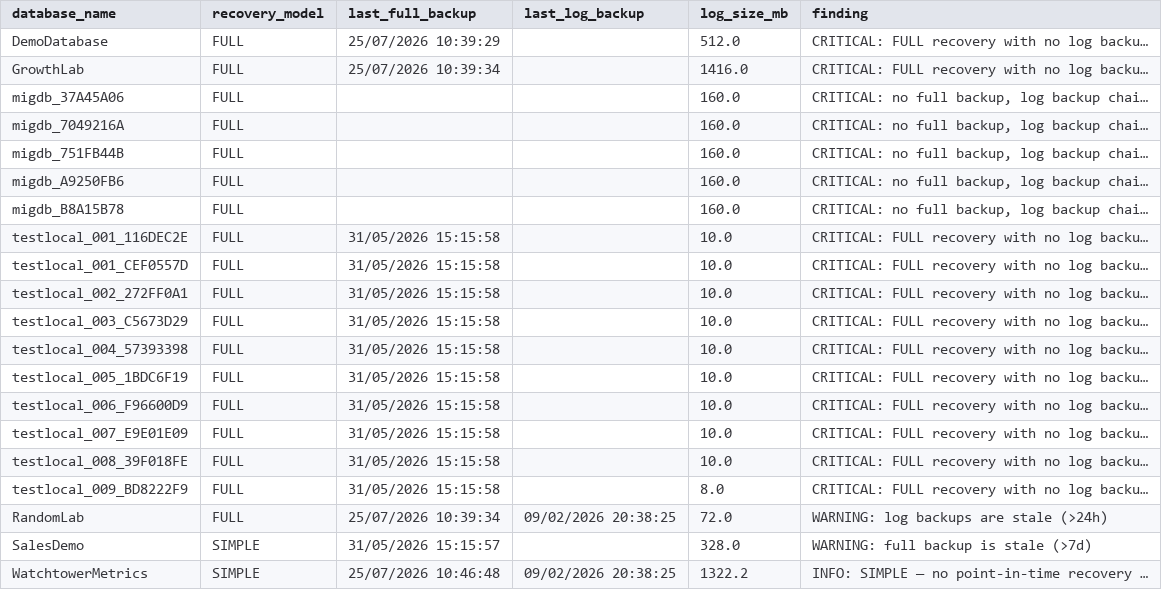
This is a genuine finding on this lab instance, not staged: several databases are FULL recovery with no log backup at all, and a handful have no full backup either.
| database_name | recovery_model | last_full_backup | last_log_backup | log_size_mb | finding |
|---|---|---|---|---|---|
| DemoDatabase | FULL | 2026-07-25 | 512.0 | CRITICAL: FULL recovery with no log backups | |
| GrowthLab | FULL | 2026-07-25 | 1416.0 | CRITICAL: FULL recovery with no log backups | |
| migdb_37A45A06 | FULL | 160.0 | CRITICAL: no full backup, log backup chain cannot start | ||
| RandomLab | FULL | 2026-07-25 | 2026-02-09 | 72.0 | WARNING: log backups are stale (>24h) |
| SalesDemo | SIMPLE | 2026-05-31 | 328.0 | WARNING: full backup is stale (>7d) | |
| WatchtowerMetrics | SIMPLE | 2026-07-25 | 2026-02-09 | 1322.2 | INFO: SIMPLE, no point-in-time recovery |
Understanding the Results
- CRITICAL: no full backup, log backup chain cannot start — the database has no full backup on record at all. Log backups are meaningless without one, there’s nothing for them to chain from.
- CRITICAL: FULL recovery with no log backups — the classic “accidental FULL” finding.
DemoDatabaseandGrowthLababove both have a healthy recent full backup, but zero log backups ever, so their transaction log grows without bound between full backups. - WARNING: log backups are stale — log backups exist but haven’t run recently enough to matter,
RandomLababove last had one over 5 months ago. - WARNING: full backup is stale — the full backup chain itself is aging out, worth checking the backup job rather than just the log.
- INFO: SIMPLE — not a failure by default, but worth a second look if anyone on the team expects point-in-time recovery for that database.
How to Fix Recovery Model Mismatches
For a FULL/BULK_LOGGED database with no log backups, the fix is either operational or a deliberate recovery model change, not both left unresolved:
-- Option 1: add a proper log backup job (the usual fix if point-in-time recovery is needed)
BACKUP LOG [DemoDatabase] TO DISK = 'D:\Backups\DemoDatabase_log.trn';
-- then schedule this on the interval your recovery-point objective requires

-- Option 2: if point-in-time recovery was never actually needed, switch to SIMPLE
ALTER DATABASE [DemoDatabase] SET RECOVERY SIMPLE;
-- take a full backup immediately after, the old log backup chain is now broken
For a database with no full backup at all, take one before anything else, log backups can’t help until a full backup exists to anchor them.
Best Practices
- Treat any CRITICAL finding as a same-day fix, not a backlog item, an unbounded growing log eventually takes the whole instance down when the drive fills
- Every FULL or BULK_LOGGED database needs a log backup job as a matter of course when it’s created, not added later once someone notices the log is huge
- Re-run this audit after any recovery model change or new database provisioning, not just on a schedule
Related Scripts
You may also find these scripts useful:
- Backup Chain Integrity
- Backup Coverage
- Backup Encryption Status
- Backup Restore Duration Estimate
- Backup Size Trend
- Log Reuse Waits
- Transaction Log Size and Usage
Frequently Asked Questions
Why does a database with recent full backups still show a CRITICAL finding?
Because full backups don’t truncate the transaction log for FULL or BULK_LOGGED recovery, only a log backup does. A database can look well-backed-up on the full backup side and still have an unbounded growing log with zero log backups behind it.
Should every database just use SIMPLE recovery to avoid this?
No, SIMPLE means no point-in-time recovery between full/diff backups, only restore to the last backup taken. That’s a real tradeoff for production databases where losing hours of transactions is unacceptable. The right fix for a FULL-recovery database missing log backups is almost always to add the missing log backup job, not to downgrade the recovery model.
Summary
Recovery model and backup posture have to agree with each other, and the gap between them is exactly what causes the “the log filled the drive” incident that always seems to come out of nowhere. It doesn’t come out of nowhere, it’s been growing since the day the mismatch started.
Run this audit as part of routine health checks, and immediately after any recovery model change or new database provisioning, so a CRITICAL finding gets caught the same week it starts, not the week the disk runs out.
Leave a Reply