
Ever wondered what is happening inside your SQL Server instance right now? sp_who, sp_who2 and sp_whoisactive all answer that question, at very different depths. The first ships documented, the second ships undocumented but better, and the third is a free community procedure that most working DBAs treat as the real answer.
This post is the working comparison: what each one shows, the quirks worth knowing, and which one to reach for when something is blocking.
The Comparison, Up Front
sp_who: The Documented Baseline
sp_who lists every process on the instance at the moment you run it: login, host, database, and the command type being run (not the SQL text itself). Session IDs 50 and below are reserved for system processes, so on a quiet instance most of what you see is SQL Server talking to itself.
EXEC sp_who;

-- narrow it to one login
EXEC sp_who 'sa';
It answers “who is connected”, and not much more. If what you actually want is to end a session, that job is covered in How to Kill a SPID in SQL Server.
sp_who2: Undocumented, and Better
sp_who2 is the version everyone actually types. It is undocumented, Microsoft could change or drop it without notice, and it has stayed put for decades anyway. On top of sp_who it adds CPUTime, DiskIO, LastBatch, ProgramName and the BlkBy column, which is the quick blocking read: a number in BlkBy is the SPID doing the blocking.
EXEC sp_who2;

-- active sessions only
EXEC sp_who2 'active';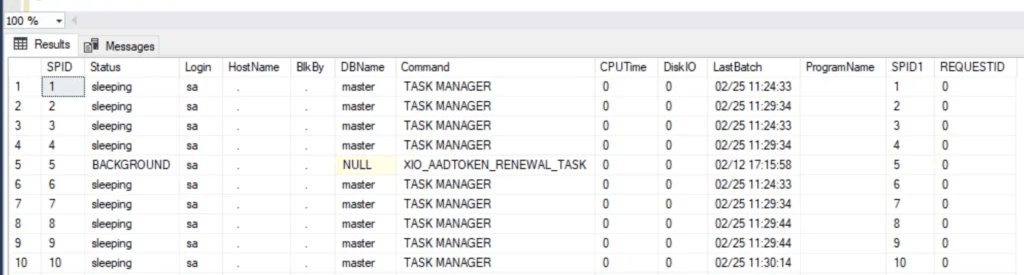
Two quirks worth knowing, both verified on a current SQL Server 2025 instance: the SPID column appears twice in the output (once at each end of the row), and the results cannot be filtered or sorted directly since it is a procedure. The working pattern for that second one is inserting the output into a temp table and querying it like anything else, which turns sp_who2 into something you can actually investigate with.
sp_who2 also earned a spot in the SSMS keyboard shortcuts world: Ctrl+1 runs sp_who by default, and the same query-shortcut mechanism can put sp_who2 or any procedure on a key.
sp_whoisactive: The One DBAs Install Everywhere
sp_whoisactive, created by Adam Machanic, is a free stored procedure and the de facto standard for “what is running right now”. Where the built-ins show you session rows, this shows you the investigation: the full SQL text of what each session is running, execution plans on request, wait information, tempdb allocations, and blocking presented as a chain rather than a number you have to chase.
By default it shows only active user sessions, no system noise, no idle connections, which is exactly the filter you want mid-incident.
-- install: run the script from whoisactive.com, then:
EXEC sp_whoisactive;

-- with query plans
EXEC sp_whoisactive @get_plans = 1;
Download it from the sp_whoisactive GitHub repo, run the install script once per instance, and it is there for every future incident. To see it demonstrated well, Brent Ozar’s short intro video is the classic run-through.
Seeing Blocking With Each One
A simple way to compare all three: create some blocking on a test instance. Open one query window, start a transaction that updates a row, and leave it uncommitted. In a second window, select from the same table. Now:
sp_whoshows the second session with a non-zeroblkvalue.sp_who2shows the blocker’s SPID inBlkBy.sp_whoisactiveshows both sessions, the exact SQL each is running, and how long the victim has been waiting.
The first two tell you blocking exists. The third tells you what to do about it. For the fuller blocking workflow on this site, see How to Check Blocking SPIDs in SQL Server.
Frequently Asked Questions
Is it safe to rely on sp_who2 if it is undocumented?
For interactive use, yes, it has been stable for decades. For anything automated or scripted, build on the documented DMVs (sys.dm_exec_sessions, sys.dm_exec_requests) instead, undocumented means no compatibility promise.
Does sp_whoisactive need sysadmin?
No. It needs VIEW SERVER STATE to see other sessions’ activity, the same permission the DMVs behind it require. Granting that is covered in Grant VIEW SERVER STATE in SQL Server.
Why does sp_who show so many sessions I did not create?
Session IDs 50 and below are SQL Server’s own system processes. They are normal, always present, and never candidates for KILL.
Related
- How to Check Blocking SPIDs in SQL Server
- How to Kill a SPID in SQL Server
- Grant VIEW SERVER STATE in SQL Server
- DBA Scripts: Performance & Troubleshooting
- SSMS: The Complete Guide, including the shortcut that runs sp_who
Summary
sp_who is the documented baseline, sp_who2 is the undocumented upgrade everyone actually uses for a quick look, and sp_whoisactive is the free install that turns “who is connected” into “here is exactly what is running, what it is blocked by, and its plan”. Use the built-ins for a glance on a server you have never touched; install sp_whoisactive everywhere you are responsible for.
Leave a Reply