
When you need to drop, restore, or change database settings, active user sessions often get in the way.
SQL Server will block these operations until all connections are cleared. In busy environments, waiting is rarely practical.
If you arrived here from Msg 5030, the database could not be exclusively locked, or from a restore that will not start, this is the check to run first.
This post shows a safe, deliberate, and review-first way to identify and kill all user sessions connected to a specific database.
When This Is Necessary
You typically need to do this when:
- Dropping a database
- Restoring over an existing database
- Bringing a database out of restoring or recovery state
- Changing database options
- Clearing abandoned application connections
Before any of them, confirm the database has a backup you could actually go back to. Get Last Database Backup Times in SQL Server answers that in one query.
This is a disruptive action. Use it intentionally and with awareness of impact.
Msg 3702 and the Session That Holds the Database
This is the message that sends most people to a page like this one, and it never names the session that is in the way:
One connection sitting in the database is enough, and it does not have to be running anything. Reproduced on SQL Server 2025 CU8 with 1 idle session holding an open transaction: DROP DATABASE, then the query that names the holder, then ALTER DATABASE ... SET SINGLE_USER WITH ROLLBACK IMMEDIATE, then the same DROP again.
open_transaction_count of 1 is the column to read in the middle result. That session has work to lose, and WITH ROLLBACK IMMEDIATE is the thing that throws it away: it narrates its own progress, 0 percent then 100 percent, and the DROP that failed seconds earlier then went through. DB_ID returning NULL is the confirmation that the database is gone.
The holder finds out the hard way. The session that was rolled back got Cannot continue the execution because the session is in the kill state. on its next statement, with no warning and nothing committed. That is the real cost of the 1 statement route, and it is why the holder query comes first.
Kill All User Sessions on a Database
Two steps. Look at who is there, then generate the KILL commands for those sessions and read them before you run them.
Both use modern DMVs, exclude your own session, and execute nothing unless you explicitly allow it. They run at the instance level but target one database.
Step 1: See Who Is Actually Holding the Database
USE master;
GO

DECLARE @DatabaseName sysname = N'DATABASE123'; -- change database name

SELECT
    s.session_id,
    s.login_name,
    s.host_name,
    s.program_name,
    s.status,
    s.open_transaction_count,
    CONVERT(varchar(19), s.last_request_end_time, 120) AS last_request_end_time
FROM sys.dm_exec_sessions AS s
WHERE s.is_user_process = 1
  AND s.session_id <> @@SPID
  AND (
        s.database_id = DB_ID(@DatabaseName)
        OR EXISTS (
            SELECT 1
            FROM sys.dm_tran_locks AS l
            WHERE l.request_session_id = s.session_id
              AND l.resource_database_id = DB_ID(@DatabaseName)
        )
      )
ORDER BY s.open_transaction_count DESC, s.session_id;
The second half of that WHERE clause is not decoration. sys.dm_exec_sessions.database_id is the session’s current database context, not the database it has work in. A session that opened a transaction in your database and then ran USE master disappears from a filter on database_id alone, while still holding locks and still blocking your restore.
I set that exact case up on a lab instance: 1 ordinary session plus 1 that had moved its context away after opening a transaction. Filtering on database_id alone returned 1 session. The query above returned 2, and ALTER DATABASE ... SET SINGLE_USER confirmed it by refusing to complete until both were gone. If the old filter is all you run, an empty result does not mean nobody is connected.
open_transaction_count and program_name are the two columns worth reading before anything else. The first tells you who has work to lose, the second tells you what will start complaining. If you would rather keep a record of who was connected than a screenshot of it, Log and Filter sp_who2 Results covers capturing that into a table you can query afterwards.
Step 2: Generate the KILL Commands
USE master;
GO

DECLARE @DatabaseName sysname = N'DATABASE123'; -- change database name
DECLARE @KillCommands nvarchar(max) = N'';

SELECT
    @KillCommands = @KillCommands +
        N'KILL ' + CONVERT(nvarchar(10), s.session_id) + N';' + CHAR(13) + CHAR(10)
FROM sys.dm_exec_sessions AS s
WHERE s.is_user_process = 1
  AND s.session_id <> @@SPID
  AND (
        s.database_id = DB_ID(@DatabaseName)
        OR EXISTS (
            SELECT 1
            FROM sys.dm_tran_locks AS l
            WHERE l.request_session_id = s.session_id
              AND l.resource_database_id = DB_ID(@DatabaseName)
        )
      );

PRINT @KillCommands;
-- EXEC sp_executesql @KillCommands; -- uncomment only after review
This script:
- Targets user sessions only
- Excludes your current connection
- Prints commands before execution
- Avoids deprecated objects
The commented EXEC sp_executesql line does work. KILL runs happily inside dynamic SQL, checked on SQL Server 2025 CU8, so the only thing standing between the printed list and a disconnected application is you removing 2 dashes.
One caveat on PRINT: it stops at 4,000 characters, so on an instance with hundreds of matching sessions the printed list is not the whole list. Step 1 is the count to trust.
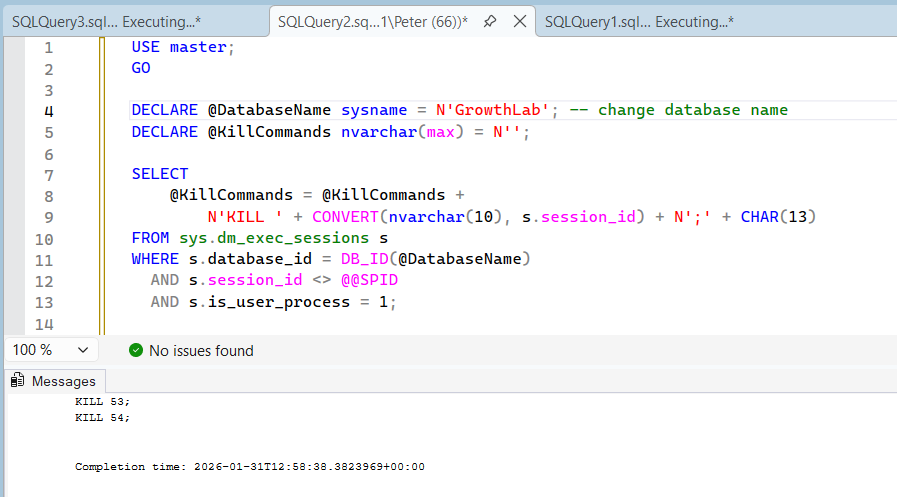
The generator prints the KILL statements into the Messages pane. Nothing has been killed at this point.
Review Before Executing
Always review the printed output first.
You should verify:
- Only the intended database is targeted
- No critical system or maintenance sessions are included
- You understand which applications will be disconnected, which is what
program_nameandhost_namein step 1 are for - You know which sessions have uncommitted work, from
open_transaction_count, because that work is what you are throwing away
Only uncomment execution when you are confident the impact is acceptable.
KILL, Single User, or Offline
Killing sessions is the right tool when you know who is there and you only need them gone for a moment. It is the wrong tool when you need the database to stay empty. These are the 3 options, and they are not interchangeable.
All 3 were run against a throwaway database on SQL Server 2025 CU8 while 2 sessions sat inside open transactions. WITH ROLLBACK IMMEDIATE narrates its own work in the Messages pane, Nonqualified transactions are being rolled back. Estimated rollback completion: 0%, then 100%. That is uncommitted application work going away, and there is no undo for it.
The WITH ROLLBACK IMMEDIATE is doing all the work in that statement. Plain ALTER DATABASE ... SET SINGLE_USER does not fail when sessions are connected, it queues behind them and waits. On the lab it was still waiting when I gave up on it, behind 3 idle sessions that were never going to commit on their own. If your single-user command appears to hang, that is what is happening.
Single user mode has a trap that catches people once each. The moment the statement succeeds, the connection that ran it owns the only slot. Every other connection, including a new SSMS query window, gets:
And SET MULTI_USER from a different connection does not rescue you. It queues behind the slot holder exactly like the original statement did. If you closed the window that set single user mode, or SSMS quietly reconnected somewhere else, the slot is held by a session you are not sitting in.
The way out is to find the holder and kill it, and sys.dm_tran_locks names it even when the session context has wandered:
-- Who is holding the single-user slot
SELECT DISTINCT l.request_session_id
FROM sys.dm_tran_locks AS l
WHERE l.resource_database_id = DB_ID(N'DATABASE123')
  AND l.request_session_id <> @@SPID;

-- KILL that session_id, then:
ALTER DATABASE [DATABASE123] SET MULTI_USER;
That sequence took a locked-out database back to usable in a single batch on the lab. There is more on the state itself, including the ways it happens by accident, in The Database Is in Single User Mode (Fix).
Important Considerations
A few things that regularly catch people out:
- Killing sessions rolls back open transactions
- Applications may immediately reconnect
- Long-running transactions can take time to unwind
- A killed session can linger in the DMVs while its rollback finishes, and killing it again does not help
KILLneedsALTER ANY CONNECTION, not sysadmin
That last one matters if you are trying to get somebody out of the sysadmin role. ALTER ANY CONNECTION comes with the sysadmin and processadmin fixed server roles, and it can also be granted on its own (Microsoft Learn: KILL). All 3 cases were tested on the lab: a login with none of them gets Msg 6102, user does not have permission to use the KILL statement, and both processadmin membership and a bare GRANT ALTER ANY CONNECTION clear it.
On the rollback: if a session is mid-rollback, KILL 57 WITH STATUSONLY reports how far through it is. It reports, it does not accelerate. A large transaction can take longer to unwind than it took to run, and the only wrong move is to keep hitting it.
If sessions reappear immediately, the application, service, or job reconnecting must be stopped first.
If they reappear no matter what you do, the section above is the honest answer: you need exclusive access, not a kill list.
Final Thoughts
Killing user sessions is not complicated, but it is powerful.
Used carefully, it clears the path for restores and maintenance. Used casually, it creates avoidable disruption. When the restore has run, Get Last Database Restore Date and Time in SQL Server confirms it actually landed.
Treat it as a controlled operational step, not a shortcut.
Clearing every session is usually done to get exclusive access. These cover what happens either side of that.
- Get Active Connections by Database, the same question asked across every database at once.
- The Database Could Not Be Exclusively Locked (Error 5030), the error that usually sends you here.
- How to Kill a SPID in SQL Server, when it is one session rather than all of them.
- The Database Is in Single User Mode (Fix), the state this can leave you in, and the way back out.
- Get Open Transactions, the uncommitted work you are about to roll back, before you roll it back.
- Database Cannot Be Opened, It Is in the Middle of a Restore, the state a half-finished restore leaves behind.
Leave a Reply