
sp_who2 is the first thing most DBAs run when a server feels busy, and the
second thing most DBAs want is to filter it. You cannot. It is a stored procedure, so there is no
WHERE clause to add and no column to order by. The output arrives, you read it, and
that is that.
The way round it is to capture the result set into a table first. Everything below was run on a SQL Server 2025 instance, including the 2 errors you are most likely to hit on the way.
Capture It Into a Temp Table
Declare a table with the same 13 columns sp_who2 returns, in the same order,
then use INSERT ... EXEC:
CREATE TABLE #who2 (
    SPID        int,
    Status      varchar(1000),
    Login       sysname,
    HostName    sysname,
    BlkBy       varchar(20),
    DBName      sysname NULL,
    Command     varchar(1000),
    CPUTime     int,
    DiskIO      int,
    LastBatch   varchar(1000),
    ProgramName varchar(1000),
    SPID2       int,
    RequestID   int
);

INSERT INTO #who2 EXEC sp_who2;
DBName, which is why the table definition has to leave that column nullable.Now it behaves like data. Busiest sessions first:
SELECT SPID, Status, Login, HostName, DBName, CPUTime, DiskIO, ProgramName
FROM   #who2
ORDER  BY CPUTime DESC;
Only what is blocking something else:
SELECT SPID, BlkBy, Status, DBName, Command, CPUTime
FROM   #who2
WHERE  BlkBy <> '  .'          -- sp_who2 pads the not-blocked value with spaces
ORDER  BY CPUTime DESC;
Or one database, ignoring the background noise:
SELECT *
FROM   #who2
WHERE  DBName = 'YourDatabase'
AND    Status <> 'BACKGROUND'
ORDER  BY DiskIO DESC;
The Errors You Will Hit
Both of these are the reason people give up on this technique, and both are quick to fix.
| Error | Cause | Fix |
|---|---|---|
Msg 213Column name or number of supplied values does not match table definition |
Your table has the wrong number of columns. sp_who2 returns 13, and
SPID appears twice. |
Declare all 13, including the second SPID and RequestID. |
Msg 515Cannot insert the value NULL into column 'DBName' |
System background tasks report no database, so DBName comes back NULL. |
Leave DBName nullable. Whether you see this at all depends on what the server is
doing at the time, which is what makes it confusing. |
Microsoft’s reference covers sp_who, sys.dm_exec_sessions and sys.dm_exec_requests in full.
Keeping It: a Logging Table
The same trick works against a permanent table, which is how you answer “what was running at 09:40 this morning”. Add a timestamp column and insert into it on a schedule:
CREATE TABLE dbo.Who2Log (
    CapturedAt  datetime2(0) NOT NULL DEFAULT SYSDATETIME(),
    SPID        int,
    Status      varchar(1000),
    Login       sysname,
    HostName    sysname,
    BlkBy       varchar(20),
    DBName      sysname NULL,
    Command     varchar(1000),
    CPUTime     int,
    DiskIO      int,
    LastBatch   varchar(1000),
    ProgramName varchar(1000),
    SPID2       int,
    RequestID   int
);

-- the column list is required here: the default on CapturedAt only applies
-- if the column is left out of the insert
INSERT INTO dbo.Who2Log
    (SPID, Status, Login, HostName, BlkBy, DBName, Command,
     CPUTime, DiskIO, LastBatch, ProgramName, SPID2, RequestID)
EXEC sp_who2;
Run that from an Agent job every minute or two and you have a history. Put a clustered index on
CapturedAt and prune it on a schedule, or it will grow quietly forever.
The Better Tool, If You Are Building Something
If this is a one-off look, capturing sp_who2 is fine. If you are building anything
that runs on a schedule, use the DMVs instead. They are queryable directly, so there is no temp
table and no column-order trap, and they carry far more than sp_who2 exposes:
SELECT  s.session_id,
        s.status,
        s.login_name,
        s.host_name,
        DB_NAME(s.database_id)  AS database_name,
        s.cpu_time,
        s.reads + s.writes      AS io,
        s.program_name,
        r.blocking_session_id,
        r.wait_type,
        r.wait_time
FROM    sys.dm_exec_sessions s
LEFT JOIN sys.dm_exec_requests r ON r.session_id = s.session_id
WHERE   s.is_user_process = 1
ORDER BY s.cpu_time DESC;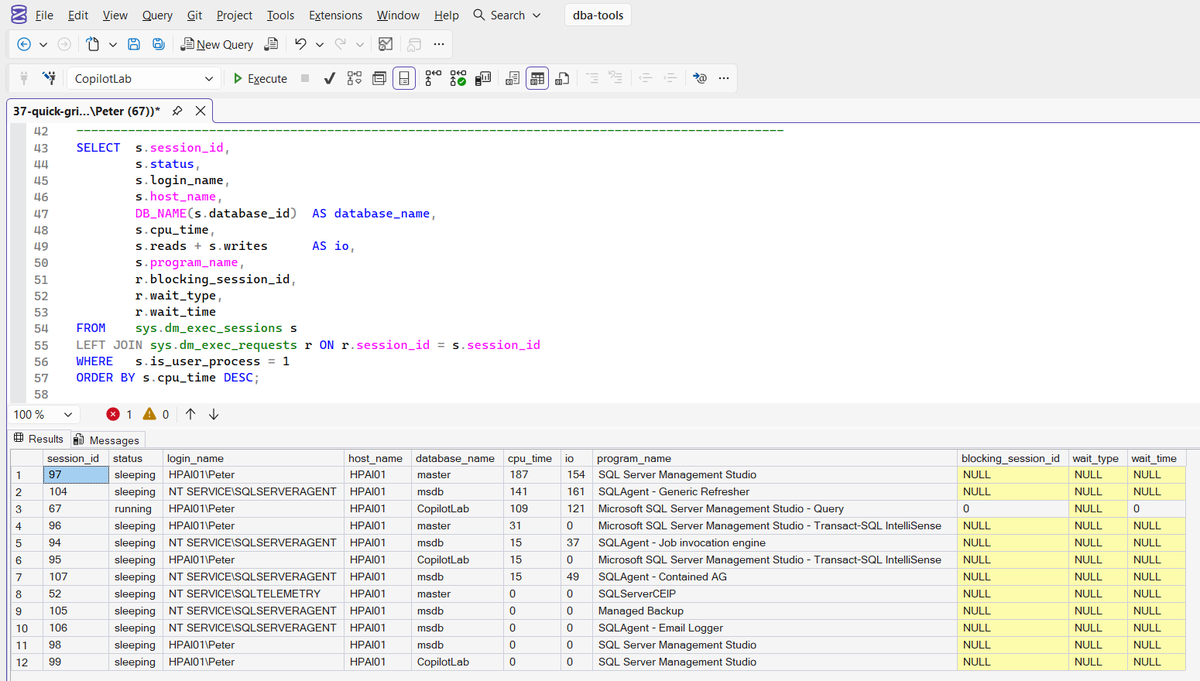
That last filter matters more than it looks. On the instance used for this post
sys.dm_exec_sessions returned more than 70 rows and only the ones in the capture were
user processes, so without is_user_process = 1 most of what you are reading is the
server talking to itself.
sp_who2 has no equivalent filter, which is a good part of why its output is hard to
read.
And if you are reaching for this mid-incident rather than building something that runs on a schedule, install sp_whoisactive. Adam Machanic’s free procedure is the one most DBAs end up putting on every instance they look after, and it answers the question this whole post is working around: it shows active sessions only, the exact SQL each one is running, and blocking as a chain rather than a SPID you have to go and chase. One install per instance, and you do not write the capture-and-filter query again.
Frequently Asked Questions
Why can I not just add a WHERE clause to sp_who2?
Because it is a stored procedure, not a view or a function. Its output is a result set on its way to the client, and there is nowhere to attach a predicate. Capturing it into a table is the only way to filter, sort or join it.
Do I have to declare all 13 columns?
Yes, and in order. Miss one and the insert fails with Msg 213, Column name or number of supplied values does not match table definition. Note that SPID appears twice in sp_who2’s output, once at each end of the row, which is why the table above has both SPID and SPID2.
Why does my insert fail with Msg 515 on DBName?
System background tasks return NULL for DBName, so a NOT NULL column rejects them with Msg 515, Cannot insert the value NULL. Leave the column nullable. This is easy to miss because it depends on what the server happens to be doing when you run it.
Should I be using sp_who2 at all in 2026?
For a quick look, it is fine and it is on every instance. For anything you intend to filter, sort, log or alert on, the DMVs are the better tool: they are queryable directly, they carry far more detail, and they let you exclude system sessions. On the instance used for this post most of what sys.dm_exec_sessions returned was system sessions; the capture above is what the filter leaves.
Summary
sp_who2 cannot be filtered because it is a procedure. Capture it into a 13
column table with INSERT ... EXEC and it becomes queryable; declare all 13
columns or you get Msg 213, and leave DBName nullable or you get
Msg 515. For anything scheduled, sys.dm_exec_sessions is the better
starting point, with is_user_process = 1 to cut out the noise.
Related
- Column Name or Number of Supplied Values Does Not Match (Error 213)
- Cannot Insert the Value NULL Into Column (Error 515)
- sp_who vs sp_who2 vs sp_whoisactive
- DBA Scripts: Get Blocking Chains
- SQL Server Blocking Troubleshooting
- DBA Scripts: Get Blocking Sessions
- How to Check Blocking SPIDs in SQL Server
- DBA Scripts: The Complete Guide
Leave a Reply