
Blocking is one of the most common causes of performance issues in SQL Server.
When one session holds a lock on a resource and another session needs that same resource, the second session waits. If that wait persists, users experience slowness.
Understanding how to quickly identify blocking SPIDs is a core DBA skill.
This guide shows two scripts:
- See what is blocked right now
- Identify the lead blocker
That’s usually all you need during an incident.
Locking vs Blocking
Locking is normal. SQL Server uses locks to maintain data integrity and transaction isolation.
Blocking is what happens when those locks prevent other sessions from moving forward. Every busy system has locking. Not every system has problematic blocking.
Sometimes blocking is brief and harmless. For example, queries that execute thousands of times per minute may briefly wait on each other under load. Individually those waits are small, but together they can look like slowness.
Persistent blocking chains are different. Those require investigation. Microsoft covers locking and blocking behaviour in more detail here:
You do not need to memorise the theory, but you should understand that most blocking starts with an open transaction holding locks longer than expected.
Script 1 – Quick Check for Blocking SPIDs
Start here when something feels slow.
This script shows:
- Blocked sessions
- Who is blocking them
- Wait type
- Wait duration
- Open transactions
- The exact statement currently executing
-- quick check for blocking sessions
SELECT
    r.session_id,
    r.blocking_session_id,
    s.host_name,
    s.login_name,
    DB_NAME(r.database_id) AS database_name,
    s.program_name,
    r.status,
    r.wait_type,
    CAST(r.wait_time / 1000.0 AS DECIMAL(10,2)) AS wait_seconds,
    CAST(r.total_elapsed_time / 1000.0 AS DECIMAL(10,2)) AS elapsed_seconds,
    r.open_transaction_count,
    LEFT(t.text, 400) AS running_sql
FROM sys.dm_exec_requests r
JOIN sys.dm_exec_sessions s
    ON r.session_id = s.session_id
CROSS APPLY sys.dm_exec_sql_text(r.sql_handle) t
WHERE r.blocking_session_id <> 0
ORDER BY r.wait_time DESC;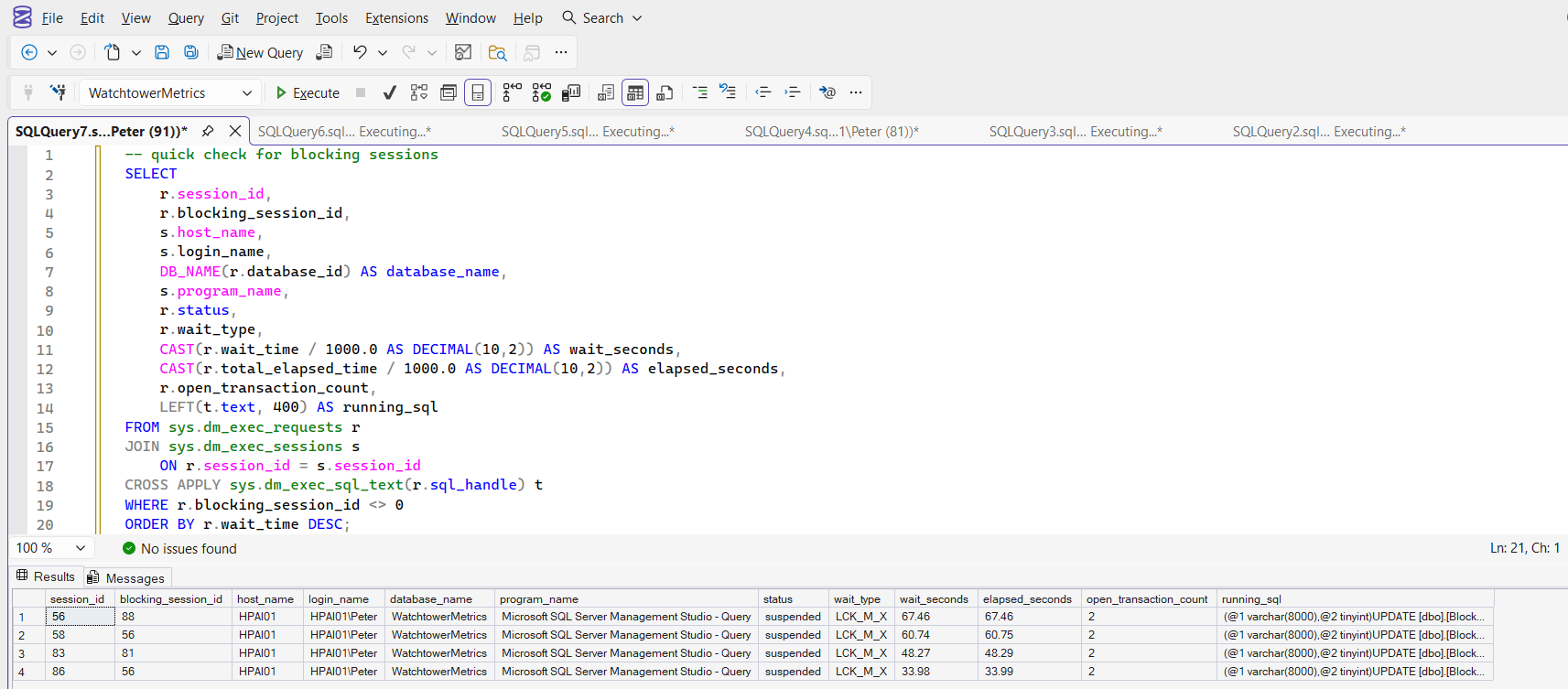
If this query is returning rows, it means those sessions are blocked. Focus on:
- High wait_seconds
- Non zero open_transaction_count
- Repeated blocking from the same SPID
If you see multiple sessions blocked by the same blocking_session_id, that is usually your starting point for investigation.
Script 2 – Identify the Lead Blocker
Once you know there is blocking, the next question is simple: Who is causing it?
The lead blocker is the session that is blocking others but is not itself blocked.
-- lead blocker inspection
WITH blockers AS
(
    SELECT DISTINCT blocking_session_id
    FROM sys.dm_exec_requests
    WHERE blocking_session_id <> 0
)
SELECT
    r.session_id,
    r.blocking_session_id,
    s.host_name,
    s.login_name,
    DB_NAME(r.database_id) AS database_name,
    s.program_name,
    r.status,
    r.wait_type,
    CAST(r.wait_time / 1000.0 AS DECIMAL(10,2)) AS wait_seconds,
    CAST(r.total_elapsed_time / 1000.0 AS DECIMAL(10,2)) AS elapsed_seconds,
    r.open_transaction_count,
    COUNT(b.session_id) AS blocked_session_count,
    LEFT(
        SUBSTRING(t.text,
            (r.statement_start_offset/2) + 1,
            ((CASE r.statement_end_offset
                WHEN -1 THEN DATALENGTH(t.text)
                ELSE r.statement_end_offset
            END - r.statement_start_offset)/2) + 1
        ), 400
    ) AS running_sql
FROM sys.dm_exec_requests r
JOIN blockers bl
    ON r.session_id = bl.blocking_session_id
JOIN sys.dm_exec_sessions s
    ON r.session_id = s.session_id
LEFT JOIN sys.dm_exec_requests b
    ON b.blocking_session_id = r.session_id
CROSS APPLY sys.dm_exec_sql_text(r.sql_handle) t
GROUP BY
    r.session_id,
    r.blocking_session_id,
    s.host_name,
    s.login_name,
    r.database_id,
    s.program_name,
    r.status,
    r.wait_type,
    r.wait_time,
    r.total_elapsed_time,
    r.open_transaction_count,
    r.statement_start_offset,
    r.statement_end_offset,
    t.text
ORDER BY blocked_session_count DESC;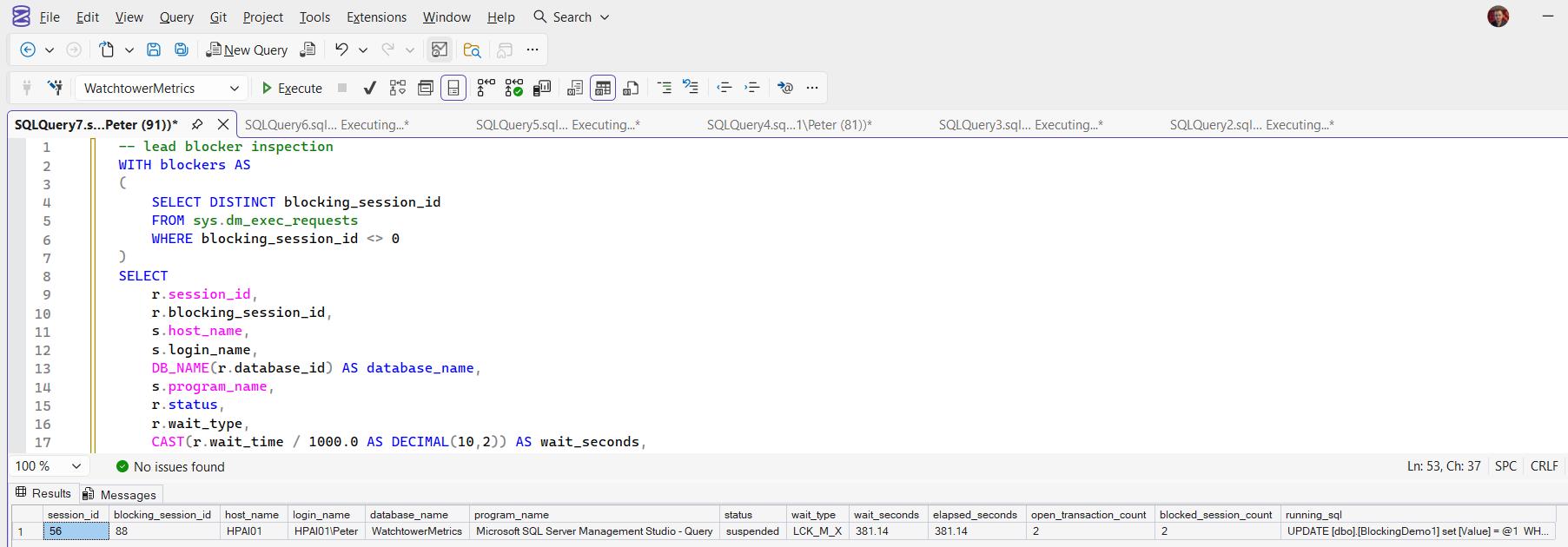
This isolates the session at the top of the blocking chain.
Now you can see:
- What it is running
- Whether it has open transactions
- How long it has been executing
This is the session you make decisions about. Now you can start asking better questions:
- Is this expected workload?
- Is it part of a deployment?
- Is it an ad hoc SSMS query someone forgot about?
- Is there an open transaction holding locks?
Killing a blocked session achieves nothing. Always target the lead blocker if action is required.
If you need a wider live view of worker threads, waits, CPU usage, and session activity, see: Check Worker Threads and Active Sessions.
Common Causes of Blocking
Blocking is rarely random. It usually comes down to:
- Long running transactions
- Ad hoc queries left running in SSMS
- Large updates or deletes without batching
- Missing indexes causing wide scans
- Application code not committing properly
Short blocking bursts can be normal. Persistent blocking chains are not.
When to Terminate a Blocking SPID
If a blocking session is causing real production impact and cannot be resolved quickly, you may need to terminate it.
Before doing that, read: How to Kill a SPID in SQL Server
Killing a SPID is sometimes necessary, but it should be the result of understanding the situation, not the first reaction.
What to Look for During an Incident
If you are on call and see blocking:
- Identify the lead blocker
- Check open_transaction_count
- Review the active statement
- Assess how long it has been running
- Decide whether it is safer to let it complete or terminate it
Blocking tells you something about workload behaviour. It is rarely just a random engine problem.
Understanding what is happening under the surface is what separates reacting to symptoms from fixing the real issue.
Leave a Reply