
Which Files Do You Actually Need
Mid restore is the wrong moment to work out how these differ, so the short version first.
- A differential is cumulative. It carries every extent changed since its base full backup, so you restore the base and then only the most recent differential.
- A log backup is sequential. Each one continues from the last, so you restore them all, in order, from the one taken after whatever data backup you restored.
Which means the restore sequence is: full, newest differential if you have one, then every log
backup since. Everything except the last statement takes WITH NORECOVERY.
Read Your Own Chain First
Before any of this matters, look at what you actually have. 3 columns in
msdb.dbo.backupset tell you whether your chain is
intact. Run it in the database you are restoring, not in master:
SELECT
    bs.database_name,
    backup_type = CASE bs.type
                      WHEN 'D' THEN CASE WHEN bs.is_copy_only = 1
                                         THEN 'Full (COPY_ONLY)' ELSE 'Full' END
                      WHEN 'I' THEN 'Differential'
                      WHEN 'L' THEN 'Log'
                      ELSE bs.type END,
    bs.name,
    bs.backup_start_date,
    bs.checkpoint_lsn,          -- on a full: the value a later differential points back to
    bs.differential_base_lsn,   -- on a differential: which full it actually needs
    bs.begins_log_chain,        -- 1 = a NEW log chain starts here, i.e. an old one ended
    bs.is_copy_only
FROM msdb.dbo.backupset AS bs
WHERE bs.database_name = DB_NAME()
  AND bs.backup_start_date >= DATEADD(DAY, -30, SYSDATETIME())
ORDER BY bs.backup_start_date, bs.backup_set_id;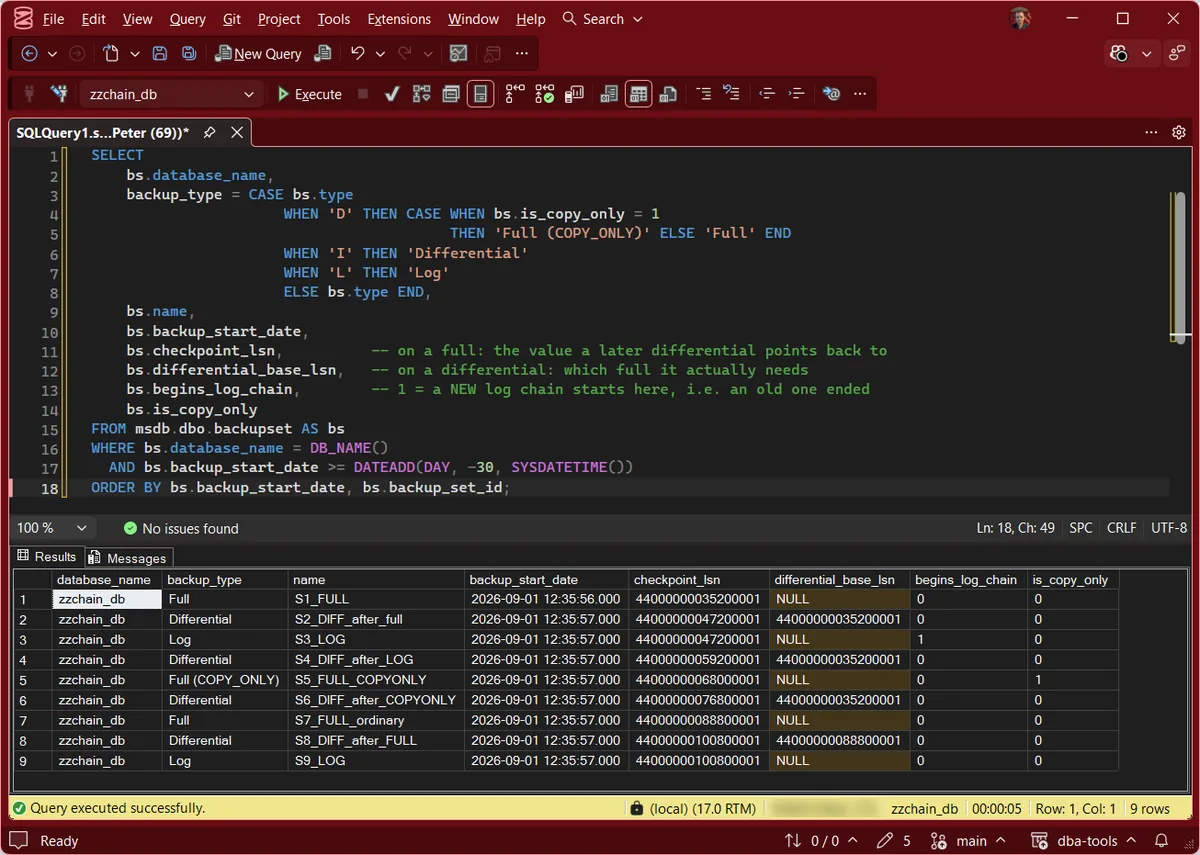
differential_base_lsn on a differential tells you exactly which full backup it
needs. begins_log_chain set to 1 anywhere except your very first log backup means a
chain ended and a new one started, and that is a break that already happened. To check every database at once rather than one at a time, Get Backup Chain Integrity runs the same reasoning across the instance.
What Moves the Differential Base, Measured
Microsoft documents that a copy-only full does not affect the base. What it never states in a
sentence is whether a log backup does. So rather than assert it, here is the answer read
straight out of msdb after running the sequence on a lab instance. These are the rows from the capture above that carry the point:
name                     type  copy_only  checkpoint_lsn     differential_base_lsn
-----------------------  ----  ---------  -----------------  ---------------------
S1_FULL                  D             0  44000000035200001  NULL
S4_DIFF_after_LOG        I             0  44000000059200001  44000000035200001   <- unchanged
S6_DIFF_after_COPYONLY   I             0  44000000076800001  44000000035200001   <- unchanged
S7_FULL_ordinary         D             0  44000000088800001  NULL
S8_DIFF_after_FULL       I             0  44000000100800001  44000000088800001   <- MOVED
Read the differential_base_lsn column against the checkpoint_lsn of
S1_FULL. A log backup leaves it pinned. A copy-only full leaves it pinned. Only the
ordinary full at step 7 moves it, and the differential immediately after now points somewhere
new.
You can reproduce that table on any test instance in about a minute, and it is worth doing once so the behaviour stops being something you half remember.
What Breaks the Chain
Someone else's full backupCOPY_ONLY, without exception. It is the entire reason the option exists.Switching to SIMPLE and backbegins_log_chain definition: a chain begins at the first log backup after a database is created or when it is switched from simple back to full. Worse, the switch to FULL “takes effect only after the first data backup”, so there is a real window where the database behaves as SIMPLE and nothing is protected.Do this take a full or a differential immediately after switching back. Either starts the chain, which surprises people who assume only a full will do.A missing log backupRarer Breaks
- Recovering too early. Omit
NORECOVERYon an intermediate restore and the database comes online. You cannot then continue, and Microsoft is explicit that you must restart the whole sequence from the full backup. - A read only database that gets rebuilt, restored, or detached and attached.
For a read only database the differential base metadata lives in
master, not in the database. Microsoft: “The SQL Server Database Engine can’t detect or prevent this problem.” Later differentials are quietly based on the wrong thing. - Losing
master. Restore it before restoring any differential of a user database, for the same reason. - Bulk-logged recovery with bulk operations in the window. The log backup is still valid, but point in time recovery inside it is not available.
The One Habit That Prevents Most of This
COPY_ONLY backup will not break your chain. An ordinary full backup will. That is the whole rule. Every backup taken outside the schedule uses COPY_ONLY: restore tests, ad hoc copies for a developer, a consultant grabbing a snapshot, the third party agent somebody installed last year. A copy-only full leaves the differential base exactly where it was, and Microsoft’s wording is that differentials “behave as if the copy-only backup doesn’t exist”.Two edges worth knowing. A copy-only log backup does not truncate the log, which is occasionally what you want and more often a surprise.
And COPY_ONLY with DIFFERENTIAL is not quite the no-op it is usually described as. Microsoft states that “if DIFFERENTIAL and COPY_ONLY are used together, COPY_ONLY is ignored, and a differential backup is created”. On SQL Server 2025 that is true of the backup and not of the metadata: the differential is created and based correctly, but msdb still records is_copy_only = 1 against it. It matters because a good many chain queries filter is_copy_only = 0, correctly, to find the last log backup that actually truncated. Reuse that filter to find the newest differential and you will skip this one.
Frequently Asked Questions
Do I restore every differential, or just one?
Just the most recent. A differential is cumulative, not incremental: each one contains everything changed since the base, not since the previous differential. Restore the full, then the latest differential, then the log backups taken after it.
Does a full backup truncate the log?
No, and this is a persistent myth. Under FULL or BULK_LOGGED, truncation follows a log backup, not a data backup. A full backup actually blocks truncation while it runs, which shows up as ACTIVE_BACKUP_OR_RESTORE in log_reuse_wait_desc. A full backup does include enough of the log to make the restored database consistent, which is probably where the confusion started.
Can I take differentials in SIMPLE recovery?
Yes. SIMPLE blocks log backups, not differentials, and Microsoft’s own SIMPLE model restore example uses one. What you lose is point in time recovery: your best possible recovery point becomes your last full or differential.
Why did my restore fail with a broken LSN chain?
Usually one of 3 things. A log backup is missing from the sequence, someone recovered the database part way through with WITH RECOVERY instead of NORECOVERY, or the differential you are restoring belongs to a different full than the one you restored. The query above answers the third in seconds: match the differential’s differential_base_lsn against the checkpoint_lsn of your fulls.
Is msdb history the same as having the backups?
No, and treating it as such has ended careers. msdb history is deleted by sp_delete_backuphistory, does not exist on a different server, and Microsoft warns that physical_device_name cannot be relied on as a restore path. The history tells you what the chain looked like. Only the files let you use it.
Related
- The Log in This Backup Set Is Too Recent or Too Early to Apply (Errors 4305, 4326 and 3159), what breaks in the log chain when a differential is mistaken for the next link
- Recovery models explained, if the SIMPLE and FULL distinction is doing the damage
- Get Backup Chain Integrity, the script that checks this across every database
- What log_reuse_wait_desc is telling you, when the log will not truncate
- How to restore a database, the mechanics
- Backups & Recovery, the pillar this sits in
Summary
A differential carries everything since the last full, so you restore only the newest one. Log
backups are a sequence, so you restore them all in order. The failure that actually happens is
not a corrupt file, it is an ordinary full backup taken by somebody outside the schedule, which
silently reparents every differential that follows it. Make out of band backups
COPY_ONLY, and read differential_base_lsn before you trust a chain you
have not tested.
Leave a Reply